Monday, 17 October 2022

OBDSTAR MK70 User Manual: Register, Update, Function Comparison

 OBDSTAR MK70 is a new generation motorcycle scanner. It is able to do IMMO programming and odometer recalibration for European, American, Asian and Chinese motorcycles. The main feature vehicle coverage and menu function display can be checked here. Today we will share more info incl. MK70 registration, update, language change and comparison.

1.How to register and update OBDSTAR MK70?

For the first time to use, you need to register and update the device.

The guide is the same as all OBDSTAR tablets. The job can be done easily on the tablet yourself.

Remember to keep charging and connect to the network during the process.

Register step:

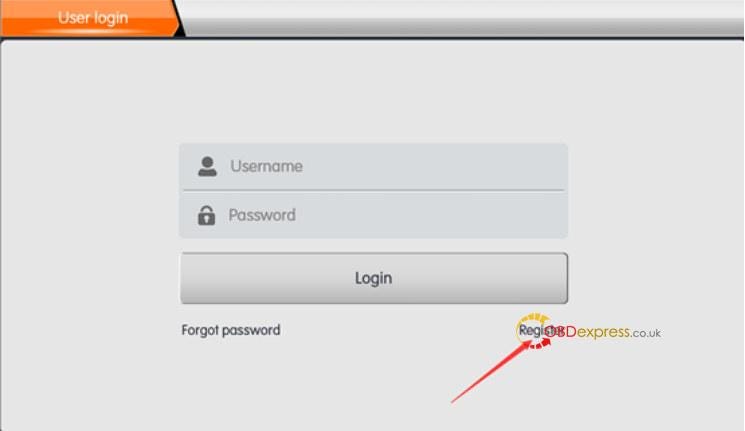
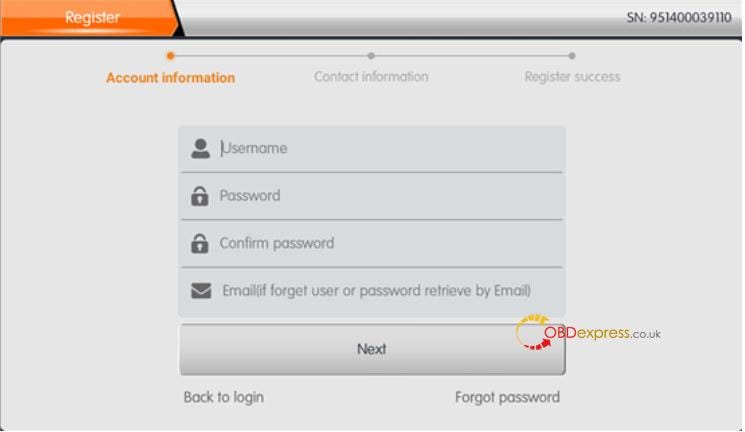
Tap DP (DiagProgram)>> Personal Center>> Register>> Fill in the personal information (user name, password, email)

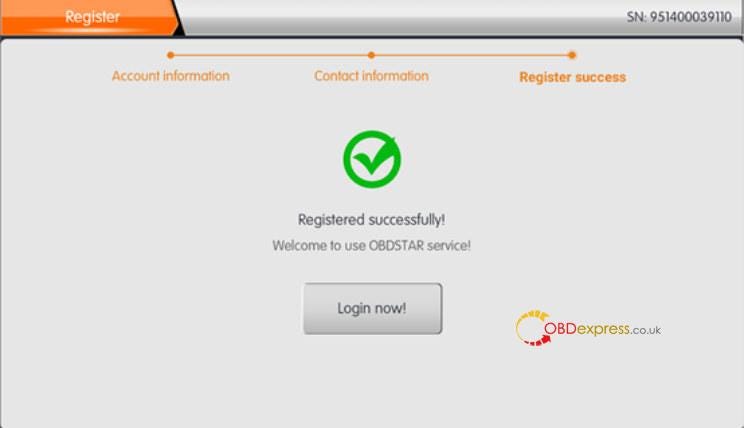
Register successfully
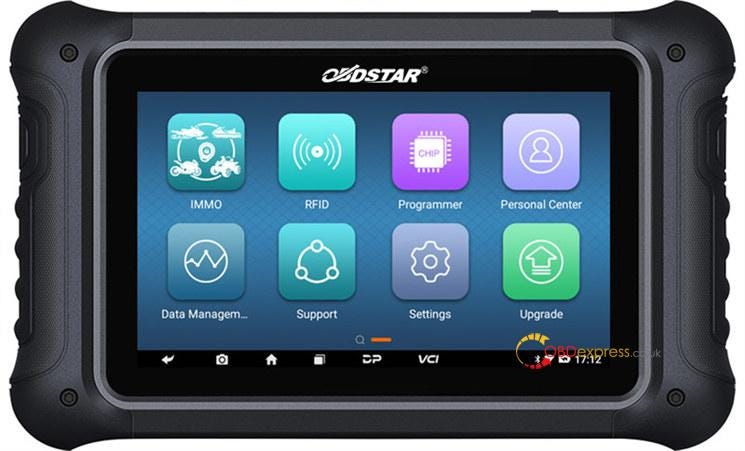
register and upgrade OBDSTAR MK70

register and upgrade OBDSTAR MK70

register and upgrade OBDSTAR MK70

register and upgrade OBDSTAR MK70

Update step:

  • Log in with the available user name and password has been registered
  • Click 'Upgrade' on the main menu and update the software with the one-click upgrade
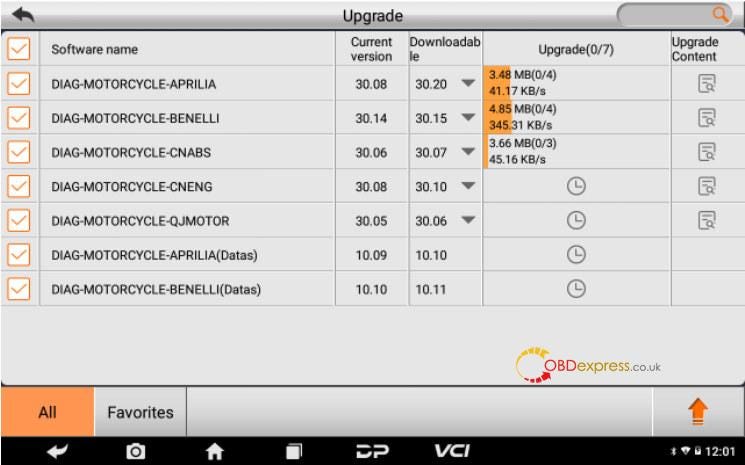
register and upgrade OBDSTAR MK70

2.How to change OBDSTAR MK70 language?

OBDSTAR MK70 Motorcycle key programmer currently supports English, Spanish, Russian, Thai, Turkish, Farsi (Persian), French, German, Polish, Italian, Indonesian, Hebrew and Vietnamese.

The default language is English. If you require other language, please offer your device SN and the language you want to our customer service to open the authorization.

After the language authorization is got, you can change language on your MK70 tablet with the steps below.

Step 1: Connect the internet to MK70

Step 2: Login with user name and password

Step 3: Click VCI to select the corresponding language to switch

Step 4: Click DP — One-click Upgrade to upgrade the software

Step 5: After the upgrade, the functions of the device can be used normally

  • What is the difference between MK70 and other OBDSTAR Motorcycle scanners?
    1. There are four main comprehension OBDSTAR Motorcycle scanners at obdexpress.co.uk: OBDSTAR MS50, MS70, MS80 and MK70.

      OBDSTAR MK70 is specially designed for Motorcycle IMMO programming+ odometer calibration.

      • IMMO by OBD/ Bench support series:
      • Supports APRILIA, BMW, BRP, DERBI, DUCATI, GILERA, HARLEY-DAVIDSON, HONDA, INDIAN, ITALJET, KAWASAKI, MOTO GUZZI, PEUGEOT, PIAGGIO, POLARIS, SUZUKI, TRIUMPH, VESPA, YAMAHA.
      • Make Key by Dump support series:

      Supports APRILIA, BMW, DUCATI, HONDA, KAWASAKI, PIAGGIO, SUZUKI, YAMAHA.

      • Programmer by Dump (ODO Recalibration) support series:

      Supports APRILIA, BENELLI, BMW, BUELL, CAGIVA, DUCATI, GENERIC, HAOJUE, HARLEY-DAVIDSON, HONDA, KAWASAKI, KTM, KYMCO, MV AGUSTA, PEUGEOT, PIAGGIO, SUZUKI, TRIUMPH, YAMAHA.

      • ODO meter by OBD (optional) support series:

      Supports BRP, DUCATI.

      OBDSTAR MS50 is specially designed for MOTORCYCLE/SNOWMOBILE/ATV/UTV diagnosis+ odometer recalibration+ Tuning.

      OBDSTAR MS70 is specially designed for MOTORCYCLE/SNOWMOBILE/ATV/UTV diagnosis.

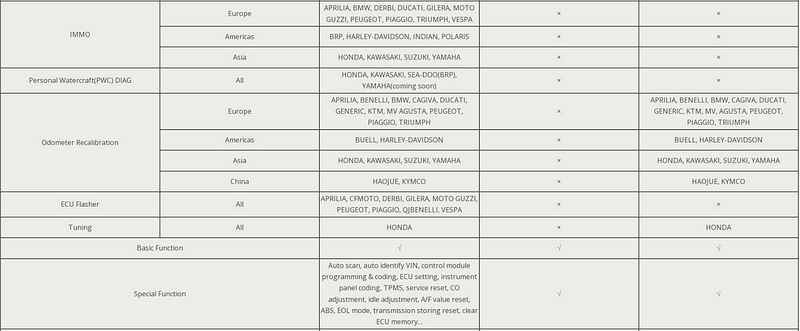
      OBDSTAR MS80 is specially designed for MOTORCYCLE/SNOWMOBILE/ATV/UTV diagnosis+ IMMO programming+ odometer recalibration+ Personal watercraft (PWC)+ ECU Flasher+ Tuning

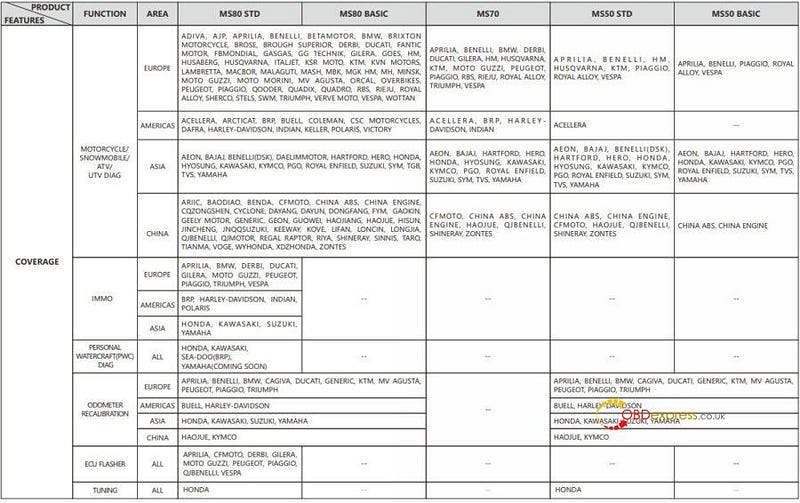
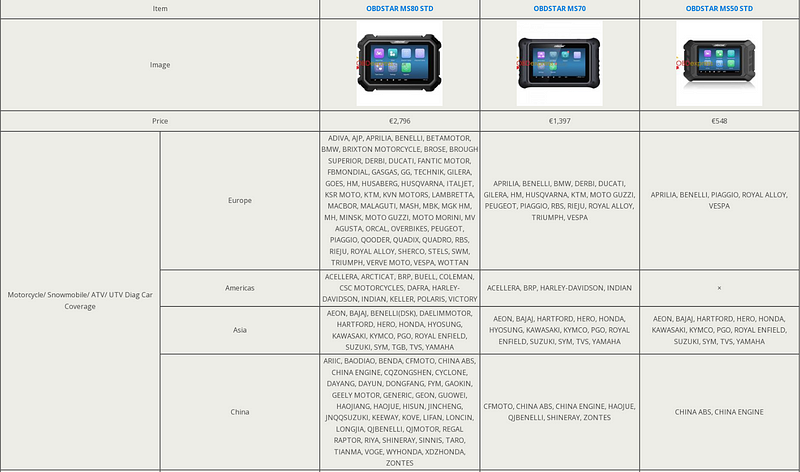
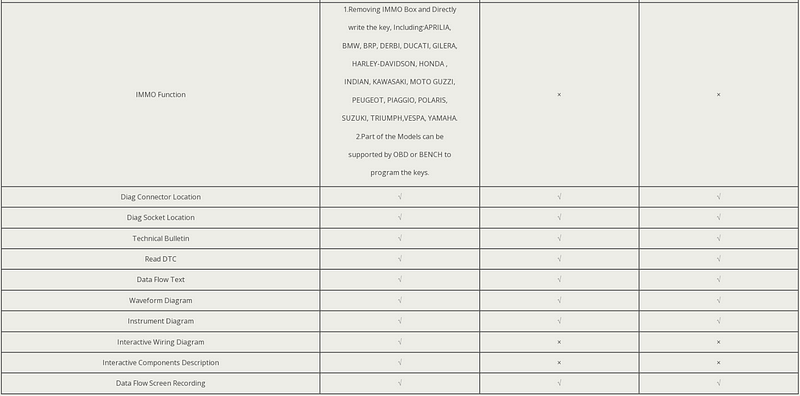
      Check the details in the following comparison image.
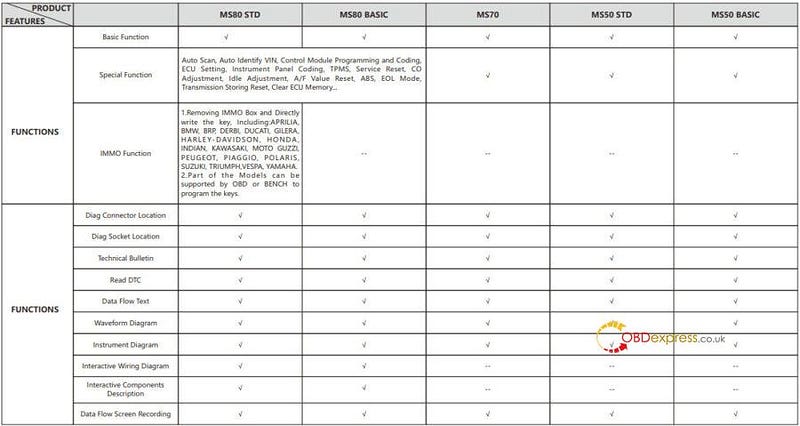
      register and upgrade OBDSTAR MK70

      register and upgrade OBDSTAR MK70

      www.obdexpress.co.uk

      OBDSTAR MS80 vs. MS70 vs. MS50 MOTO Diagnostic Tool

       How to choose the best motorcycles diagnostic tool? Here we have listed out the latest hit motorbike scanner in 2022 for comparison — OBDSTAR MS80, MS70 & MS50. What's different between them? Which one is better?

      Let's move forward to find the answer.

      MS80 vs. MS70 vs. MS50 ComparisonDifferences

      MS80 vs. MS70 vs. MS50 ComparisonDifferences

      MS80 vs. MS70 vs. MS50 ComparisonDifferences

      MS80 vs. MS70 vs. MS50 ComparisonDifferences

      Price

      OBDSTAR MS80>MS70 > MS50

      - MS80 is the most costly.

      - MS50 is the cheapest.

      Car Coverage

      OBDSTAR MS80 > MS70 > MS50

      - MS80 supports the widest car coverage in Europe, Americas, Asia, etc.

      - MS70 place the second.

      - MS50 supports the least.

      Function

      OBDSTAR MS80 > MS50> MS70

      - MS80 supports the most features than the others, such as IMMO, personal watercraft(PWC) diag, ECU flasher, interactive wiring diagram, interactive components description, etc.

      - Only MS70 does not support odometer recalibration & Honda tuning.

      Conclusion

      For those on a budge without having to diagnose American motorcycles, OBDSTAR MS50 is recommended. Besides, MS50 also supports odometer recalibration & Honda tuning.

      For those who need a widest coverage and most features, OBDSTAR MS80 is the best.

      If the budget is somewhere in between, and need a wider diagnostic coverage, MS70 is suitable.
      www.obdexpress.co.uk

      Wednesday, 12 October 2022

      What's new in KT200 ECU Programmer in V2022.10.1

      The KT200 ECU programmer pushed a new update patch at the beginning of October, which greatly enhanced its cloning function and added support for some ECU models. We will introduce the detailed update content below.
      New Automatic Function: Tricore Clone.

      Added automatism to clone the following control units with OTP zone adaptation and password:

      - MED17.5 AUDI

      - MED17.5.25 AUDI

      - MEVD17.4.2 CITROEN

      - EDC17 C08 HYUNDAI

      - EDC17 C53 HYUNDAI

      - EDC17 C08 KIA

      - EDC17 C53 KIA

      - EDC17 C66 MERCEDES BENZ

      - MEVD17.4.2 PEUGEOT

      - MED17.5 SEAT

      - MED17.5.25 SEAT

      - MED17.5 SKODA

      - MED17.5.25 SKODA

      - ME17.9.20 SMART

      - EDC17 C73 TOYOTA

      - MED17.5 VOLKSWAGEN

      - MED17.5.25 VOLKSWAGEN

      New Full System For Mercedes Truck And Claas Continental ACM / MCM

      - Full System For Continental ACM / MCM Mercedes Truck And Claas

      Until now, the K-line MCM2 D1/D2 and ACM versions were supported. Full reading of MCM2.1 D3/D4 and ACM2.1 in CAN line is now also available.

      - Reading and writing Micro

      - Reading and writing EEPROM

      - Recovery

      - Checksum

      To enable full system communication in D4 hardware versions, it will be necessary to perform simple unlocking operations with the control unit open by performing bridges on the PCB.

      At the end it will be possible to close the control unit and read and write all the contents from the pinout.

      Follow the instructions in the operating manuals.

      KT200 ECU Programmer October 1st new upgrade patch preview

      PSA Hybrid4 HV17.4

      - Bench Mode Per Centraline PSA Hybrid4 HV17.4

      Full reading of Citroen/Peugeot HYBRID4 ECUs via pinout added.

      The ECU has 2 internal HCUs.

      - Reading and writing Micro HCU1 / HCU2

      - Reading and writing EEPROM HCU1 / HCU2

      - Recovery

      - Checksum

      KT200 ECU Programmer October 1st new upgrade patch preview

      BOOT MODE (BAM) for EMS S8 e CRD2

      We have added new BOOT MODE (BAM) for complete control unit management on SCANIA:

      - CONTINENTAL EMS S8

      and new BOOT MODE (BAM) for MERCEDES BENZ / FCA with control units:

      - DELPHI CRD2.xx (Versioni SOLENOID e PIEZOTEC)

      This makes reading and writing ECU in open mode easier compared to the previous JTAG mode (JTAG function still available).

      Furthermore, with this method, it's no longer necessary for Delphi CRD2.xx SOLENOIDs to open the ECU from the underside.

      - Reading Micro + EEPROM

      - Writing Micro + EEPROM

      - Recovery

      - Checksum

      KT200 ECU Programmer October 1st new upgrade patch preview

      New Automatic Function: Tricore Clone

      Added automatism to clone the following control units with OTP zone adaptation and password:

      - BMW MEVD17.2.8

      - BMW MEVD17.2.H

      - FIAT DCU17 PC42

      - MERCEDES BENZ EDC17 CP10

      - MERCEDES DCU17 PC42

      - MINI MEVD17.2.8

      - MINI MEVD17.2.H

      - RENAULT DCU17 PC42

      - VOLVO EDC17 CP48

      Continental GPEC2, GPEC3, GPEC4, GPEC4LM!

      New BOOT MODE (BAM) for ECUs Continental GPEC fitted on vehicles FCA FIAT, JEEP, CHRYSLER, DODGE:

      - CONTINENTAL GPEC2A

      - CONTINENTAL GPEC3

      - CONTINENTAL GPEC4

      - CONTINENTAL GPEC4LM

      - Reading Micro + EEPROM

      - Writing Micro + EEPROM

      - Recovery

      - Checksum

      KT200 ECU Programmer October 1st new upgrade patch preview

      Cummins Cm2200 Dodge Chrysler

      Added JTAG MODE for control unit Continental Cummins CM2200 for vehicles DODGE and CHRYSLER

      - Reading

      - Writing

      - Recovery

      - Checksum

      KT200 ECU Programmer October 1st new upgrade patch preview

      New Boot Modes For Delphi DCM7.1 A/B PSA

      - Boot Mode Solution For Delphi ECU DCM7.1A / DCM7.1B

      Added New Boot Mode for micro AURIX TC297 for ECUs DCM7.1A and DCM7.1B mounted on PSA group cars.

      - Reading

      - Writing

      - Recovery

      - Checksum

      KT200 ECU Programmer October 1st new upgrade patch preview

      Updates for JTAG — BENCH — OBD

      - NEW BOOT VIA PINOUT FOR MITSUBISHI OUTLANDER 2.0 PETROL

      - Read and write

      - Recovery

      - Checksum

      Added JTAG mode for ADBLUE ACM VOLVO TRUCKS EURO 6 control unit

      - Read

      - Writing

      - Recovery

      - Checksum

      KT200 ECU Programmer October 1st new upgrade patch preview

      Added to the OBD driver for MARELLI 9DF FCA also the VIRTUAL

      reading, in addition to the real reading already present.

      * Exclusive ! — Full System for MARELLI 9GF and 8GSW sw version from 2020

      News:

      - Full System Marelli 9GF for software version from 2020

      - Full System Marelli 8GSW for software version from 2020

      Added new full system drivers for MARELLI 9GF and MARELLI 8GSW control units for versions with software update blocked since 2020.

      On these control units with updated software was no longer allowed the complete reading of micro and eeprom from pinout.

      Is now possible: read and write the complete content without opening the control unit.

      - Reading and writing Micro

      - Reading and writing EEPROM

      - Recovery

      - Checksum

      Finally, attach the download address of KT200 2022.10.1 version software:
      https://mega.nz/file/MKd03YQA#wpv1vARRRYNx9dERkYbIIoPdoaEMrVErVVLRUJYJP4k

      How to renew BMW key frequency with OBDSTAR X300 DP Plus?

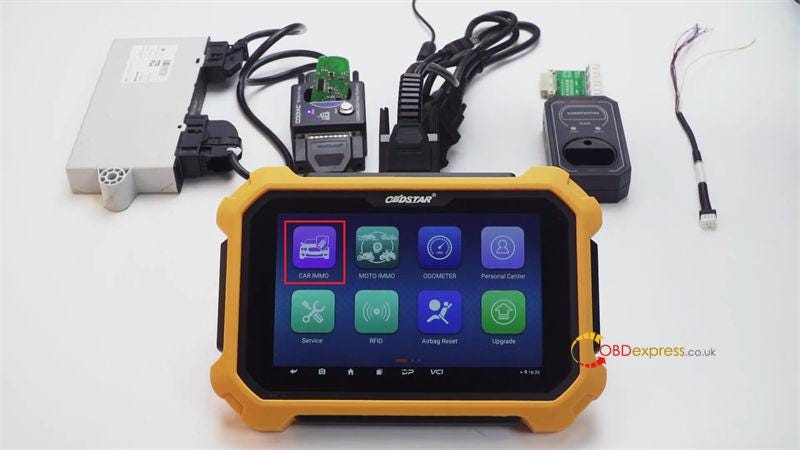
       This is a guide on how to use OBDSTAR X300 DP Plus to renew a BMW 868MHz frequency key on bench. In the process, GODIAG CAS4 / CAS4+ Test Platform will work as ignition switch to connect with CAS module.

      Remove key shell, put circuit board into GODIAG Test Platform:

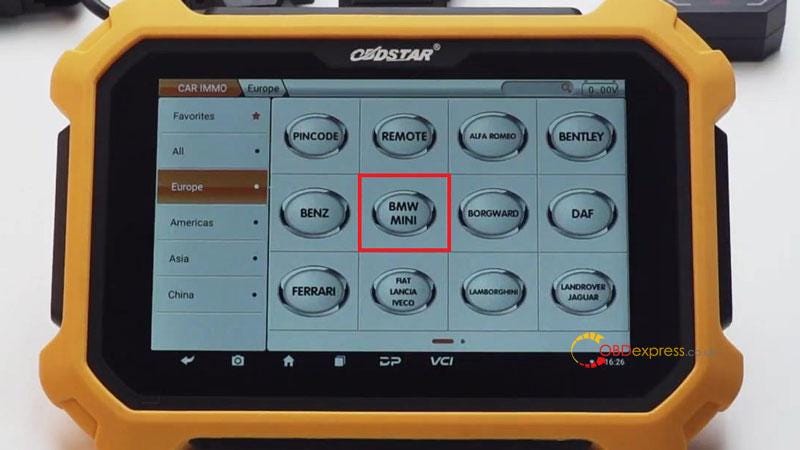
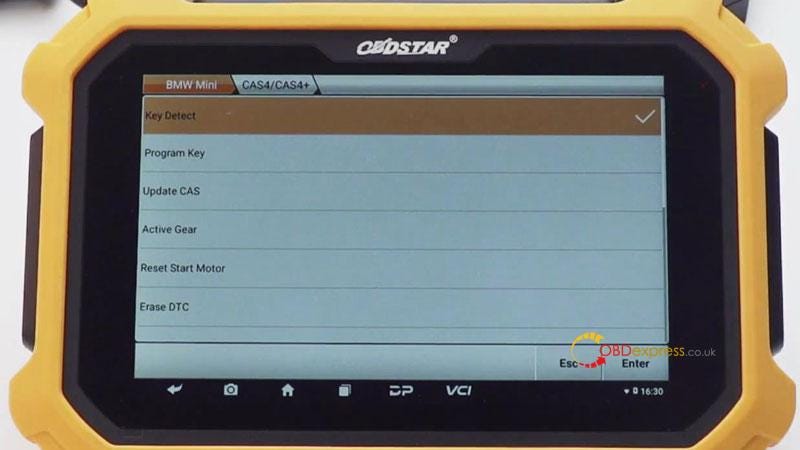
      Car immo >> Europe >> BMW MINI >> BMW MINI V30.46 >> BMW >> CAS4/CAS4+

      This function is available by connecting the server, please ensure the Internet connection is normal.

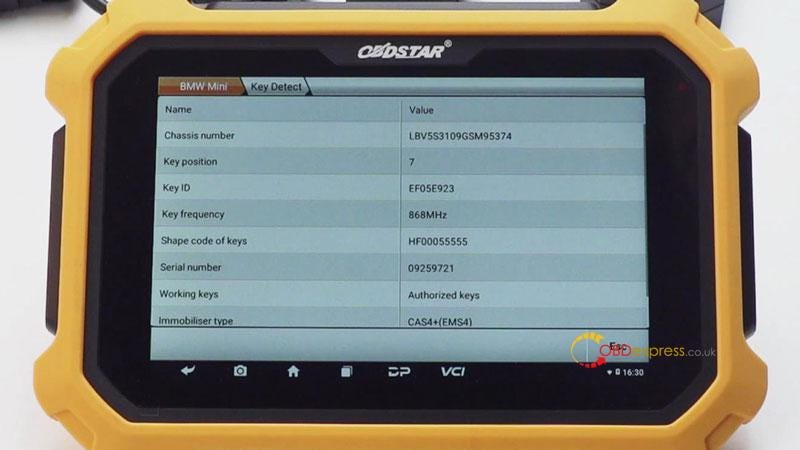
      Key detect >> Enter >> Enter

      As we can see, the key frequency is 868MHz.

      OBDSTAR X300 DP Plus Renew BMW 868MHz Key

      OBDSTAR X300 DP Plus Renew BMW 868MHz Key

      OBDSTAR X300 DP Plus Renew BMW 868MHz Key

      OBDSTAR X300 DP Plus Renew BMW 868MHz Key

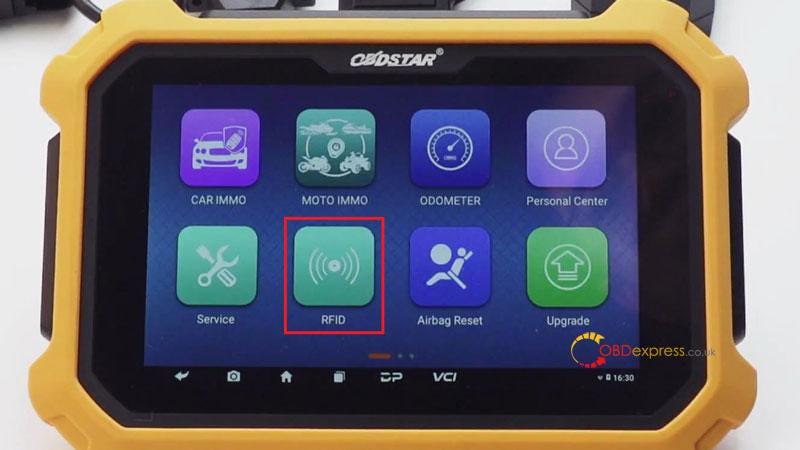
      Go back to home page:

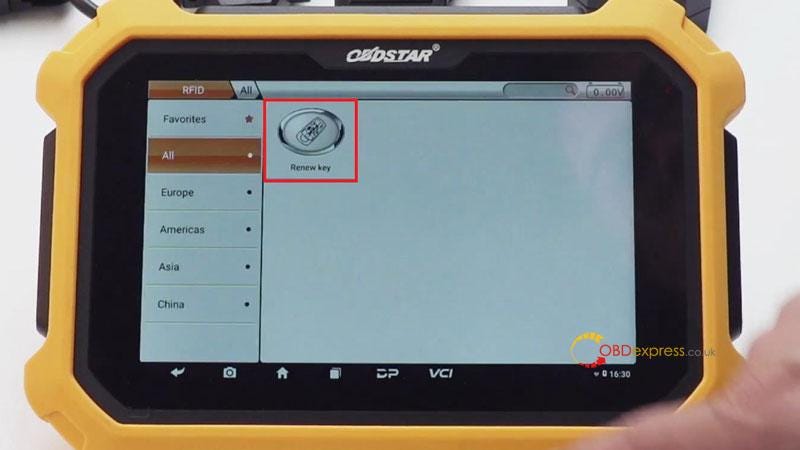
      RFID >> Renew key >> Renew key V31.08 >> BMW >> F chassis >> 868MHz >> IN-Circuit-HUF5661

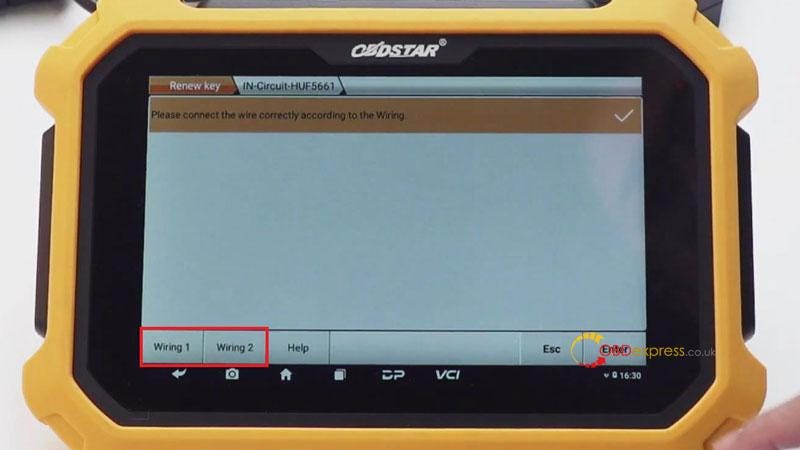
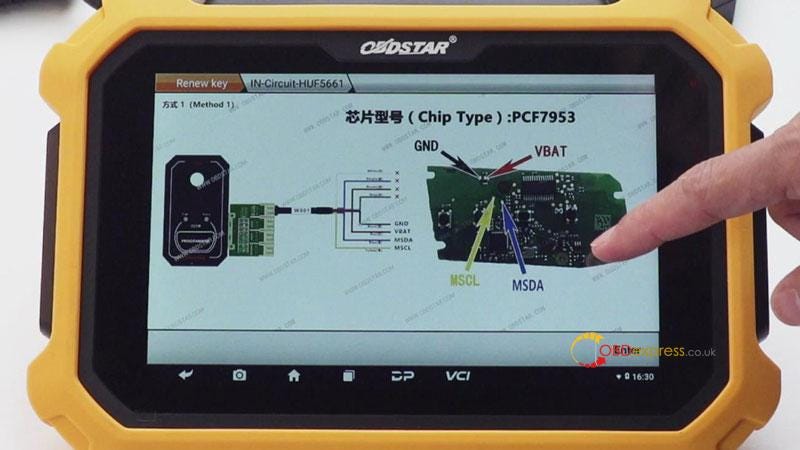
      Please connect the wire correctly according to the wiring diagram.

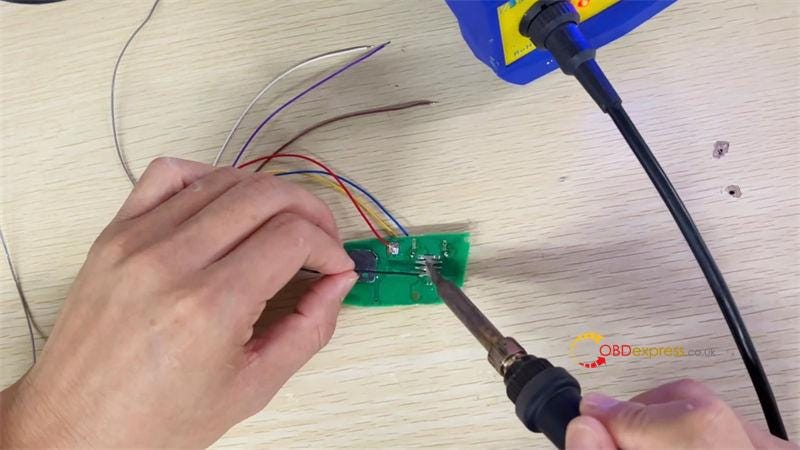
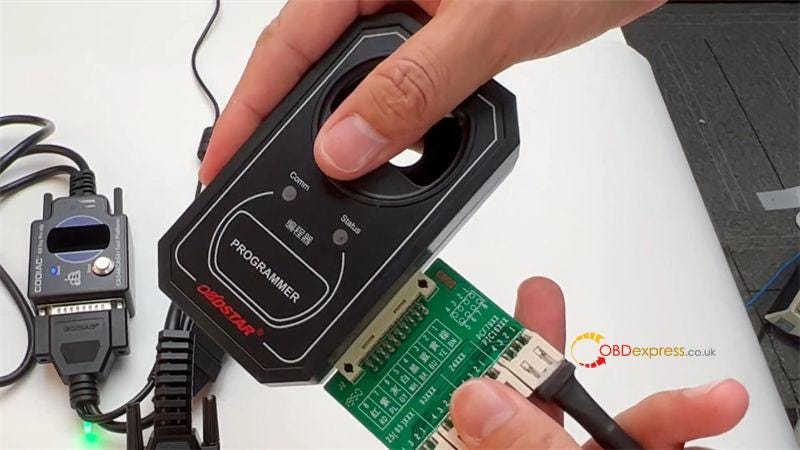
      Connect circuit board to C001 adapter, P001 programmer & Key Master Plus.

      Supply 12V power to the adapter.

      Press "Enter" to start writing data…

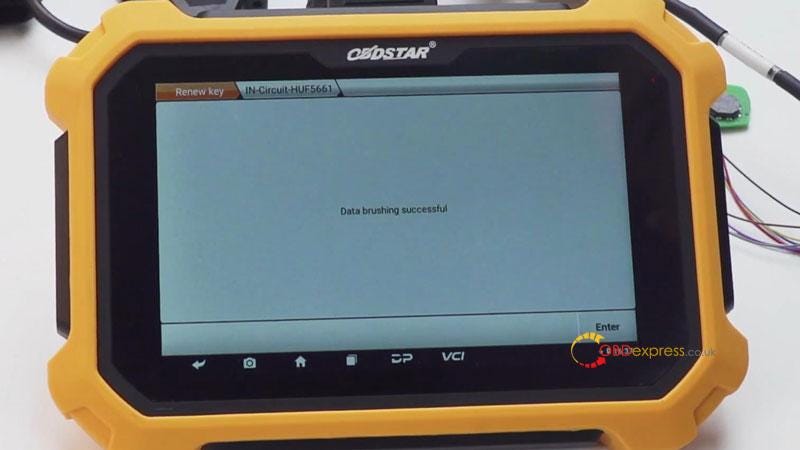
      Data brushing successful.

      BMW key renew was done.

      OBDSTAR X300 DP Plus Renew BMW 868MHz Key

      OBDSTAR X300 DP Plus Renew BMW 868MHz Key

      OBDSTAR X300 DP Plus Renew BMW 868MHz Key

      OBDSTAR X300 DP Plus Renew BMW 868MHz Key

      OBDSTAR X300 DP Plus Renew BMW 868MHz Key

      OBDSTAR X300 DP Plus Renew BMW 868MHz Key

      OBDSTAR X300 DP Plus Renew BMW 868MHz Key

      www.obdexpress.co.uk

      Which Volvo vehicles does the OBDSTAR P50 support?

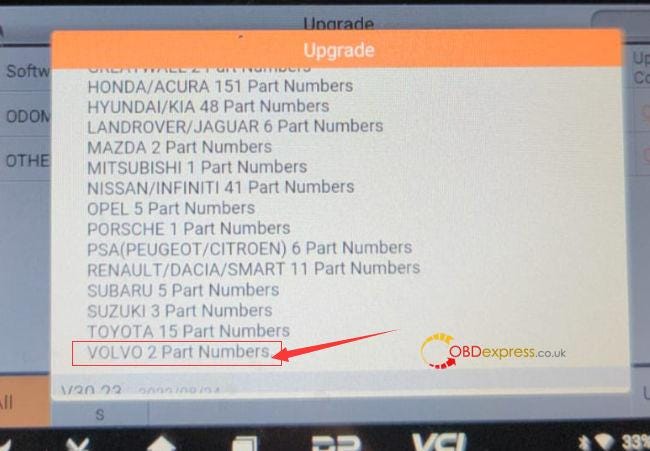
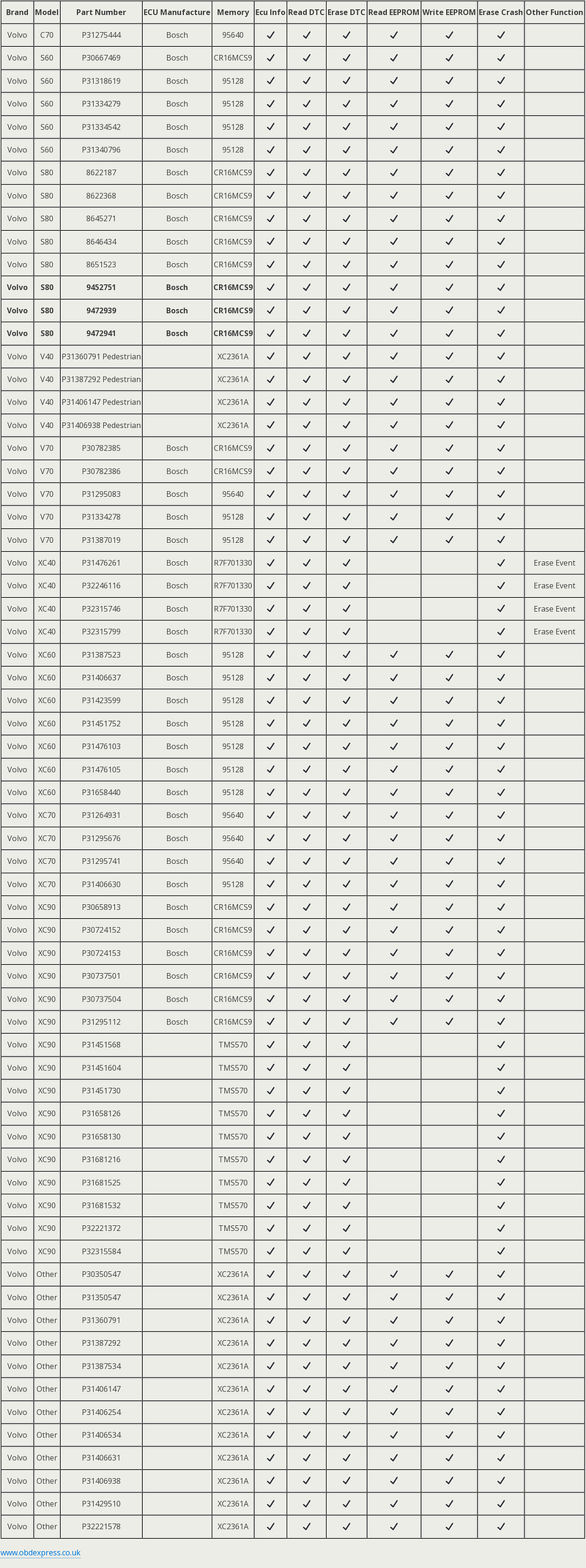
       OBDSTAR P50 is able to do airbag resetting for Volvo incl. read ECU info, read DTC, erase DTC, read EEPROM, write EEPROM, erase crash and erase event. The new upgrade adds 2 Volvo Part Numbers- S80 9452751 and 9472941 CR16MCS9. Check the newest car list.

      OBDSTAR P50 Volvo Airbag Reset Car List

      OBDSTAR P50 Volvo Airbag Reset newest Car List:

      Volvo car models: C70, S60, S80, V40, V70, XC40, XC60, XC70, XC90,

      Part number:

      • 8622187, 8622368, 8645271, 8646434, 8651523
      • 9452751, 9472939, 9472941
      • P30350547
      • P30667469, P30658913
      • P30724152, P30724153, P30737501, P30737504
      • P30782385, P30782386,
      • P31295083, P31275444, P31295112, P31264931, P31295676, P31295741
      • P31318619, P31334279, P31334542, P31340796, P31387523, P31334278, P31387019, P31350547, P31360791, P31387292, P31387534
      • P31360791 Pedestrian, P31387292 Pedestrian, P31406147 Pedestrian, P31406938 Pedestrian
      • P31476261, P31406637, P31423599, P31451752, P31476103, P31476105, P31406630, P31451568, P31451604, P31451730, P31406147, P31406254, P31406534, P31406631, P31406938, P31429510
      • P31658126, P31658130, P31681216, P31681525, P31681532, P31658440
      • P32246116, P32221372, P32221578
      • P32315746, P32315799, P32315584
      OBDSTAR P50 Newest Volvo Airbag Reset Car List

      www.obdexpress.co.uk

      Tuesday, 11 October 2022

      Autel and Xhorse tool all key lost programming for 2020 Jeep Wrangler

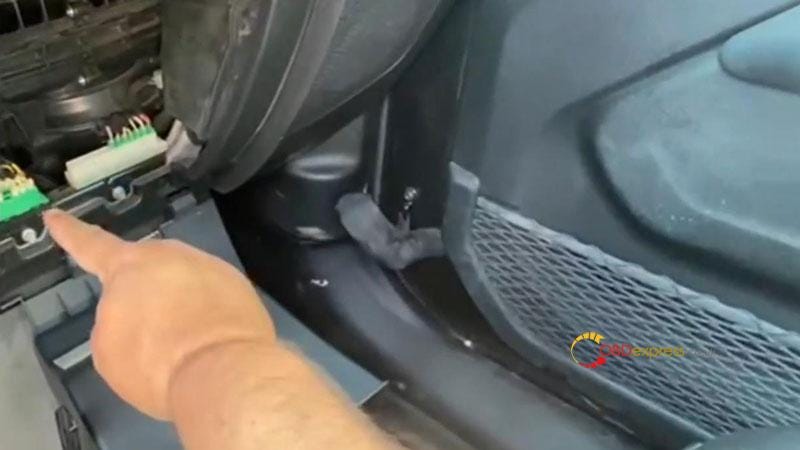
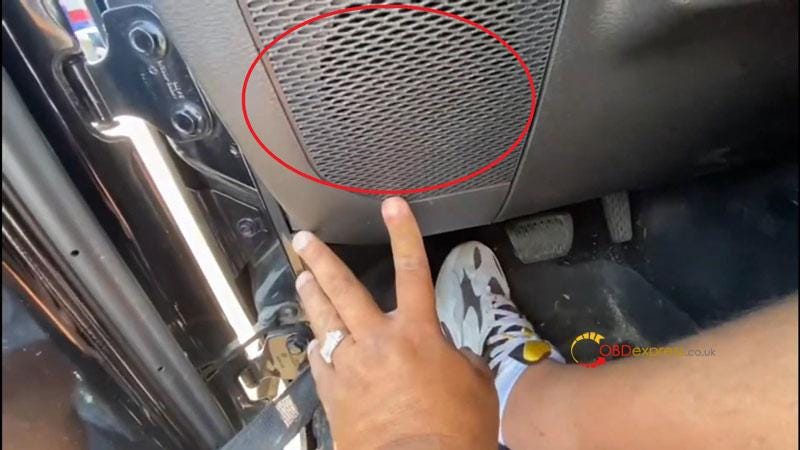
       This is a quick demo on how to program 2020 Jeep Wrangler all keys lost with Autel & Xhorse key tools. The Jeeps has 2 gateway connectors, one is back in the storage tray at assistant seat. Just press the button to take out connector. The other one is under lower left corner of steering wheel, remove that part to access the connector. Either is OK.

      2020 Jeep Wrangler AKL programming with Autel and Xhorse devices

      2020 Jeep Wrangler AKL programming with Autel and Xhorse devices

      Tools Required

      Autel MaxiIM KM100

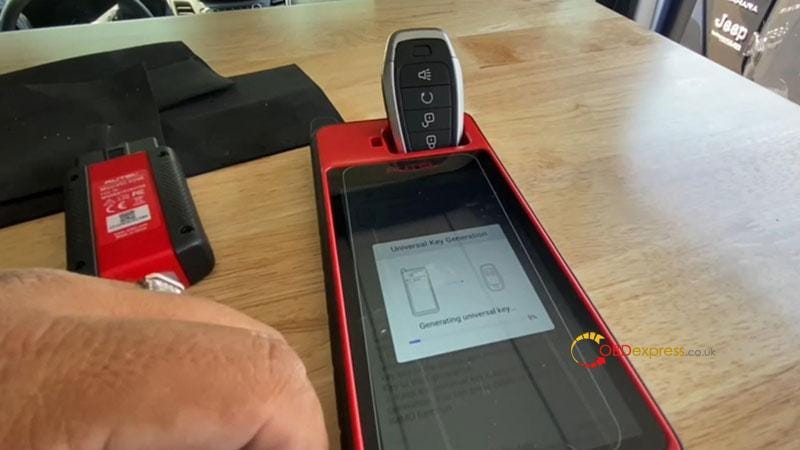
      Autel Universal Smart Key

      Xhorse VVDI Key Tool Plus

      I'll use ADC 2011 cable to program the key.

      After using Autel KM100 to generate the universal key.

      2020 Jeep Wrangler AKL programming with Autel and Xhorse devices

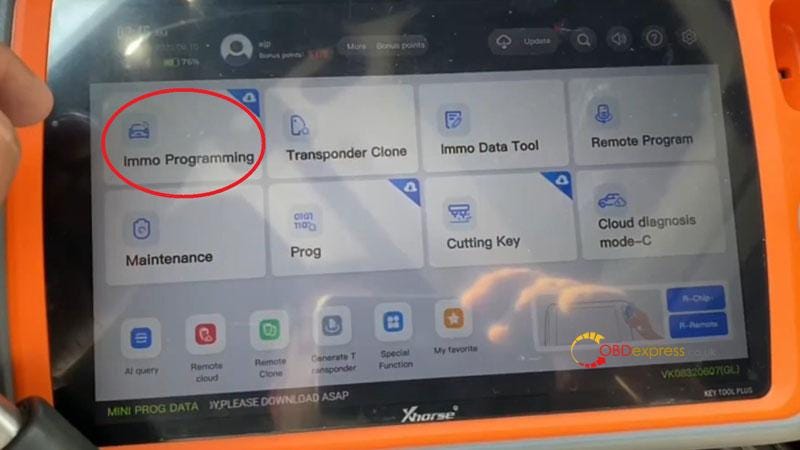
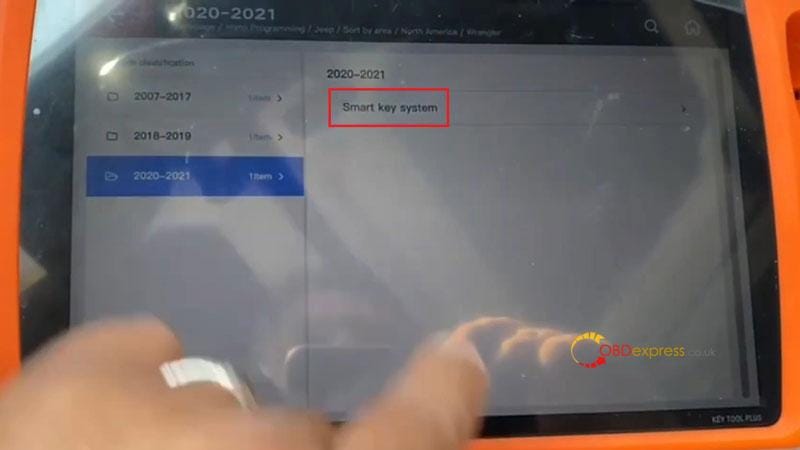
      Connect VVDI Key Tool Plus into OBD, enter into

      IMMO programming >> Jeep >> Select by area >> North America >> Wrangler >> 2020–2021 >> Smart key system >> Start programming

      Please use 12+8 Adapter, the gateway connector is generally behind the CD player(Commander, Cherokee), under the co-pilot glove box(Grand, Cherokee), and under the steering wheel(Compass, Wrangler).

      Press "OK".

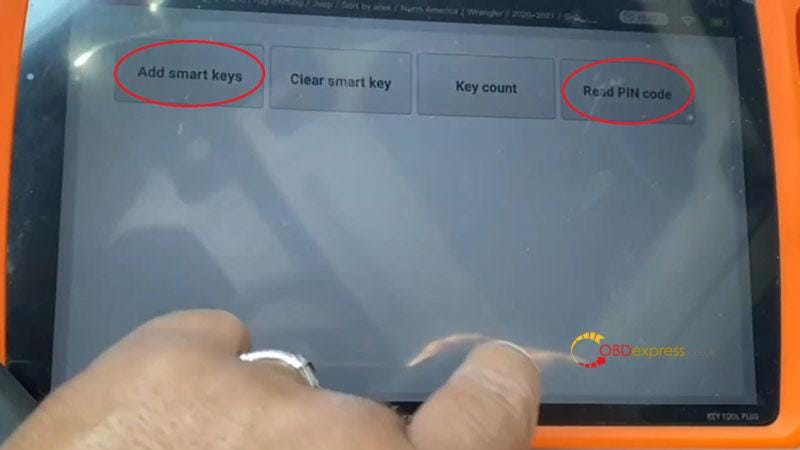
      Press "Read PIN code".

      Open network connection, it takes a few minutes during calculating password.

      Switch ignition off, turn on the security warning light(double flash lights).

      Press "OK".

      Key Tool Plus Pad starts calculating…

      *Don't scare if it appear on the screen that failed. This will happen until getting the password.

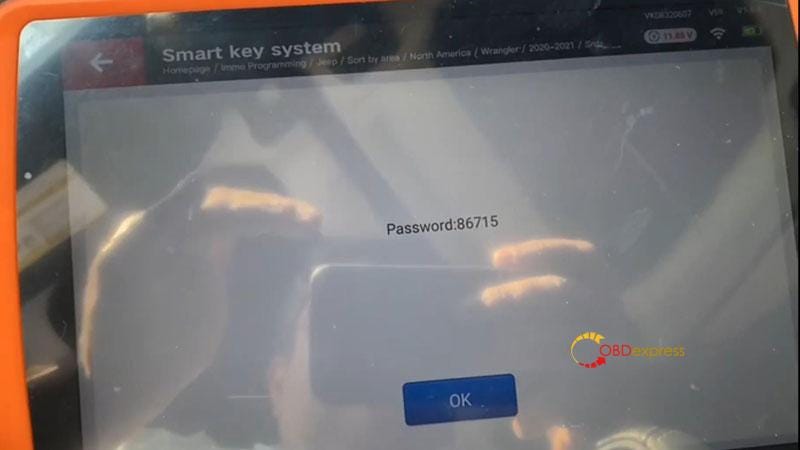
      Passwords were successfully read out: 86715

      2020 Jeep Wrangler AKL programming with Autel and Xhorse devices

      2020 Jeep Wrangler AKL programming with Autel and Xhorse devices

      2020 Jeep Wrangler AKL programming with Autel and Xhorse devices

      2020 Jeep Wrangler AKL programming with Autel and Xhorse devices

      Press "Add smart keys".

      Switch ignition off, turn on the security warning light.

      Place the smart key to be programmed inside the car, take other keys out of the car, make sure there are no wireless devices near the smart key.

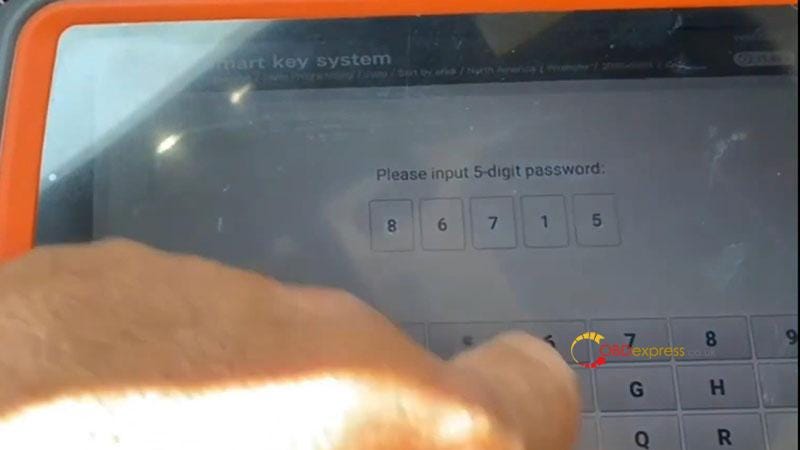
      Inputpassword: 86715

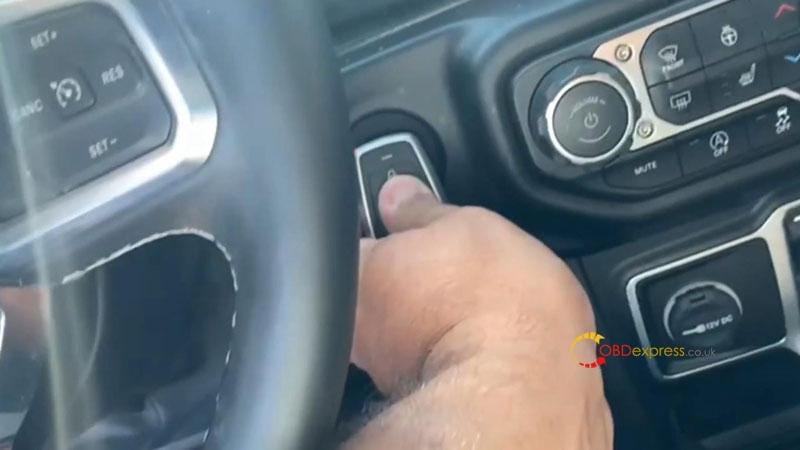
      After clicking "OK", keep the top of smart key to be programmed touching the start button until the device prompts to release.

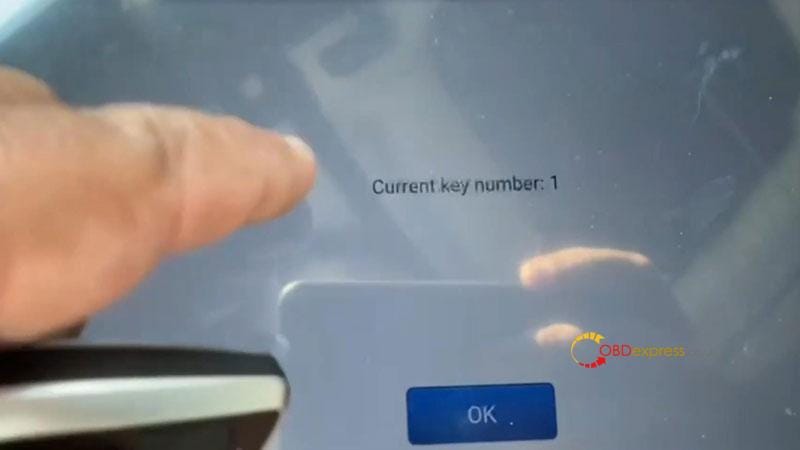
      Current key number: 1

      Program completed!

      Remove OBD to have a test, the car can start.

      Done.

      2020 Jeep Wrangler AKL programming with Autel and Xhorse devices

      2020 Jeep Wrangler AKL programming with Autel and Xhorse devices

      2020 Jeep Wrangler AKL programming with Autel and Xhorse devices

      www.obdexpress.co.uk

      Digimaster 3 Corrected 2007 Toyota LandCruiser Mileage

       I have a 2007 200 series toyota landcruiser, it's 93A86 memory chip, and want to correct mileage by Yanhua Digimaster 3. But I don't find the option to enter, only see 93C86. Is it not supported?

      Obdexpress.co.uk engineer answers:

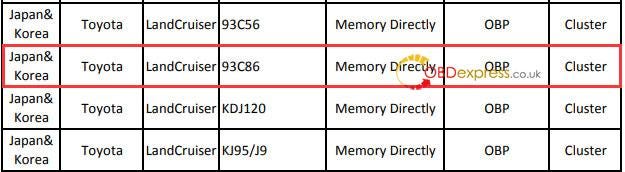
      All 93 chips are supported.

      93A type chip is the same as 93C.

      Currently Digimaster 3 supports TOYOTA LandCruiser 93C56, 93C86 (93A86), KDJ120 and KJ95/J9.

      Digimaster 3 Corrected 2007 Toyota LandCruiser Mileage

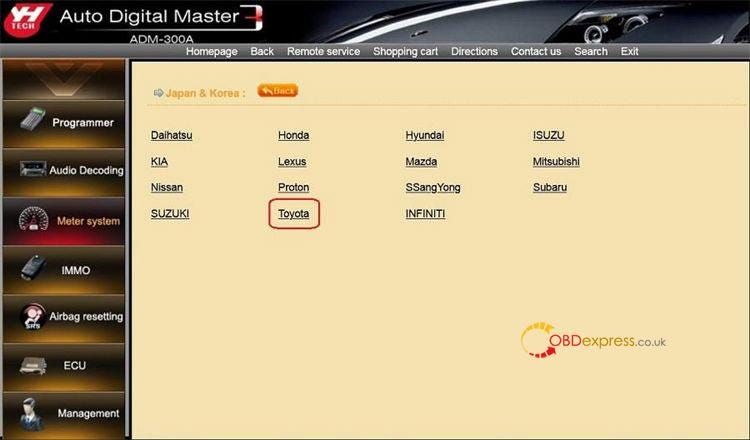
      Operation path:

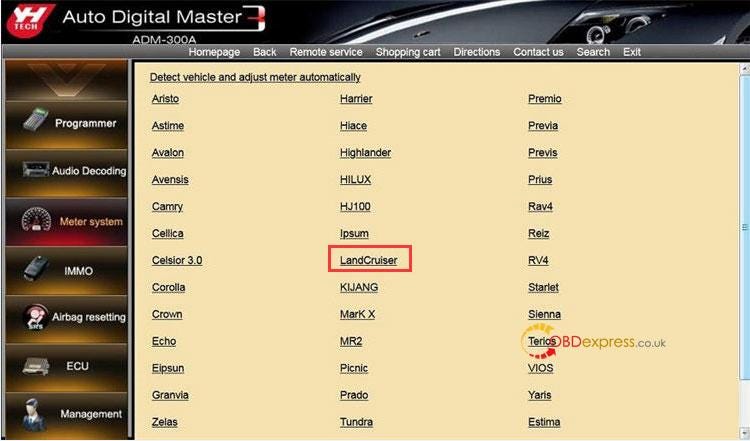
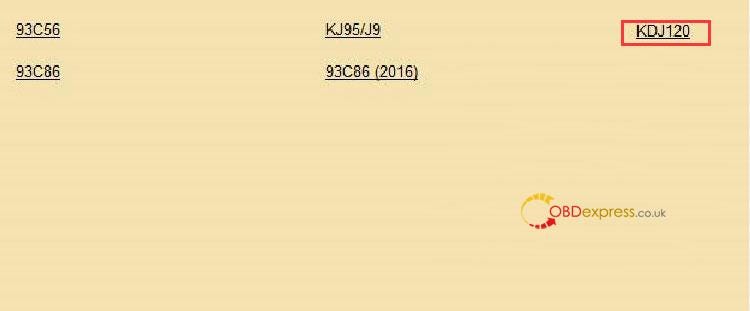
      Meter System>> Japan& Korea>> Toyota>> LandCruiser>> KDJ120

      Digimaster 3 Corrected 2007 Toyota LandCruiser Mileage

      Digimaster 3 Corrected 2007 Toyota LandCruiser Mileage

      Digimaster 3 Corrected 2007 Toyota LandCruiser Mileage

      Digimaster 3 Corrected 2007 Toyota LandCruiser Mileage

      Then follow the on-screen instruction to adjust odometer.

      For more Toyota car models supported by Yanhua Digimaster III via the OBP adapter, Check Yanhua Digimaster3 Toyota odometer correction supported list

      For more information, please contact us:
      Email: sales@OBDexpress.co.uk
      WhatsApp: +86 18750906257
      Skype: obd2express.co.uk


      KEYDIY New KD-Moto Adapter Adds Honda, Yamaha & Ducati

        Motorcycle key programming is now coming to the KEYDIY KD-X4 . The new KEYDIY KD-Moto Adapter adds dedicated motorcycle coverage for a w...