Wednesday, 6 May 2026

New VAPON VP360: OBD Odometer Correction & DTC Tool 2026

 The VAPON VP360 is a professional handheld tool dedicated to OBD Odometer Correction and precision vehicle diagnostics. Engineered for maximum workshop efficiency, it combines specialized mileage calibration with a stable Bench Mode and DTC Read & Clear functionality, providing a high-performance, cost-effective solution for automotive technicians.

New VAPON VP360_OBD Odometer Correction and DTC Tool

Core Product Features

  1. Professional Odometer Correction: Expert-level mileage calibration and instrument cluster repair performed directly via the OBDII port.
  2. Stable Bench Mode: Enables secure data reading and writing on the bench to ensure data integrity without requiring the vehicle to be present.
  3. DTC Read & Clear: Integrated system diagnostics to quickly scan, identify, and erase Diagnostic Trouble Codes (DTCs).
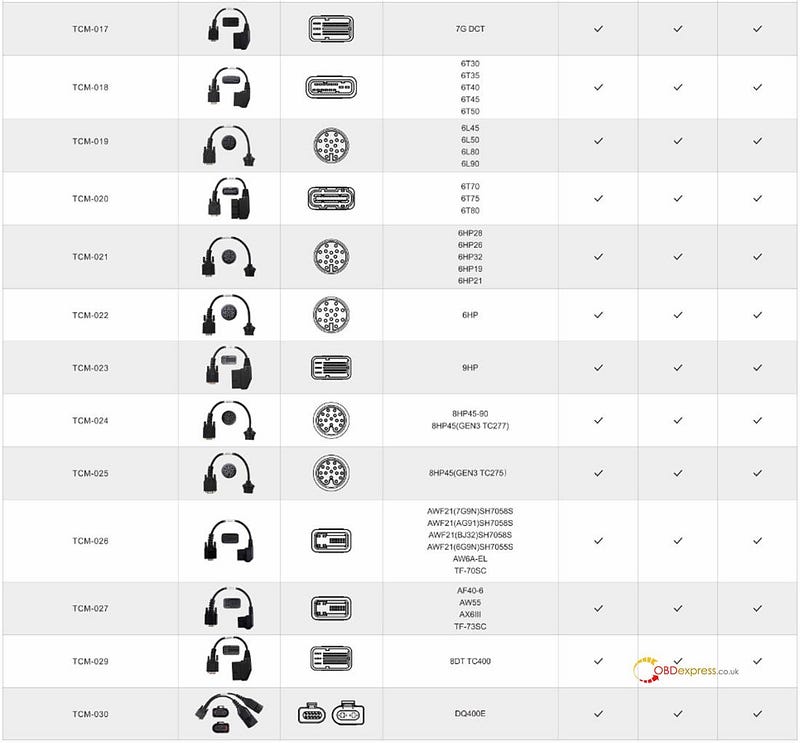
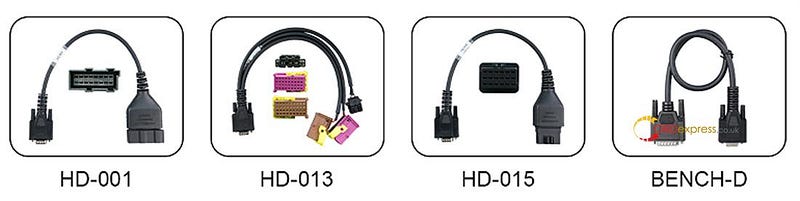
  4. Future-Proof Expansion: New adapters added through OTA updates.


New VAPON VP360_OBD Odometer Correction and DTC Tool

Extensive Brand Coverage

The VP360 supports a wide range of global manufacturers across major markets:

  • European: VAG Group(VW, Audi, Skoda, Seat), BMW, Mercedes-Benz, Porsche, Land Rover, Jaguar, Fiat, Alfa Romeo, Renault.
  • American: Ford, Chrysler, GM, Jeep, Dodge.
  • Asian: Toyota, Lexus, Nissan, Infiniti, Mazda, Mitsubishi, Hyundai, Kia, Subaru, Suzuki, Isuzu, SsangYong, BYD, Geely, Chery, Great Wall, Changan, GAC, MG, Wuling, Hongqi, BAIC, Venucia.

Software & Update Policy

  • 12 Months Free Updates: Includes one full year of complimentary software and protocol updates from the date of activation.
  • Low-Cost Renewal: After the initial 12-month period, the annual update fee is $100 USD.
  • OTA Scalability: Stay current with the latest vehicle models and new adapter support via online updates.


New VAPON VP360_OBD Odometer Correction and DTC Tool

Hardware Specification

ItemSpecificationDisplay3.5" TFT Color LCDResolution320 x 480 pixelsProcessorARM Cortex-M4Storage (ROM)4 GBUSBUSB 2.0 (Update & Charge)OBD InterfaceDB15 to OBD-II 16-PinProtectionIP54Working Temp.-10°C to 50°CStorage Temp.-20°C to 70°CHumidity5% — 95% Non-CondensingDimensions195 × 95 × 32 mmWeight0.38 kg (Main Unit)ProtocolsCAN / K-Line / J1850ExpandableTF Card Slot

What’s in the Box?

VAPON VP360 Odometer Correction Tool

OBDII-16 Diagnostic Cable

USB-2.0 Data Cable

User Manual

Professional Carrying Case


New VAPON VP360_OBD Odometer Correction and DTC Tool

Why Choose VAPON VP360?

The VAPON VP360 is a strategic investment for professionals focusing on mileage adjustment and DTC management. With its transparent $100 annual update path, robust IP54 protection, and a hardware design that supports new adapters via OTA, it remains a reliable and scalable choice for modern diagnostic environments.

www.obdexpress.co.uk

Yanhua ACDP2 with Module 45 Correct VW DQ38x_GEN2 Mileage

 This guide demonstrates mileage correction on 2022+ VW DQ38x0DE/0GC and DQ500 0DL transmissions (BH1G0401 bootloader, 7-pin connector) using Yanhua Mini ACDP1/ACDP2 with Module 45 on bench.

Important Notes:

ACDP1 Module 45 — compatible with Yanhua ACDP1 only

ACDP2 Module 45 — compatible with Yanhua ACDP2 only

Step-by-Step Procedure

Step 1: Verify TCU Type

Confirm the TCU features the new 7-pin plug (see illustration).

This is essential, as older gearboxes require a different connection method.

Step 2: Connect Device

Open the hood, locate and disconnect the original gearbox connector.

Connect Mini ACDP-1/ACDP-2 and corresponding Module 45 SH25xx-0DE interface board to the gearbox.

Move the jumper cap to the "CAN-R" position (as marked).

Power on Yanhua ACDP device.


Yanhua ACDP2 with Module 45 Correct VW DQ38x_GEN2 Mileage

Step 3: Identify Info

Run ACDP app and verify device connection in the upper right corner.

Navigate to VW/AUDI → Gearbox mileage correction → VW → DQ38x_GEN2 (0DE/0GC).


Yanhua ACDP2 with Module 45 Correct VW DQ38x_GEN2 Mileage

Tap "Identify info" to view system details.

Confirm current mileage (e.g., 17150 km) and system run time (453h).

Screenshot and save this information.


Yanhua ACDP2 with Module 45 Correct VW DQ38x_GEN2 Mileage

Step 4: Correct Mileage (Auto Mode)

Select "Mileage correction (auto mode)."

Read system info and chip info, then save EEPROM data.

Enter desired new mileage (e.g., 16300 km).

Start writing chip data — mileage calibration is now complete.


Yanhua ACDP2 with Module 45 Correct VW DQ38x_GEN2 Mileage

Step 5: Correct Time (Auto Mode)

Select "Time correction (auto mode)."

Confirm system info — the mileage should now display your modified value.

Save EEPROM data, then enter new system run time (e.g., 450).

Ready to write the chip. Correct run time completed successfully.


Yanhua ACDP2 with Module 45 Correct VW DQ38x_GEN2 Mileage

License Note:

If you already own any of these modules (ACDP Module 19 / 25 / 30 or ACDP2 Module 19 / 25 / 30), you need only purchase Module 45 license (A60B) to access VW DQ38x_Gen2 functionality — no additional Module 45 hardware is required.

Read also:

http://blog.obdexpress.co.uk/2026/04/24/vw-dq38x_gen2-gearbox-read-write-by-yanhua-module-45/

VW DQ38x_GEN2 Gearbox Read & Write by Yanhua Module 45

 How to use Yanhua ACDP2 to read and write 2022- DQ38x_GEN2 gearbox data?

ACDP Module 45 is required to access this functionality.

Preparation:

Or Mini ACDP2 with ACDP2 Module 45

  • Android/IOS Smartphone/ tablet with installed ACDP APP

Steps to read and write 2022- DQ38x_GEN2 Gearbox:

Step 1 — Check Your TCU Type

First things first — make sure you’ve got the new TCU with a 7-pin connector.

(X) Older gearboxes? They use a different hookup and won’t work here.

Step 2 — Hook Everything Up

Connect your Mini ACDP1 (or ACDP2) and the Module 45 interface board to your VW gearbox.

Flip the jumper cap to "CAN-R" — just follow the marking on the board.

Power up your ACDP key programmer.


VW DQ38x_GEN2 Gearbox Read Write by Yanhua Module 45

Step 3 — Identify Gearbox Info

Open ACDP app on your Android or iPhone.

Make sure your ACDP device shows as connected.

Go here:

VW/AUDI → Gearbox RD/WR → VW → DQ38x_Gen2 (0DE/0GC)


VW DQ38x_GEN2 Gearbox Read Write by Yanhua Module 45

Tap [Identify info].

Look at the BOOT version — it should say BH1G0401. Snap a screenshot for safekeeping.

ACDP app will dig up the chip info. When it’s done, tap OK.


VW DQ38x_GEN2 Gearbox Read Write by Yanhua Module 45

Step 4 — Back Everything Up

Tap [Full Backup Data].

Take another screenshot of the system info.

Save the chip data.

Then just wait for the backup to finish.


VW DQ38x_GEN2 Gearbox Read Write by Yanhua Module 45

Step 5 — Write to a New Gearbox

Unplug the first gearbox.

Connect your Yanhua ACDP + Module 45 to a different DQ38x Gen2 gearbox.

Tap [Full write data].

Check the BOOT version again — still BH1G0401, right? Great. Screenshot it.

Pick the original chip data file (the one you just backed up).

Double-check everything matches the new gearbox.

! Super important:

Do NOT turn off the power or unplug anything while writing. You could fry the chip.

Hit start and let it do its thing.

When you see the confirmation message on screen — congratulations, you’re done!


VW DQ38x_GEN2 Gearbox Read Write by Yanhua Module 45

In addition, Yanhua Mini ACDP2 with Module 45 also can correct mileage for 2022- DQ38x 0DE/0GC and DQ500 0DL (bootloader of BH1G401 and 7-PIN connector) on bench.

www.obdexpress.co.uk

New VAPON VP360: OBD Odometer Correction & DTC Tool 2026

 The VAPON VP360 is a professional handheld tool dedicated to OBD Odometer Correction and precision vehicle diagnostics. Engineered for m...