Showing posts with label Yanhua BMW MINI ACDP. Show all posts

Wednesday, 22 February 2023

How to Solve BMW ID7 Dashboard Black Screen?

 BMW G series is equipped with ID7 dashboard, and there is no tool can change mileage of G series IMMO Module at present. When you modify ID7 dash mileage, and install back to the car, the real mileage will sync from IMMO module, and the dash will also appear black (dark) screen. How to fix this problem?
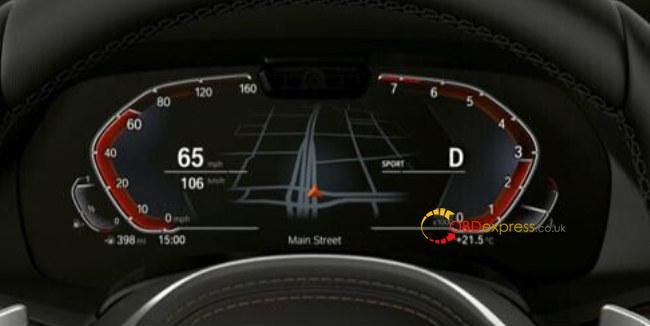
Yanhua BMW ID7 Special Filter Usage Introduction

For this problem, Yanhua Tech has developed and released a new filter- Yanhua BMW ID7 Special Filter to solve the problem.
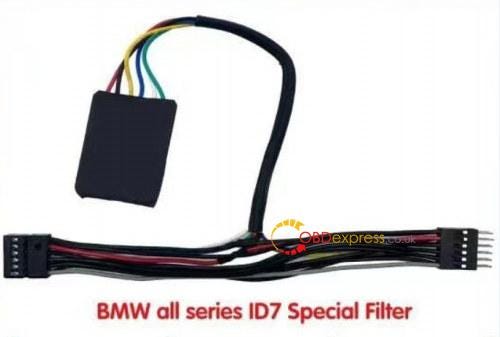
Yanhua BMW ID7 Special Filter Usage Introduction

It's special for BWM 2019+ 5/7/X5/X7, 2020+ 3/X3/X4/X6 and more BMW cars with ID7 type instrument. The purpose is to stop the mileage from BDC2/3, and not to show in the instrument. But NOT for ID7 dash Mileage KM Freezing or stopping. Not for stop mileage running!!!

It's easy and safe to use Yanhua BMW ID7 Instrument Special Can Filter. The filter is docked with the original car instrument plug and socket. No need to weld the filter. Just plug and play.
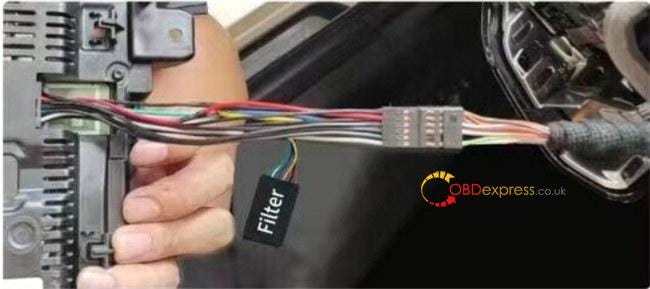
Yanhua BMW ID7 Special Filter Usage Introduction

The detailed steps:

1.Separate the shell from the original instrument plug

2.Install the shell to the filter

3.Plug the filter into the instrument socket

4.Plug the filter pin into the instrument harness socket
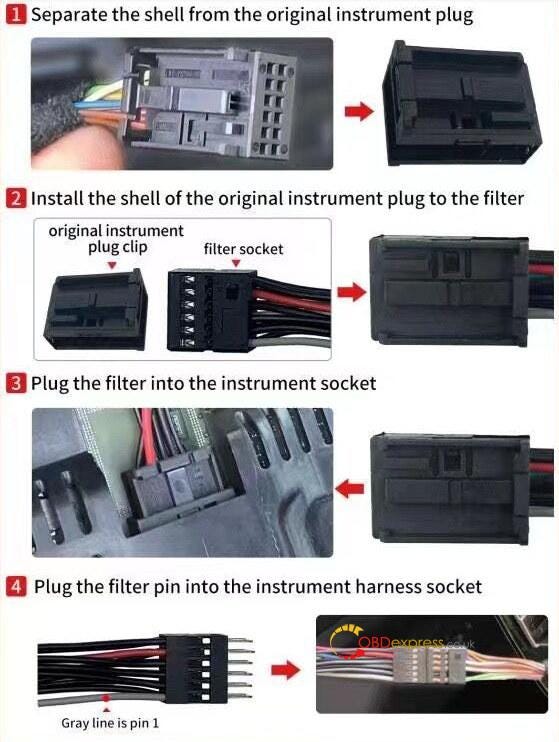
Yanhua BMW ID7 Special Filter Usage Introduction

Available link to get Yanhua BMW ID7 Special Filter:

https://www.obdexpress.co.uk/wholesale/bmw-id7-special-filter.html

www.obdexpress.co.uk

Monday, 28 May 2018

Real Professional Share: ACDP MINI - NO Soldering & Wiring - Good for Newbies

Here obdexpress will show 3 point of Yanhua ACDP Mini are highlighted for BMW CAS and FEM/BDC programming, esp.
This share good for newbies.

  1. Require no soldering experience:
ACDP application with Help file – how to connect

 ACDP MINI - NO Soldering & Wiring - Good for Newbies  1

 ACDP MINI - NO Soldering & Wiring - Good for Newbies  2
  1. Less risk when you do programming:
Automatic test of adapters connection, will help avoid data lost because of bad communication.
(cannot go to the next step if the connection is not in a good way)
 ACDP MINI - NO Soldering & Wiring - Good for Newbies  3

  1. No worries of data lost!

Easy to program FEM without soldering:

For BMW with a good FEM module,

FEM module data restore:
ACDP can be used with FEM module in a good condition but with data issues.
No worries! No module data lost.
Note: You’d better know the data version. If not, choose the newest.
Then the matching should be synchronized with the original device.
Data cannot be as expensive as before coz data now can be restored.

For BMW with a replacement of FEM modules,

FEM module data backup and write:
ACDP is used when there is something wrong with the FEM module.
You should have a working FEM module to write data that’s read from the old and bad FEM.

ACDP has its own adapter for CAS3+/CAS4+:

Recommendation: disassemble the CAS3+/CAS4+ module for programming
ACDP has its adapter for CAS3+/CAS4+ programming.
If done via OBD2, it’s a must to lower the version with ALL tools.
And in the process of downgrading, The data might get lost or leave historical issues that fault cannot be cleared.
So, you’d better disassemble the CAS3+/CAS4+ module and connect it via an specialized adapter for programming.
Please clear some contact points if with thick three anti-paint.
No need soldering chips and wiring


Tips of using ACDP App via a mobile:
Bluetooth turns ON on a mobile, search BT and find out ACDP, then connected
Note: DO NOT manually pair Bluetooth connection.
If you fail to find out ACDP BT, turn on location service, usually in Settings, security and privacy

WiFi is connected with a router or a location service
All data communication is done via WiFi
Note: If you fail to match the key in the process, check the WiFi signal is good or not and also check the WiFi name (NO Chines or other special characters! Only English and numbers available) and password (correct?)
5G cannot be supported!
 ACDP MINI - NO Soldering & Wiring - Good for Newbies  4


Videos: How to use Yanhua ACDP Mini for BMW programming?


Sunday, 27 May 2018

How To Solve Install ACDP APK Error “untrusted enterprise developer” &"Download Fail"

Here is some FAQ about install BMW ACDP MINI tool  APK
Question 1:How to download ACDP APP?
A:Scan the QR code
Android-QR-code
or learn here :http://blog.obdexpress.co.uk/2018/05/24/yanhua-mini-acdp-software-android-ios-installation/

Question 2:After you install ACDP APK on your IOS device, you may get this error :Untrusted Enterprise Developer.How to solve?
untrusted enterprise developer
Solution from OBDexpress.co.uk
please follow the below steps:
Settings--Genaral--Device Management ,and vefified the APK

Question 3:
If prompt:Download Fail,do not exit while downloading,retey? how to do ?
yanhua-bmw-acdp-key-programmer-apk-1
Solution:
When you get this error, please click"YES" ,the APK will download automatically, and do not leave your device in Dormancy mode.
yanhua-bmw-acdp-key-programmer-apk-2

KEYDIY New KD-Moto Adapter Adds Honda, Yamaha & Ducati

  Motorcycle key programming is now coming to the KEYDIY KD-X4 . The new KEYDIY KD-Moto Adapter adds dedicated motorcycle coverage for a w...