Showing posts with label YANHUA MINI ACDP. Show all posts

Monday, 15 December 2025

Guide to Exporting Yanhua ACDP Folders via Android/ IOS

 This article walks you through the process of compressing and sharing your Yanhua ACDP/ACDP2 project folders from both Android and iOS smartphones.

Prerequisite: Verify Your App Version

The process is nearly identical on both platforms, but you must have the correct Mini ACDP app version installed.

Android (V3.0.142 or above), iOS (V3.6.5 or above):
Open App -> [Me] -> [About]


A Complete Guide to Exporting Yanhua ACDP Folders via Android_IOS

The General Export Process

The core workflow involves three actions in the "My Files" section: Locate > Compress > Share.

Platform-Specific Instructions

On Android:

Locate your folder (e.g., BDC2_ICP_OBD_IMMO_LOST).


A Complete Guide to Exporting Yanhua ACDP Folders via Android_IOS

Use the three points next to it to select "Zip".


A Complete Guide to Exporting Yanhua ACDP Folders via Android_IOS

Use the three points on the created .zip file to select "Share".


A Complete Guide to Exporting Yanhua ACDP Folders via Android_IOS

Choose your preferred sharing method (e.g., WeChat > File Transfer) to export the file off the device.


A Complete Guide to Exporting Yanhua ACDP Folders via Android_IOS

On iOS:

Locate your folder (e.g., bmw).


A Complete Guide to Exporting Yanhua ACDP Folders via Android_IOS

Long-press it and select "Zip" from the context menu.


A Complete Guide to Exporting Yanhua ACDP Folders via Android_IOS

Long-press the resulting .zip file and select "Share".

Choose your preferred sharing method (e.g., WeChat > File Transfer) to export the file off the device.


A Complete Guide to Exporting Yanhua ACDP Folders via Android_IOS

That’s the whole process to export Yanhua Mini ACDP2 folder on Android and IOS devices.

www.obdexpress.co.uk

Wednesday, 5 March 2025

Yanhua ACDP Correct VW MQB49 RF7F01404/ 1406 Mileage by Bench

 Yanhua VW MQB YH-OBD Platform is available at OBDExpress.co.uk now.

It’ s compatible with Yanhua ACDP/ACDP-2 with Module 34 for VW RH850 MQB49 RF7F01404/1406 5C dashboard mileage correction on Bench.


Yanhua ACDP Correct VW MQB49 RF7F01404 1406 Mileage

Yanhua VW MQB YH-OBD Platform Function:

  1. Supports VW MQB dashboard to light up and read info independently.
  2. Supports VW MQB dashboard chip of RF7F01404/1406 to complete the mileage correction on the MQB YH-OBD platform, thus no need to assemble the dashboard back to car for OBD operation.

How to correct mileage of MQB49 RF7F014xx 5C?

Turn on the ignition and light up the odometer, record the original mileage, then remove the odometer

Power on Yanhua Mini ACDP device

Run Mini ACDP APP, confirm the ACDP device has been bound

Method 1:

Select VW>> VW MQB IMMO (ODO)>> MQB49 (RF7F014xx 5C)>> ICP+OBD ODO (RF7F01404, RF7F01406)>> RF7F01404 Interface Board RF7F01404/05 or RF7F01406 Interface Board RF7F01406

Operation guide:

Step 1: OBD Identify Odometer

Step 2: ICP Modify Odometer Help

Step 3: OBD Modify Odometer

Step 4: ICP Write Odometer Help

OBD Modify Odometer by Yanhua ACDP VW MQB YH-OBD Platform:

Select Step 3: OBD Modify Odometer>> Modify Odometer (YH Platform)


Yanhua ACDP Correct VW MQB49 RF7F01404 1406 Mileage

Follow the wiring diagram below to connect:

  • Align the Yanhua MQB-YH-OBD interface board with the instrument interface and install it, and push the interface board switch toward the CAN-R.
  • Then connect Yanhua ACDP2 to MQB-YH-OBD Platform correctly


Yanhua ACDP Correct VW MQB49 RF7F01404 1406 Mileage

Method 2:

Select VW>> VW MQB IMMO (ODO)>> MQB48/49 ODO- Method 2 ((RF7F014xx 5A/5C/5D)>> OBD identify (UDS)>> Identify info (YH platform)


Yanhua ACDP Correct VW MQB49 RF7F01404 1406 Mileage

Connection:

  • Connect ACDP, the interface board of the YH Platform and the VW odometer properly
  • Push the switch of interface board toward the CAN-R.


Yanhua ACDP Correct VW MQB49 RF7F01404 1406 Mileage

Confirm the system info (VIN and mileage-78455), click "Continue"

Verify the chip model

OBD identify info finish


Yanhua ACDP Correct VW MQB49 RF7F01404 1406 Mileage

Remember the save path

Back to the last menu, and select R7F701404 (5C) according to the identified chip model

Disassemble the odometer and connect ACDP, the interface board and it properly


Yanhua ACDP Correct VW MQB49 RF7F01404 1406 Mileage

1: Identify Info

Detect the pin

Confirm the system info

Whether need pre-process: NO

Note: If "YES", preprocess; If "NO", no need preprocess.

Identify chip info finish

Remember the save path


Yanhua ACDP Correct VW MQB49 RF7F01404 1406 Mileage

2: Pre-process chip

If the chip requires processing, click "Pre-process chip".

In this case, just skip it.

3: OBD+ICP reset mileage

Select Reset mileage (YH platform)

Step 1: ICP modify data

Verify the system info and continue


Yanhua ACDP Correct VW MQB49 RF7F01404 1406 Mileage

Save the original data of the instrument

Pay attention to the path, time and file name of the file backup

Write chip data

Modify odometer data finish

Remember the save path


Yanhua ACDP Correct VW MQB49 RF7F01404 1406 Mileage

Step 2: OBD modify mileage

Verify the system info and continue

Input the new mileage (i.e.64755)

Reset mileage finish

Remember the save path


Yanhua ACDP Correct VW MQB49 RF7F01404 1406 Mileage

Step 3: ICP write data

Select the coding data ending with "F Orig"

Save the generate data of the instrument

Backup file success

Write odometer data finish

Remember the save path

Finally, back to "Identify info (YH platform)" to verify if the odometer mileage is the same as new one

Or install the odometer in the car to verify if the odometer mileage is normal.


Yanhua ACDP Correct VW MQB49 RF7F01404 1406 Mileage

Done!

Read also:

Yanhua ACDP with Module 34 Change VW MQB 3426+95128 Dashboard Mileage:

http://blog.obdexpress.co.uk/2024/08/29/yanhua-acdp-with-module-34-change-vw-mqb-342695128-dashboard-mileage/

How to install the Yanhua ACDP Module 34 interface board (R7F701402, D70F3426, R7F701402)?

http://blog.obdexpress.co.uk/2024/07/24/how-to-install-the-yanhua-acdp-module-34-interface-board-r7f701402-d70f3426-r7f701402/

Monday, 3 March 2025

Yanhua ACDP Toyota R7F701401 Unencrypted Mileage Correction

 This is a tutorial on how to do Toyota R7F701401 unencrypted chip model full LCD intrument mileage correction with Yanhua Mini ACDP 2. Need to work with Module 35 & Toyota R7F701401 Interface Board.

Turn on the ignition to light up the instrument panel, record the original mileage, then remove it.

Or remove the instrument panel first, light it up per the power — on diagram and record the original mileage.

Power on the ACDP and open Mini ACDP APP.


Yanhua ACDP Toyota R7F701401 Unencrypted Mileage Correction

Module >> TOYOTA ODO >> R7F701401(Not encrypt)

Connect the interface board to the device properly.

Reset mileage(auto mode) >> OK >> Continue

Verify instrument info, click Continue.

Reading chip data, please wait…

Cilck OK to save the original data of the instrument.

Verfiy the mileage, click Continue.

Enter new mileage valute: 48889km

Write chip data is about to begin, and forbidden to power off or unplug the device during operation! Click Continue.

Writing chip data, please wait…

Reset mileage finish.


Yanhua ACDP Toyota R7F701401 Unencrypted Mileage Correction

Light the instrument panel per the power — on diagram and check if the mileage is correct.

Or install the instrument panel in the vehicle and check if the mileage is correct.

www.obdexpress.co.uk

Wednesday, 27 March 2024

New Easy Way to Export Yanhua Mini ACDP Data in Android

 Here we provide 2024 new easy way to export Yanhua Mini ACDP 2/ ACDP 1 data in Android system phone.

NOTE

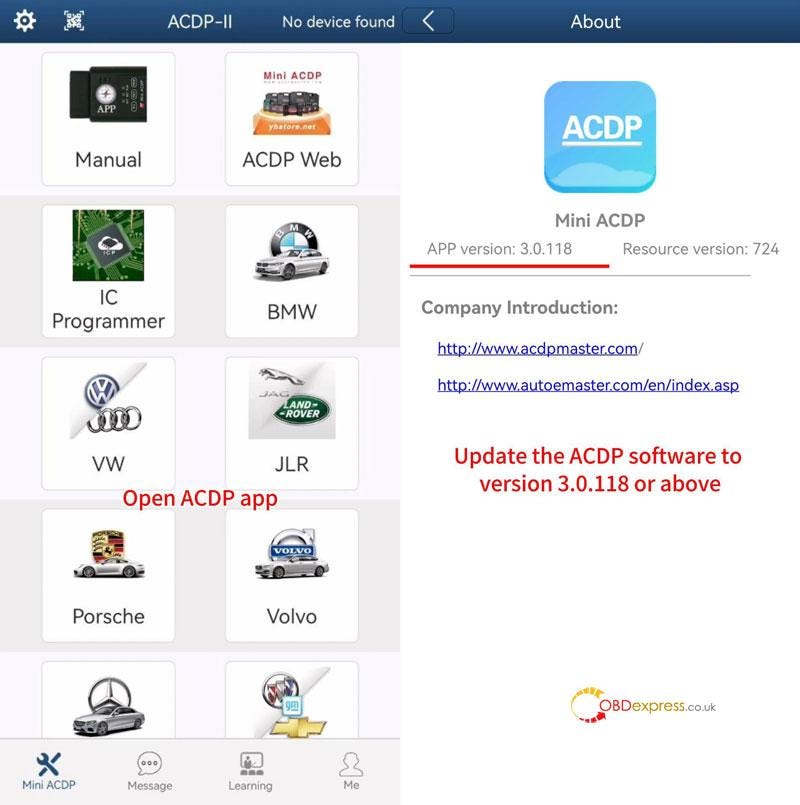
Please ensure the ACDP APP version is 3.0.118 or above.

Export Yanhua Mini ACDP Data in Android

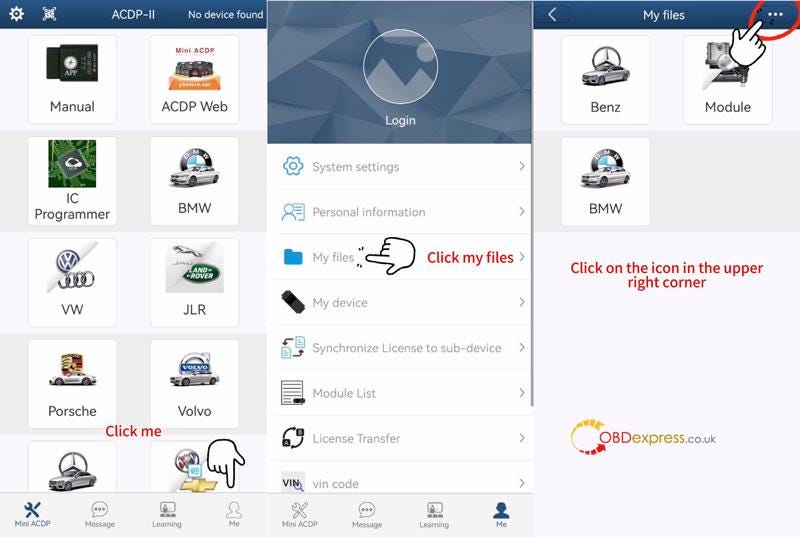
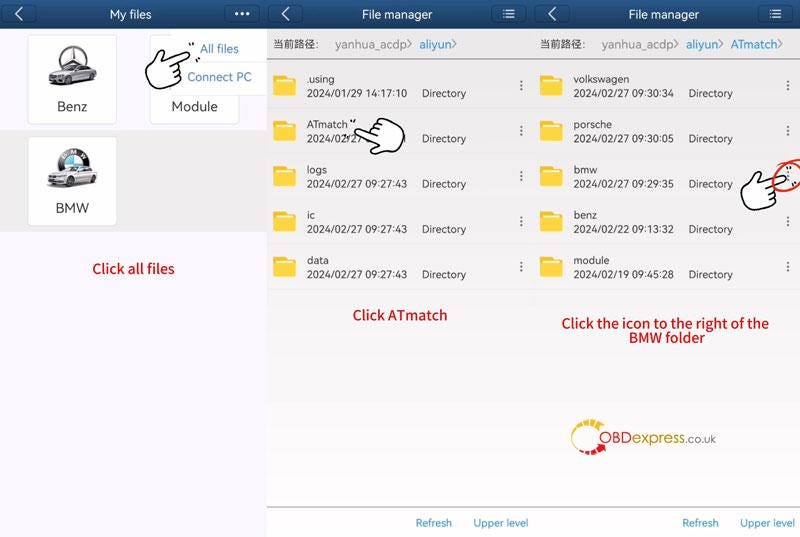
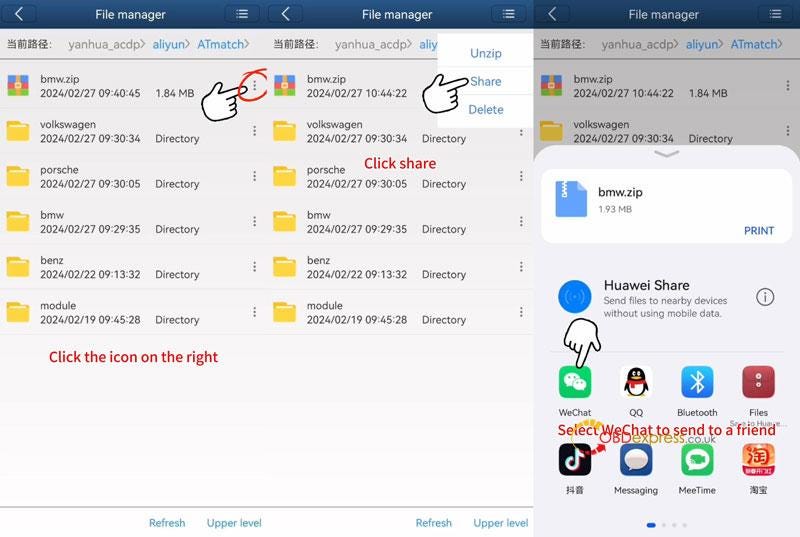
Open ACDP software >> Me >> My files >> More >> All files >> ATmatch

Here's taking BMW folder as an example, click the More icon right to the BMW folder.

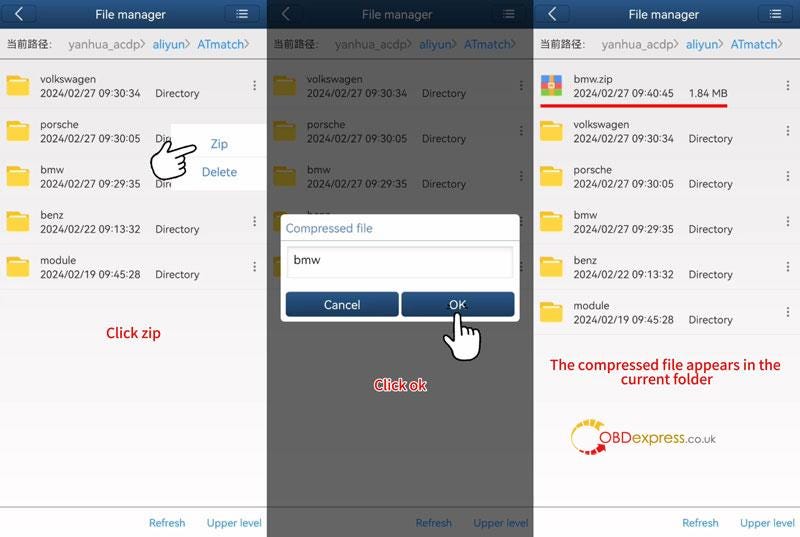
Zip >> OK

The compressed BMW file will appear in the the current folder.

Click More icon right to the zipped file.

Now we can share to others via social media as wanted.

Easy done!

Export Yanhua Mini ACDP Data in Android

Export Yanhua Mini ACDP Data in Android

Export Yanhua Mini ACDP Data in Android

Export Yanhua Mini ACDP Data in Android

Read also

Yanhua Mini ACDP IOS System Data Export & PC Bind Guide

Thursday, 5 October 2023

Two Methods to Transfer Yanhua ACDP License on ACDP Software

 Users can transfer the Yanhua ACDP module license from ACDP-1 to ACDP-2 by purchasing the transfer authorization, and transfer the license on ACDP software by factory or yourself.

ACDP-1 to ACDP-2 License Transfer Plan:

http://blog.obdexpress.co.uk/2023/09/11/how-to-transfer-yanhua-mini-acdp-1-module-license-to-acdp-2/

Two methods to transfer Yanhua Mini ACDP license:

After selecting Plan A or Plan B,

Method 1:

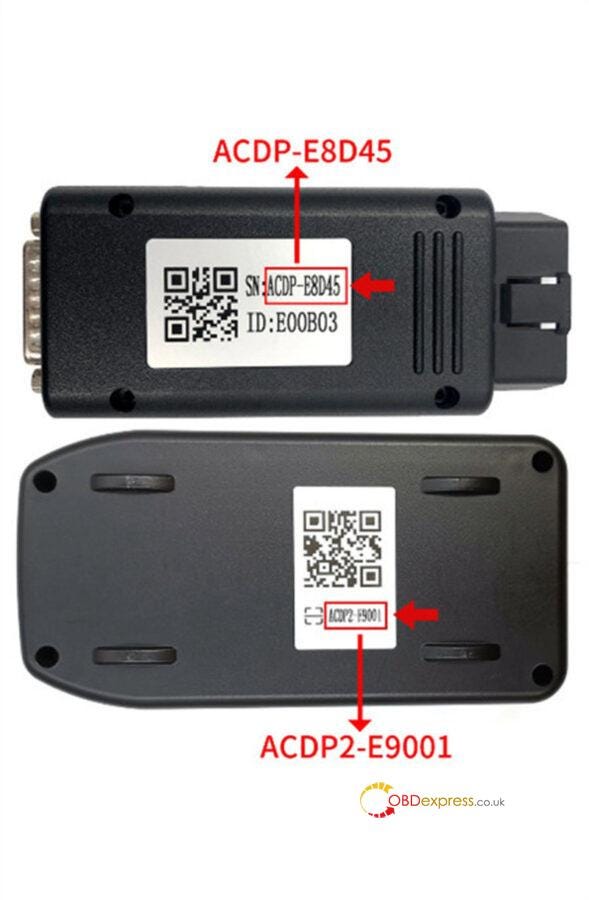
You can put the pictures of ACDP-1 and ACDP-2 SN together and provide it to obdexpress.co.uk customer service, and Yanhua Tech factory will transfer the license for you to use directly without any operation.

Transfer Yanhua ACDP License on ACDP Software

Method 2:

If you only provide the SN of your Mini ACDP-1 and Yanhua ACDP-2 without pictures, you can obtain the authorization transfer code from us, but need to connect device and then transfer the license on Mini ACDP software on your own.

Check the detailed operation steps below.

Step 1: Obtain the authorization transfer code by offering the new and old device SN

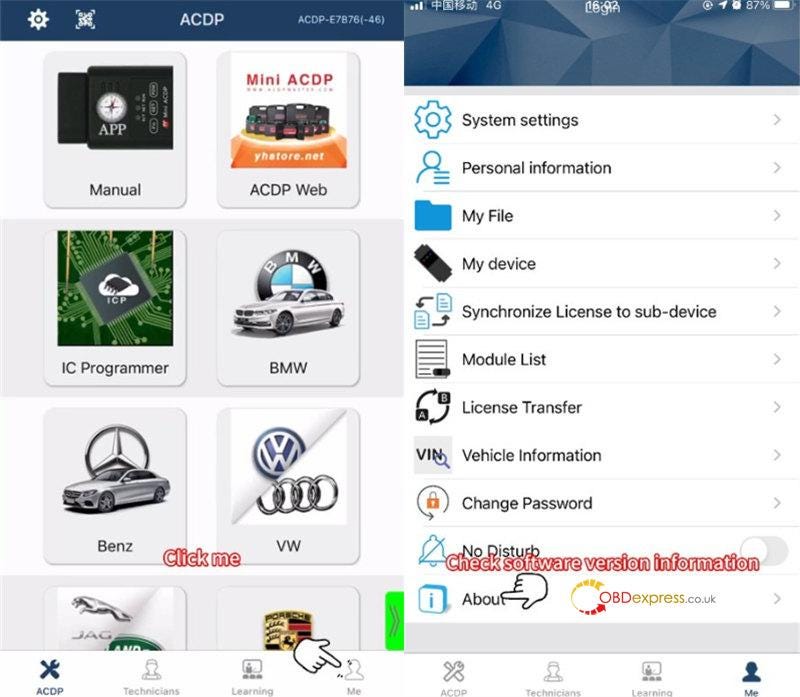
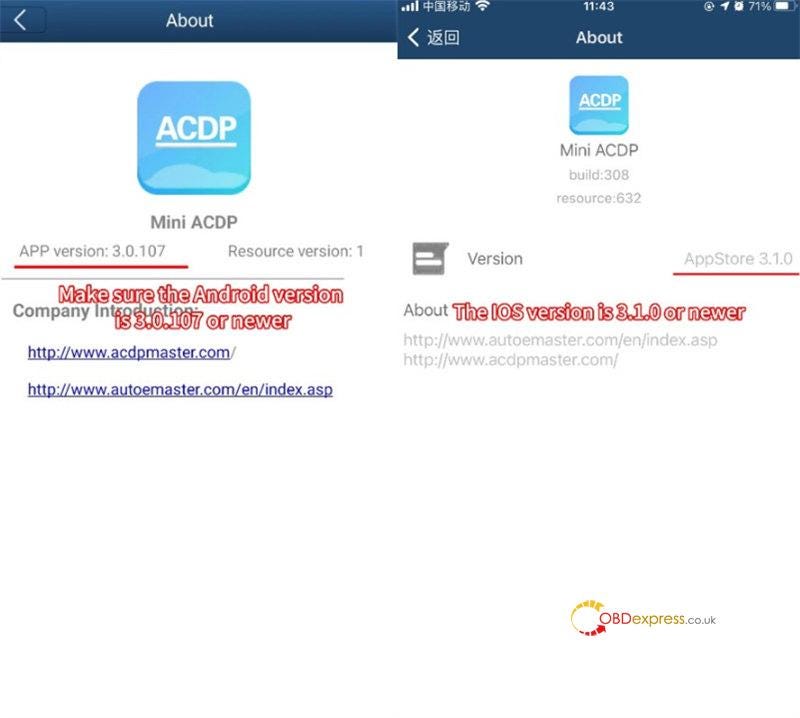
Step 2: Open ACDP software, click Me>> About to check the software version information

Transfer Yanhua ACDP License on ACDP Software

Make sure the Android version is 3.0.107 or newer, and the IOS version is 3.1.0 or newer

Transfer Yanhua ACDP License on ACDP Software

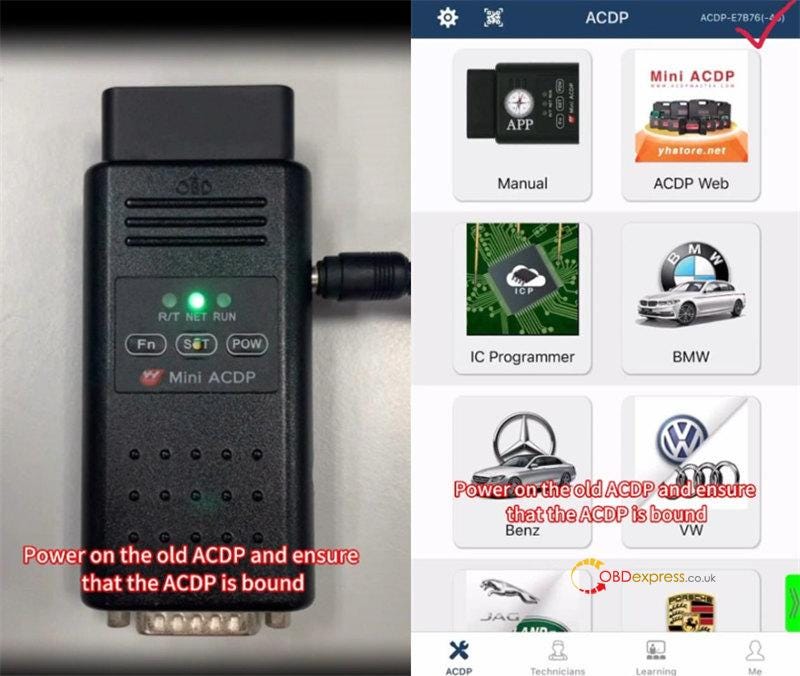
Step 3: Power on the Yanhua ACDP-1 and ensure the device is bound

Transfer Yanhua ACDP License on ACDP Software

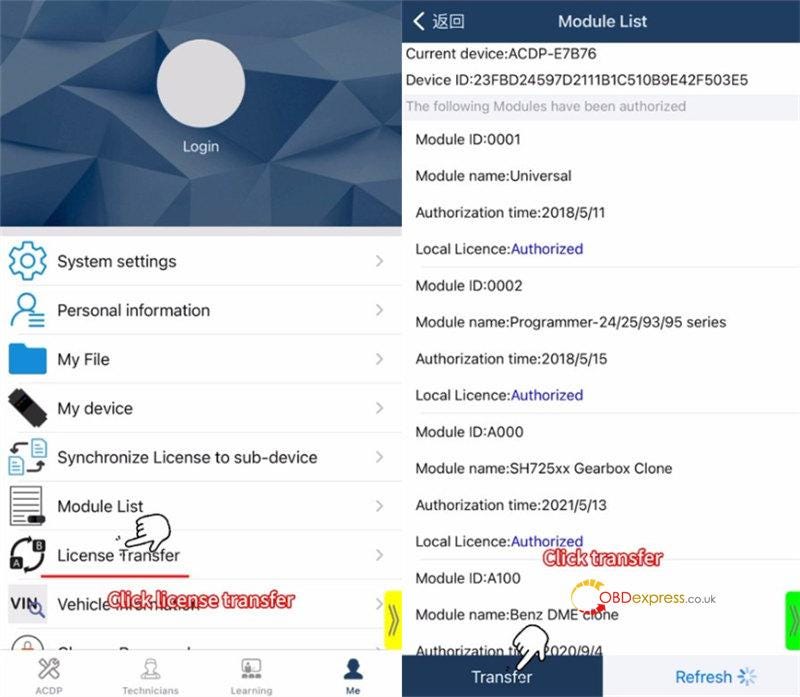
Step 4: Click Me>> License Transfer

When it shows the module list, tap "Transfer" at the left bottom corner.

Transfer Yanhua ACDP License on ACDP Software

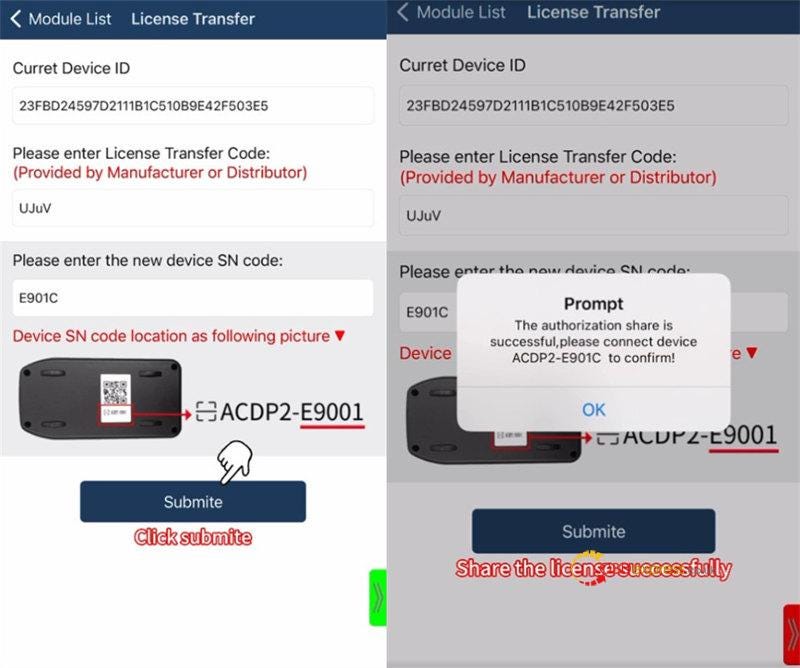
Enter the authorization transfer code and the SN code of Yanhua Mini ACDP-2

Click "Submite"

The authorization share is successful. Please connect the ACDP-2 device to confirm.

Transfer Yanhua ACDP License on ACDP Software

Contact us:

  • Email: sales@OBDexpress.co.uk
  • Skype: obd2express.co.uk
  • WhatsApp Business:+44 7418609676
  • WhatsApp After-sales Service: +86 18750906257
  • WeChat(微信): 15705931767
  • Online Customer Service

Working Time: 9:00am — 18:00 pm (UTC+08:00), Monday to Friday.

www.obdexpress.co.uk

Thursday, 10 August 2023

3 Ways to Connect Yanhua Mini ACDP 2 via USB Cable

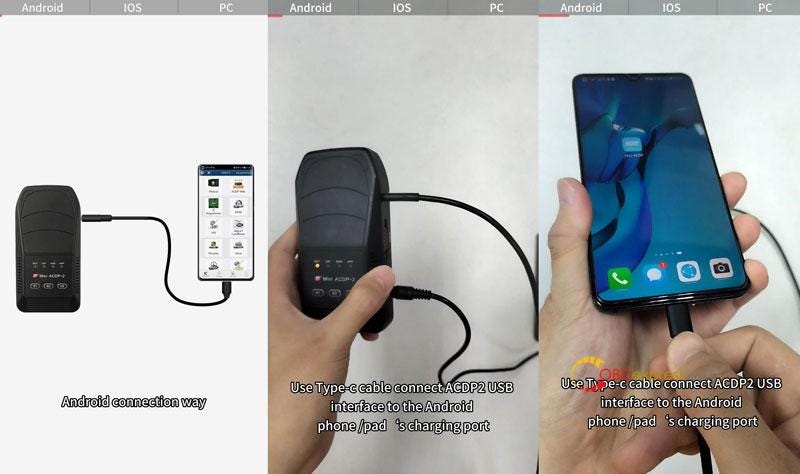
 How to connect Yanhua Mini ACDP 2 via USB cable? Here we provide 3 ways to connect with Android/IOS phone and PC. Thus, there are 3 different connection cables coming with ACDP 2.

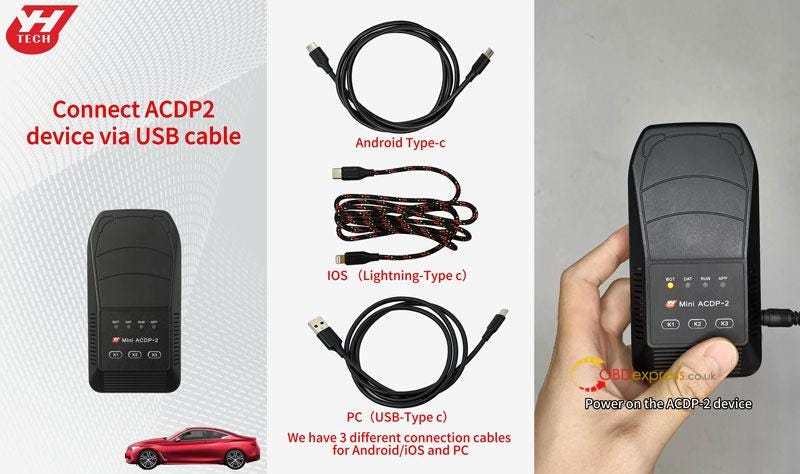
Accessories

Android Type-C

IOS(Lightning-Type C)

PC (USB-Type C)

Power on Mini ACDP 2 device.

Connect Yanhua Mini ACDP 2 via USB Cable

Android Connection Way

  • Plug Type-C cable into Mini ACDP 2 USB port, the other end into Android phone/pad' s charging port.
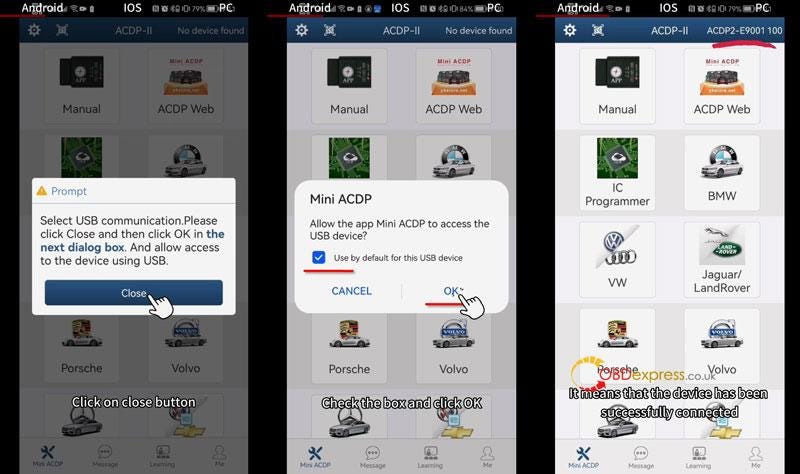
  • Open ACDP APP, click "Close" button to allow access to the device using USB.
  • Selected "Used by default for this USB device", click "OK".
    1. When the device ID is displayed in the upper right corner, which means the device has been successfully connected.

      Connect Yanhua Mini ACDP 2 via USB Cable

      Connect Yanhua Mini ACDP 2 via USB Cable

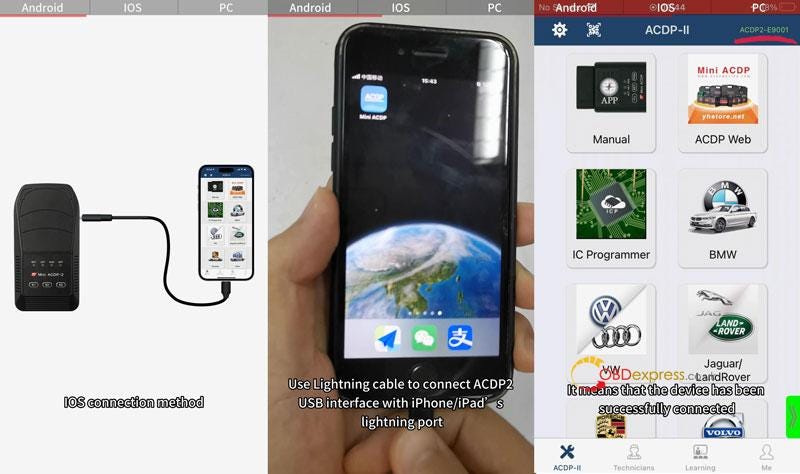
      IOS Connection Way

    2. Plug lightning cable into ACDP 2 USB port, the other end into iPhone/iPad's lightning port.
    3. Open ACDP APP to check the device ID in upper right corner: if it displayed that means successful connection.
      1. Connect Yanhua Mini ACDP 2 via USB Cable

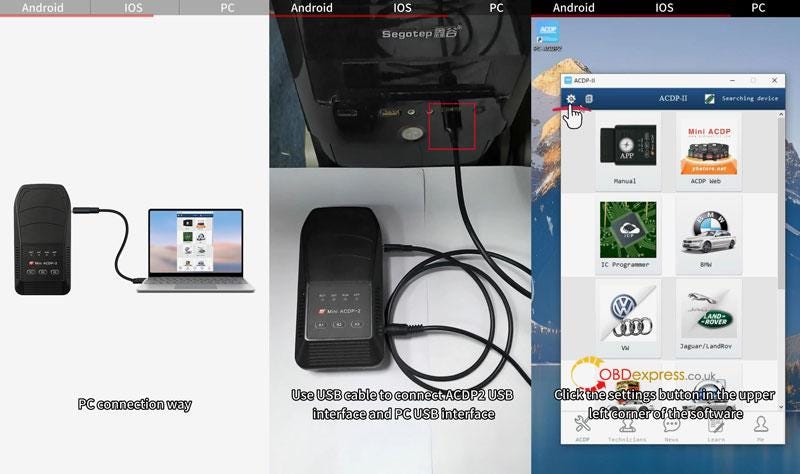
        PC Connection Way

      2. Plug USB cable into USB ports of Mini ACDP 2 and PC.
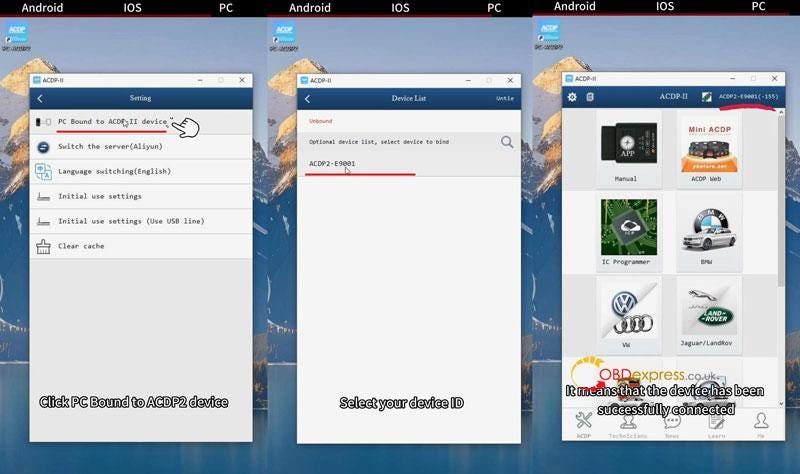
      3. Open PC-ACDP 2 software: Settings >> PC Bound to ACDP II device >> Select your device ID >> Return back to homepage
        1. When the device ID is displayed in the upper right corner, which means connection is successful.

          Connect Yanhua Mini ACDP 2 via USB Cable

          Connect Yanhua Mini ACDP 2 via USB Cable

          www.obdexpress.co.uk

          Wednesday, 2 August 2023

          What's the Difference between Yanhua Mini ACDP 1 and ACDP 2?

           Yanhua Mini ACDP 1 is discontinued and replaced by the 2nd generation Mini ACDP 2.

          Yanhua ACDP 2 advantages:

          1.It’s more convenient to connect. Can via both wireless and USB connection.

          2.Device can be bound with three methods:

          • Bind by USB cable directly
          • Configure wifi or hotspot binding through the USB cable
          • Configure wifi or hotspot binding through the Bluetooth of the mobile phone

          Comparison between ACDP 1 and ACDP 2:

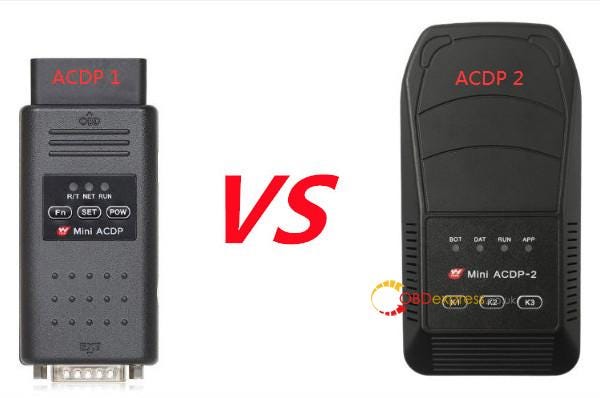
          1.Host difference

          Difference between Yanhua Mini ACDP 1 and ACDP 2

          2.Connection difference

          ACDP 1: Wireless connection only

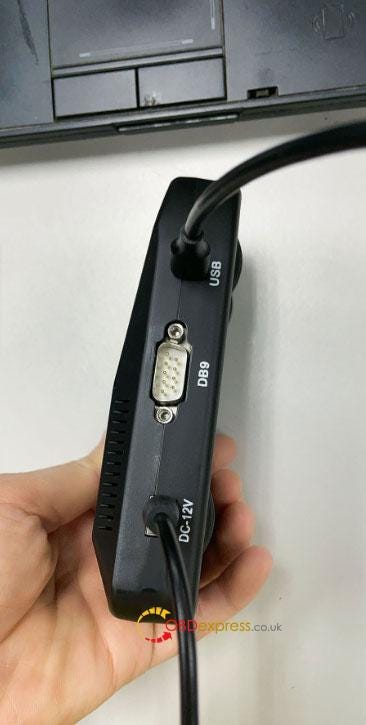
          ACDP 2: Wireless and USB connection, connect ACDP host via Android, iOS and PC devices via USB without Bluetooth adapter.

          How to bind the second-generation ACDP?

          1. Bind directly through the USB cable. The 3 USB cables correspond to Android, IOS, and PC respectively. After binding the device in this way, the USB cable must be connected to the host and the mobile phone, and it cannot be used without the USB cable. Disconnect the USB cable and the device will lose connection.
          2. Configure wifi or hotspot binding through the USB cable. The binding process of this method requires a USB connection, and then enter the wifi or hotspot name and password to complete the binding. After binding, you can unplug the USB cable and use it wirelessly.
          3. Configure wifi or hotspot binding through the Bluetooth of the mobile phone. This method is the same as the binding method of the 1st generation host. Wireless use after binding.
          Difference between Yanhua Mini ACDP 1 and ACDP 2

          3.Package difference

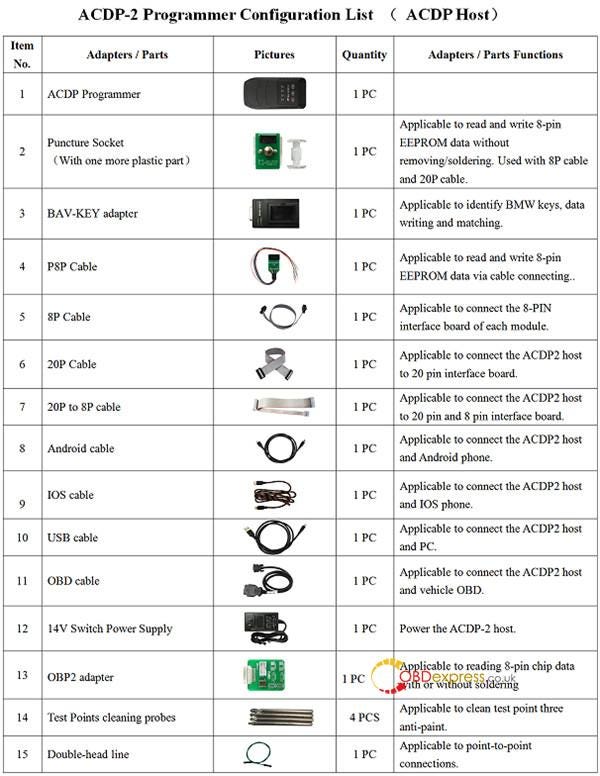
          Yanhua Mini ACDP 2 has more accessories such as Android cable, IOS cable, USB cable, OBD cable, and supports 14v switch power supply while ACDP 1 supports 12V.

          Package list:

          1pc x ACDP Programmer

          1pc x Puncture Socket (With one more plastic part)

          1pc x BAV-KEY adapter

          1pc x P8P Cable

          1pc x 8P Cable

          1pc x 20P Cable

          1pc x 20P to 8P cable

          1pc x Android cable

          1pc x IOS cable

          1pc x USB cable

          1pc x OBD cable

          1pc x 14V Switch Power Supply

          4pcs x Test Points cleaning probes

          1pc x Double-head line

          Difference between Yanhua Mini ACDP 1 and ACDP 2

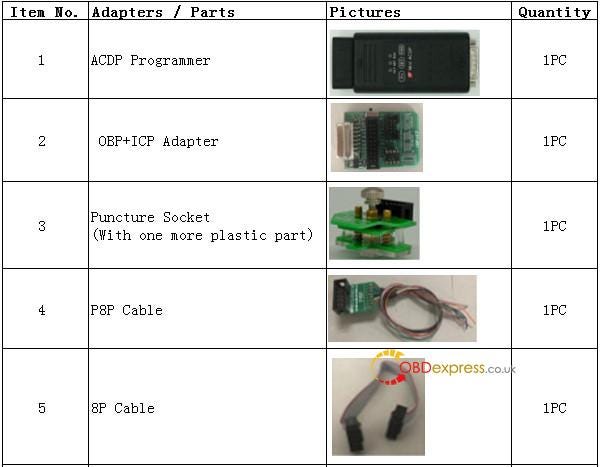
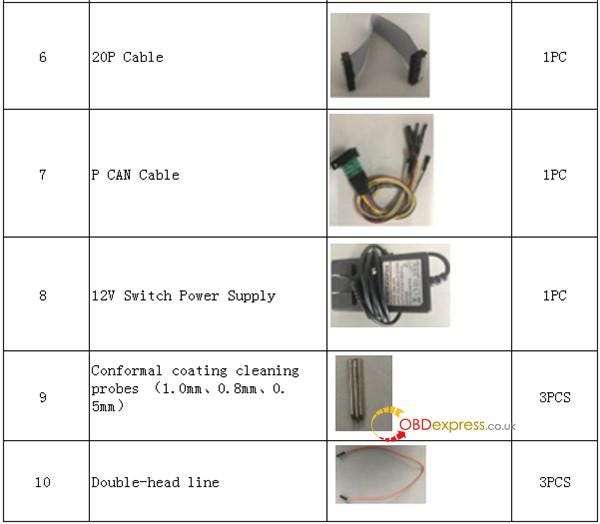
          Mini ACDP 1 package list:

          Difference between Yanhua Mini ACDP 1 and ACDP 2
          Difference between Yanhua Mini ACDP 1 and ACDP 2

          Besides, the interface boards used are different.

          We will update it in the next article soon. Stay tuned!

          Yanhua Mini ACDP 2 Key Programming Tool:

          https://www.obdexpress.co.uk/wholesale/yanhua-mini-acdp-2-key-Programmer.html

          KEYDIY New KD-Moto Adapter Adds Honda, Yamaha & Ducati

            Motorcycle key programming is now coming to the KEYDIY KD-X4 . The new KEYDIY KD-Moto Adapter adds dedicated motorcycle coverage for a w...