Showing posts with label KT200 ECU Programer. Show all posts

Thursday, 16 February 2023

New version KT200 or FoxFlash clone MEDC17 operation guide

Foxflash and New KT200 ECU programmer can support MEDC17 free clone service while most of others tool need patch the files after reading out. It perfectly solves the problem that the car cannot start normally after writing the original ECU data into the new ECU.

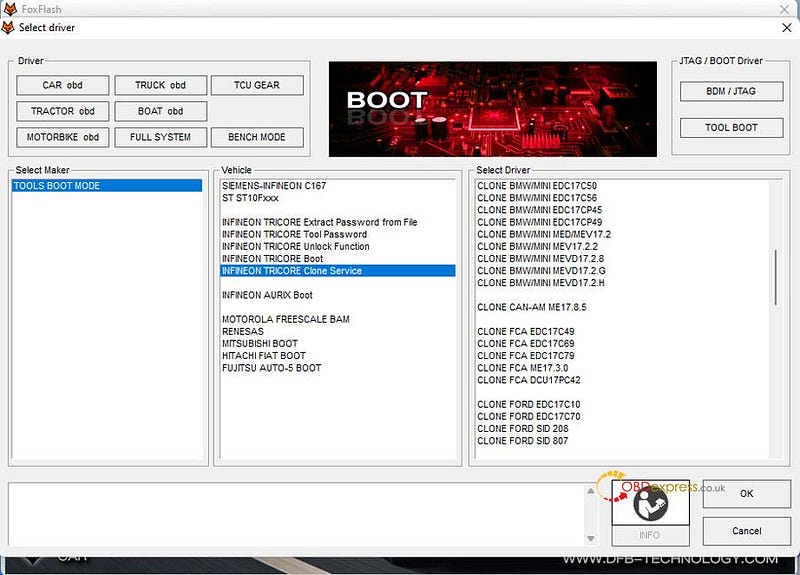
BOSCH EDC17/ME (D) 17/MEV17 TRICORE ECU Clone List:

(For foxflash and New KT200)

CLONE VAG EDC17U01

CLONE VAG EDC17CP14/20

CLONE VAG EDC17CP24

CLONE VAG EDC17C46

CLONE VAG EDC17CP44

CLONE VAG EDC17C54

CLONE VAG EDC17CP54

CLONE VAG EDC17C64

CLONE VAG EDC17C74

CLONE VAG EDC17CP74

CLONE VAG MED17.5.5

CLONE VAG ME17.5.20

CLONE VAG MED17.5.2

CLONE VAG MED17.1.11

CLONE VAG MED17.1.27

CLONE VAG MED17.5.21

CLONE VAG MED17.5.25

CLONE VAG ME17.5.26

CLONE BMW/MINI EDC17CP02

CLONE BMW/MMI EDC17C41

CLONE BMW/MINI EDC17C50

CLONE BMW/MINI EDC17C56

CLONE BMW/MINI EDC17CP45

CLONE BMW/MINI EDC17CP49

CLONE BMW/MINI MED/MEV17.2

CLONE BMW/MINI MEV17.2.2

CLONE BMW/MINI MEVD17.2.8

CLONE BMW/MINI MEVD17.2.G

CLONE BMW/MINI MEVD17.2.H

CLONE CAN-AM ME 17.8.5

CLONE FCA EDC17C49

CLONE FCA EDC17C69

CLONE FCA EDC17C79

CLONE FCA ME17.3.0

CLONE FCA DCU17PC42

CLONE FORD EDC17C10

CLONE FORD EDC17C70

CLONE FORD SID 208

CLONE FORD SID 807

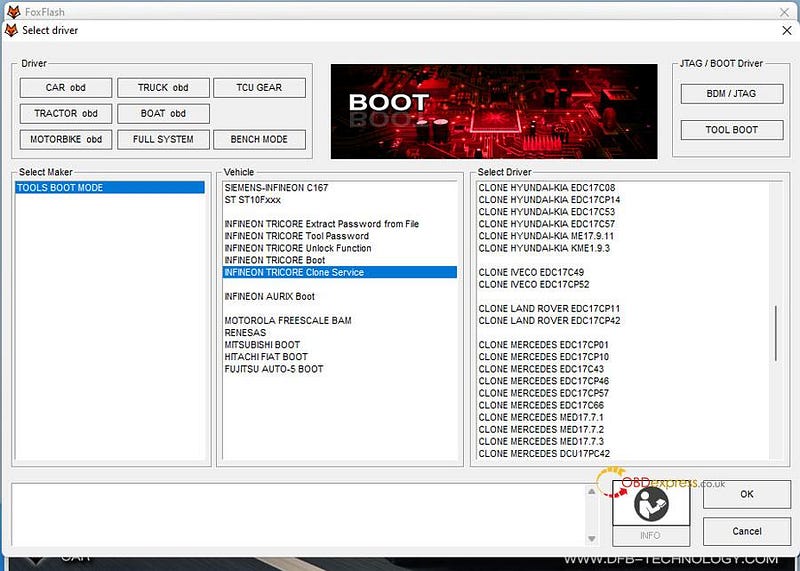
CLONE HYUNDAI-KIA EDC17C08

CLONE HYUNDAI-KIA EDC17CP14

CLONE HYUNDAI-KIA EDC17C53

CLONE HYUNDAI-KIA EDC17C57

CLONE HYUNDAI-KIA ME17.9.11

CLONE HYUNDAI-KIA KME 1.9.3

CLONE IVECO EDC17C49

CLONE IVECO EDC17CP52

CLONE LAND ROVER EDC17CP11

CLONE LAND ROVER EDC17CP42

CLONE MERCEDES EDC17CP01

CLONE MERCEDES EDC17CP10

CLONE MERCEDES EDC17C43

CLONE MERCEDES EDC17CP46

CLONE MERCEDES EDC17CP57

CLONE MERCEDES EDC17C66

CLONE MERCEDES MED17.7.1

CLONE MERCEDES MED17.7.2

CLONE MERCEDES MED17.7.3

CLONE MERCEDES DCU17PC42

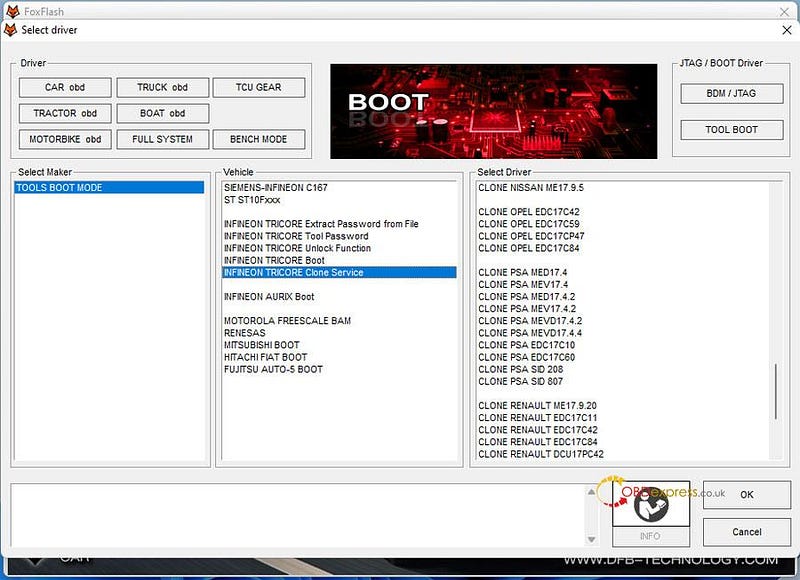
CLONE NISSAN ME17.95

CLONE OPEL EDC17C42

CLONE OPEL EDC17C59

CLONE OPEL EDC17CP47

CLONE OPEL EDC17C84

CLONE PSA MED17.4

CLONE PSA MEV17.4

CLONE PSA MED17.4.2

CLONE PSA MEV17.4.2

CLONE PSA MEVD17.4.2

CLONE PSA MEVD17.4.4

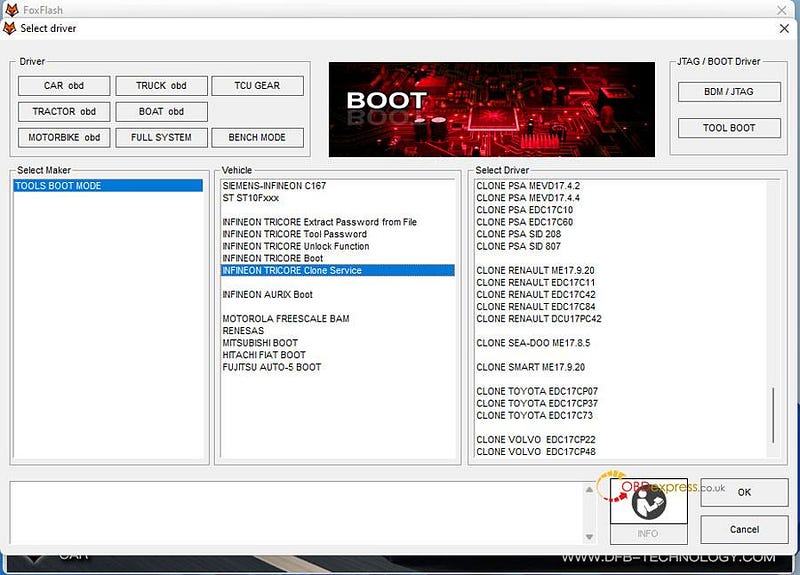
CLONE PSA EDC17C10

CLONE PSA EDC17C60

CLONE PSA SID 208

CLONE PSA SID 807

CLONE RENAULT ME17.9.20

CLONE RENAULT EDC17C11

CLONE RENAULT EDC17C42

CLONE RENAULT EDC17C84

CLONE RENAULT DCU17PC42

CLONE SEA-DOO ME17.8.5

CLONE SMART ME17.9.20

CLONE TOYOTA EDC17CP07

CLONE TOYOTA EDC17CP37

CLONE TOYOTA EDC17C73

CLONE VOLVO EDC17CP22

CLONE VOLVO EDC17CP48
New version KT200 or FoxFlash clone MEDC17 operation guide

New version KT200 or FoxFlash clone MEDC17 operation guide

New version KT200 or FoxFlash clone MEDC17 operation guide

New version KT200 or FoxFlash clone MEDC17 operation guide

New version KT200 or FoxFlash clone MEDC17 operation guide

How to clone ECU?

Hardware: New KT200/Foxflash ECU Chip Tuning Tool

Software: KTsuit/foxflash software

Mode: BOOT MODE TRICORE/ BENCH TRICORE

Steps:

1.Connect New KT200/Foxflash to ECU correctly, and make sure the internet connection on the computer is good.

2.Run New KT200 KTsuit software or foxflash software

Read the (Micro [flash] and EEPROM data of original ECU (ECU 1) and the new ECU (ECU 2) in BOOT MODE TRICORE or BENCH TRICORE separately

3.Select the driver

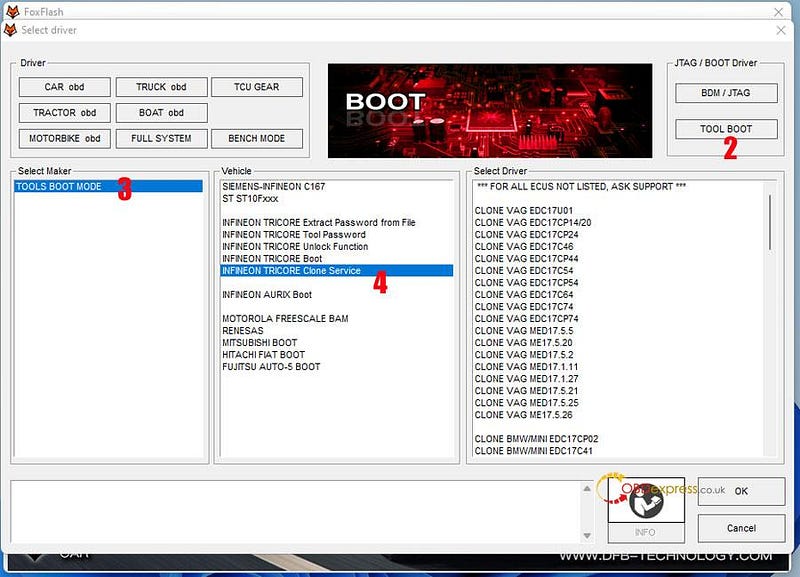
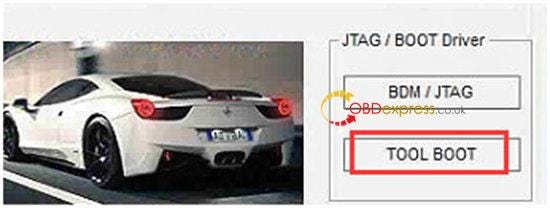
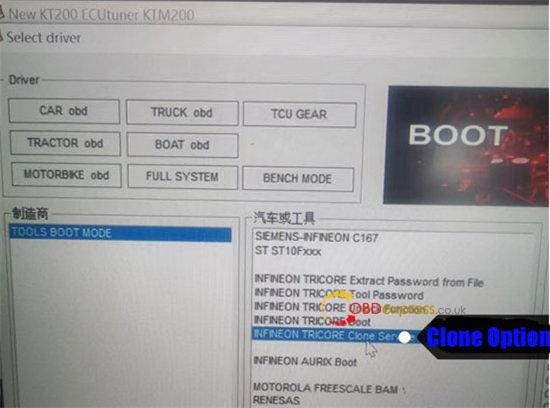
TOOL BOOT>> TOOLS BOOT MODE>> INFINEON TRICORE Clone Service>> the corresponding ECU clone option>> Click OK
New version KT200 or FoxFlash clone MEDC17 operation guide

New version KT200 or FoxFlash clone MEDC17 operation guide

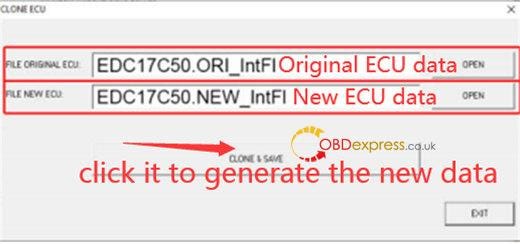
4.Open the original ECU (ECU 1) micro file and new ECU (ECU 2) micro file in sequence

5.Click "Clone & Save", and the software will generate the new ECU data and save it in the selected directory.
New version KT200 or FoxFlash clone MEDC17 operation guide

6.In the software, select TOOLS BOOT MODE>> INFINION TRICORE Boot>> select the corresponding ECU
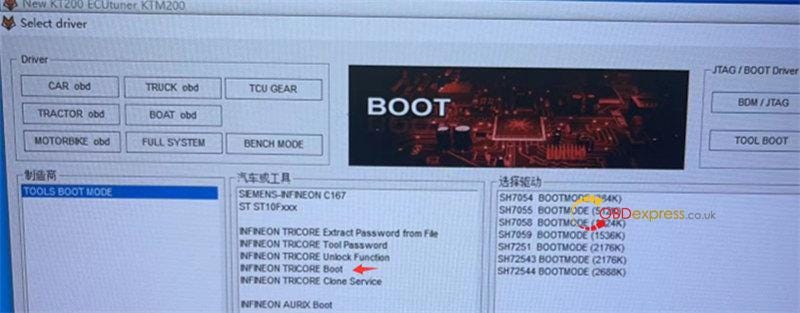
New version KT200 or FoxFlash clone MEDC17 operation guide

Choose the new file just created in ECU 2 to write into the new ECU

Note: As the BENCH TRICORE may cause the incomplete writing of ECU data. It's recommended to read and write in Boot mode.

Please Note!

  • Directly write the original ECU (ECU 1) EEPROM into the new ECU you want. Don't make any changes.
  • Write Micro[flash] and eeprom data separately. Don't select read all or write all.
  • If the Micro[flash] data cannot be written, it needs to be processed manually with Winols or written by the professional engineer.
  • Volkswagen 5th generation anti-theft system is not supported.
    1. FoxFlash Super Strong ECU TCU Clone and Chip Tuning Tool:

      https://www.obdexpress.co.uk/wholesale/foxflash-super-ecu-tcu-tool.html

      New KT200 ECU Programmer Master Version With 10 licenses:

      https://www.obdexpress.co.uk/wholesale/kt200-ecu-programmer-full-version-with-case.html

      www.obdexpress.co.uk


      Wednesday, 7 September 2022

      KT200 and KTM200 ECU read test via OBD/ Bench/ Boot/ BDM/ JTAG

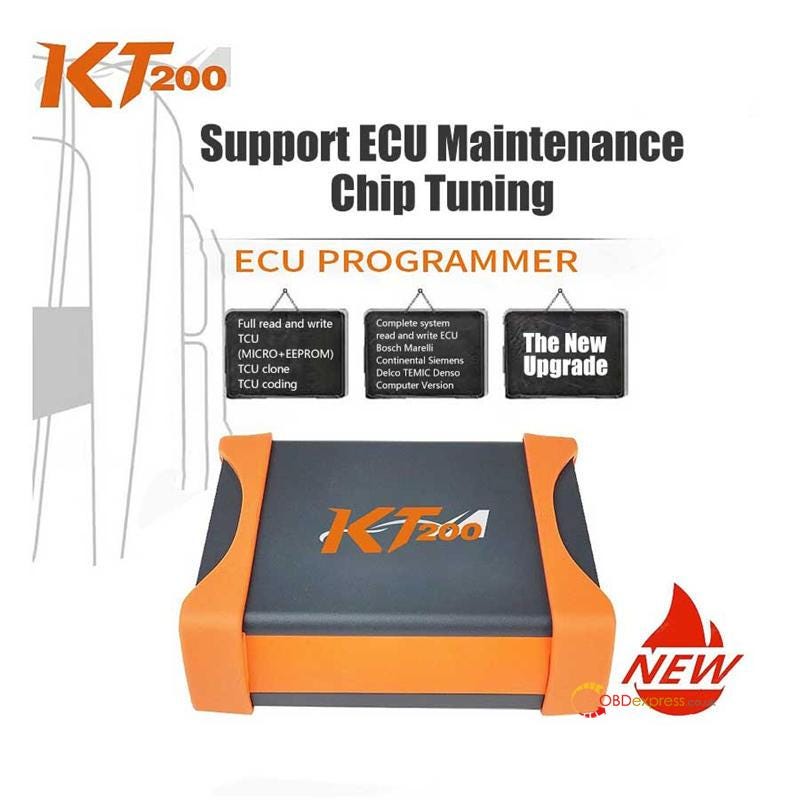
       KT200/KTM200 is a new and professional ECU reading and writing equipment which supports ECU maintenance, chip tuning and DTC code removal for 99% of the models in the market. It works online for BOSCH, MAGNETI MARELLI, CONTINENTAL, Denso, DELCO, TEMIC or SIEMENS by bench, boot, BDM/JTAG and OBD mode, no need an extra dongle. It has been tested and confirmed to working well on BMW/ HONDA/ VAG/AUDI/ SAK / Mitsubishi by obdexpress.co.uk engineer.

      KT200 and KTM200 ECU read test

      KT200 ECU programmer has two versions:

      • KT200 Auto Version includes 7 licenses: Car OBD, Truck OBD, Full System, BDM/JTAG, TOOL BOOT, Bench Mode, TCU Gear
      • KT200 Full Version includes 10 licenses: Car OBD, Truck OBD, Tractor OBD, Boat OBD, Motorbike OBD, Full System, BDM/JTAG, TOOL BOOT, Bench Mode, TCU Gear

      Here is the detailed test.

    2. Download and install KT200 software (KT200- 22.804) before operation.
        • Free download KT200 software

        Source 1: https://mega.nz/file/GRBEDZwJ#u-prP9xtZ5EFAPF6b-3enpJMC1FlZIxXBe-E4OuV7Og

        Size: 792.7 MB

        No password!

        Source 2: https://mega.nz/#P!AgHSKheYMsubCc1ggFXBrpJV_tTLNhOzbZ2hB7LyElxxrTuYplE-rK46Agf0dR8apzrv4n8PAqqMGrcM0mnXChjEqZwaUVVq_54E7XLCMhH6MXf1zsCL6mDnGkJUMauEQEAUzTh1j7A

        Password: 20220811

        Operating system: Windows 7, Windows 8/ 8.1, Windows 10, Windows 11

        • KT200 software installation video:

        https://youtu.be/szWzxPqx18A

        After software download, install KT200 driver and software

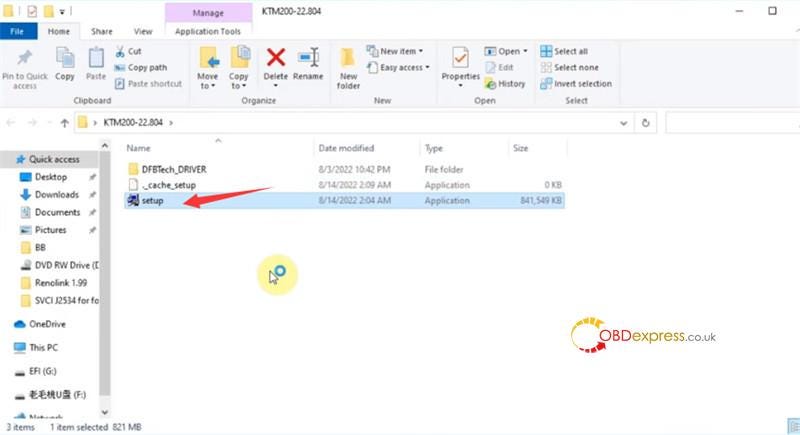
        Click setup application on the KT200 software folder

        KT200 and KTM200 ECU read test

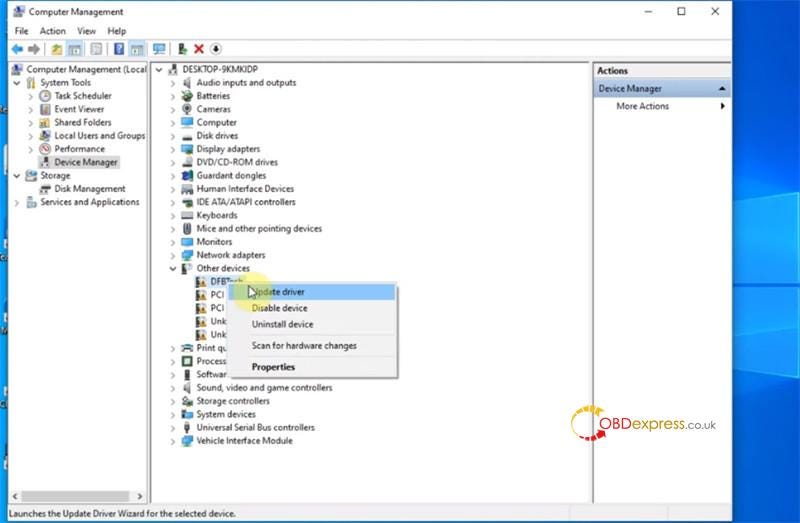
        Go to Device Manager>> other devices>> DFBTech device>> Update driver

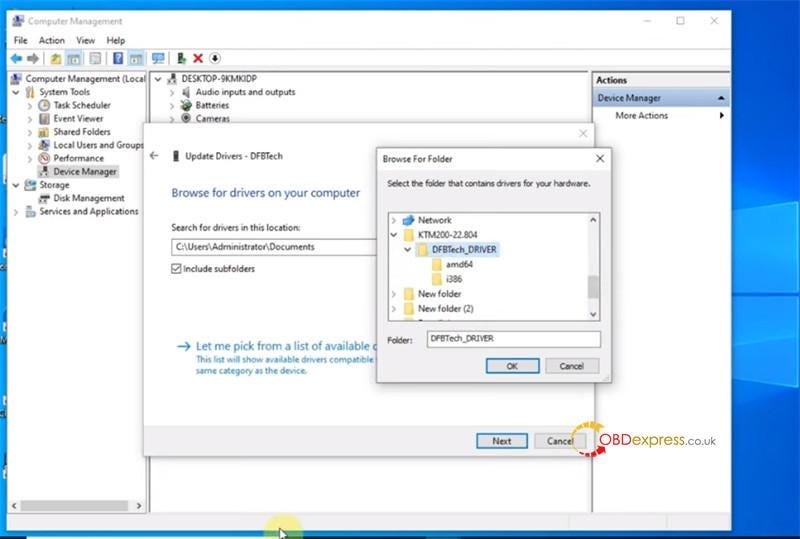
        Browse driver location C:/Users/Administrator/Desktop /KTM200–22.804/DFBTech_Driver folder

        KT200 and KTM200 ECU read test

        KT200 and KTM200 ECU read test

        Choose 'Install this driver software anyway'

        Windows has successfully updated your drivers

        The USB DFBTech Driver appears under Universal Serial Bus controllers

        2.Test different ECUs

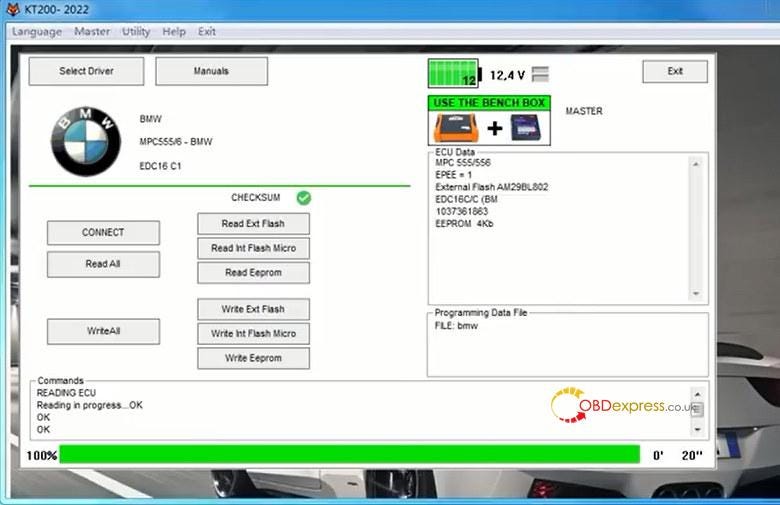
        BMW EDC16 C1 MPC555/6- in bench mode

        https://youtu.be/PqiJnqVibBs

        HONDA EDC17 C58 TC1793- in bench mode

        https://youtu.be/nS_4tSY45Ok

        VAG MG1CS001 SPC5777- in bench mode

        https://youtu.be/4ZBaDC044Tk

        AUD SH7055-in BDM/JTAG mode

        https://youtu.be/0-T8TI-ThtE

        SAK TC1738 — in BOOT mode

        https://youtu.be/0-T8TI-ThtE

        Mitsubishi Outlander E6T70484- in BOOT mode

        https://youtu.be/0-T8TI-ThtE

        Connection:

        There are three methods to find the wiring diagram.

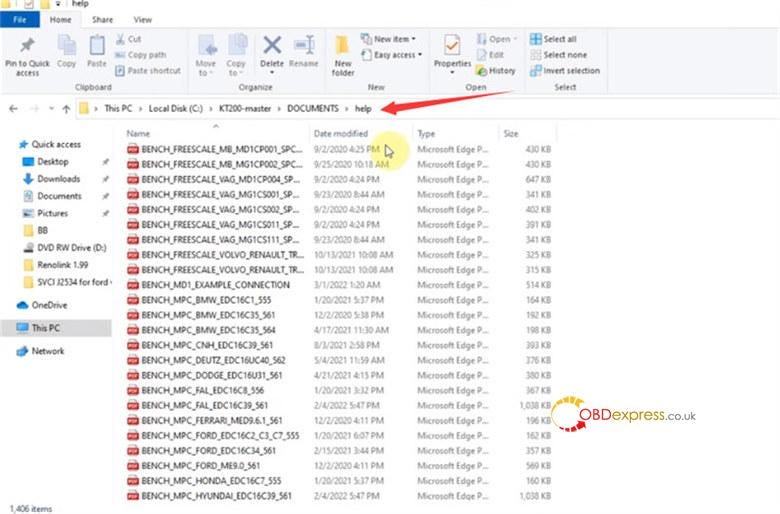
        Method 1: In KT200 software folder: C:/KT200-master/DOCUMENTS/help directory

        KT200 and KTM200 ECU read test

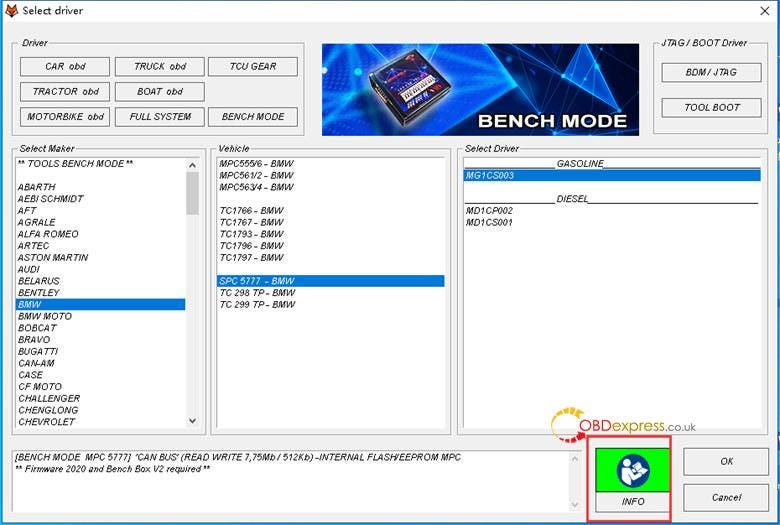
        Method 2: In Select Driver interface, after selecting the operation mode, car maker, vehicle and driver, click 'INFO' at the bottom right corner of the screen to check the corresponding wiring diagram

        KT200 and KTM200 ECU read test

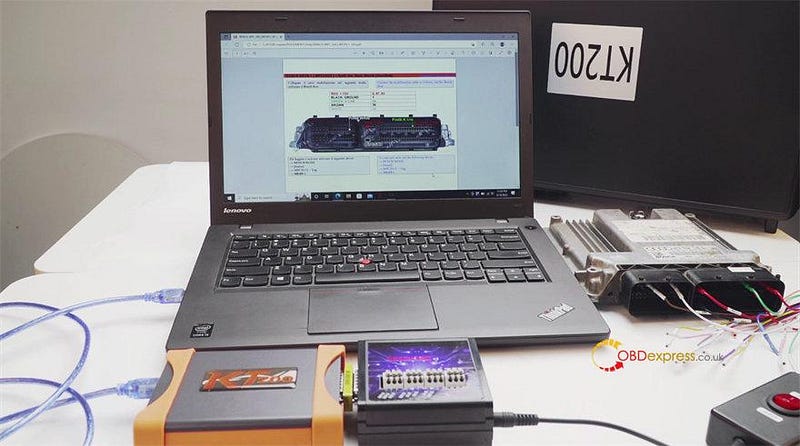
        Method 3: Check from ECUHELP software

        Connect KT200 to ECU and computer

        KT200 and KTM200 ECU read test

        Enable network connection (make sure the internet is normal during operation)

        Step-by-step to read ECU:

        Run KT200 software

        Select Driver

        Select the ECU operation mode, car maker, vehicle and driver, press OK

        First connect>> create a new file name to save original data>> read ECU

        Just follow the video above and prompt on the screen to operate.

        KT200 and KTM200 ECU read test

        Besides the ECU tested above, KT200 can do much more TCUs than PCMtuner, such as VOLVO MPS6, VAG DQ400E/SQ100, Jeep 9h28 TCUs.

        Check KTM200 ECU Support List

        www.obdexpress.co.uk


        KEYDIY New KD-Moto Adapter Adds Honda, Yamaha & Ducati

          Motorcycle key programming is now coming to the KEYDIY KD-X4 . The new KEYDIY KD-Moto Adapter adds dedicated motorcycle coverage for a w...