Monday, 16 June 2025

Yanhua Module 39 Correct Benz MB HU7 Instrument Mileage

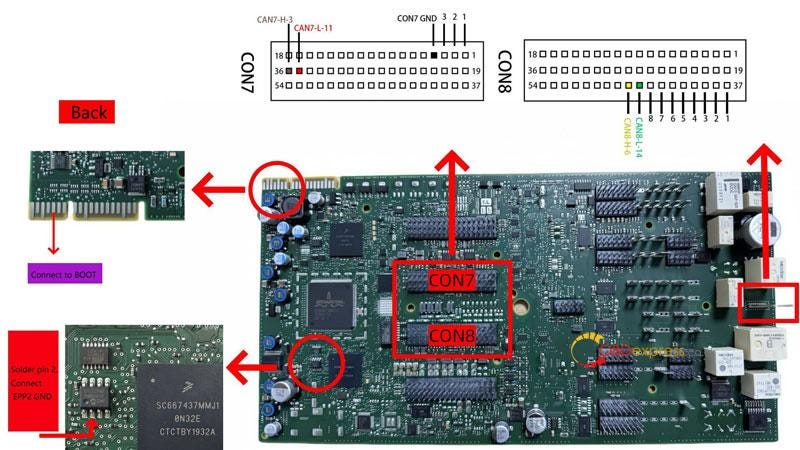
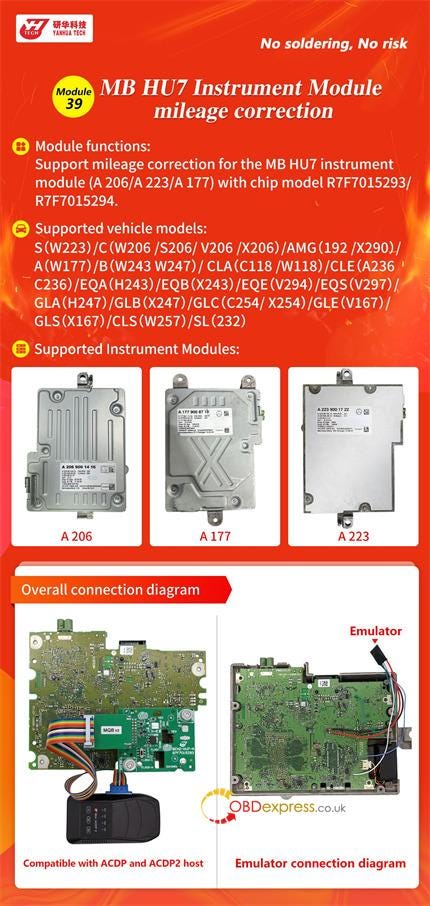
 Yanhua Module 39 is specially designed for Mercedes-Benz MB HU7 instrument module (A206/A223/A177) equipped with chip model R7F7015293/R7F7015294 mileage correction on bench. It’s compatible with Yanhua ACDP1/ACDP2.

Yanhua Module 39 Correct Benz MB HU7 Instrument Mileage

Which BENZ car models are supported?

  • S-Class (W223)
  • C-Class (W206 / S206 / V206 / X206)
  • AMG (192 / X290)
  • A-Class (W177)
  • B-Class (W243 / W247)
  • CLA (C118 / W118)
  • CLE (A236 / C236)
  • EQA (H243)
  • EQB (X243)
  • EQE (V294)
  • EQS (V297)
  • GLA (H247)
  • GLB (X247)
  • GLC (C254 / X254)
  • GLE (V167)
  • GLS (X167)
  • CLS (W257)
  • SL (232)

Which instrument modules are supported?

  • A206
  • A177
  • A223

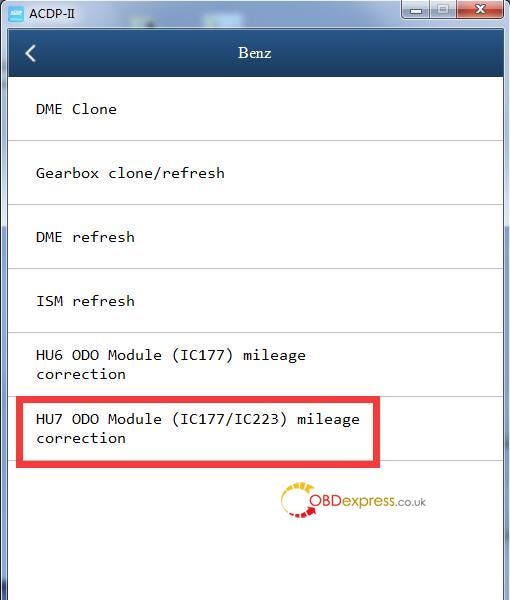
ACDP APP Menu Path:

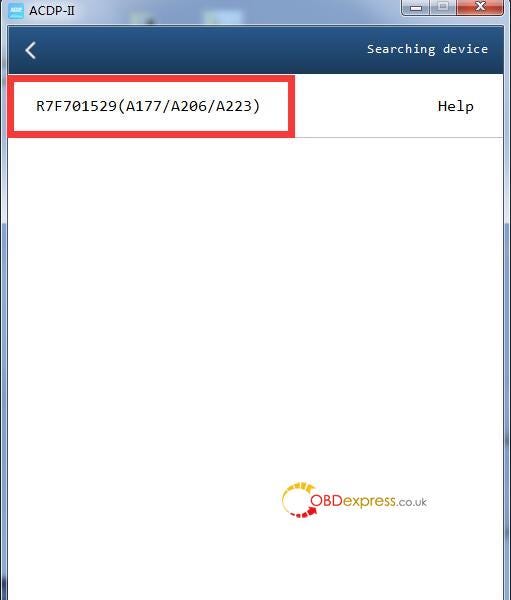
Select Benz-> HU7 ODO Module (IC177/IC223) mileage correction-> R7F701529 (A177/A206/A223)

Yanhua Module 39 Correct Benz MB HU7 Instrument Mileage

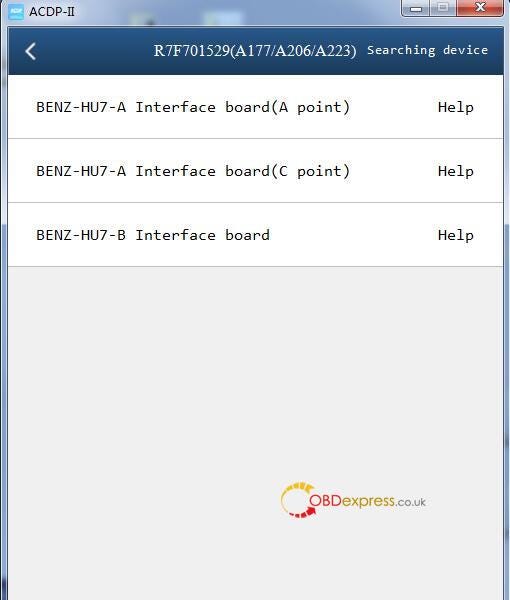
Select the corresponding interface board according to the dashboard type.

  • BENZ-HU7-A Interface board (A point)
  • BENZ-HU7-A Interface board (C point)
  • BENZ-HU7-B Interface board

Yanhua Module 39 Correct Benz MB HU7 Instrument Mileage

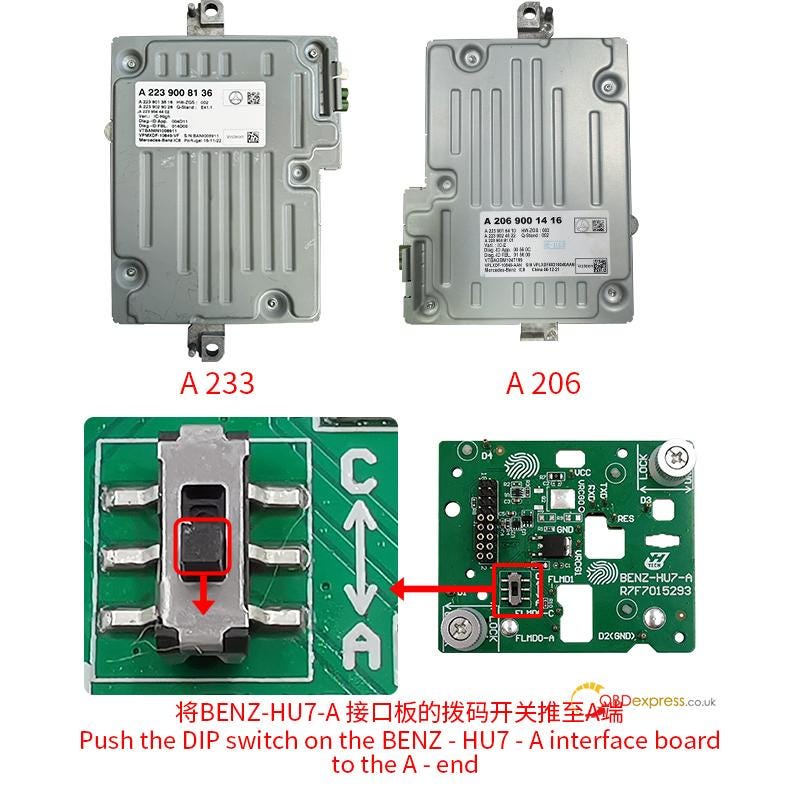
BENZ-HU7-A Interface board (A point)- for A223 and A206 with R7F7015293 chip

(need to push the DIP switch on the BENZ-HU7-A interface board to the A-end)

Yanhua Module 39 Correct Benz MB HU7 Instrument Mileage

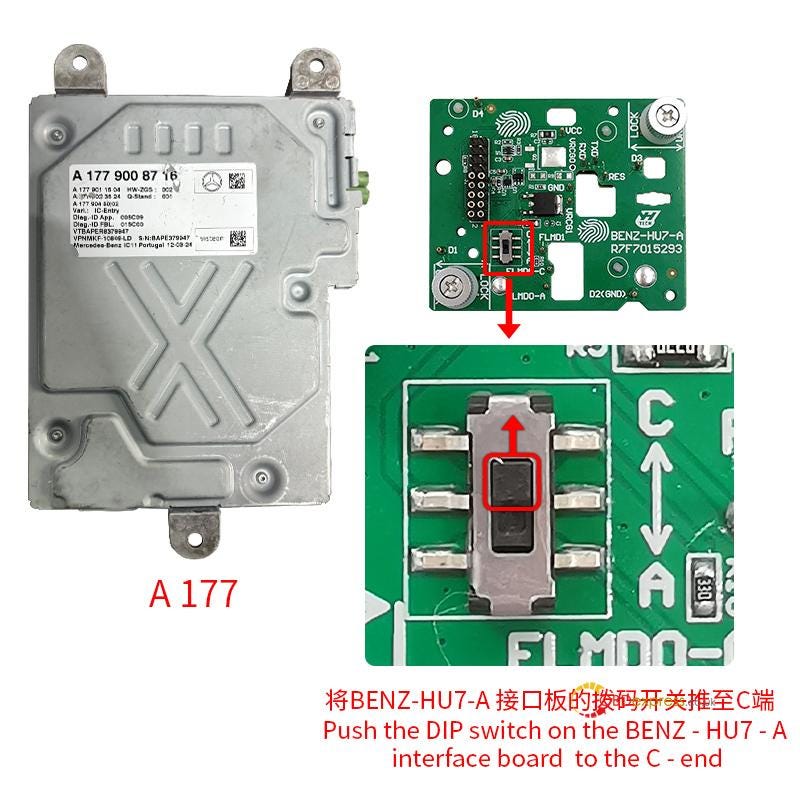
BENZ-HU7-A Interface board (C point)- for A177 with R7F7015293 chip

(need to push the DIP switch on the BENZ-HU7-A interface board to the C-end)

Yanhua Module 39 Correct Benz MB HU7 Instrument Mileage

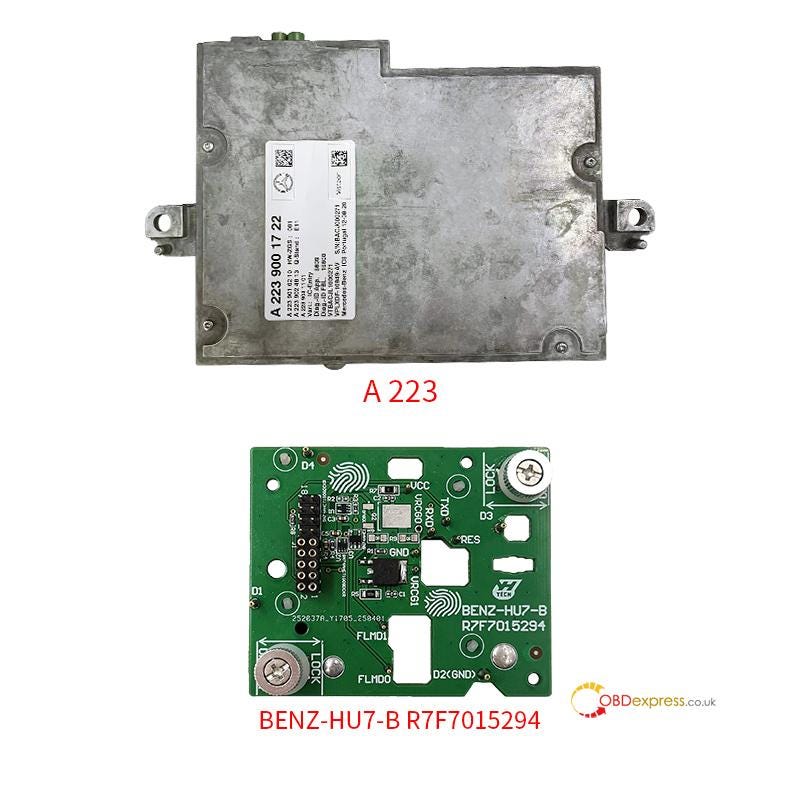
BENZ-HU7-B Interface board- for A223 with R7F7015294 chip

Yanhua Module 39 Correct Benz MB HU7 Instrument Mileage

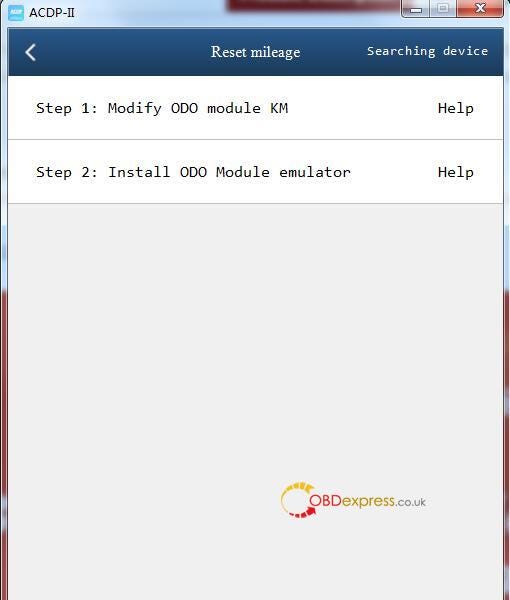
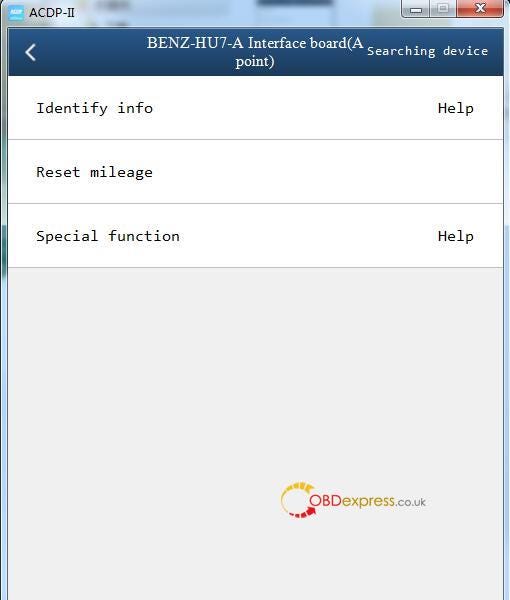
Reset mileage steps:

1.Identify info.

2.Reset mileage

Step 1: Modify ODO Module KM

Step 2: Install ODO Module emulator

Yanhua Module 39 Correct Benz MB HU7 Instrument Mileage

Yanhua ACDP Module 39:

https://www.obdexpress.co.uk/wholesale/yanhua-acdp-module39-mb-hu7-mileage-correction.html

www.obdexpress.co.uk

VAPON VP100 BMW G Chassis Add Key Connection Guide

 Programming a new key for your BMW G chassis model with the VAPON VP100 is a straightforward process. Follow these steps to ensure a successful key addition:
Step 1: Backup BDC Code via OBD

Connect the VP100 Key Programmer to the vehicle’s OBD port to retrieve the BDC (Body Domain Controller) code.

Step 2: Pre-Process the BDC2 Module

  • Remove the BDC2 module from the vehicle.
  • Use the VP100 adapter for pre-processing (refer to the wiring diagram and tutorial).

Step 3: Reinstall BDC2 & Generate Dealer Key

  • Reinstall the BDC2 module back into the vehicle.
  • Generate the dealer key using the VP100 tool.

Step 4: Key Matching & Verification

  • Place the new key near the induction coil (typically on the right side of the steering column).
  • Hold the start button for 20 seconds until pairing is complete.
  • Test the key to ensure proper functionality.

VAPON VP100 BMW G Chassis Add Key Connection Guide

Read also

VAPON VP100: No Token Limit, Free License For BMW Models

http://blog.obdexpress.co.uk/2025/04/17/vpioo-vp100-no-token-limit-free-license-for-bmw-models/

www.obdexpress.co.uk

Wednesday, 4 June 2025

Lonsdor K518 Pro Add 2016 Toyota RAV4 8A All Smart Keys Lost

 How to program a smart key to 2016 Toyota RAV4 8A (all keys lost) using Lonsdor K518 Pro?

It’s easy to operate via OBD. Require Lonsdor Simu-Antenna and LT20 Smart Key (LT20–04) to work with the device.

Check the step-by-step guide below.

1.Connect device and vehicle

Connect the K518 Pro key programmer to the vehicle’s OBD port via the OBD cable

Power on the device and ensure internet connectivity

2.Convert Smart Key

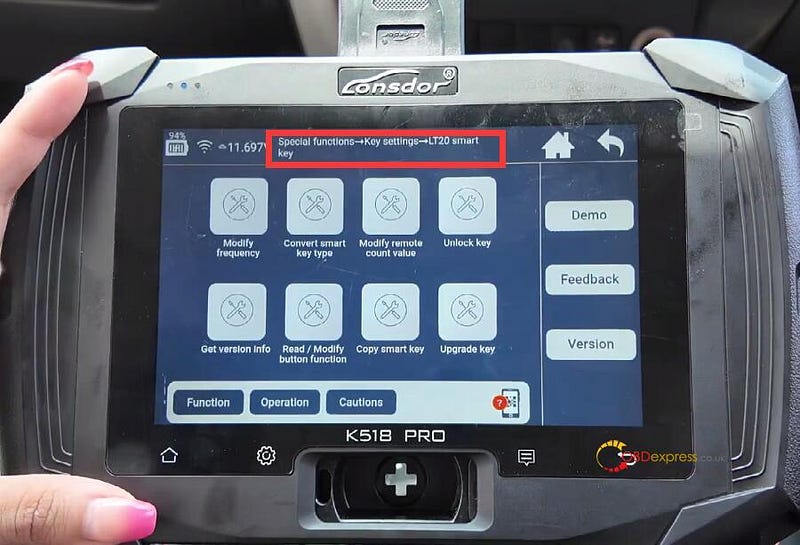
Navigate to:

Special Functions > Key Settings > LT20 Smart Key > Convert Smart Key Type


Lonsdor K518 Pro Programs 2016 Toyota RAV4 All Keys Lost

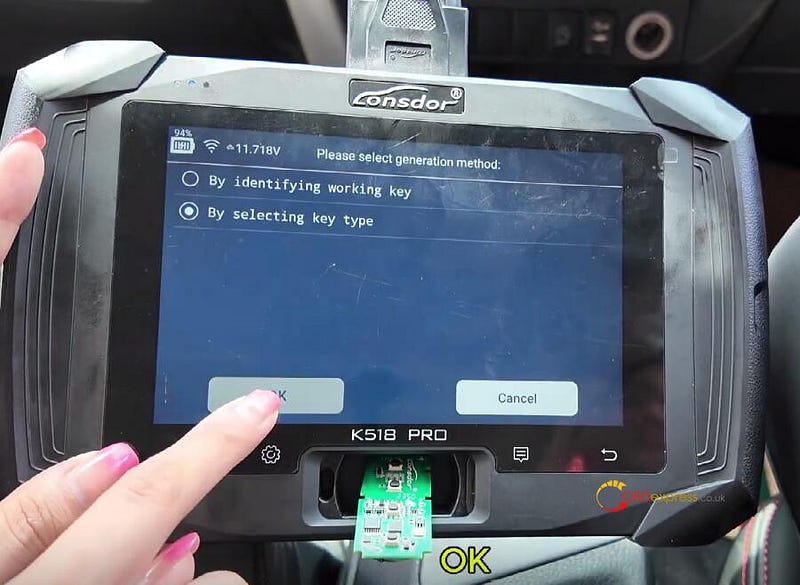
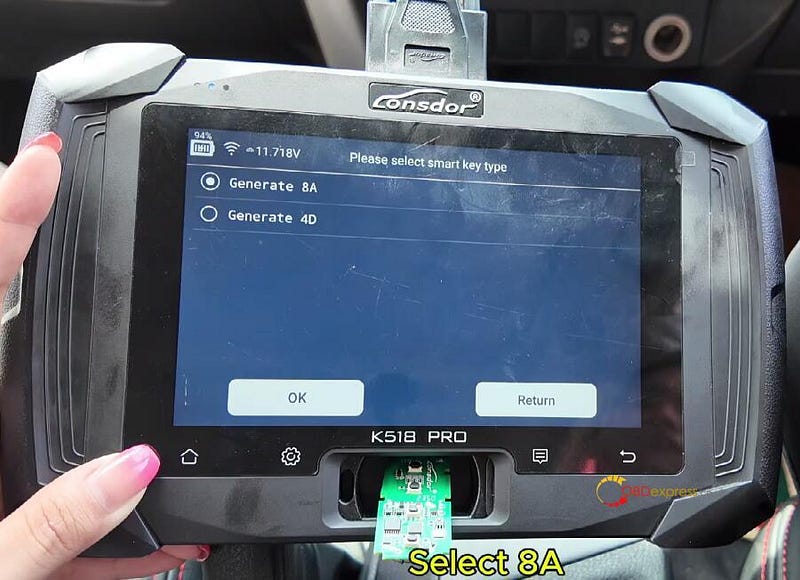
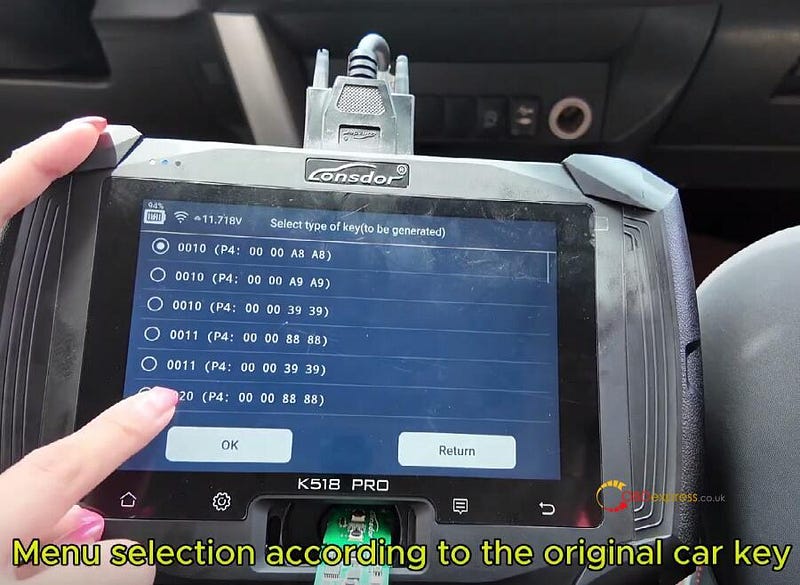
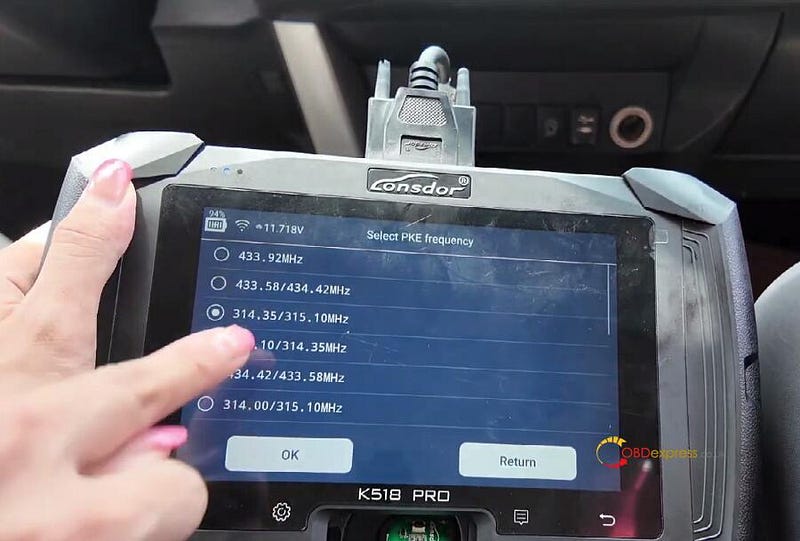
Select the following options:

Key Type

Generate 8A

Key type

PKE frequency


Lonsdor K518 Pro Programs 2016 Toyota RAV4 All Keys Lost

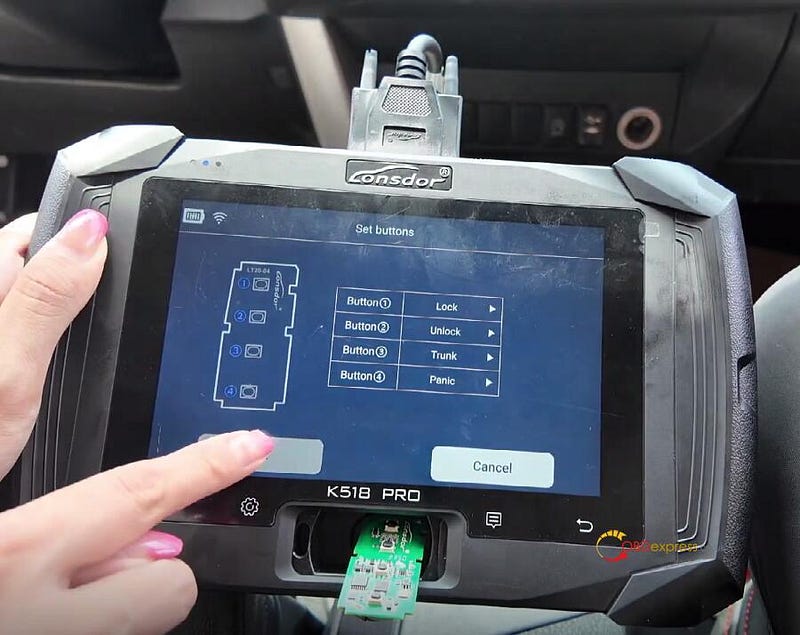
Set the key button according to the key position of the original car key


Lonsdor K518 Pro Programs 2016 Toyota RAV4 All Keys Lost

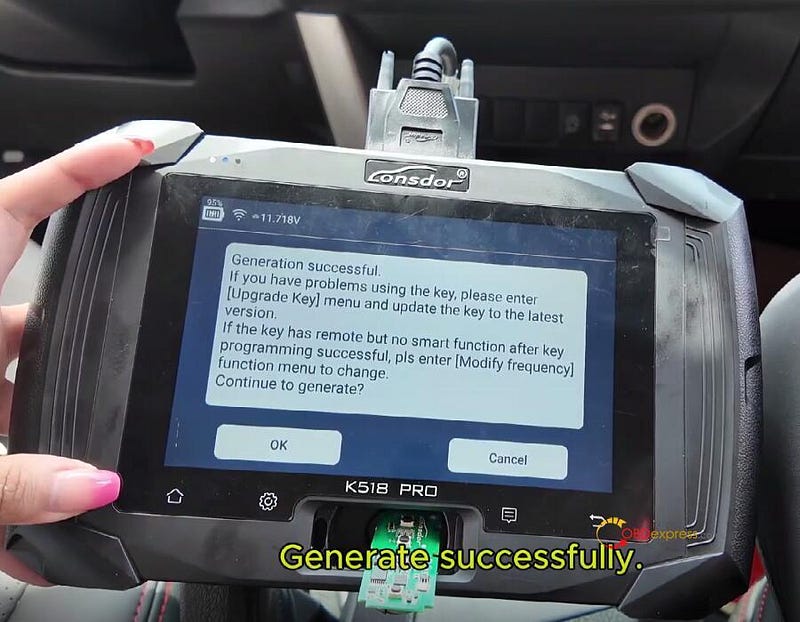
Generate key successfully


Lonsdor K518 Pro Programs 2016 Toyota RAV4 All Keys Lost

3.Backup EEPROM Data

Navigate to:

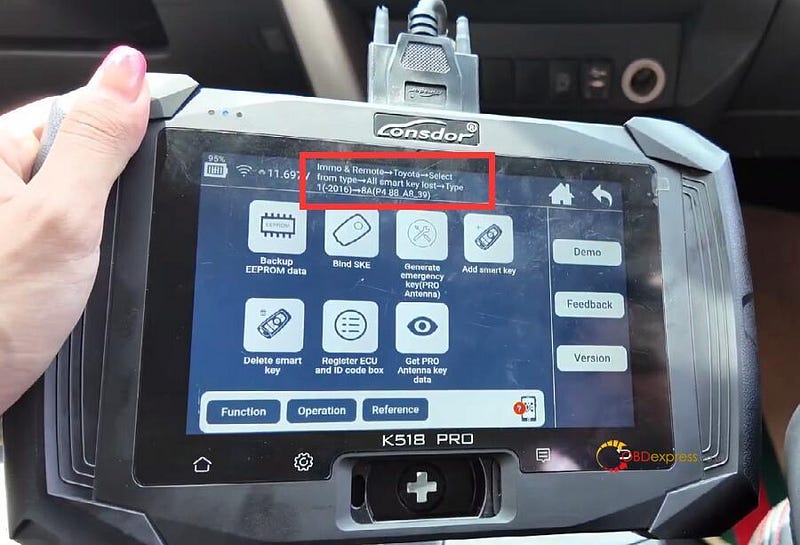
Immo & Remote-> Toyota-> Select from type-> All smart key lost-> Type 1 (-2016)-> 8A (P4 88 A8_39)-> Backup EEPROM Data

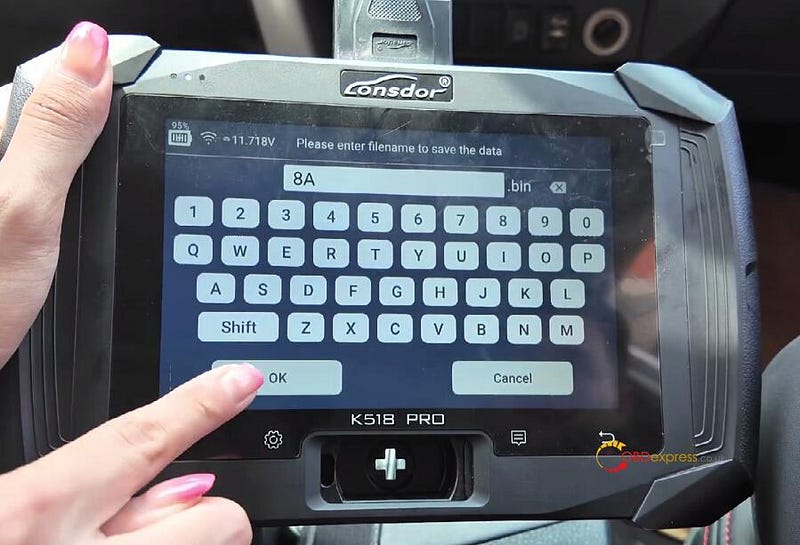
Enter filename to save the data

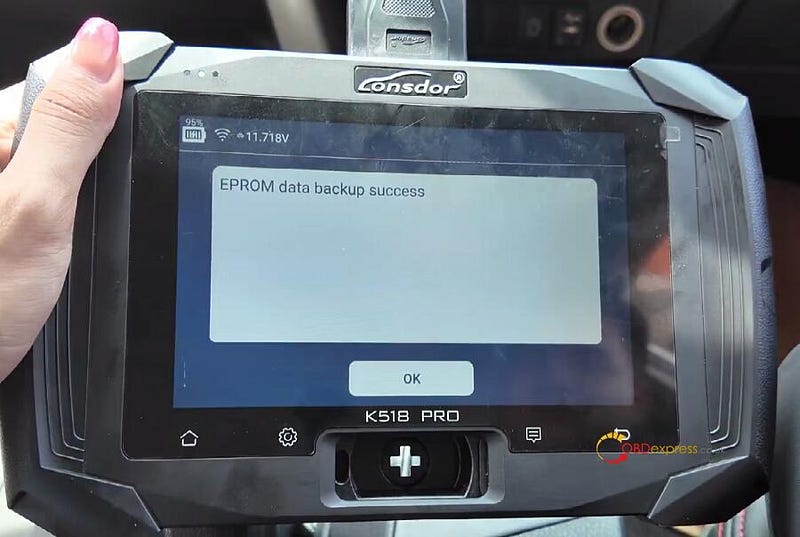
Backup data success


Lonsdor K518 Pro Programs 2016 Toyota RAV4 All Keys Lost

4.Generate emergency key

Select Generate emergency key (PRO Antenna)

Connect the simu-antenna and place the Antenna’s top in the card slot of Lonsdor K518 Pro

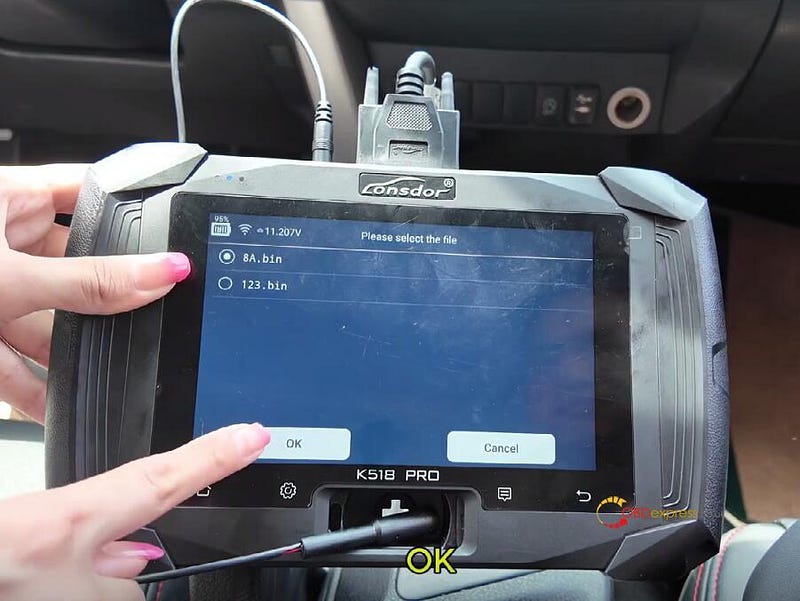
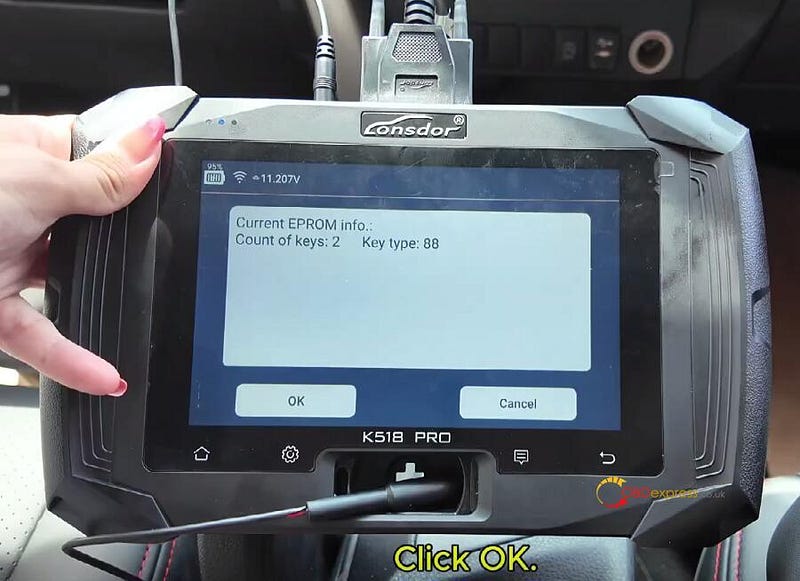
Load the saved EEPROM file and confirm details

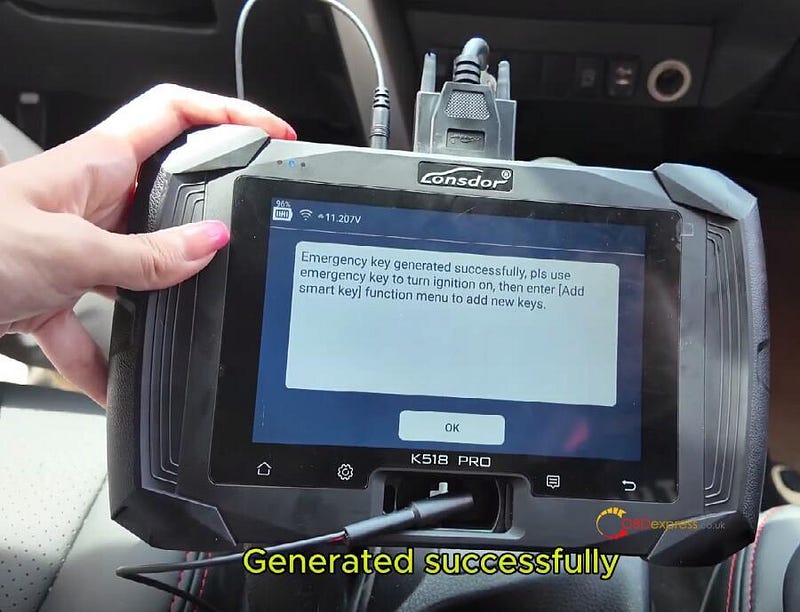
Generate emergency key successfully


Lonsdor K518 Pro Programs 2016 Toyota RAV4 All Keys Lost

5.Add smart key

Ensure the smart key battery is full charge.

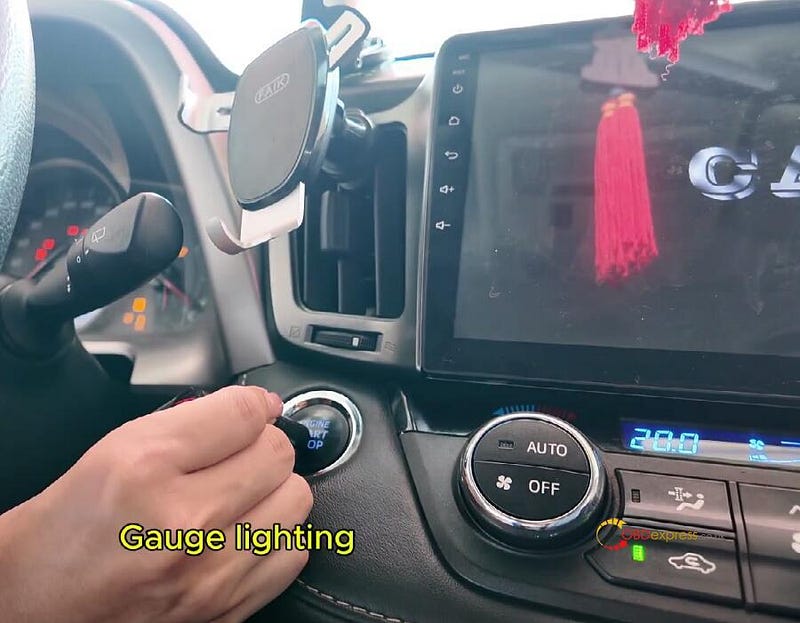
Hold the emulator key near the ignition until the dashboard lights up.

Register the new key:

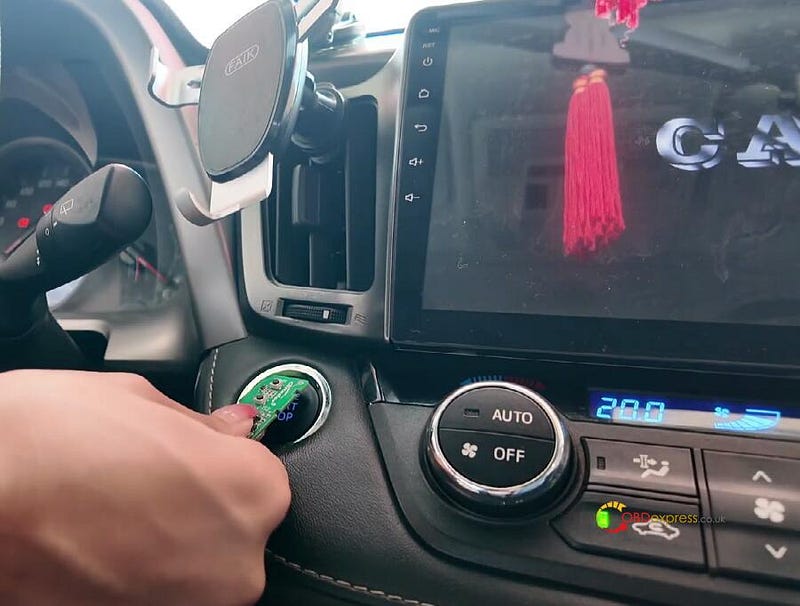
  • Place the new key near the Start button until the buzzer beeps once.
  • Within 30 seconds, hold it again until the buzzer beeps twice.

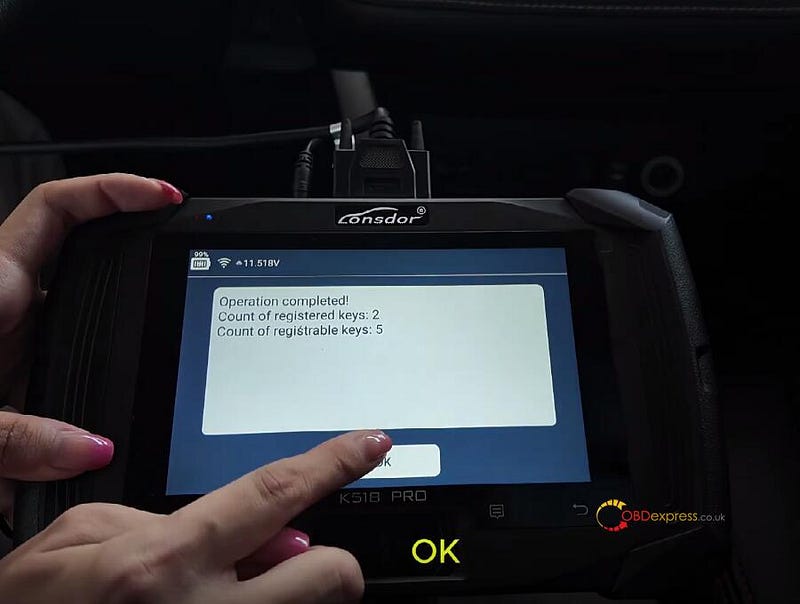
Operation completed!

The registered key count shows 2.


Lonsdor K518 Pro Programs 2016 Toyota RAV4 All Keys Lost

6.Verify:

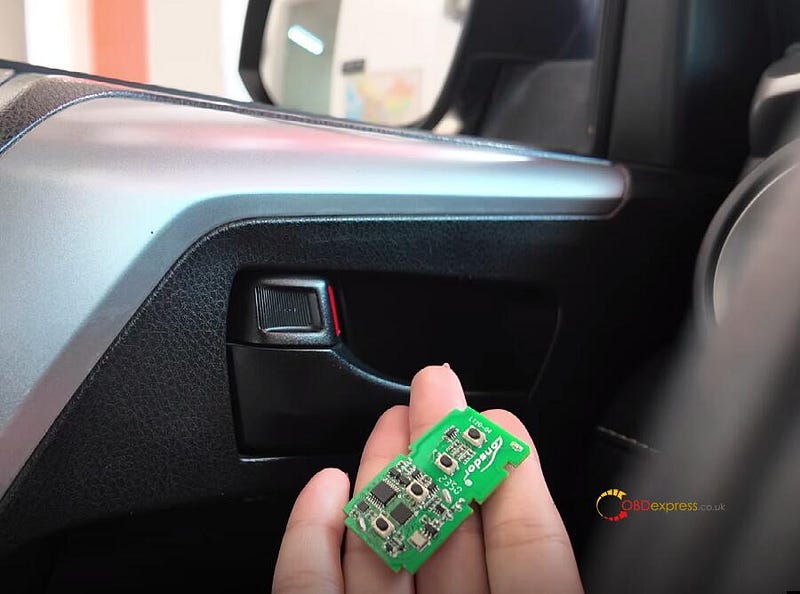
Test ignition and remote functions with the programmed Lonsdor LT20 Smart Key PCB


Lonsdor K518 Pro Programs 2016 Toyota RAV4 All Keys Lost

Important Notes:

  • Internet access is required for key generation.
  • Always backup EEPROM data before programming.
  • Abort the process if errors occur and retry.
  • For 2016 RAV4, use 8A (P4 88 A8_39) protocol.

www.obdexpress.co.uk

OBDSTAR ODO Calibration Update: Audi, Toyota, Hyundai

 OBDSTAR X300 Classic G3, ODO Master and X300 Mini VW now support mileage calibration for Audi, Toyota, Lexus, and more. Features include ECU eeprom reading, odometer adjustment and DTC erasure. Ideal for mechanics and enthusiasts working on newer models.

Supported Tools

X300 Classic G3 (Key Master G3)

ODO Master

X300 MINI VW

VW [Version: V42.56]

Add Mileage Calibration function for below models:

AUDI S4 2013-

AUDI S4 2008–2012

TOYOTA/LEXUS [Version: V40.51]

Add ECU Info., Read eeprom(R7F701441), Mileage Calibration, Write eeprom(R7F701441), Erase DTC functions for below models:

  • LEXUS NX R7F701441 DENSO
  • LEXUS RX R7F701441 DENSO
  • TOYOTA BX4 R7F701441 DENSO
  • TOYOTA BZ4 R7F701441 DENSO
  • TOYOTA BZ4X R7F701441 DENSO
  • TOYOTA COROLLA R7F701441 DENSO
  • TOYOTA FRONTLANDER R7F701441 DENSO
  • TOYOTA LEVIN R7F701441 DENSO
  • TOYOTA YARIS 2020- R7F701441 DENSO

Optimized software.

HYUNDAI [Version: V41.53]

  1. Add Mileage Calibration function for HYUNDAI VERNA 2014 24C16.
  2. Optimized software.

OBDSTAR ODO Calibration Update_Audi Toyota Hyundai

Supported Tools

X300 Classic G3 (Key Master G3)

ODO MASTER

CHANGAN [Version: V40.17]

Add Mileage Calibration and Mileage Reset functions for below models:

  • CHANGAN UNI-K RH850+24C16
  • CHANGAN UNI-V 2022 RH850+24C16

Optimized software.

GEELY [Version: V41.41]

Add Read eeprom, Mileage Calibration, Write eeprom functions for below model:

GEELY COOLRAY CONTINENTAL(R7F701412)


OBDSTAR ODO Calibration Update_Audi Toyota Hyundai

Supported Tools

Key Master Dp Plus

TOYOTA [Version: V30.39]

Add Mileage Calibration function for below models:

  • LEXUS GX550 2023-R7F701401 DENSO
  • LEXUS LM350H R7F701401 DENSO
  • LEXUS LS500 2023-R7F701401 DENSO
  • LEXUS NX350 R7F701401 DENSO
  • LEXUS RX350 2023-R7F701401 DENSO
  • LEXUS RX450H 2023-R7F701401 DENSO
  • TOYOTA ALPHARD 2023-R7F701401 DENSO
  • TOYOTA BZ4X 2023-R7F701401 DENSO
  • TOYOTA CAMRY 2024-R7F701401 DENSO(80)
  • TOYOTA COROLLA 2023-R7F701401 DENSO
  • TOYOTA COROLLA CROSS 2023-R7F701401 DENSO
  • TOYOTA CROWN 2024-R7F701401 DENSO
  • TOYOTA HARRIER 2020-R7F701401 DENSO
  • TOYOTA HIGHLANDER 2023-R7F701401 DENSO(70)
  • TOYOTA LEVIN 2024-R7F701401 DENSO
  • TOYOTA RAV4 2023-R7F701401 DENSO
  • TOYOTA TACOMA IV 2023-R7F701401 DENSO
  • TOYOTA TUNDRA 2022-R7F701401 DENSO
  • TOYOTA VELLFIRE III 2023-R7F701401 DENSO
  • TOYOTA WILDLANDER 2020-R7F701401 DENSO

Optimized software.

CHRYSLER/DODGE/JEEP [Version: V30.82]

Add Mileage Calibration function for below models:

  • CHRYSLER 300 TYPE1(2018-D70F352X)
  • CHRYSLER NEON 2016-
  • CHRYSLER TOWN&COUNTRY 2007-BODY CONTROL MODULE
  • CHRYSLER VOYAGER 2007-BODY CONTROL MODULE
  • CHRYSLER YPSILON
  • DODGE DURANGO 2019-
  • DODGE DURANGO 2014-TYPE2
  • DODGE DURANGO 2004-
  • DODGE RAM PROMASTER
  • DODGE VIPER 2013-
  • JEEP GLADIATOR M.MARELLI(7 TFT)
  • JEEP GRAND TYPE2(2007-BODY CONTROL MODULE)
  • JEEP RENEGADE TYPE1(2020-HYBRID)
  • JEEP RENEGADE TYPE3(2015-)

OBDSTAR ODO Calibration Update_Audi Toyota Hyundai

www.obdexpress.co.uk

What is Xhorse Key Tool MIDI?

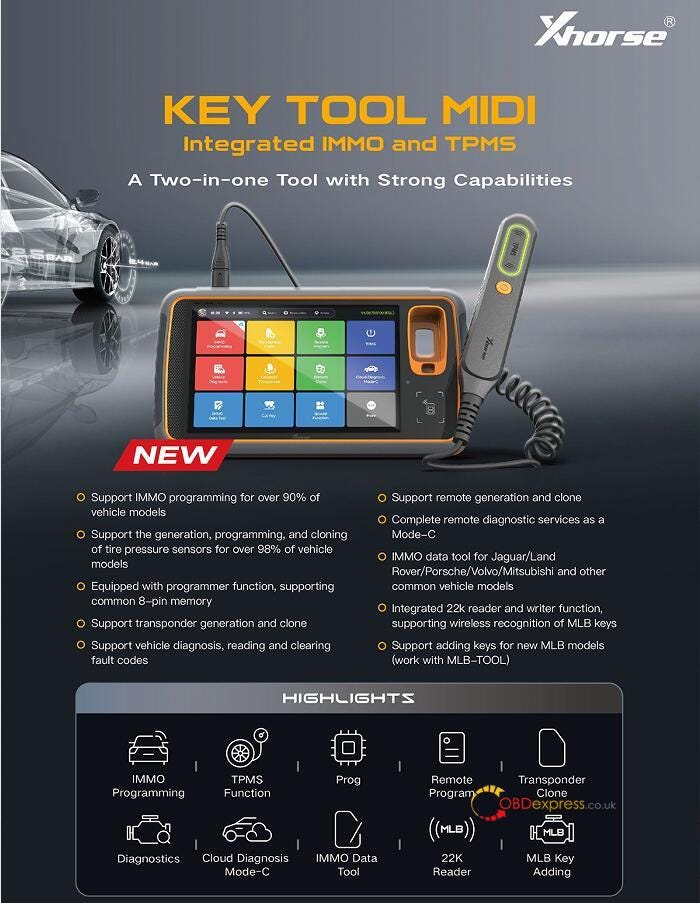
 The Xhorse Key Tool MIDI is a Two-In-One Tool with advanced IMMO programming and comprehensive TPMS functionality. This tool delivers unmatched efficiency and broad vehicle coverage — all through an intuitive large touch-screen interface.


What is Xhorse Key Tool MIDI

Key Features & Capabilities:

  • IMMO Programming (90%+ Vehicle Coverage)

Supports VW Group (4th Gen, MQB, and 5th Gen), BMW (CAS1–4, FEM/BDC), Mercedes FBS3, Porsche, Land Rover, Jaguar, and more.

Note: Some models may require additional programmers or adapters.

  • TPMS Mastery (98%+ Vehicle Coverage)

Generate, program, and clone tire pressure sensors with unmatched compatibility.

  • Key & Remote Expertise

Transponder generation & cloning

Remote key generation & diagnostics (Mode-C)

Full remote diagnostics for seamless key integration

  • Advanced Diagnostics

Read and clear fault codes

Perform vehicle system diagnostics

  • Specialized IMMO Tools

22K Reader/Writer for wireless MLB key recognition

IMMO Data Tool for Jaguar, Land Rover, Volvo, Mitsubishi, and other major brands

MLB Key Support for latest models (via Xhorse MLB-TOOL)

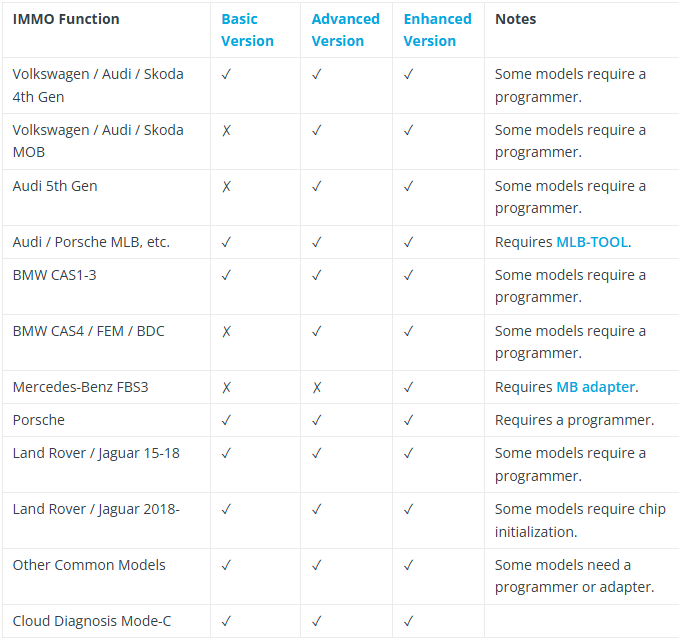
Xhorse VVDI Key Tool MIDI has 3 configurations:

  • Basic version: Supports remote function (key tool function), VAG IMMO 1–4 generation, BMW CAS1-CAS3, programmer basic functions, regular IMMO models and TPMS functions.
  • Premium version: Supports basic version all features, add VW IMMO5 IMMO, BMW CAS4/FEM/BDC IMMO functions.
  • Enhanced version: All features of the advanced version, adding Mercedes-Benz FBS3 IMMO functions

What is Xhorse Key Tool MIDI

Why Choose the Xhorse Key Tool MIDI?

✔ Wide Vehicle Coverage — Works with 90%+ IMMO systems and 98%+ TPMS sensors

✔ User-Friendly — Large touchscreen with simple, guided workflows

✔ Future-Ready — Regular software updates for new vehicle models

✔ Professional-Grade — Trusted by locksmiths and auto technicians worldwide

Xhorse VVDI Key Tool MIDI is coming soon, stay tuned!

Contact us to pre-order it now!

  1. Email: sales@OBDexpress.co.uk
  2. WhatsApp: +86 18750906257

Working Time: 9:00am — 18:00 pm (UTC+08:00), Monday to Friday

www.obdexpress.co.uk

Monday, 2 June 2025

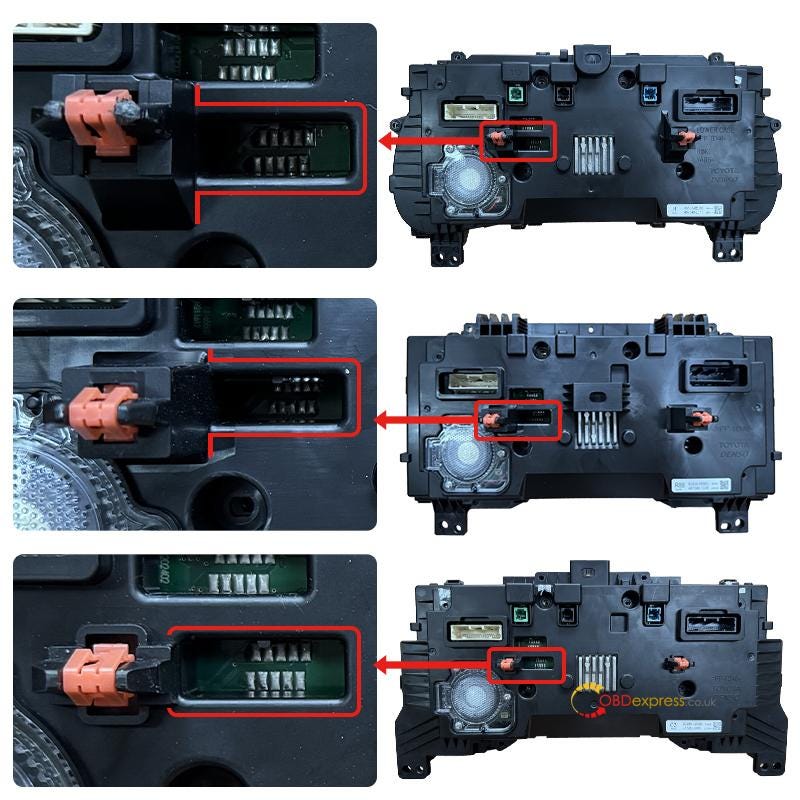
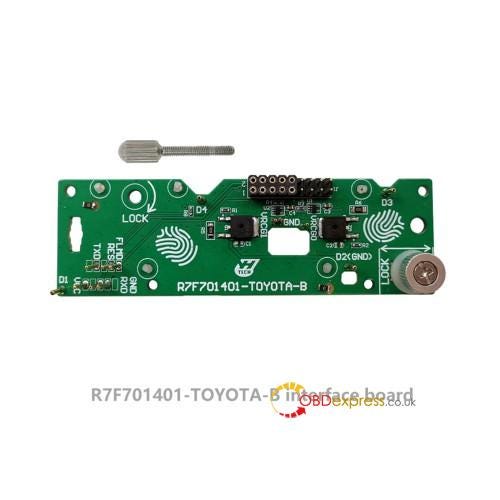
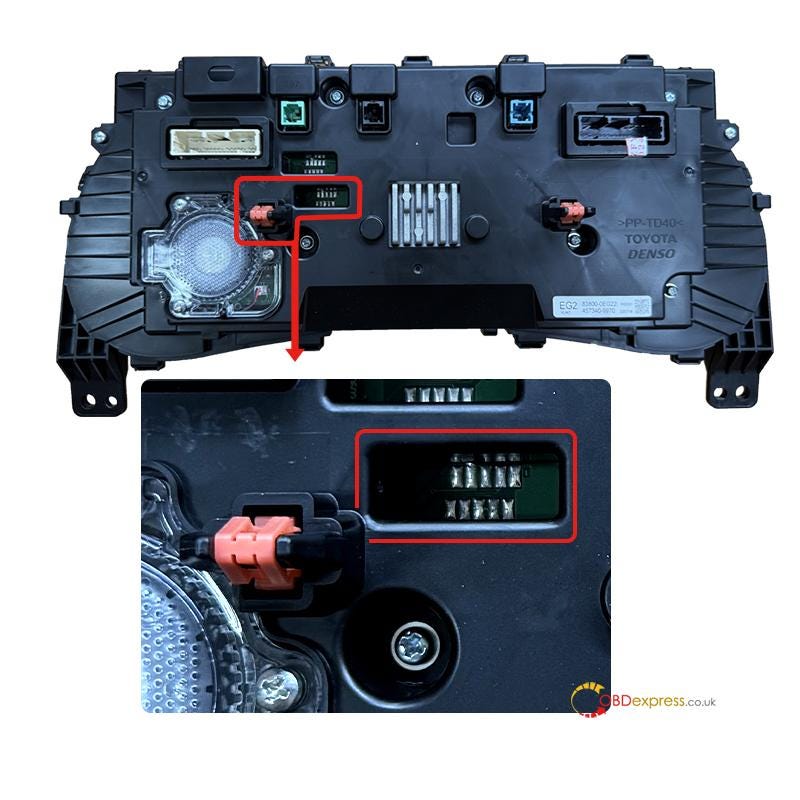
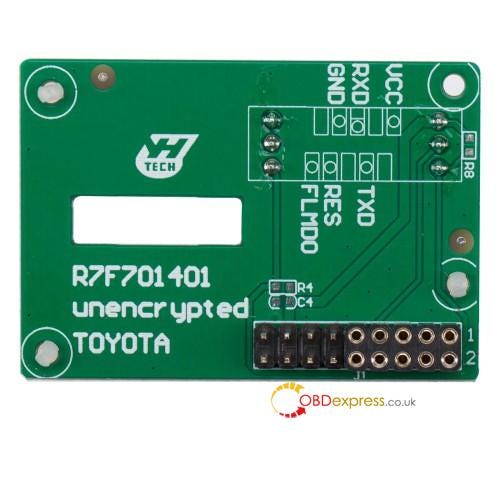
How to Choose Yanhua Interface Board for Toyota R7F701401?

 Toyota vehicles come with various dashboard types, especially when it comes to R7F701401 chips. To address these variations, Yanhua Tech has developed different interface boards for accurate and efficient mileage correction. All interface boards are compatible with Yanhua Mini ACDP or ACDP2, and Module 35, allowing mileage correction on bench without soldering, pin lifting, or capacitor removal.

Choose the correct interface board based on the chip encryption type and dashboard layout to ensure reliable and safe operation.

1.For Toyota R7F701401 encrypted dashboard


How to Choose Yanhua Interface Board for Toyota R7F701401

Operation guide:

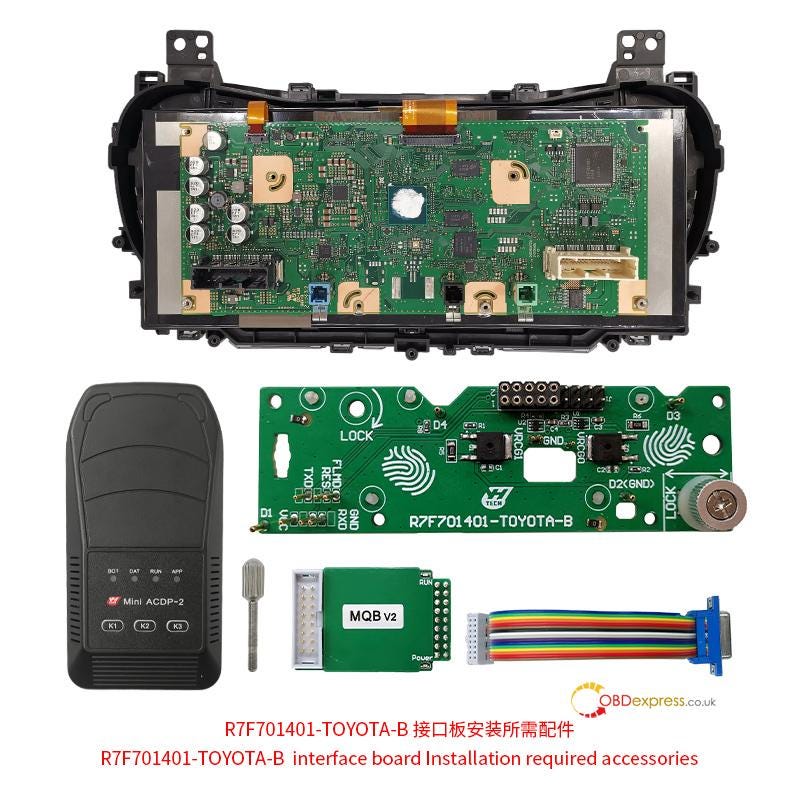
Required Tools:


How to Choose Yanhua Interface Board for Toyota R7F701401

Connection method:

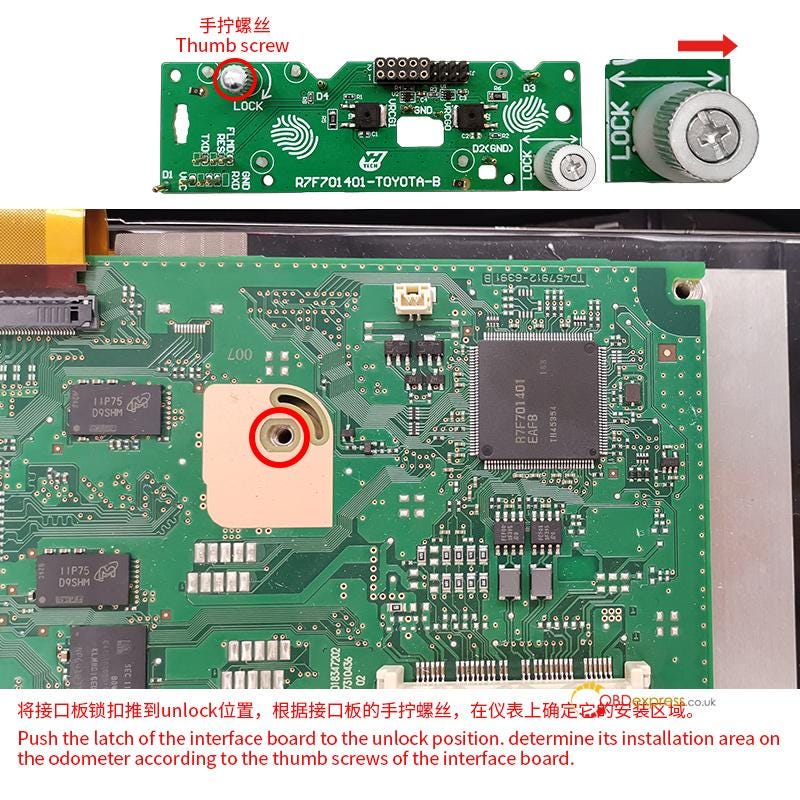
Step 1

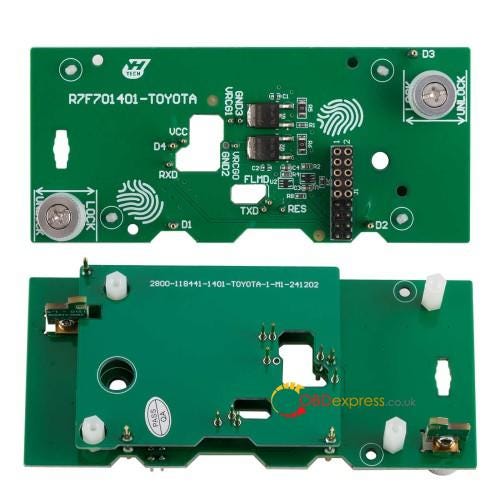
Push the latch of the interface board to the "Unlock" position

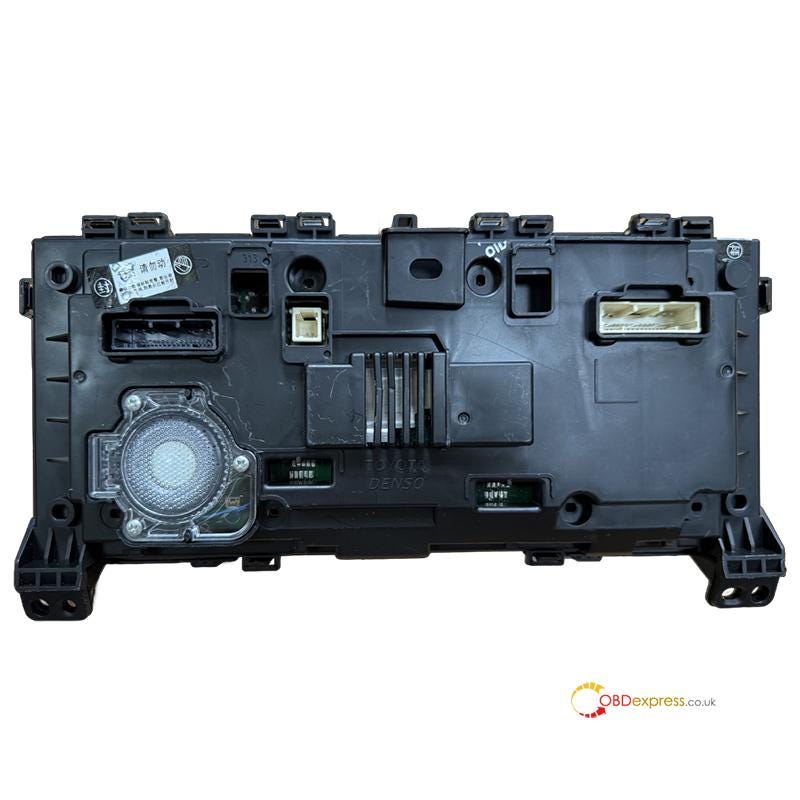
Determine its installation area on the odometer according to the thumb screws of the interface board


How to Choose Yanhua Interface Board for Toyota R7F701401

Step 2

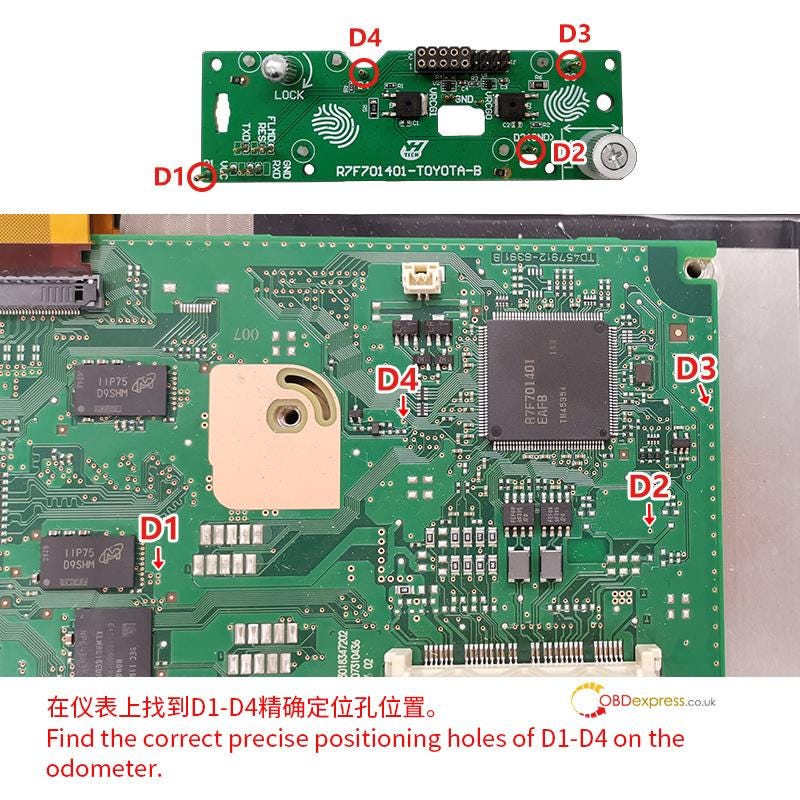
Find the correct precise positioning holes of D1–D4 on the odometer


How to Choose Yanhua Interface Board for Toyota R7F701401

Step 3

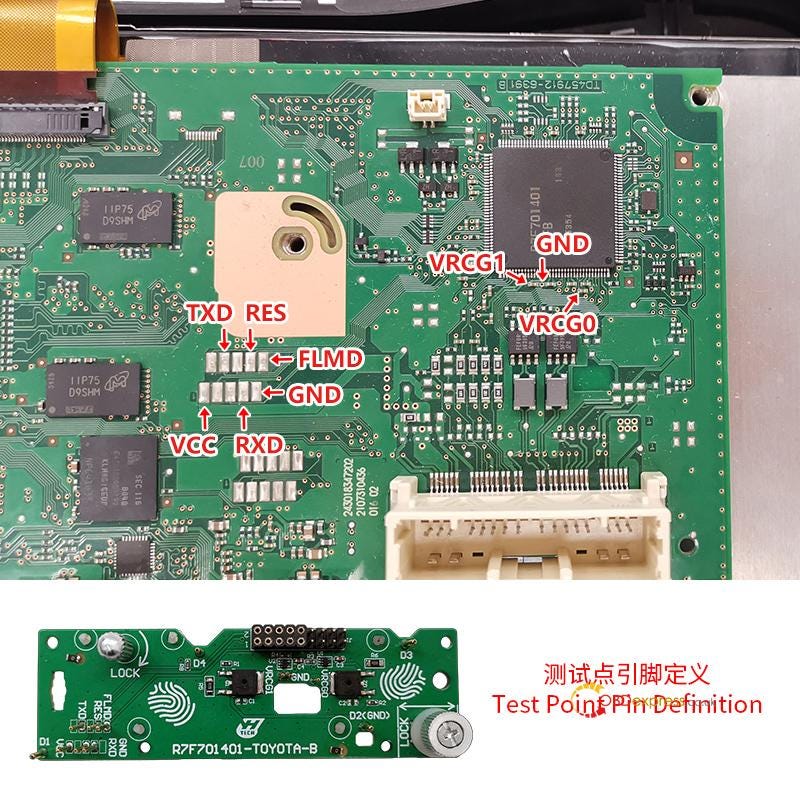
Test point pin definition


How to Choose Yanhua Interface Board for Toyota R7F701401

Step 4

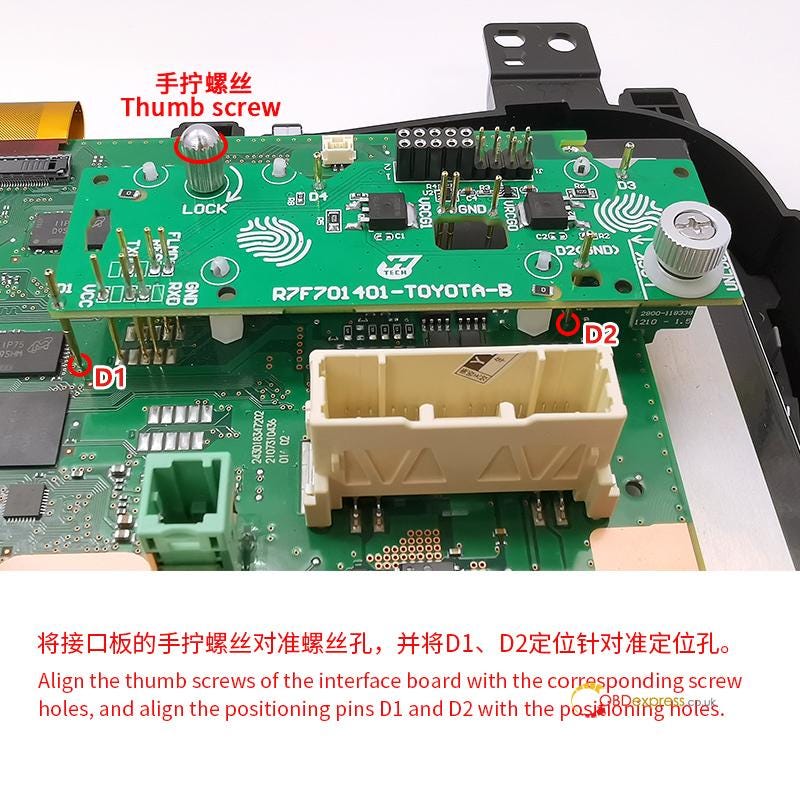
Align the thumb screws of the interface board with the corresponding screw holes

Align the positioning pins D1 and D2 with the positioning holes


How to Choose Yanhua Interface Board for Toyota R7F701401

Step 5

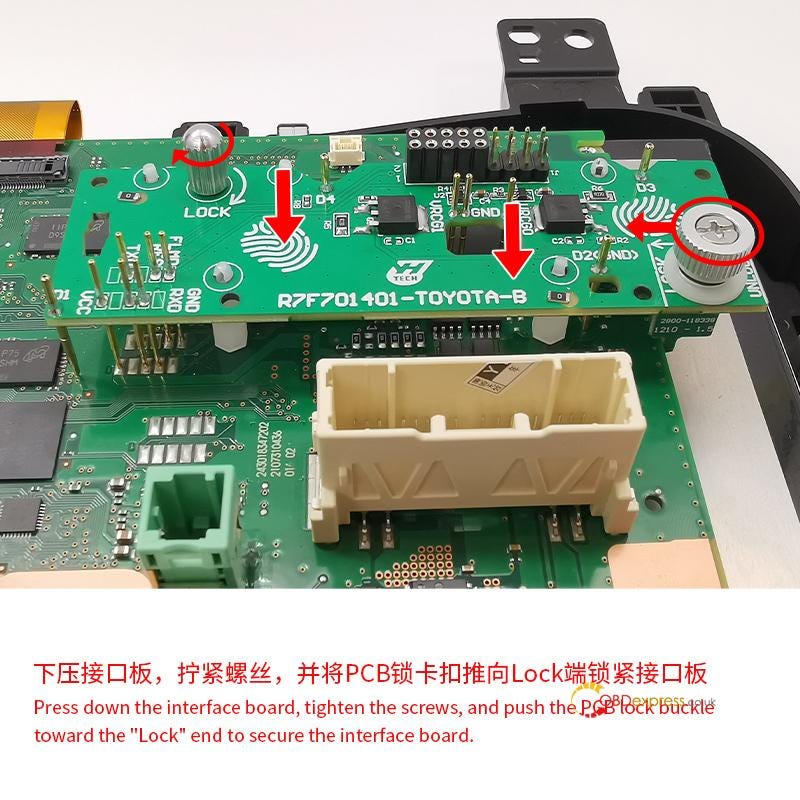
Press down the interface board

Tighten the screws

Push the PCB lock buckle toward the "Lock" end to secure the interface board


How to Choose Yanhua Interface Board for Toyota R7F701401

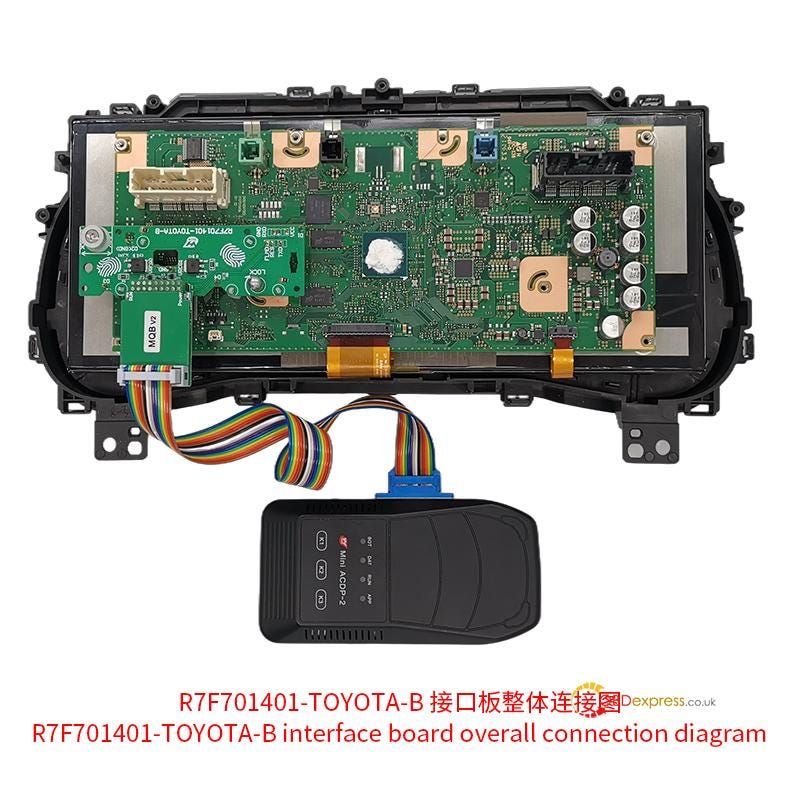
Overall connection diagram:


How to Choose Yanhua Interface Board for Toyota R7F701401

Mini ACDP APP Menu Path:

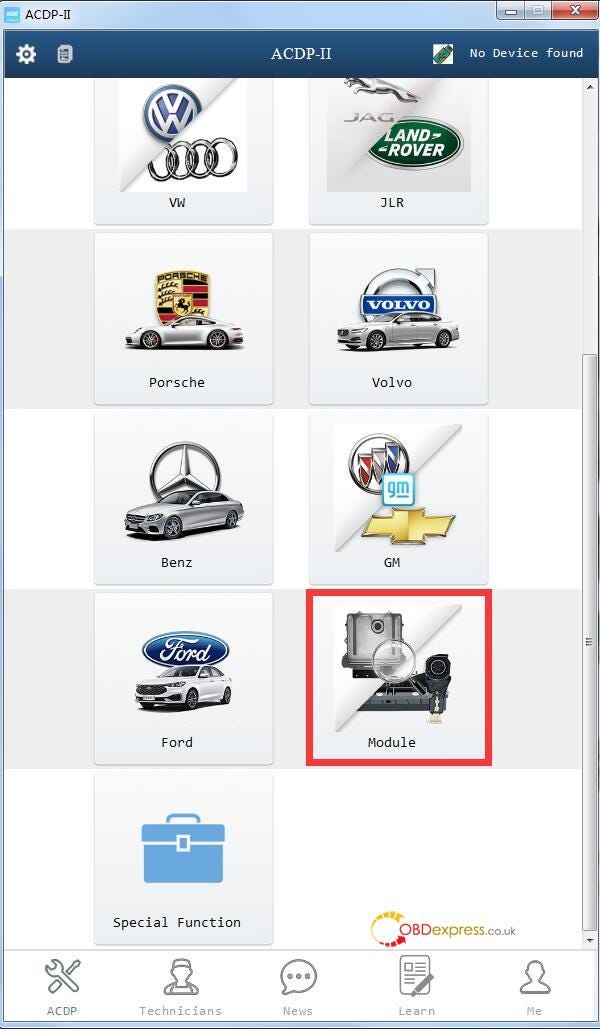
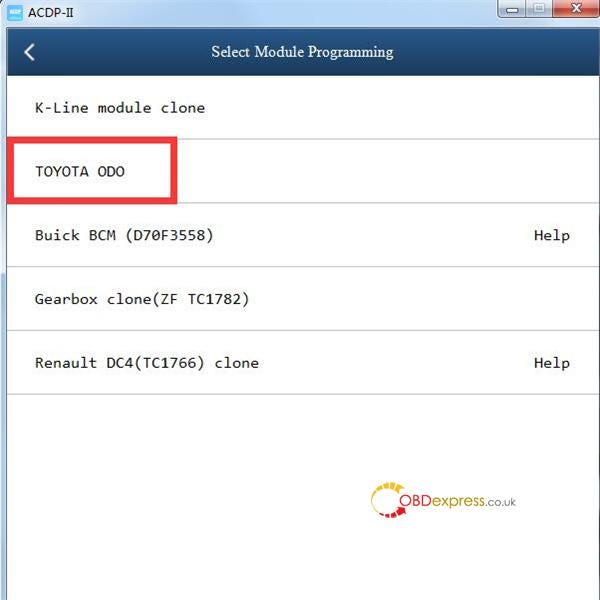
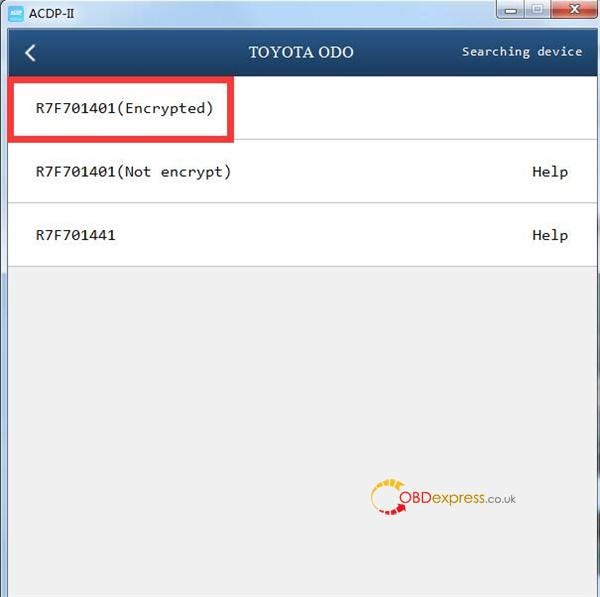
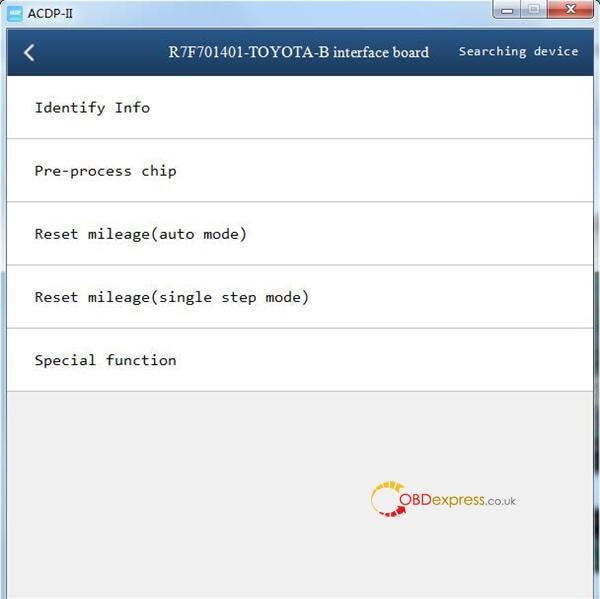
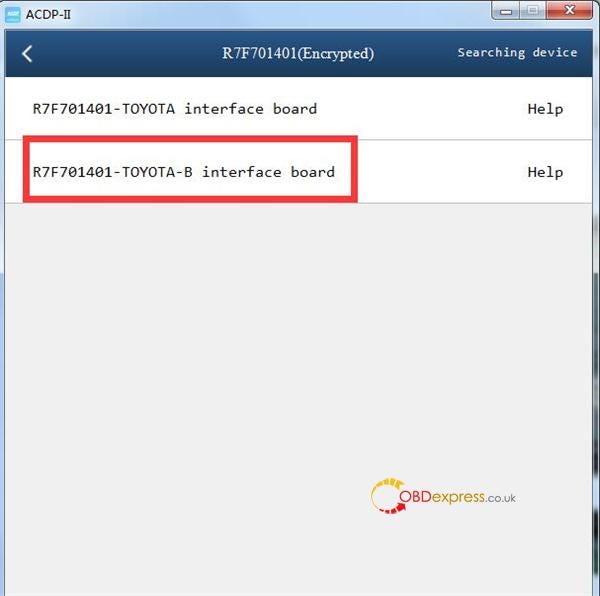
Module → TOYOTA ODO → R7F701401 (Encrypted) → R7F701401-TOYOTA-B Board


How to Choose Yanhua Interface Board for Toyota R7F701401

Process:

1.Identify Info — Confirm cluster details

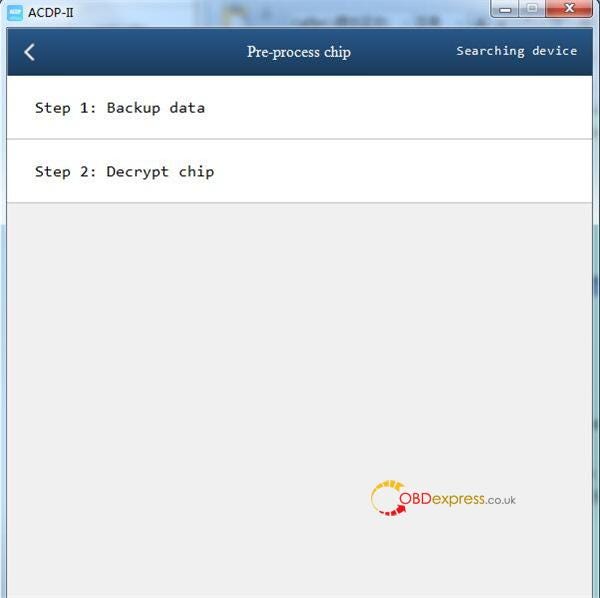
2.Pre-Process Chip

Step 1: Backup original data

Step 2: Decrypt chip

3.Reset Mileage (auto mode)


How to Choose Yanhua Interface Board for Toyota R7F701401

2.For Toyota R7F701401 full LCD meter (encrypted)


How to Choose Yanhua Interface Board for Toyota R7F701401

Operation guide:

http://blog.obdexpress.co.uk/2024/12/18/toyota-r7f714xx-odo-buick-bcm-nec3558-mileage-repair-with-yanhua-acdp2/

3.For Toyota R7F701401 unencrypted dashboard


How to Choose Yanhua Interface Board for Toyota R7F701401

Operation guide:

http://blog.obdexpress.co.uk/2025/02/25/yanhua-acdp-toyota-r7f701401-unencrypted-mileage-correction/

KEYDIY New KD-Moto Adapter Adds Honda, Yamaha & Ducati

  Motorcycle key programming is now coming to the KEYDIY KD-X4 . The new KEYDIY KD-Moto Adapter adds dedicated motorcycle coverage for a w...