Showing posts with label Yanhua ACDP Module. Show all posts

Tuesday, 18 August 2026

YANHUA ACDP Module 47 Introduction: 2018+ JLR Duplicate Key

 What’s New: YANHUA Module 47 works with Mini ACDP-2 or ACDP to support 2018+ JLR duplicate key programming without removing the RFA via the OBD + ICP method.

Functions

  • Key duplication is supported for vehicles with the UWB function originally disabled. If the vehicle’s UWB function was originally enabled, the new duplicated key will be restricted.
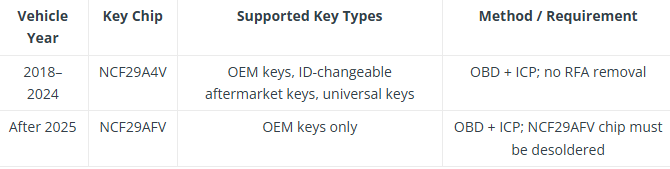
  • For 2018–2024 vehicles using the NCF29A4V chip, ACDP/ACDP 2 supports OEM keys, ID-changeable aftermarket keys, and universal keys to duplicate a new key.
  • For vehicles after 2025 using the NCF29AFV chip, ACDP/ACDP2 only supports OEM keys to duplicate a new key, and the NCF29AFV chip needs to be desoldered.

YANHUA ACDP Module 47 Introduction_2018+ JLR Duplicate Key

Supported Models


YANHUA ACDP Module 47 Introduction_2018+ JLR Duplicate Key

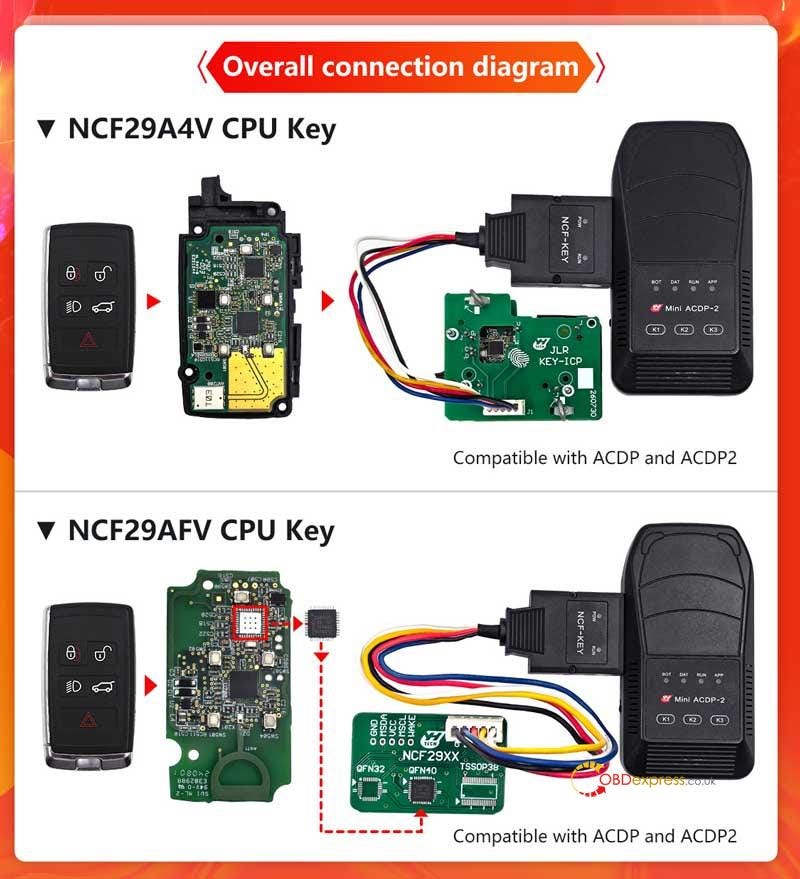
Overall Connection Diagram: NCF29A4V CPU Key, NCF29AFV CPU Key


YANHUA ACDP Module 47 Introduction_2018+ JLR Duplicate Key

www.obdexpress.co.uk

Monday, 27 July 2026

Yanhua ACDP Module Guide for Benz VGS4-0 NAG2 Clone

 Replacing a damaged Mercedes-Benz VGS4–0 NAG2 (7G-Tronic Plus) transmission control unit no longer requires costly dealer online authorization. With Yanhua Mini ACDP2, key technicians and transmission specialists can complete full IMMO and coding data cloning in minutes!

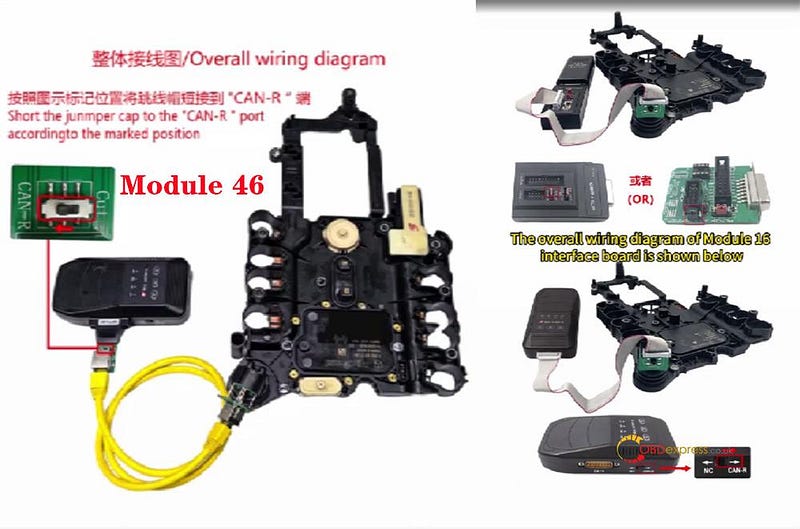
Choosing Your Tool Setup: Module 16 vs Module 46

Yanhua offers two flexible hardware options depending on your shop’s needs:

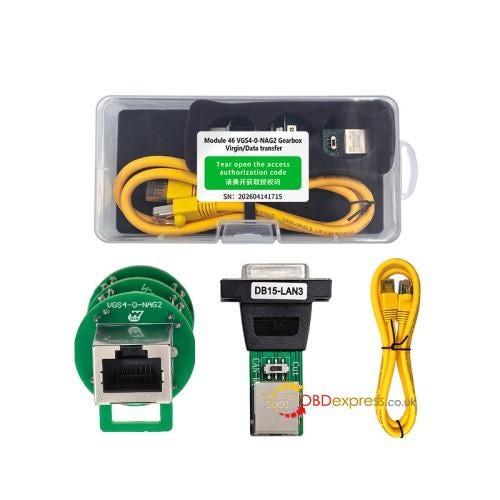
The ultimate dedicated solution for MB VGS4–0-NAG2(4–4) TCU virginizing, personalization, and cloning. No third-party devices needed.


How to Use Yanhua ACDP Module Clone Benz VGS4-0 NAG2

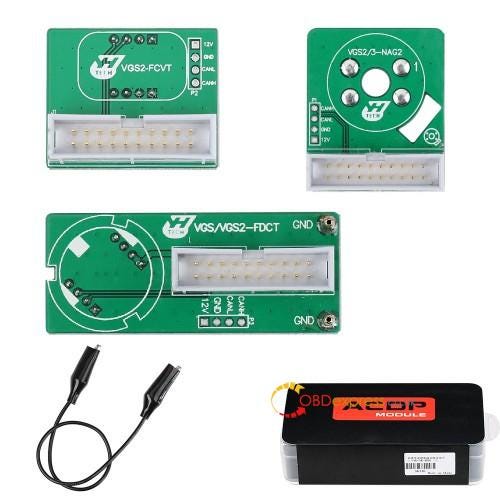
The all-rounder module for workshops servicing various Mercedes transmissions, including VGS-FDCT, 722.8 FCVT, and 722.9 VGS2/VGS3 systems.


How to Use Yanhua ACDP Module Clone Benz VGS4-0 NAG2

👉 Smart Buying Tip: Already own Module 16? Save money by purchasing only Module 46 License (A107)! Your current Module 16 bench board is 100% compatible.

Easy 3-steps Replacement Procedure

1. Connection

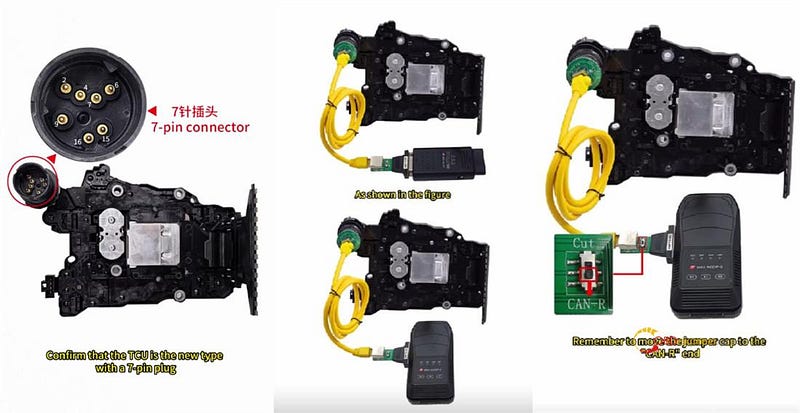
Connect ACDP2 unit to the VGS4 interface board and TCU. Ensure the jumper cap is shorted to CAN-R for bus stability.


How to Use Yanhua ACDP Module Clone Benz VGS4-0 NAG2

2.Read & Backup

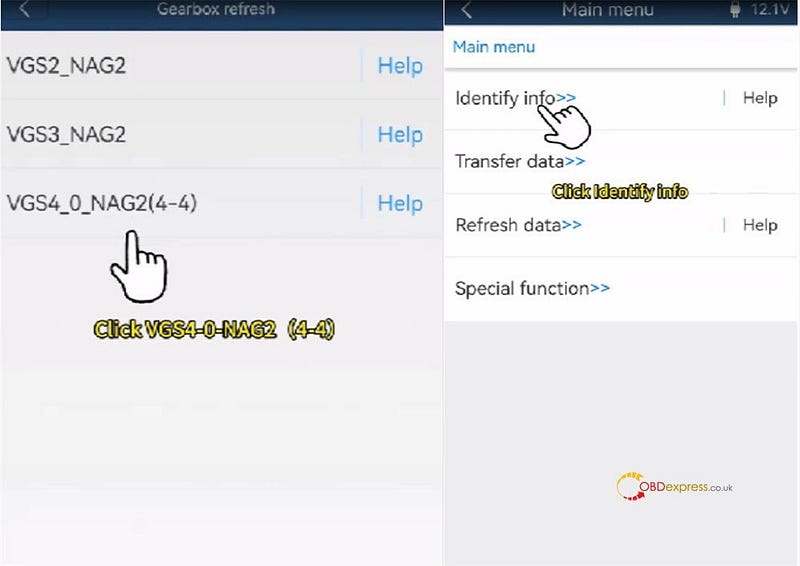
  • Access BENZ -> Gearbox refresh -> VGS4 NAG2 -> Identify Info.

How to Use Yanhua ACDP Module Clone Benz VGS4-0 NAG2
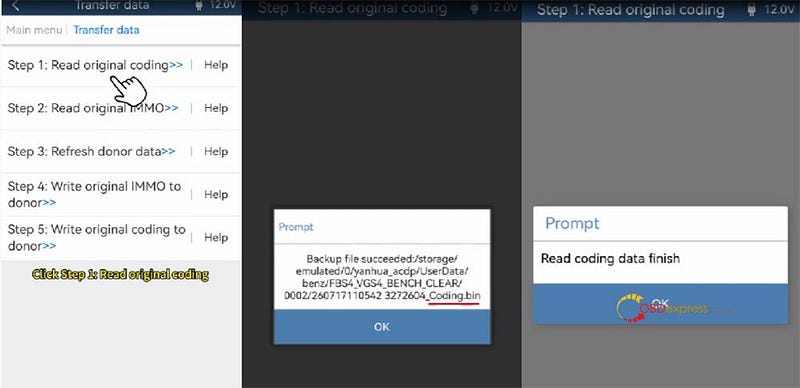
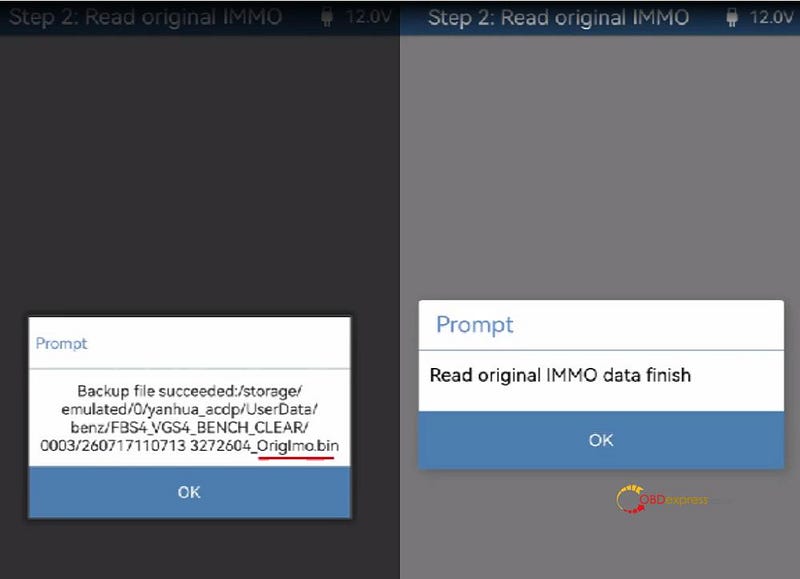
  • Select Step 1 and Step 2 separately to back up original coding (…coding.bin) and IMMO data (…OrigImo.bin) .

How to Use Yanhua ACDP Module Clone Benz VGS4-0 NAG2

3.Donor Renewal & Flashing

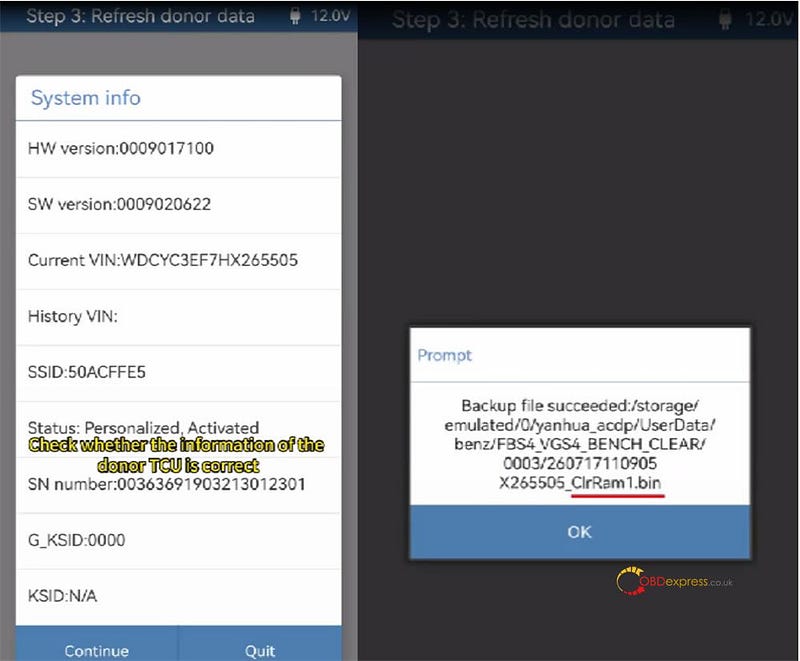
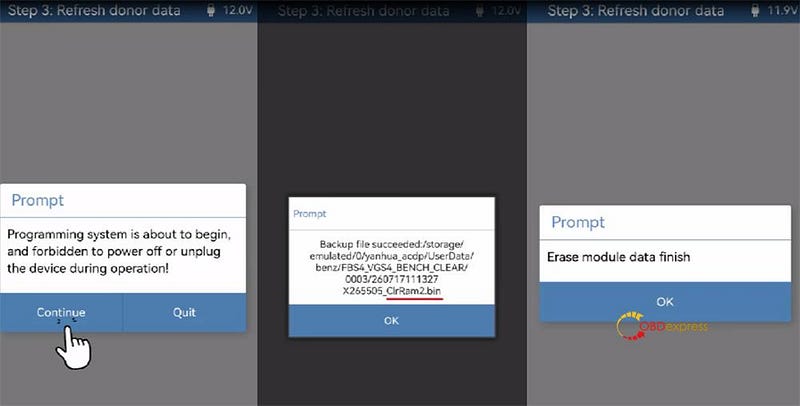
Connect donor TCU and execute Step 3 to automatically back up and refresh the unit.


How to Use Yanhua ACDP Module Clone Benz VGS4-0 NAG2

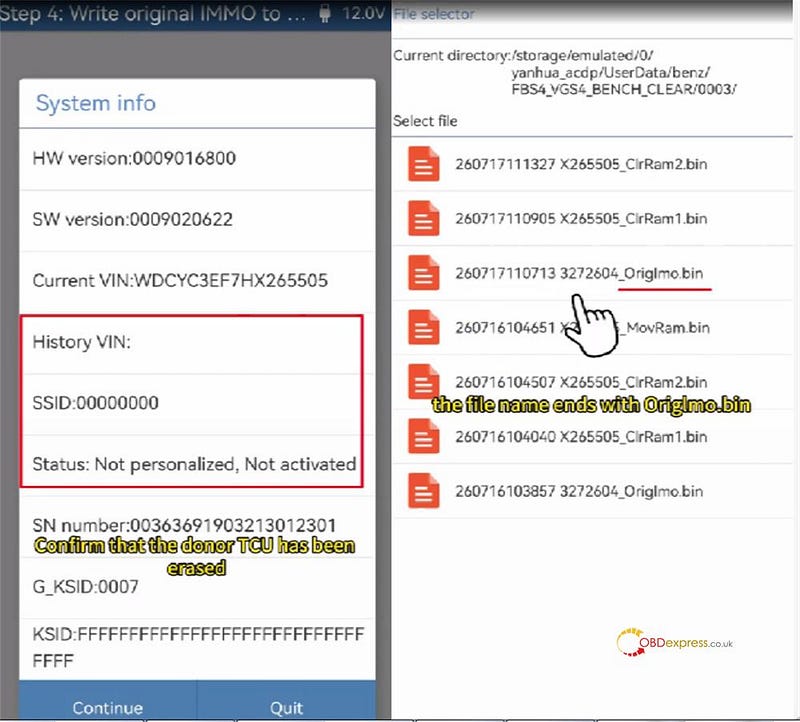
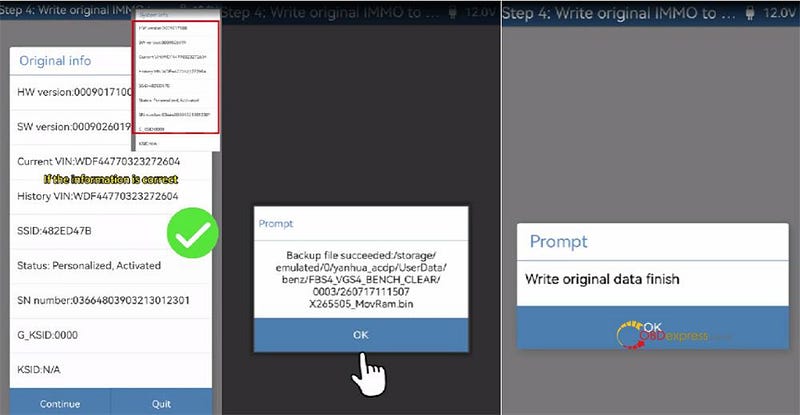
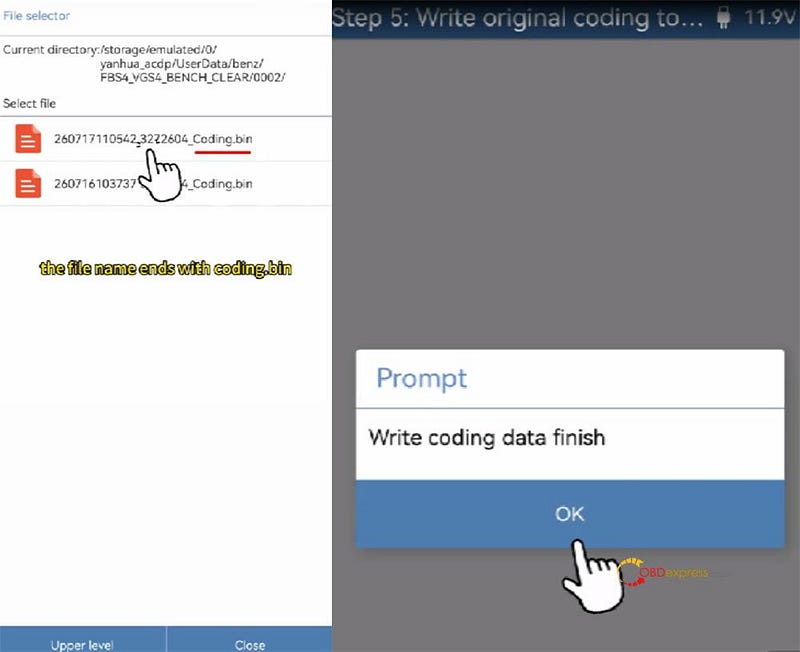
Write original IMMO (Step 4) and original coding (Step 5).


How to Use Yanhua ACDP Module Clone Benz VGS4-0 NAG2

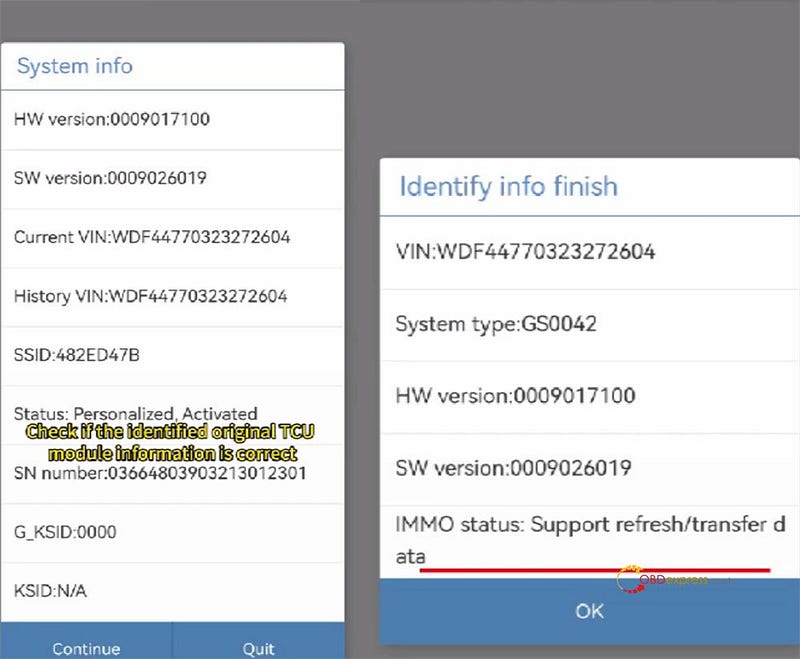
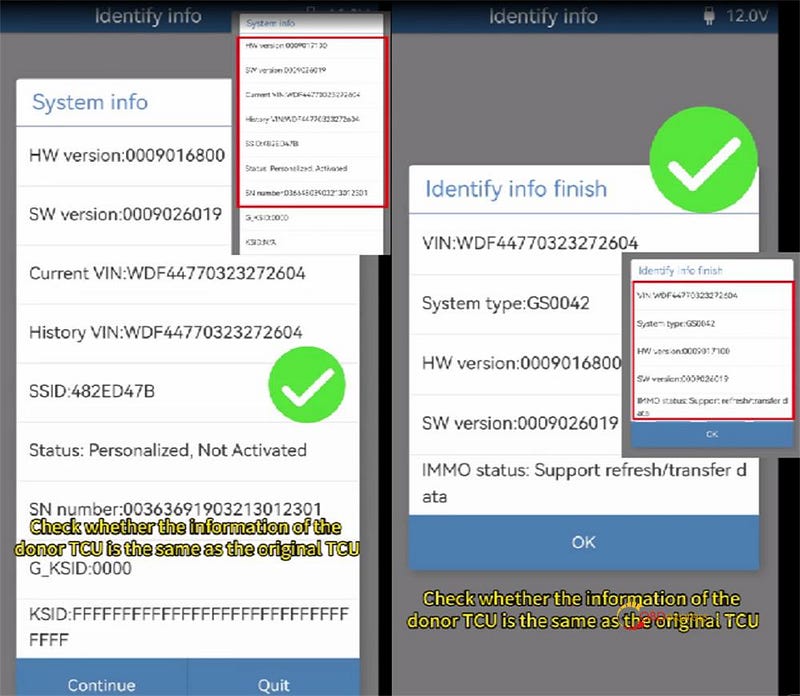
Perform a final identification check to confirm successful data transfer!


How to Use Yanhua ACDP Module Clone Benz VGS4-0 NAG2

www.obdexpress.co.uk

Wednesday, 6 May 2026

VW DQ38x_GEN2 Gearbox Read & Write by Yanhua Module 45

 How to use Yanhua ACDP2 to read and write 2022- DQ38x_GEN2 gearbox data?

ACDP Module 45 is required to access this functionality.

Preparation:

Or Mini ACDP2 with ACDP2 Module 45

  • Android/IOS Smartphone/ tablet with installed ACDP APP

Steps to read and write 2022- DQ38x_GEN2 Gearbox:

Step 1 — Check Your TCU Type

First things first — make sure you’ve got the new TCU with a 7-pin connector.

(X) Older gearboxes? They use a different hookup and won’t work here.

Step 2 — Hook Everything Up

Connect your Mini ACDP1 (or ACDP2) and the Module 45 interface board to your VW gearbox.

Flip the jumper cap to "CAN-R" — just follow the marking on the board.

Power up your ACDP key programmer.


VW DQ38x_GEN2 Gearbox Read Write by Yanhua Module 45

Step 3 — Identify Gearbox Info

Open ACDP app on your Android or iPhone.

Make sure your ACDP device shows as connected.

Go here:

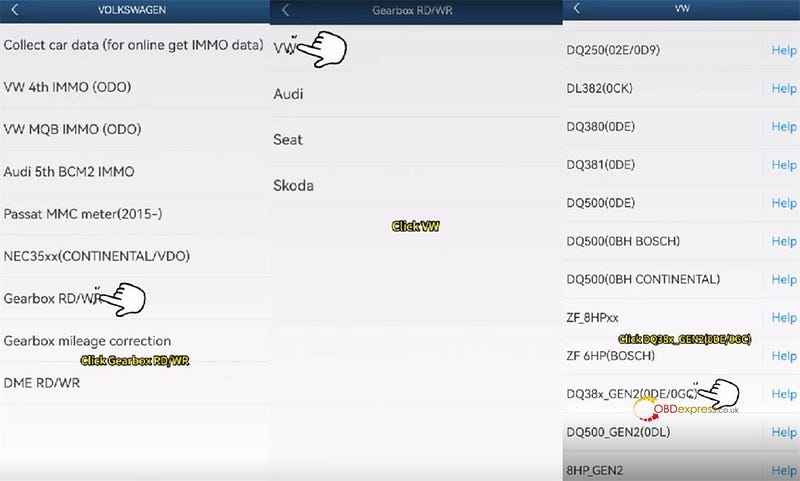
VW/AUDI → Gearbox RD/WR → VW → DQ38x_Gen2 (0DE/0GC)


VW DQ38x_GEN2 Gearbox Read Write by Yanhua Module 45

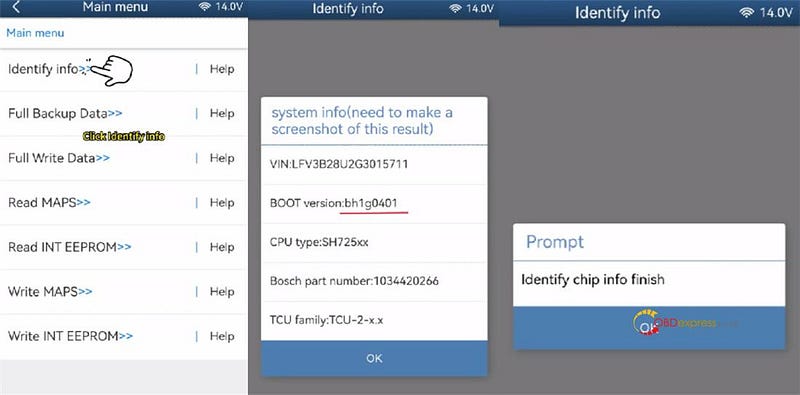
Tap [Identify info].

Look at the BOOT version — it should say BH1G0401. Snap a screenshot for safekeeping.

ACDP app will dig up the chip info. When it’s done, tap OK.


VW DQ38x_GEN2 Gearbox Read Write by Yanhua Module 45

Step 4 — Back Everything Up

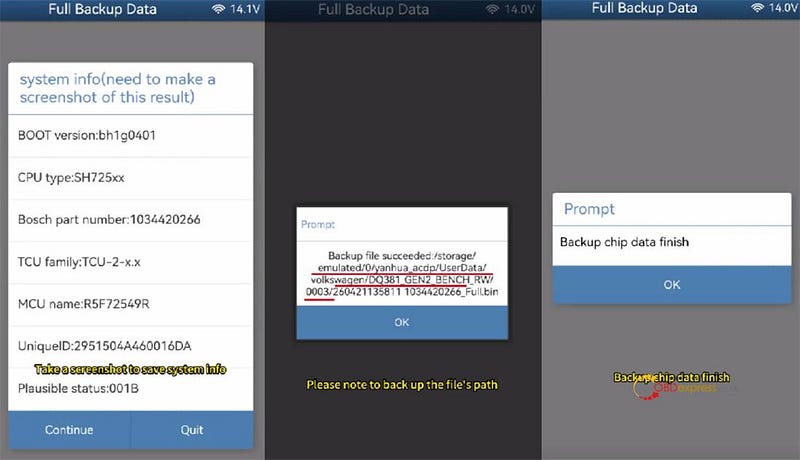
Tap [Full Backup Data].

Take another screenshot of the system info.

Save the chip data.

Then just wait for the backup to finish.


VW DQ38x_GEN2 Gearbox Read Write by Yanhua Module 45

Step 5 — Write to a New Gearbox

Unplug the first gearbox.

Connect your Yanhua ACDP + Module 45 to a different DQ38x Gen2 gearbox.

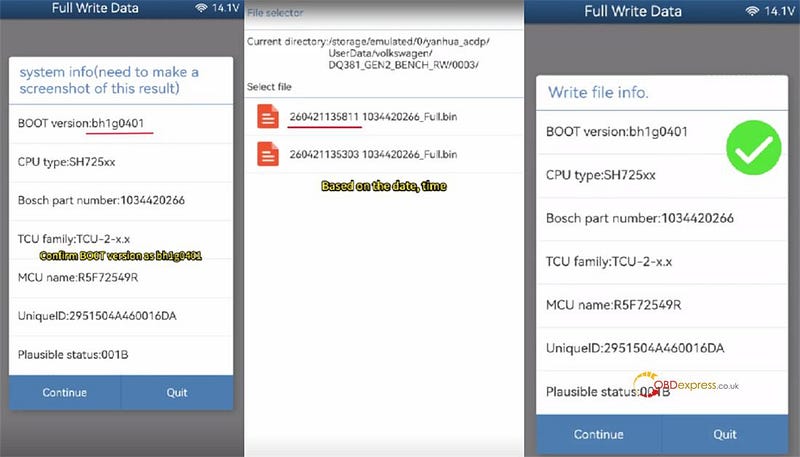
Tap [Full write data].

Check the BOOT version again — still BH1G0401, right? Great. Screenshot it.

Pick the original chip data file (the one you just backed up).

Double-check everything matches the new gearbox.

! Super important:

Do NOT turn off the power or unplug anything while writing. You could fry the chip.

Hit start and let it do its thing.

When you see the confirmation message on screen — congratulations, you’re done!


VW DQ38x_GEN2 Gearbox Read Write by Yanhua Module 45

In addition, Yanhua Mini ACDP2 with Module 45 also can correct mileage for 2022- DQ38x 0DE/0GC and DQ500 0DL (bootloader of BH1G401 and 7-PIN connector) on bench.

www.obdexpress.co.uk

Tuesday, 21 April 2026

How to Use Yanhua Module 45 for VAG DQ38x_GEN2 Gearbox?

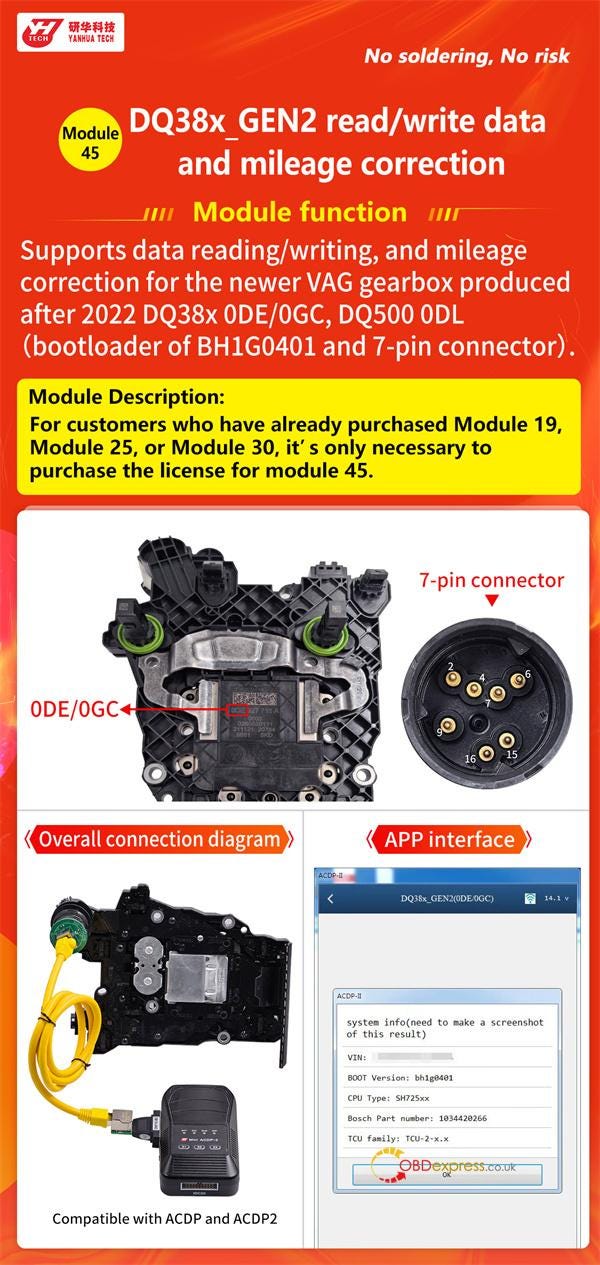
Yanhua has been released two ACDP Module 45 versions to for data reading/writing and mileage correction on 2022- DQ38x 0DE/0GC and DQ500 0DL (bootloader of BH1G401 and 7-PIN connector) gearbox ECUs. Check the detailed user guide below.

What Can Yanhua ACDP Module 45 Do?

  • Read & write data — complete access to gearbox ECU information.
  • Perform mileage correction — adjust odometer values accurately.
  • Compatible exclusively with 2022+ VAG gearboxes, specifically:

DQ38x (0DE / 0GC)

DQ500 (0DL)

! Requirement: Bootloader BH1G401 + 7-PIN connector must be present.


How to Use Yanhua Module 45 for VAG DQ38x_GEN2 Gearbox

How to Choose Yanhua Module 45?

Good news for existing Yanhua users.

If you already own any of the following:

Then you do not need to purchase additional Module 45 Adapter.

Simply buy Module 45 License (A60B) — and the new functions will be activated on your device immediately.

https://www.obdexpress.co.uk/

Monday, 30 March 2026

Yanhua ACDP Module 44: VW Audi Porsche 5C/5D Key Adding Tutorial

 Programming a new VW, Audi, or Porsche 5C/5D (MQB49) key is now streamlined with the Yanhua Mini ACDP 2 and Module 44. This guide provides a professional, step-by-step walkthrough for adding a key using a combination of OBD and ICP modes.

Initial Setup & Connection

Before starting, ensure your hardware is properly connected to avoid data interruptions.

  • OBD Connection: Plug the ACDP 2 into the vehicle’s OBDII port.
  • Ignition: Turn the ignition ON; the instrument cluster must be active.
  • App Binding: Open the ACDP app and verify the device is successfully bound in the top-right corner.

Check Video Tutorial

https://www.youtube.com/watch?v=3b2Kp8-LHrc

Step 1: Identify Vehicle & Key Data

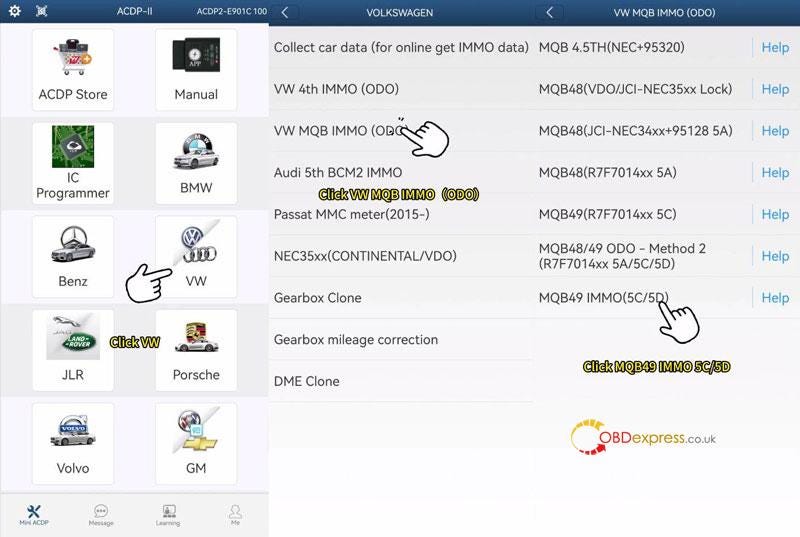
  • Navigate Path: Go to VW > VW MQB IMMO(ODO) > MQB49 IMMO(5C/5D).
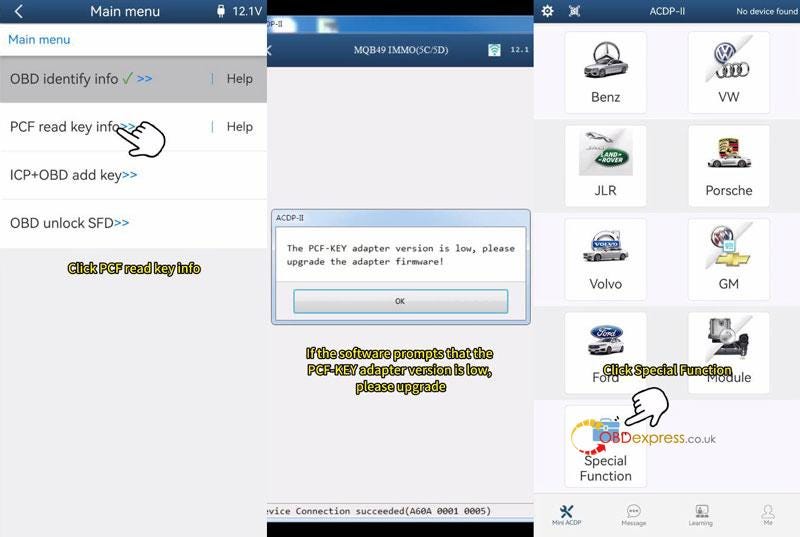
  • OBD Identify: Select OBD identify info to verify car data. Tip: Screenshot the Key ID and quantity for later reference.
  • Verify Original Key: Place the working key into the PCF adapter and select PCF read key info to confirm its ID.

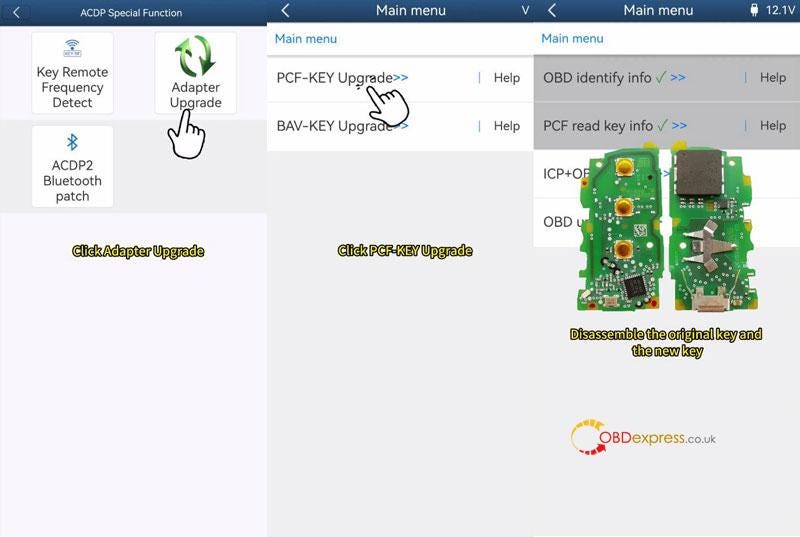
Note: If prompted, perform a "PCF-KEY Upgrade" under Special Functions first.


Yanhua ACDP Module 44_VW Audi Porsche 5C 5D Key Adding Tutorial

Step 2: ICP Data Reading & Dealer Key Preparation

This stage involves reading the internal data of the working key to prepare the new one.

  • Disassemble Keys: Remove the circuit boards from both the original and the new blank key.
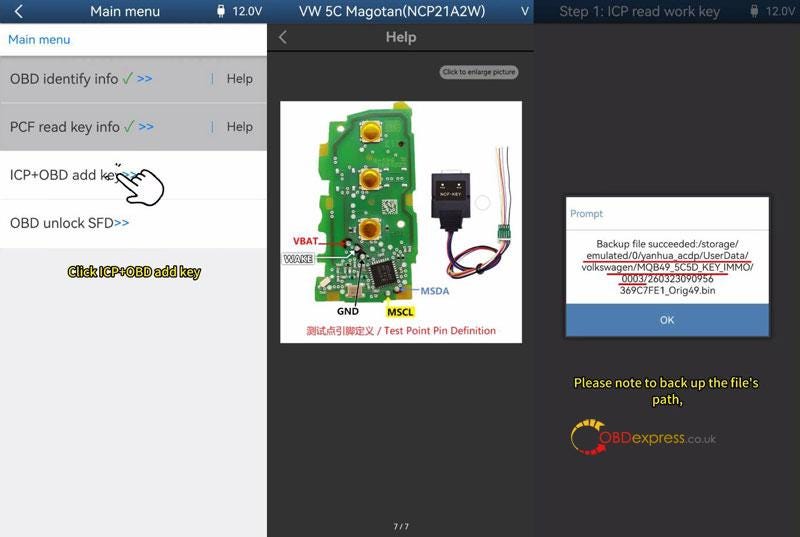
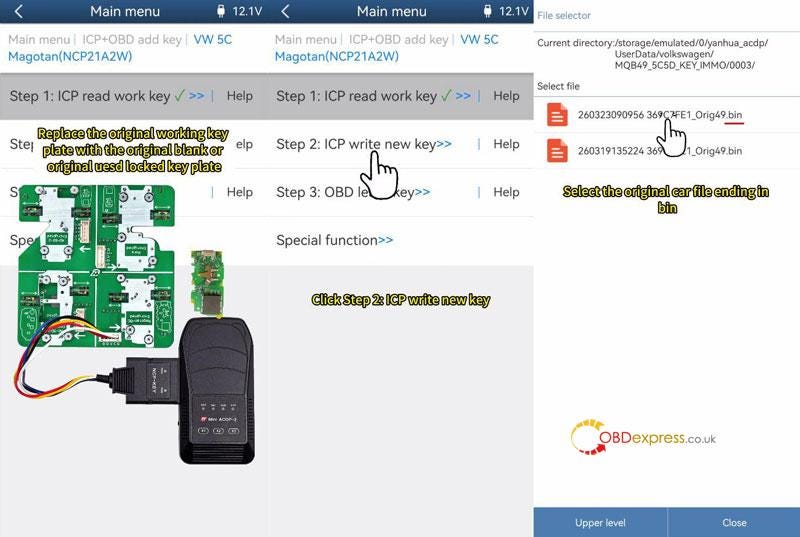
  • Read Working Key: Connect the original key plate to the interface board and ACDP. Select ICP+OBD add key > VW 5C Magotan > Step 1: ICP read work key. Save the resulting .bin file.
  • Create Dealer Key: Replace the original plate with the new blank key plate. Select Step 2: ICP write new key, load your saved .bin file, and click Make dealer key.

Yanhua ACDP Module 44_VW Audi Porsche 5C 5D Key Adding Tutorial

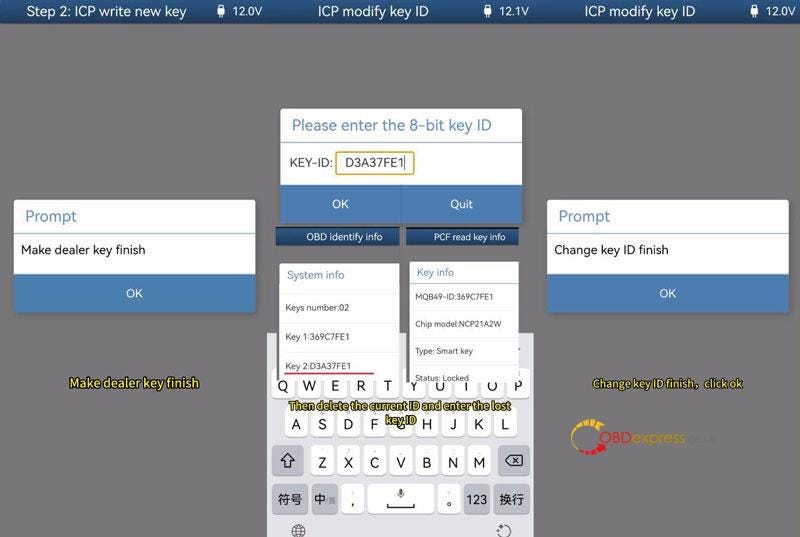
Step 3: Modify Key ID (Recommended)

To ensure future programming compatibility, it is best to align the new key ID with the vehicle’s records.

  • Go to Special Function > ICP modify key ID.
  • Enter a "lost" key ID from your earlier OBD screenshots.
  • Warning: Do not modify it to match the ID of the currently working key.

Yanhua ACDP Module 44_VW Audi Porsche 5C 5D Key Adding Tutorial

Step 4: OBD Key Learning

The final step syncs the prepared keys to the vehicle’s immobilizer system.

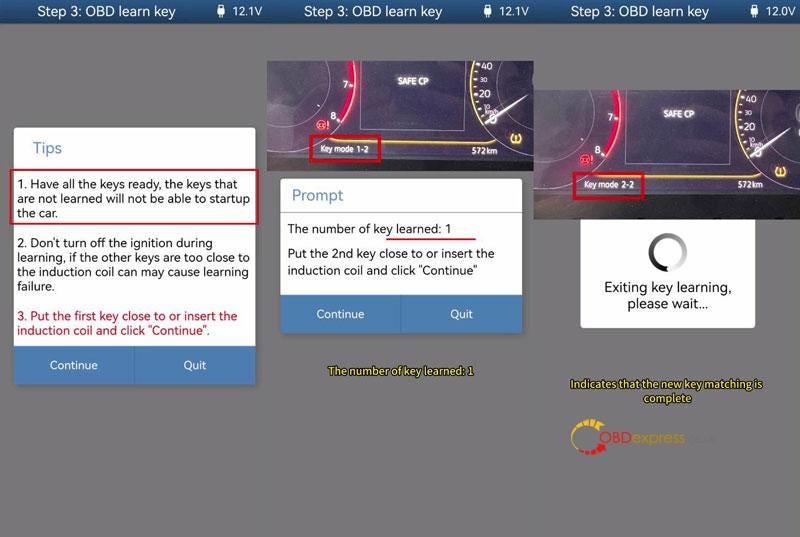
  • Restore: Reassemble the keys (with batteries), turn the ignition ON, and open the vehicle hood.
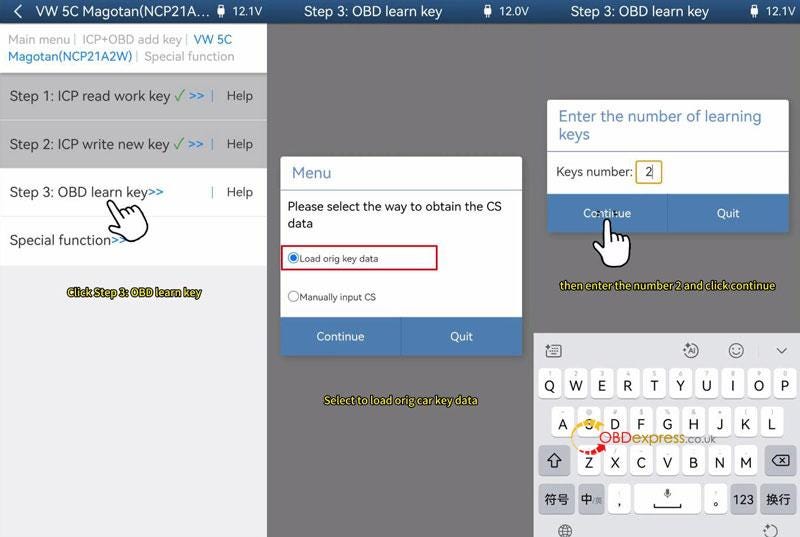
  • Start Learning: Select Step 3: OBD Learn key and load the original car data file.
  • Input Quantity: Enter the total number of keys (e.g., "2").
  • Induction: Hold each key near the vehicle’s induction coil one by one as prompted.
  • Confirmation: The dash will show the progress (e.g., 2–2). Test both keys for engine start and remote functions.

Yanhua ACDP Module 44_VW Audi Porsche 5C 5D Key Adding Tutorial

www.obdexpress.co.uk

Monday, 9 February 2026

Yanhua ACDP2 with Module 34 Correct VW MK8 Golf 5D Mileage

 Question: Is it possible to correct mileage for VW MK8 Golf 5D by Mini ACDP2? How quickly can it do the job?

Answer:

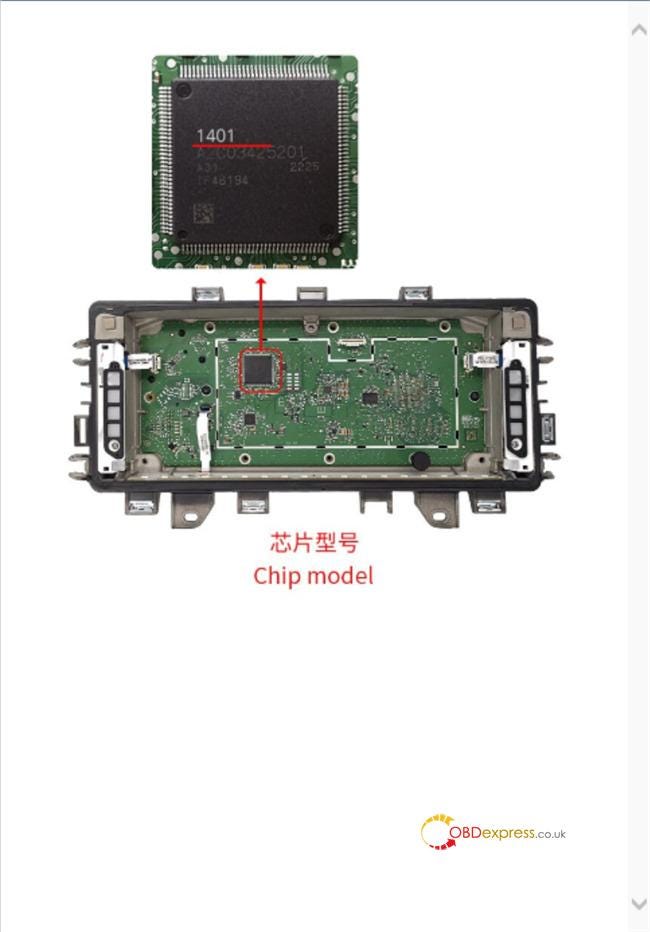
Yes, Golf 8 2021 and 2022 with 1401 CPU and 5D type are supported.

Use ACDP Module 34 and 5D Interface Board to work with Yanhua ACDP2/ACDP on bench.

It takes about 10 minutes to complete the mileage correction.

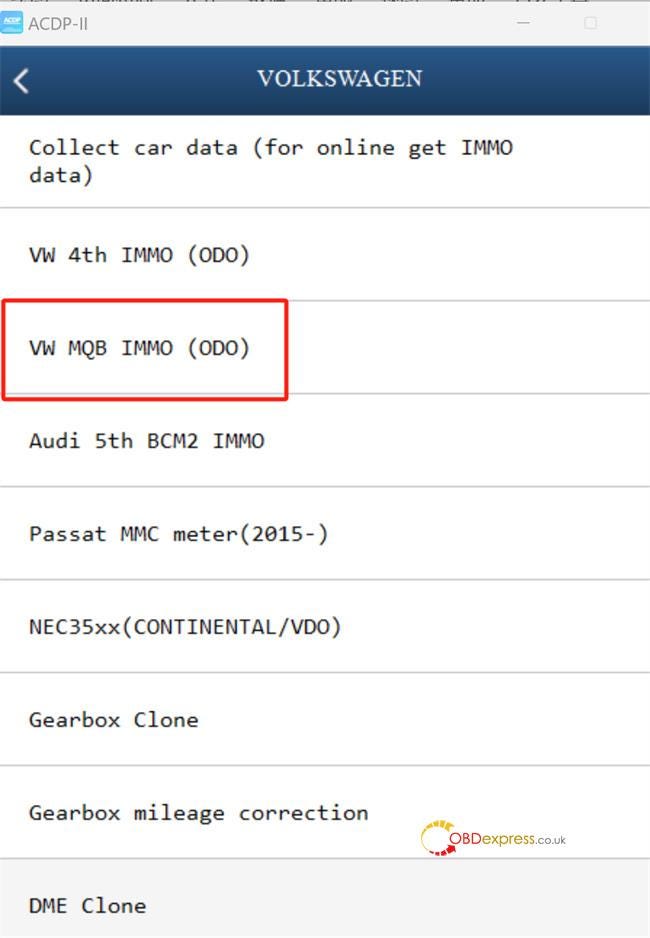
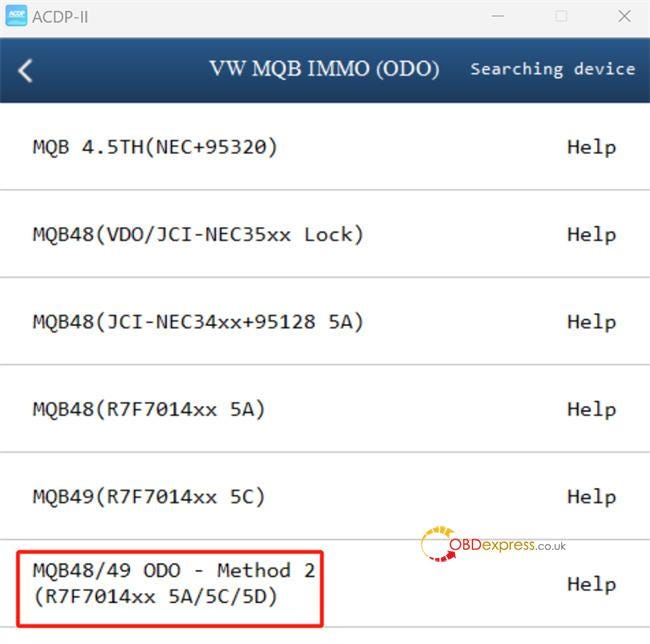
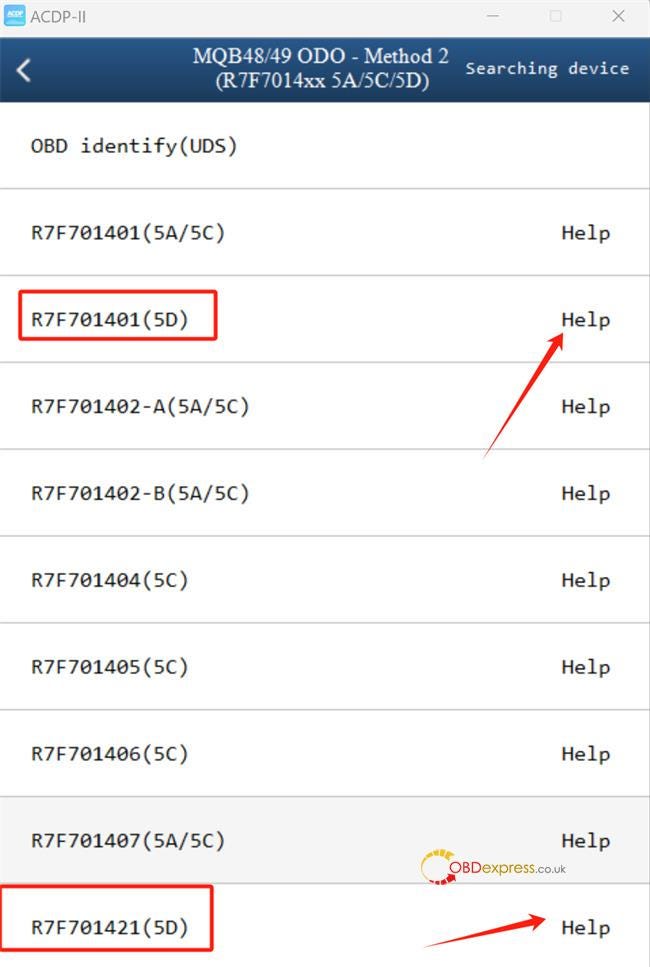
1.ACDP APP menu path:

Navigate to Volkswagen-> VW MQB IMMO (ODO)-> MQB48/49 ODO- Method 2 (R7F7014xx 5A/5C/5D)-> R7F701401 (5D) or R7F701421 (5D)

Click "Help" to check the wiring diagram


Yanhua ACDP2 with Module 34 Correct VW MK8 Golf 5D Mileage

2.Connection method:

For 1401 CPU chip model:


Yanhua ACDP2 with Module 34 Correct VW MK8 Golf 5D Mileage

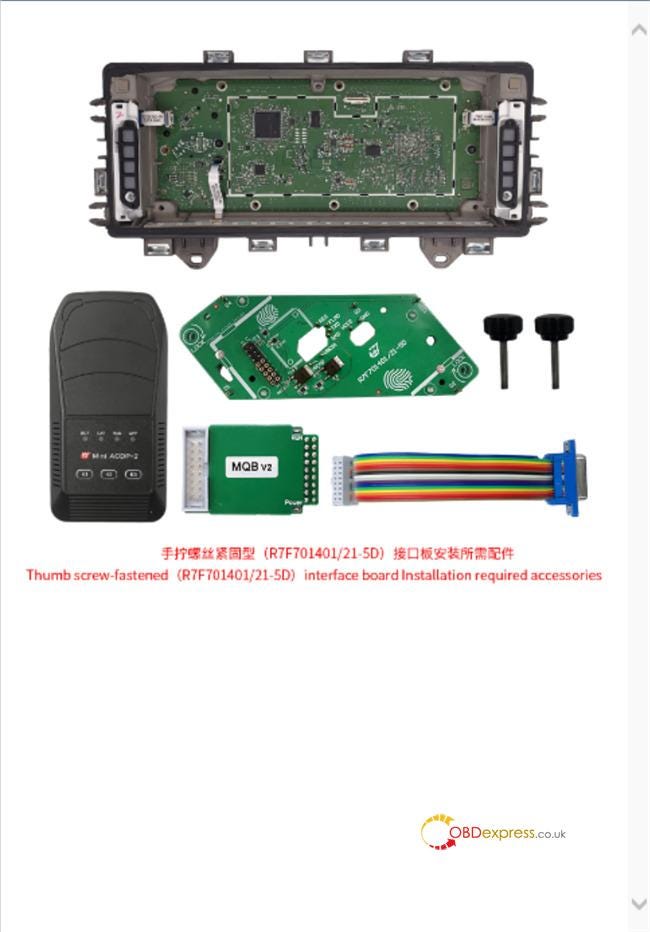
Required accessories:


Yanhua ACDP2 with Module 34 Correct VW MK8 Golf 5D Mileage

Connection:


Yanhua ACDP2 with Module 34 Correct VW MK8 Golf 5D Mileage
  • Locate the D1, D2, D3, and D4 positioning holes correctly on the instrument panel.

Yanhua ACDP2 with Module 34 Correct VW MK8 Golf 5D Mileage
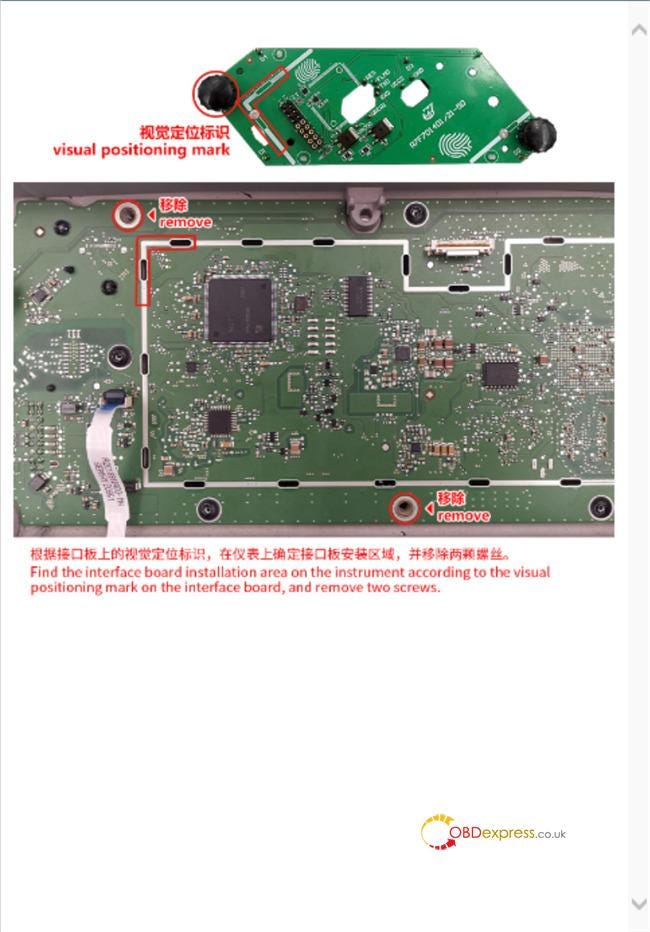
  • Accurately place the interface board into the installation area, align the D1 and D2 positioning points and screw hole

Yanhua ACDP2 with Module 34 Correct VW MK8 Golf 5D Mileage
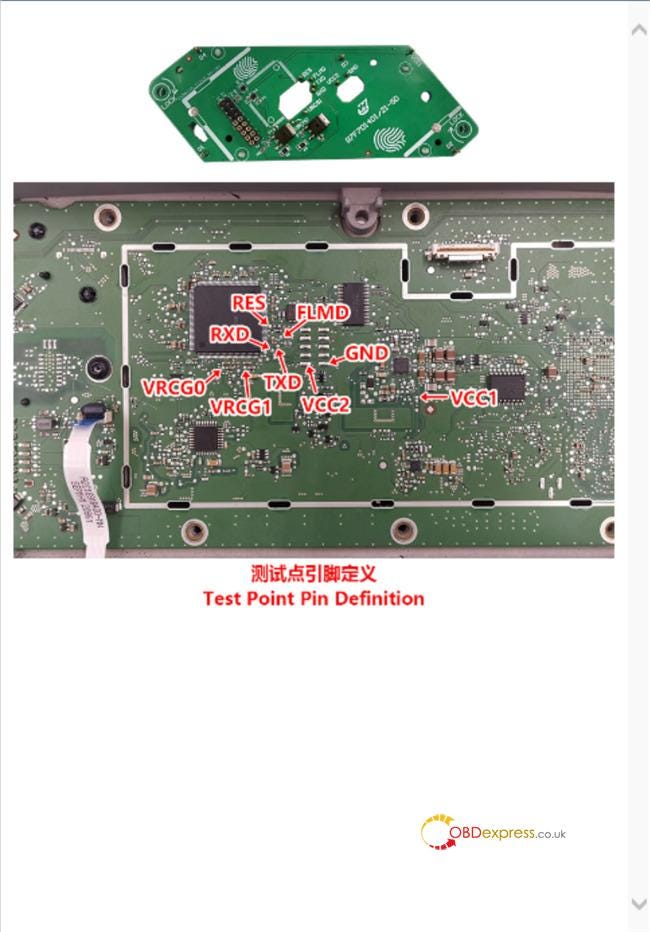
  • Check the test points pin definition

Yanhua ACDP2 with Module 34 Correct VW MK8 Golf 5D Mileage
  • Overall connection diagram

Yanhua ACDP2 with Module 34 Correct VW MK8 Golf 5D Mileage

3.Mileage correction method:

Step 1: Pre-process chip

Step 2: Reset mileage


Yanhua ACDP2 with Module 34 Correct VW MK8 Golf 5D Mileage

www.obdexpress.co.uk

Wednesday, 29 October 2025

Yanhua ACDP Module 42 Transfer Mercedes DSM (FBS4) Data

 This guide walks you through the process of transferring data from an original Mercedes-Benz FBS4 Gear Shift Module (DSM) to a secondhand one using Yanhua Mini ACDP2 with Module 42.

Yanhua ACDP Module 42 Features:

  • Support Mercedes-Benz DSM/DSM222 (FBS4) modules virgin and data transfer
  • Compatible with both ACDP2 and ACDP1 Master basic module

Operation guide:

1.Before You Start:

  • Ensure your ACDP programmer is bound and connected (check the top right of the ACDP app).
  • This example uses part number DSM (FBS4) A0002703252.

2.Main steps:

Step 1: Read Data from the Original Module

Run ACDP APP, navigate to Benz-> ISM/DSM Refresh-> DSM (FBS4) or DSM222 (FBS4) Help.


Yanhua ACDP Module 42 Transfer Mercedes DSM FBS4 Data

Check the part number and connect ACDP to the original vehicle’s DSM.

  • DSM (FBS4): A0002703252, A0002703352, A0002703452
  • DSM222 (FBS4): A0002704252, A0002704452, A0002704652

Yanhua ACDP Module 42 Transfer Mercedes DSM FBS4 Data

Select DSM FBS4 > Identify Info and click Continue.

Verify the module’s identification information is correct. Take a screenshot for your records, then click OK.


Yanhua ACDP Module 42 Transfer Mercedes DSM FBS4 Data

Now, click Transfer Data -> Step 1: Read Original Module Data.

Click Continue twice to begin reading.


Yanhua ACDP Module 42 Transfer Mercedes DSM FBS4 Data

When prompted to save, back up the file carefully. Note the file path, date, and time. The filename must end with ORIG.bin. Click OK.


Yanhua ACDP Module 42 Transfer Mercedes DSM FBS4 Data

Once the reading is complete, click OK and disconnect the ACDP from the original module.

Step 2: Clear Data from the Second-hand Module

Connect ACDP to the second-hand DSM (it must have the same part number).

Select Step 2: Clear Donor Module Data and click Continue.

Verify the identified information of the second-hand module and click Continue.


Yanhua ACDP Module 42 Transfer Mercedes DSM FBS4 Data

When prompted to save, back up this file as well. The filename should end with CLR.bin. Click OK.

Click Continue to start erasing. Once finished, click OK.


Yanhua ACDP Module 42 Transfer Mercedes DSM FBS4 Data

Step 3: Write Data to the Second-hand Module

Select Step 3: Write Data to Donor Module and click Continue.

Confirm that the data on the secondhand module has been successfully cleared. Click Continue.

Select Original Data. Choose the correct file you saved in Step 1 (check the date, time, part number, and the ORIG.bin filename).


Yanhua ACDP Module 42 Transfer Mercedes DSM FBS4 Data

Confirm the part data is correct and click Continue.

Click OK to save chip data, then Continue to start writing.

Once the transfer is complete, click OK.


Yanhua ACDP Module 42 Transfer Mercedes DSM FBS4 Data

Final Verification

Go back and click Identify Info again.

Crucially, verify that the information of the secondhand module now matches the screenshot you took of the original module.

If everything matches, the process is successfully completed.


Yanhua ACDP Module 42 Transfer Mercedes DSM FBS4 Data

Key Tips for Success:

  • Always Back Up: Carefully save and name both the bin and CLR.bin files. This is your safety net.
  • Double-Check Part Numbers: Ensure the original and secondhand modules have identical part numbers.
  • Verify at the End: The final identification check is essential to confirm a successful transfer.

Alright, that’s the whole process to transfer data on a Mercedes-Benz DSM (FBS4) module by Mini ACDP2 and Yanhua Module 42 on bench.

Video guide:

https://youtu.be/xaff7YyZilk

www.obdexpress.co.uk
How to Unlock Ford BOSCH MD1CP006 with OBDSTAR ECU Master via Boot?
 This guide covers the procedure for unlocking, reading, and writing locked Bosch MD1 CP006 engine control units found on Ford F-250 and F-...