Lonsdor
JLR Connector is designed for 2015-2021 Land Rover & Jaguar. It supports
AKL programming under alarm state.
FK72 version -- Program via OBD
HPLA version--Program via OBD with specific JLR
Connector
Part 1. Land Rover (2015-2018)
Path
LAND ROVER>>Select from vehicle>>Land Rover
(2015-2018)>>Smart key>>Type 4(via OBD)
Function
All smart key lost: re-program keys when all registered smart keys are
lost.
Identify smart key: identify and check if current key is Lonsdor dedicated
key for LandRover &Jaguar.
Operation
Tips: PIN not required;
Support programming key by OBD
Write smart key(via OBD)
This function can program key by OBD(no need to dismantle car module),
support Key Add and All Key Lost operations, please note:
(1) Key Add operation will not delete the programmed keys, at least one
unlocked working key is required during the procedure;
(2) All Key Lost operation will delete the programmed keys, the unlocked
working keys can be re-programmed on current vehicle. For the locked working
key, please make sure the key can be unlocked before programming, otherwise it
will be deleted;
(3) New key(to be programmed) only supports Lonsdor dedicated key for Jaguar
LandRover.
Communicating...
Do you have working key for this car? If yes, click OK to execute Key Add
operation; if no, click Cancel to execute AKL operation.
Must select a position with key ID to generate working key:
Key postion: [01] ID:2B14CE37 sync code: 00148B6D
Key postion: [02] ID:11BDD036 sync code: 0020E374
Key postion: [03] ID:00000000 sync code: 00000000
Key postion: [04] ID:00000000 sync code: 00000000
Key postion: [05] ID:00000000 sync code: 00000000
Please put the key(to be generated) into K518 card slot.
Select current key type:
(1) Lonsdor dedicated key for Jaguar LandRover
(2)Unlocked dealer key(from car manufacturer) or aftermarket key, programmed
on current vehicle already
Reading and writing data to key...please keep the key placed stably in the
slot.
Communicating...
Generation successful, click OK to program more keys.
Program completed.
Identify smart key
Please put the smart key(to be identified) into K518 card slot.
Reading and writing data to key...please keep the key placed stably in the
slot.
Key ID: 11BDD036, it's Lonsdor dedicated key for Jaguar LandRover.
Please put the smart key(to be identified) into K518 card slot.
Reading and writing data to key...please keep the key placed stably in the
slot.
Key ID: 2B14CE37, it's not Lonsdor dedicated key for Jaguar LandRover.
Please put the smart key(to be identified) into K518 card slot.
Attention
- This function support key programming. Just directly connect the device to
car OBD port to program. Dismantle FREE.
- You can select Key Add or All Key Lost operations, Key Add will not delete
the programmed keys, All Key Lost will delete the programmed working keys, the
unlocked working keys can be re-programmed on current vehicle. For the locked
working key, please make sure the key can be unlocked before programming,
otherwise it will be deleted.
- Must select the position with key ID to generate working key. It's actually
replacing working key, not adding new key, so you can only select the position
with key ID.
- When the device prompts "The selected key position doesn't have key ID or
valid data, you cannot generate working key here!", please change to the
position with key ID.
- When program the deleted key on AKL condition, if it prompts "Identified
that the selected key position ID doesn't match current key ID, cannot generate
working key successfully, please change the position and retry", indicate the
key position is incorrect. Before program, you can identify the deleted key ID
first and then select position with the same ID, or try to change to other
postions until generation successful.
- Must use Lonsdor dedicated key for Jaguar LandRover(JLR), or unlocked dealer
key from car manufacturer or aftermarket key(programmed on current vehicle
already), otherwise it will prompt "Failed to read and write data to key. Please
check if the key or key chip is correct".
- Lonsdor dedicated key has two frequency: 315 and 433MHz, select the
corresponding Lonsdor dedicated key according to working key's frequency, the
dedicated key will not be locked and is reusable.
- The key generated by using Lonsdor dedicated key, share all the functions of
working key. If the working key is added by dismantling KVM, there is no
Emergency Start function, then the generated Lonsdor key will not has this
function accordingly.
- On AKL condition for JLR, car will under alarm status:
(1) Part no.FK72: generate working key directly via OBD;
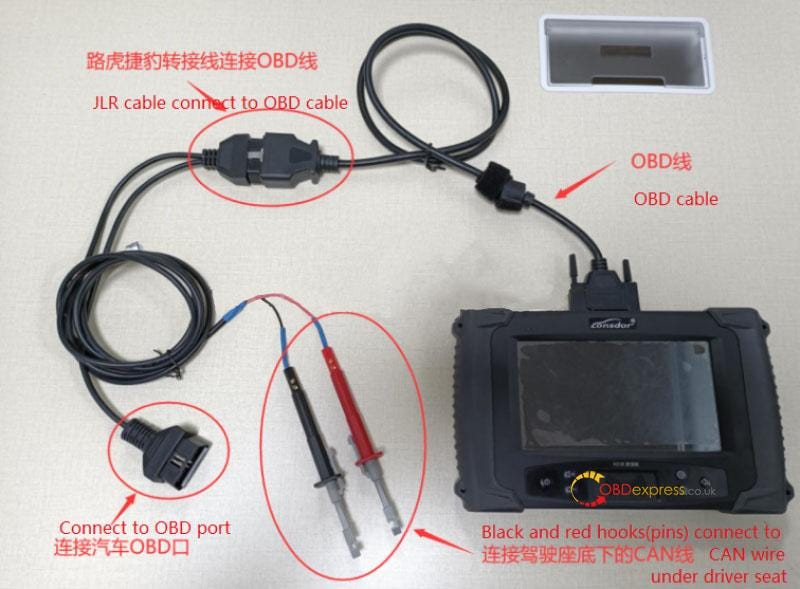
(2) Part no.HPLA: connect JLR cable to generate working key.
JLR Connnector Connection
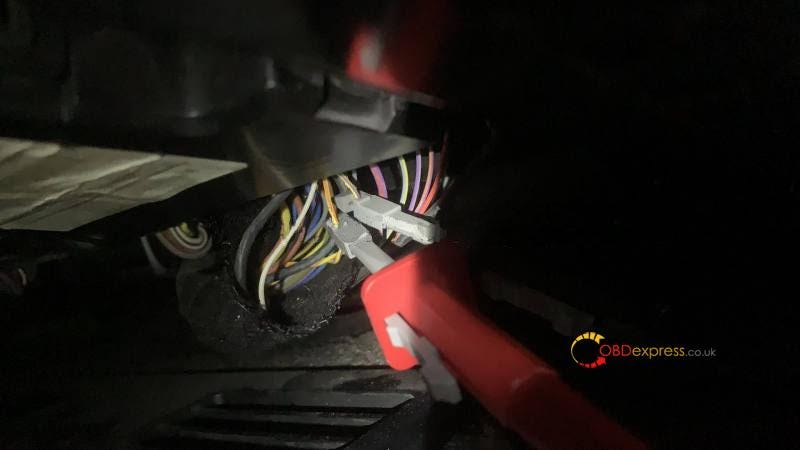
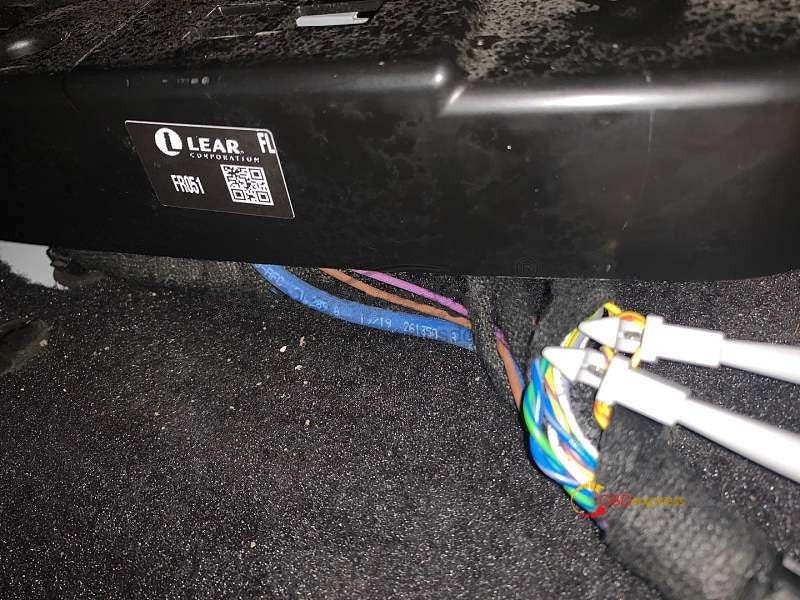
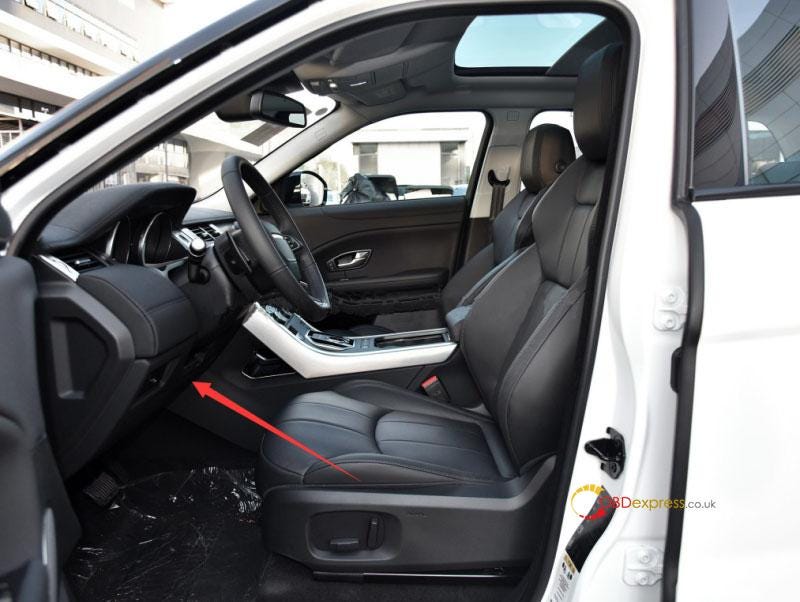
(1) Find CAN wire under driver seat
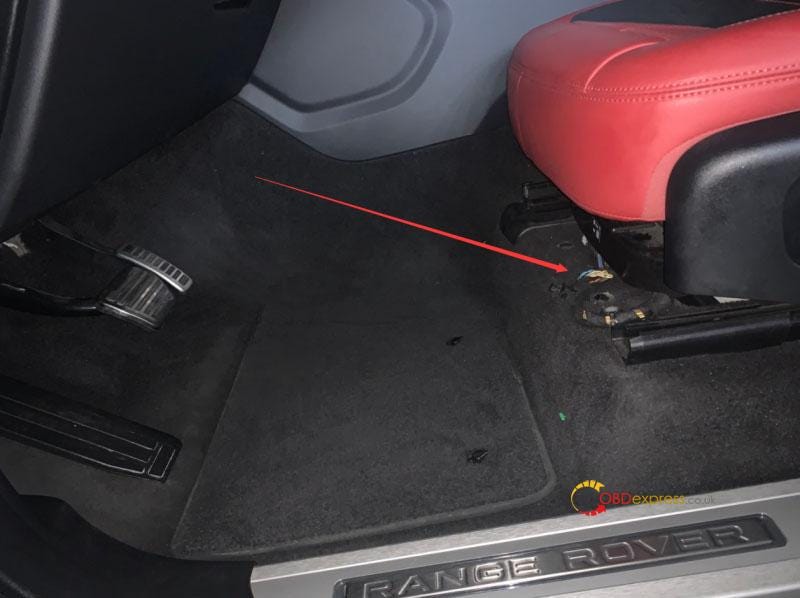
(2) Find the wire in below pics:
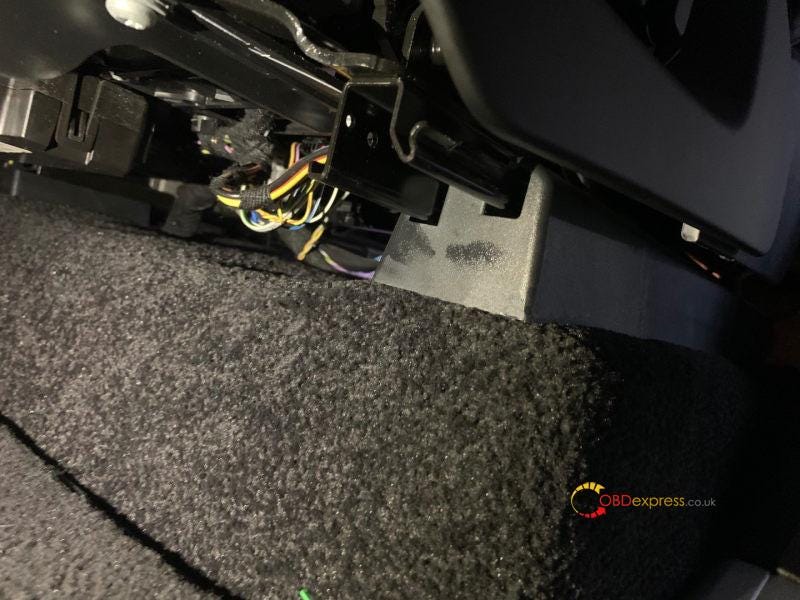
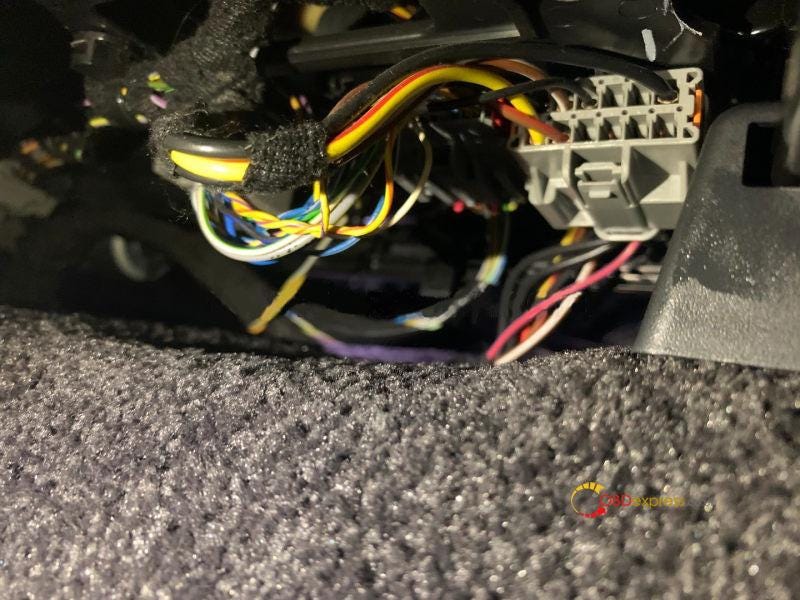
(3) Connection way is shown below, there is a twisted pair (CAN wire) under
driver seat, one is yellow-red CANH, the other is yellow-purple CANL, connect
the red hook(pin) to CANH, and conect the black hook(pin) to CANL. If the
twisted pair is different in color, try to connnect the two hooks to different
wires respectively, if communication fails, then change the connection
order.
(4) JLR cable connection:
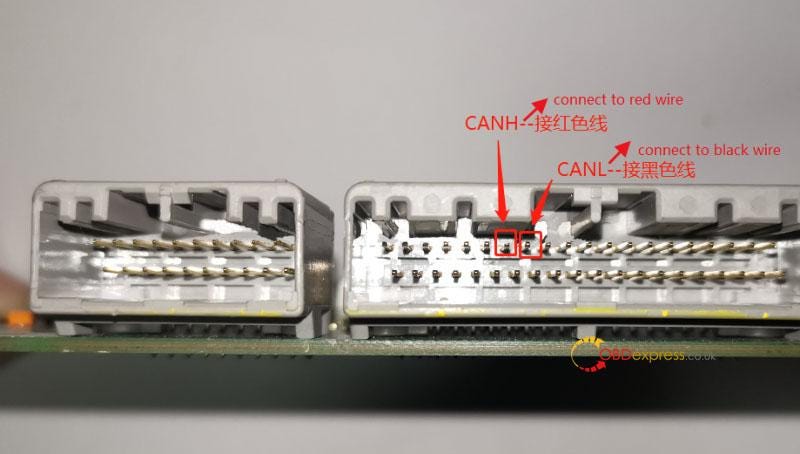
(5) CAN wire is different in position for some vehicle models, cannot
directly connect JLR cable under driver seat. Require to find KVM in trunk
first, use L-JCD 2 in 1 cable to connect CAN wire. If using JLR cable, require
to connect a extension cord, then use two clamps to connect CAN. Shown in below
pic:
Reference
PIN code required: No
OBD Position: Under steering wheel
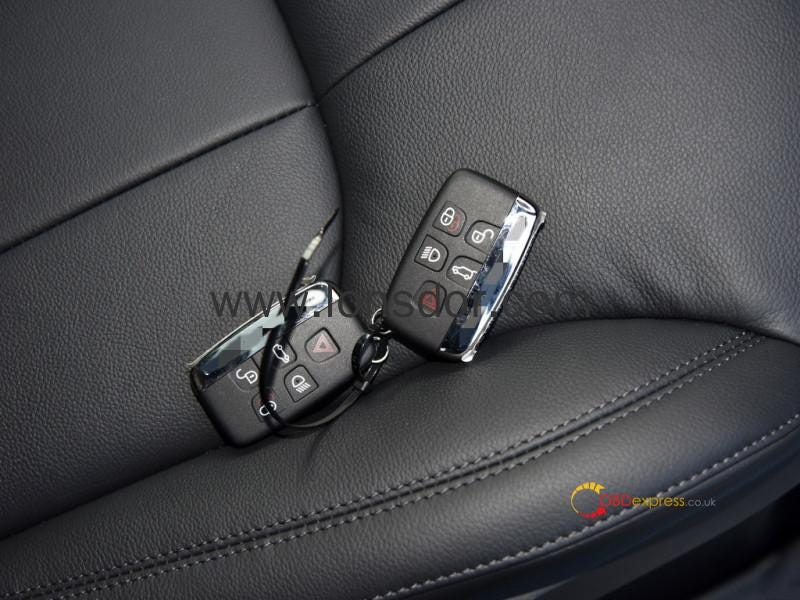
Key.
Part 2. Land Rover (2018-)
Path
LAND ROVER>>Select from vehicle>>Land Rover (2018-)>>Smart
key
Function
Copy and add smart key: copy and add key in the position of working key, and
generate new key in the position of lost key.
All smart key lost: reprogram keys when all registered keys are lost.
Identify smart key: identify smart key ID.
Modify vehicle config: make it possible for low equipped keys to be
programmed on high config vehicles.
Replace RFA: replace vehicle RFA module.
Write RFA initial data: if the replaced RFA chip has no intial data written,
you can use this function to write data to the RFA.
Operation
Key Programming Procedure
High config vehicles with PSPS:
1)Add key when working key is available, vehicle is not in alarm
state:
JPLA ver: Replace RFA—> Modify vehicle config—> Copy and add smart
key.
K8D2 ver: Replace RFA—> Modify vehicle config—> Copy and add smart key,
or modify vehicle config—> copy and add smart key—> Replace RFA.
2)On AKL condition, vehicle is in alarm state:
Connect JLR cable well(refer to 'Attention'), then enter [All smart key lost]
function menu, use Lonsdor JLR key to generate an emergency key, after
generation press the remote's unlock button to disarm vehicle alarm state. After
disarming the state, unplug the JLR cable. No need to connect JLR cable while
replacing RFA and modifying vehicle config.
JPLA ver: Replace RFA—> Modify vehicle config—> Copy and add smart
key.
K8D2 ver: Replace RFA—> Modify vehicle config—> Copy and add smart key,
or modify vehicle config—> copy and add smart key—> Replace RFA.
Low config vehicles without PEPS:
1)Add key when working key is available, vehicle is not in alarm
state:
Enter [Copy and add smart key] function menu, use Lonsdor JLR key to add new
key.
2)On AKL condition, vehicle is in alarm state:
Connect JLR cable well(refer to 'Attention'), then enter [All smart key lost]
function menu, use Lonsdor JLR key to add new key.
Copy and add smart key
This function can copy and add key in the position of working key, and
generate new key in the position of lost key, please note:
(1) For low config models without PEPS, the generated key function is
complete, can be used directly. For high config models with PEPS, the key has
RKE and Emergency Start functions ONLY (no PKE) after copy finished;
(2) RKE function of the copied key will conflict with the working key in the
same key position;
(3) New key to be generated must be Lonsdor dedicated JLR(2018+) key.
Communicating...
Software ver: K8D2-14C104-AC;
Pls prepare all working keys, and in turn to place each key into this
device's card slot to idenitify. Pls note: if a working key is not identified in
the slot, after new key generation completed, RKE function of the unidentified
working key will become invalid;
Pls place the working key to be identified into this device's card slot;
Reading and writing key...pls keep the key placed stably;
Identified key info: key ID: 59B6F4E7 , remote sync code: 1FFB4E00;
Pls select the position with key ID to copy and generate working key;
Pls place the key to be generated into this device's card slot;
Reading and writing key...pls keep the key placed stably;
Key generation success, if current vehicle is in alarm state, pls press the
remote's unlock button to disarm the state;
Program completed.
All smart key lost
This function is for AKL condition, please note the following points, use it
with caution:
(1) It will delete all working keys and doesn't support the lost keys to be
re-programmed to the vehicle;
(2) New keys must be Lonsdor dedicated JLR(2018+) key;
(3) For low config models, it supports AKL programming (generate key
directly). For high config models, require to use car manufacturer's diagnosis
device to execute [Replace RFA] process first, and then modify car config
(namely, disable UWB function), before using this function to do AKL;
(4) High config models use this function directly when no config data
modified, and the generated key has RKE and Emergency Start functions ONLY (has
no PKE).
Communicating...
Software ver: K8D2-14C104-AC;
Pls select the position with key ID to copy and generate working key;
Pls place the key to be generated into this device's card slot;
Reading and writing key...pls keep the key placed stably;
Key generation success, if current vehicle is in alarm state, pls press the
remote's unlock button to disarm the state;
Program completed.
Identify smart key
Pls place the smart key to be identified into this device's card slot;
Reading and writing key...pls keep the key placed stably;
Key ID: 59B6F4E7.
Modify vehicle config
This function is designated for JLR(2018+) high config models, by using it to
disable UWB PEPS function, support for low equipped keys to be programmed to the
high config models.
(1) Backup vehicle config data: back up config data of current vehicle;
(2) Modify vehicle config data: disable UWB PEPS function;
(3) Restore vehicle config data: restore the config data backed up before to
current vehicle.
Back up vehicle config data;
Communicating...
Pls enter the filename;
Backup success;
Modify vehicle config data;
Communicating...
Reading data...
Disable/turn off UWB PEPS function;
Configuring system...
Completed.
Replace RFA
This function is the programming process of replacing RFA module for
JLR(2018+) models, pls note the following:
(1) If current vehicle RFA is locked, [Replace RFA] process cannot be
executed;
(2) Confirm that current vehicle has installed brand new RFA module, or that
the main chip of current RFA has been replaced with a brand new chip SPC560B60L3
and initial data has been written;
(3) Vehicle battery voltage should be kept above 12V, otherwise exception may
occur during programming, highly suggest that you plug external 12V DC to power
up vehicle battery.
(4) Pls prepare at least two keys which can be programmed to current
vehicle.
(5) In vehicle alarm state, pls disarm the alarm first before function
execution.
Communicating...
Read info:
Part no.: JPLA-14C430-AB
Software ver: JPLA-14C104-AE
VIN code: SALGA2BV4JA******
The program will turn ignition on automatically, pls confirm the ignition is
turned off;
The following process is to execute RFA data programming function, if current
RFA has been executed once a complete data programming, can skip over this
process. Click OK to execute RFA data programming; click Cancel to enter key
programming process directly.
Loading...
Erasing data storage block...
RFA data programming completed, to program key multiple times, can skip over
this process, and directly enter key programming function.
Configuring system...
The program will turn ignition on automatically, pls confirm the ignition is
turned off;
Learning VIN...
Writing immo ID...
Pls prepare at least 2 keys to be programmed, and place the key inside the
vehicle, need to press the unlock button during programming, click OK and follow
the prompts, start to program key;
Pls hold the smart key to be programmed in hand;
Press hard and hold the unlock button for 4s, the buzzer beeps twice to
indicate current key programming success;
Program completed.
Write RFA initialized data
Pls select RFA module No.:
(1) JPLA-XXXXXX-XX
(2) K8D2-XXXXXX-XX
(3) J9C3-XXXXXX-XX
Writing DFLASH data...
Writing CFLASH data...
Success.
Attention
- For low config vehicles without PEPS, the generated key function is
complete, can be used directly. For high config vehicles with PEPS, the copied
key has RKE and Emergency Start functions ONLY (has no PKE).
- RKE function of the copied key will conflict with the working key in the
same key position.
- When copying and adding key, in turn to put all working keys into the
device's card slot. After key generation is complete, RKE function of
unidentified working key will become invalid.
- Must select the position with key ID to generate new working key.
- After key generation is complete, if current vehicle is in alarm state, pls
press the remote's unlock button to disarm the state.
- [All smart key lost] function will delete all working keys, and doesn't
support the lost key to be re-programmed to the vehicle. High config models use
this function directly when no config data modified, then the generated key only
has RKE and Emergency Start functions (has no PKE).
- For low config models, it supports AKL programming (generate key directly).
For high config models, require to disable UWB function first, and then use car
manufacturer's diagnosis device to execute [Replace ECU] process, before using
this function to do AKL.
- Before replacing RFA, require to prepare at least 2 keys which can be
programmed to current vehicle.
- When replacing RFA, plug external 12V DC to power up the vehicle
battery.
- Vehicle will be under alarm state on AKL condition, you can use JLR cable to
connect the device to the vehicle to realize communication.
JLR Connnector Connection
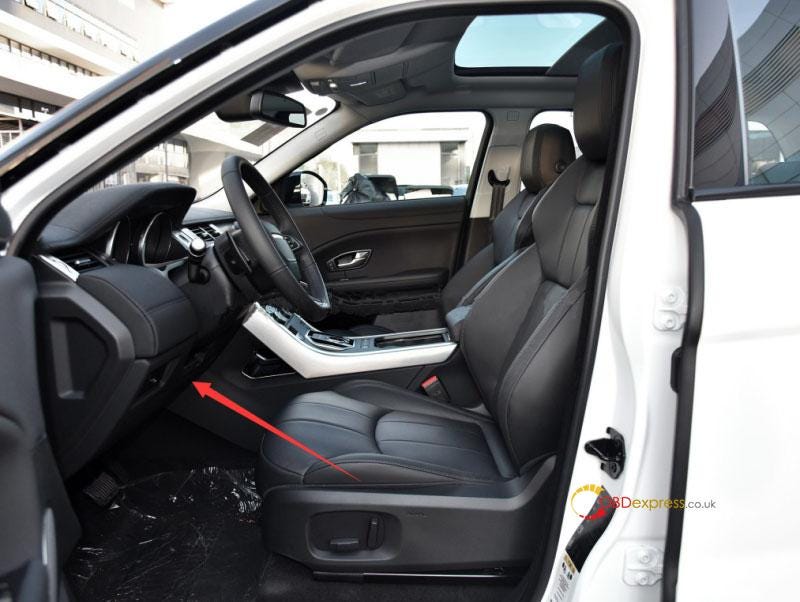
(1) Find CAN wire under driver seat.
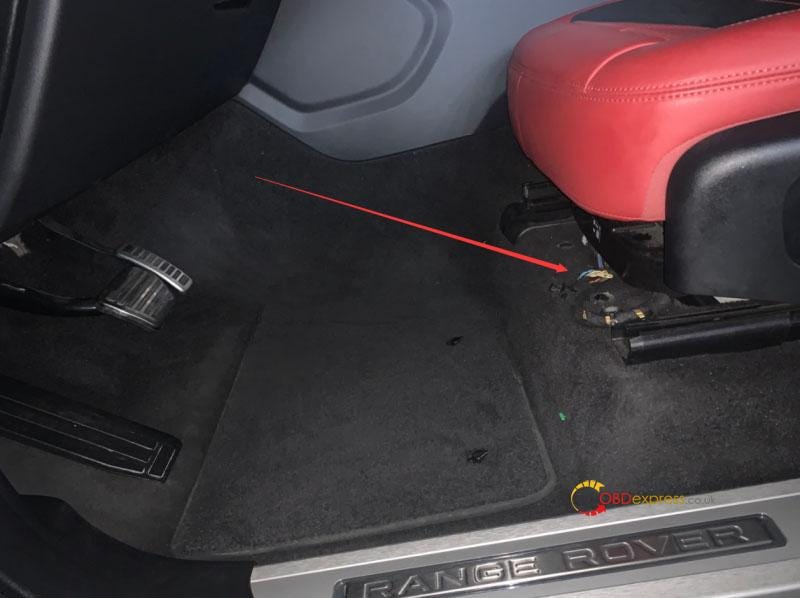
(2) Find the wire in below pics:
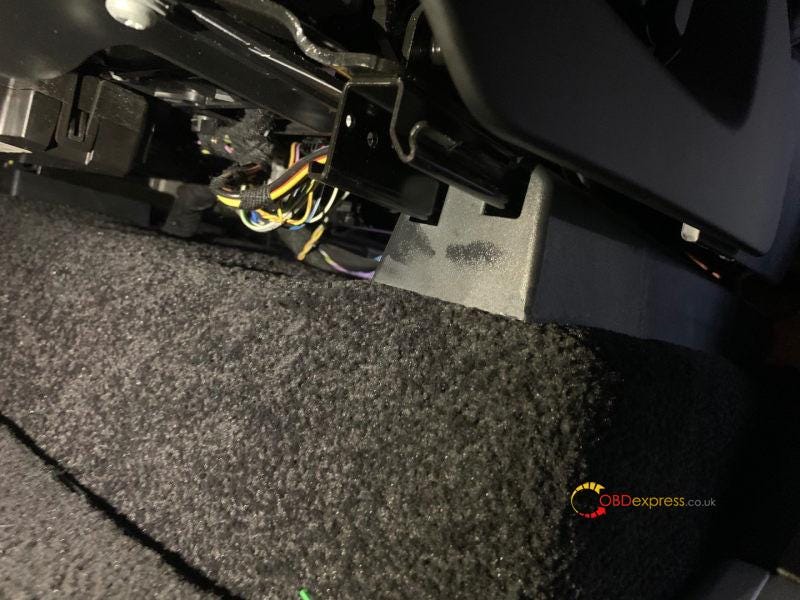
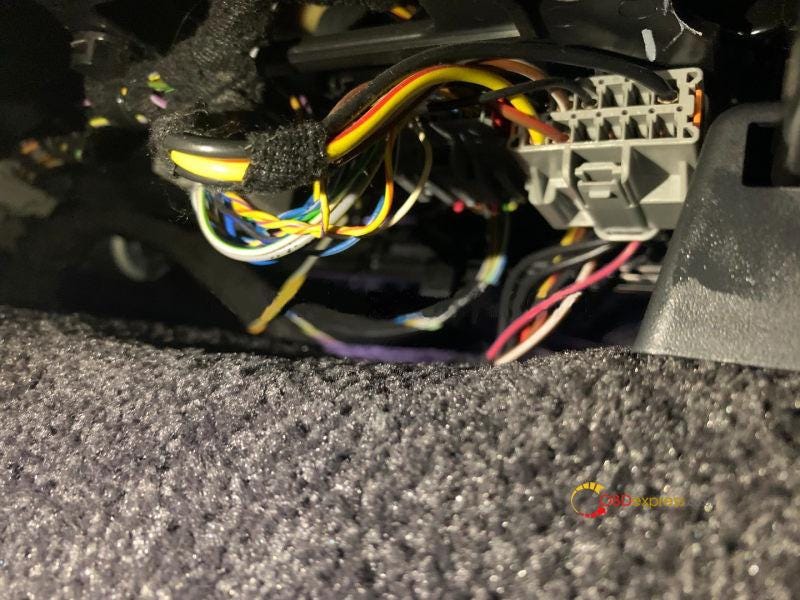
(3) Connection way is shown below, there is a twisted pair (CAN wire) under
driver seat, one is yellow-red CANH, the other is yellow-purple CANL, connect
the red hook(pin) to CANH, and conect the black hook(pin) to CANL. If the
twisted pair is different in color, try to connect the two hooks to different
wires respectively, if communication fails, then change the connection
order.
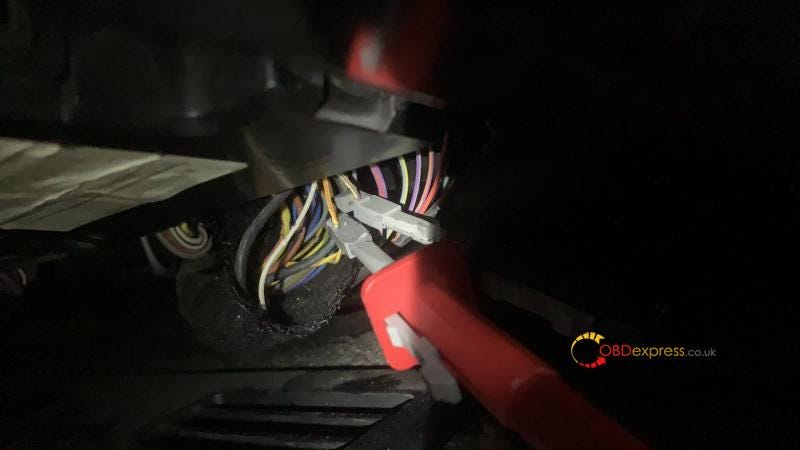
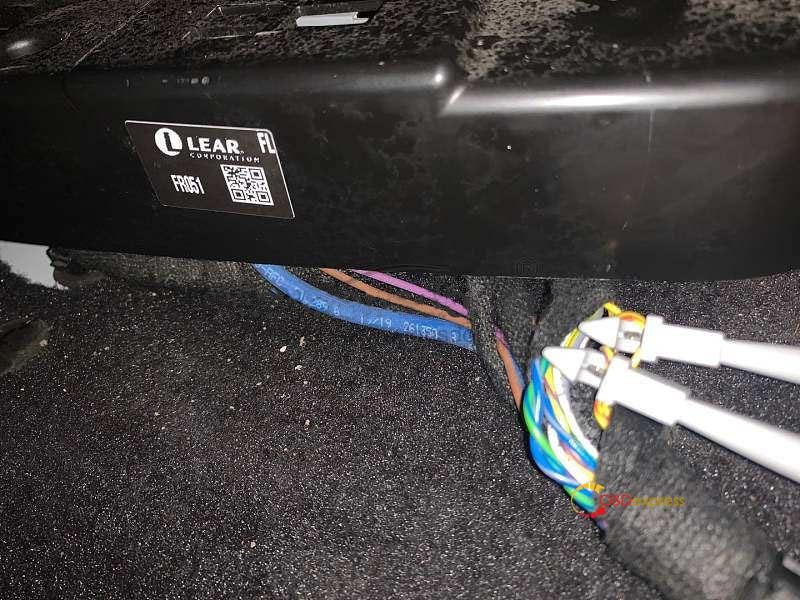
(4) JLR cable connection
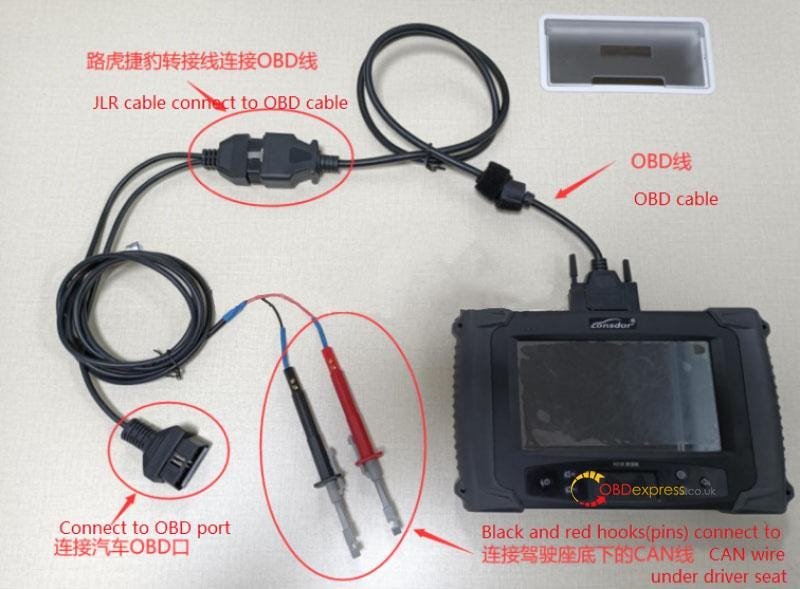
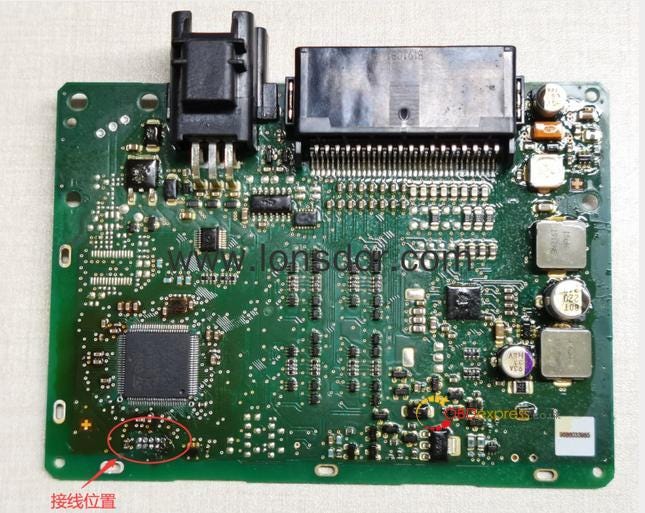
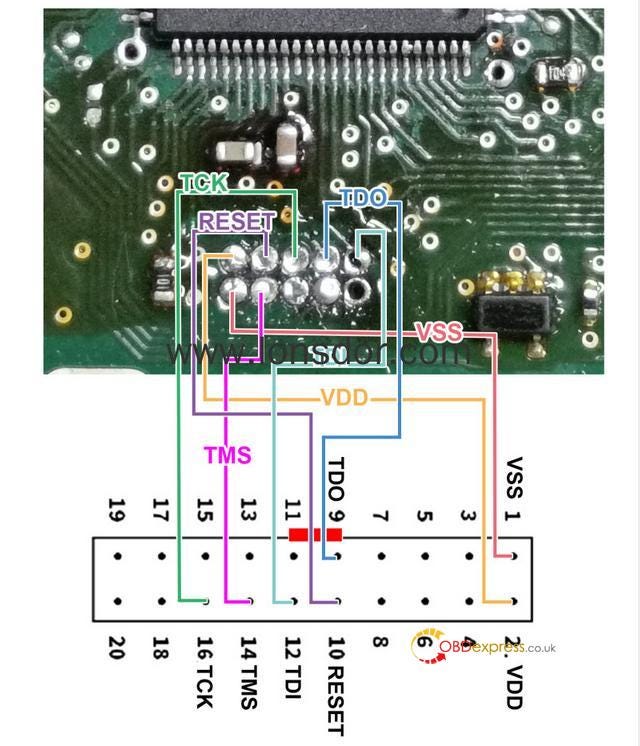
(5) If the replaced RFA chip has no intial data written, in [Write RFA
initial data] function menu you can use KPROG adaptor to write data to the
RFA.
RFA pcb
Chip wiring diagram
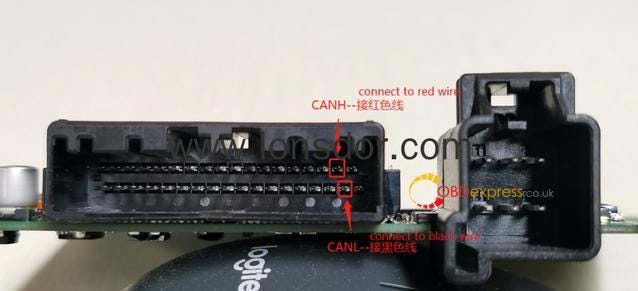
(6) CAN wire is different in position for some vehicle models, cannot
directly connect JLR cable under driver seat. Require to find KVM in car trunk
first, use L-JCD 2 in 1 cable to connect CAN wire. If using JLR cable, require
to add a extension cord, then use two clamps to connect CAN.
Reference
Chip type: 49
Remote type: 5BTN smart key, 315/433MHz
PIN code required:No
Dealer key required:No
Working key required:No
OBD Position: Under steering wheel
Key.
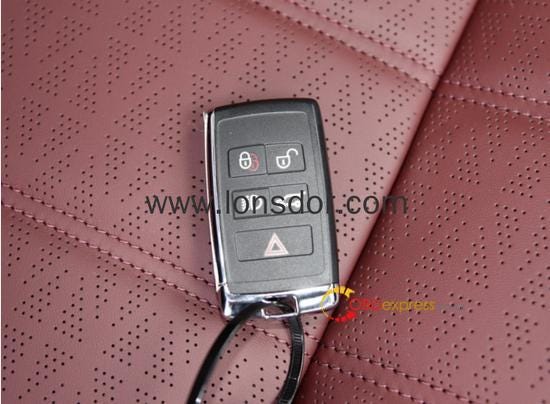
This is how to use Lonsdor
JLR Connector for 2015-2021 Land Rover & Jaguar AKL programming.
https://www.obdexpress.co.uk/