Showing posts with label VNCI 6154A. Show all posts

Wednesday, 20 May 2026

VNCI 6154B and VNCI 6154A VAG Diagnostic Tools Comparison

 For automotive technicians and specialists working within the Volkswagen Group (VAG) ecosystem, selecting the right hardware interface is critical for reliable flashing and coding. While VNCI 6154A has long been a benchmark for reliable diagnostics, the newly released VNCI 6154B brings massive hardware upgrades tailored for modern vehicle architectures.


VNCI 6154B and VNCI 6154A VAG Diagnostic Tools Comparison

Let’s look at how these two factory-level alternatives to the OEM VAS 6154 stack up against each other.

Key Similarities

Despite the hardware generational gap, both interfaces maintain the core functionalities required for comprehensive dealership-level work:

  • Software Compatibility: Both devices are fully compatible with ODIS Service (ODIS-S) and ODIS Engineering (ODIS-E).
  • Driver Infrastructure: Both interfaces operate seamlessly with the ODIS 5G Wi-Fi driver architecture.
  • Full OEM Capabilities: Both tools support complete dealer-level operations including vehicle diagnostics, module coding, parameters configuration, module flashing, and online SVM services.
  • Advanced Protocols: Network architecture for both tools includes native support for CAN FD and DoIP (Diagnostics over Internet Protocol).
  • Flexible Connectivity: Support for both standard Wi-Fi station mode and WLAN Access Point connections.

Detailed Comparison:


VNCI 6154B and VNCI 6154A VAG Diagnostic Tools Comparison

Key Differences:

VNCI 6154B VAG diagnostic tool offers upgraded hardware designed specifically for high-speed flashing, massive data transfers, and maximum stability on late-model VAG vehicles.

  • Better Driver Support: 6154B officially supports the enhanced 5053 driver; 6154A does not.
  • Next-Level Wireless: Enjoy stable 5G Wi-Fi (DoIP) and smart auto-crossover detection (DoIP MDIX) on 6154B for seamless wireless flashing.
  • Massive DoIP Speed Boost: 6154B clocks in at a rapid 100 MB/s compared to 6154A’s slower 20 MB/s.
  • Modern USB-C Port: Say goodbye to old USB connections. 6154B utilizes a USB Type-C interface pushing 480 MB/s, leaving 6154A’s 12 MB/s bandwidth in the dust.

New VNCI 6154B is 40 times faster than 6154A VAG diagnotis tool, making it the ultimate tool for high-speed ECU flashing and programming!


VNCI 6154B and VNCI 6154A VAG Diagnostic Tools Comparison

Summary Recommendation

  • Buy 6154B if: You work on 2024+ cars, do lots of heavy programming, or want the most future-proof hardware.
  • Buy 6154A if: You want a cheap, tried-and-tested tool that works perfectly for basic diagnostics, coding, and coding for older to mid-2020s VAG vehicles.

Both devices work with official ODIS-S and ODIS-E software, allowing for OEM-level diagnostics.

www.obdexpress.co.uk

Monday, 24 April 2023

VNCI 6154A Guide: Firmware Update, USB Connection, Change SN

 VNCI 6154A is a OEM diagnostic adapter for VW group vehicles, and compatible with latest ODIS software. This is a VNCI 6154A VAG Diagnostic Tool instruction guide on how to update firmware, connect by USB and change serial number. Read the article carefully to learn how to do.

How to update VNCI 6154A firmware?

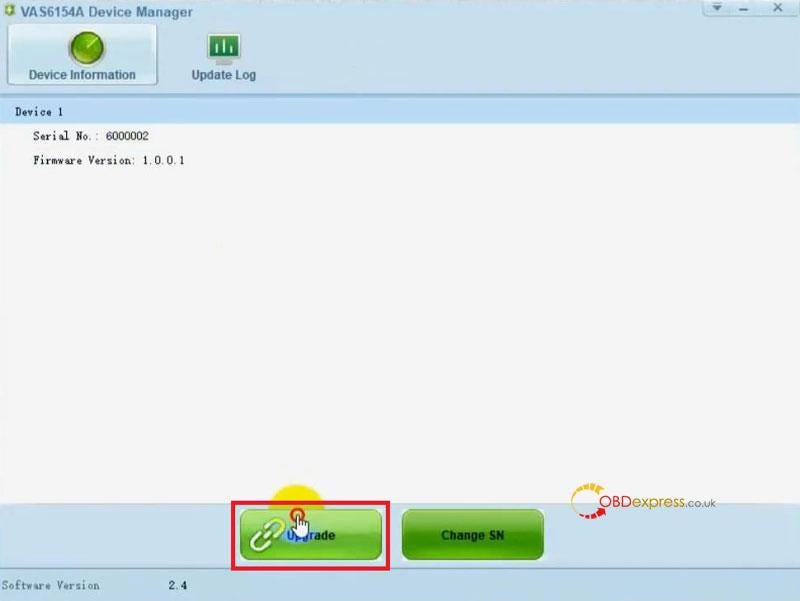
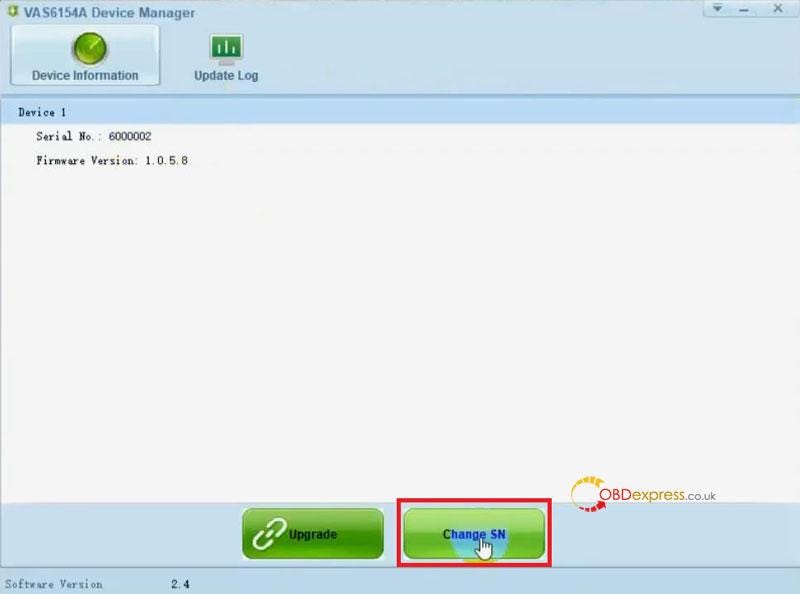
Run VNCI 6154A Device Manager >> Upgrade

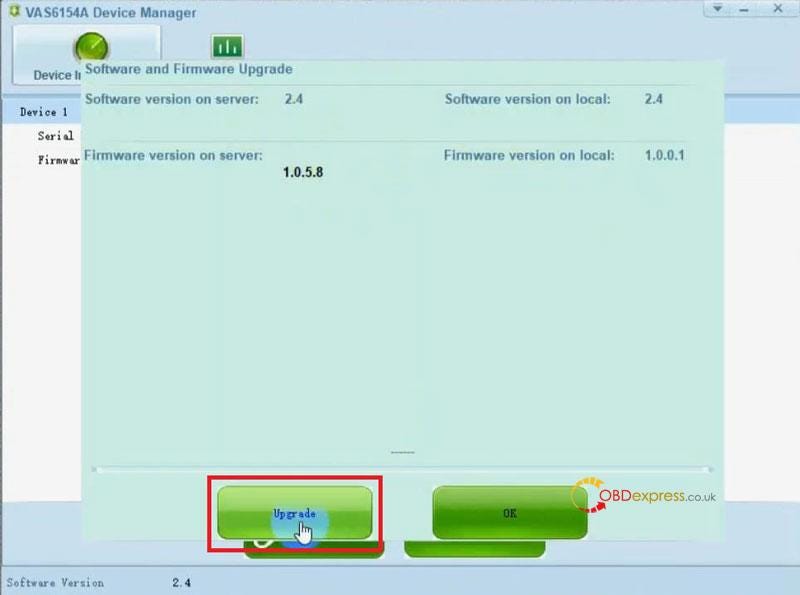
If there are new software releases, continue clicking "Upgrade".

After the update is completed, VNCI 6154A will emit a beep sound, Click "OK".

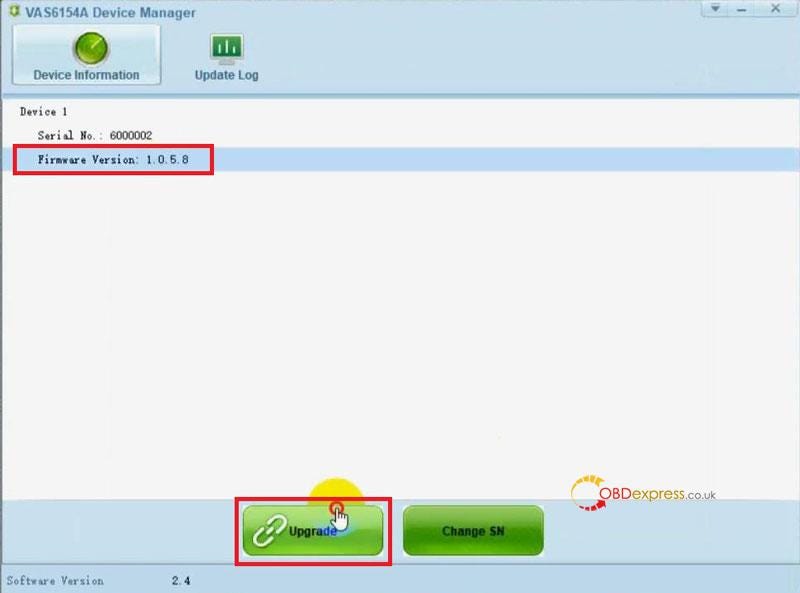
Selected latest firmware version >> Upgrade >> OK

VNCI 6154A Guide - Firmware Update, USB Connection, Change SN

VNCI 6154A Guide - Firmware Update, USB Connection, Change SN

VNCI 6154A Guide - Firmware Update, USB Connection, Change SN

How to connect VNCI 6154A via USB?

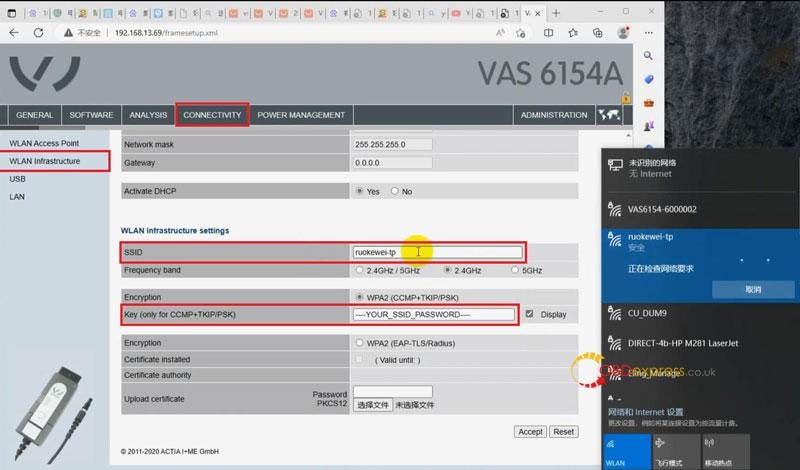
Connect VNCI 6154A and computer via USB, enter 192.168.13.69.

Select language >> Connectivity >> WLAN infrastructure >> Selected "WLAN operating mode after startup">> Type WiFi name in SSID, password in Key >> Accept

Make sure to connect computer and device in the same WiFi.

VNCI 6154A Guide - Firmware Update, USB Connection, Change SN

If VNCI 6154A is connected to the car OBD power supply and unable to connect via USB. At this time, we can use AP connection(WiFi) method.

Details refer to:

How Configure VNCI 6154A VAG ODIS Tool Connection?

How to change VNCI 6154A Serial Number?

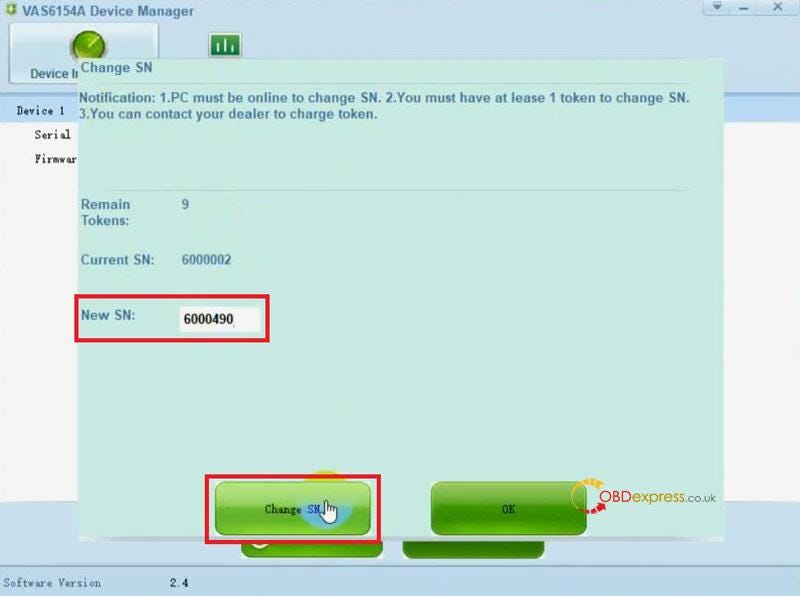
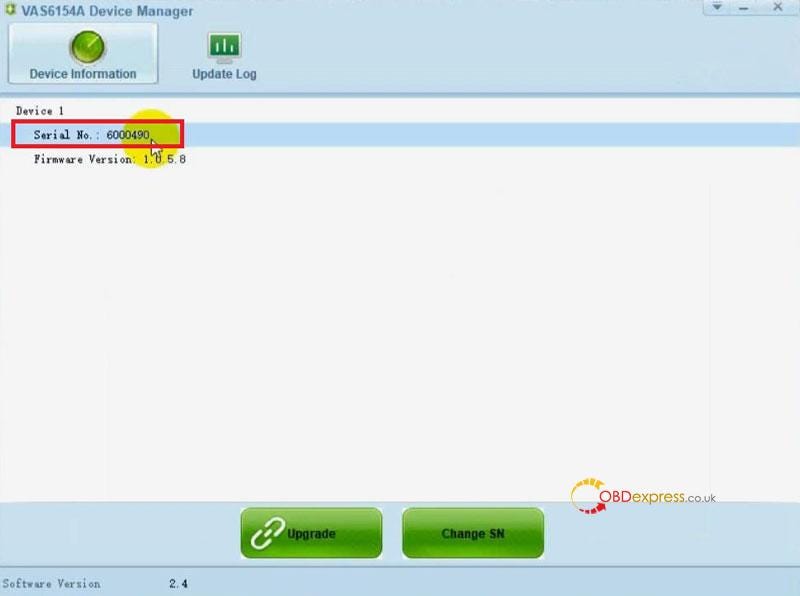
Run VNCI 6154A Device Manager>> Change SN >> Enter New SN: 6000490 >> Change SN

The Serial Number has been changed.

Done.

Notification:

  • PC must be online to change SN.
  • You must have at least 1 token to change SN.
  • You can contact your dealer to charge token.
    1. VNCI 6154A Guide - Firmware Update, USB Connection, Change SN

      VNCI 6154A Guide - Firmware Update, USB Connection, Change SN

      VNCI 6154A Guide - Firmware Update, USB Connection, Change SN

      www.obdexpress.co.uk


      Monday, 10 April 2023

      How to Configure VNCI 6154A VAG Tool Connection?

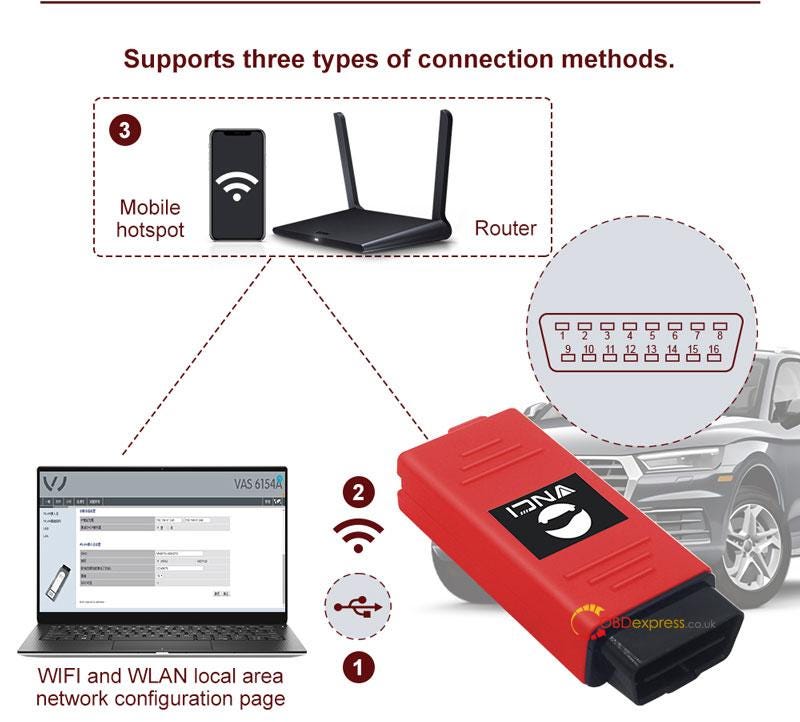
       There are 3 connection methods for VNCI 6154A VAG Diagnostic Tool: USB connection, AP connection(WiFi) & station connection(WLAN local area network). Just as its name implies, USB connection is easy to connect VNCI 6154A with computer via USB cable. So we're going to focus on introducing AP connection & station connection.

      * VNCI 6154A ODIS Tool can be powered via OBD port.

      How to connect VNCI 6154A via WiFi?

      AP (WiFi) connection mode is quite simple, as long as connect VNCI 6154A with computer via device WiFi, similar to Bluetooth.

    2. Plug VNCI 6154A into vehicle OBD to power on;
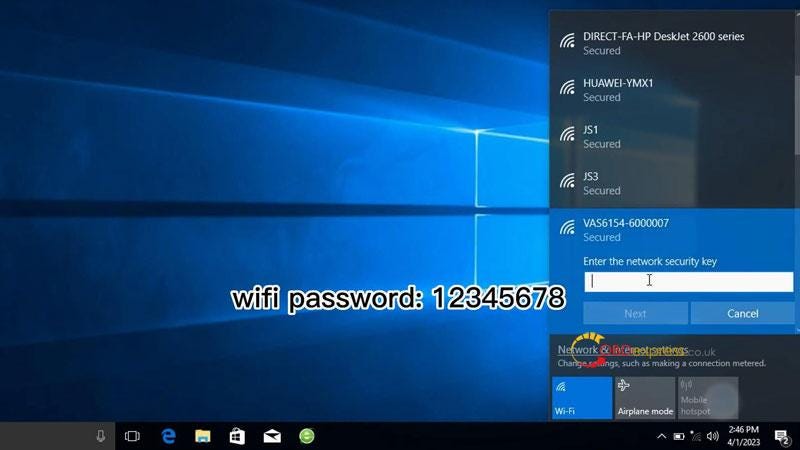
    3. Search & connect to VAS6154 WiFi on computer(password: 12345678);
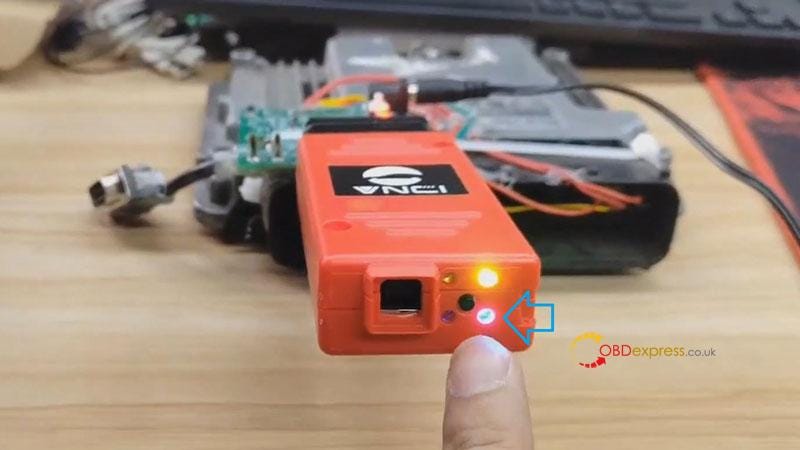
    4. After successful connection, the Conn blue light will turn on.
      1. Configure VNCI 6154A VAG Tool Connection

        Configure VNCI 6154A VAG Tool Connection

        Configure VNCI 6154A VAG Tool Connection

        Operation Video:

        https://www.youtube.com/watch?v=y87NDv-M-pk

        How to connect VNCI 6154A via WLAN?

        Station(WLAN) connection mode means to connect VNCI 6154A & computer to the same local area network.

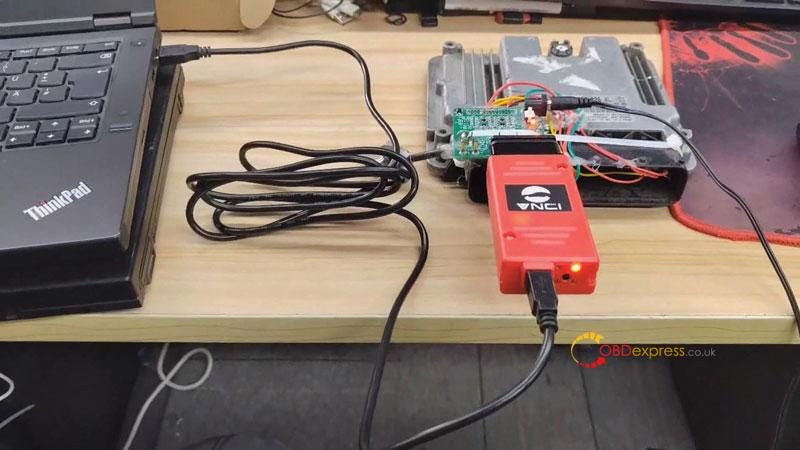
      2. Connect VNCI 6154A to computer via USB cable, run ODIS software;
        1. Configure VNCI 6154A VAG Tool Connection

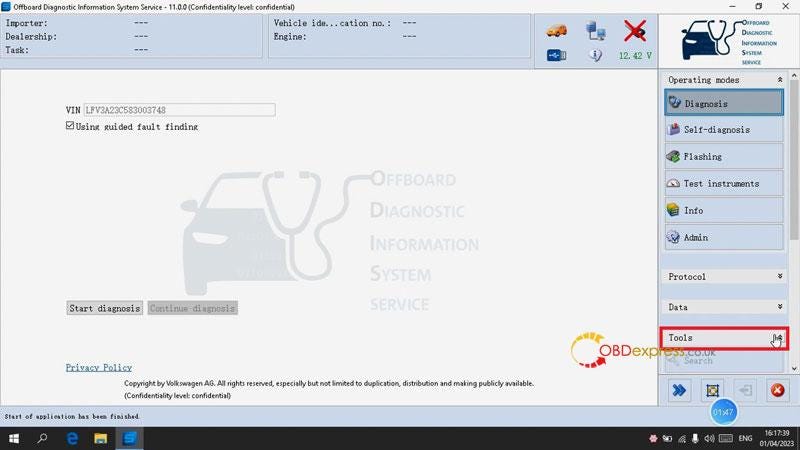
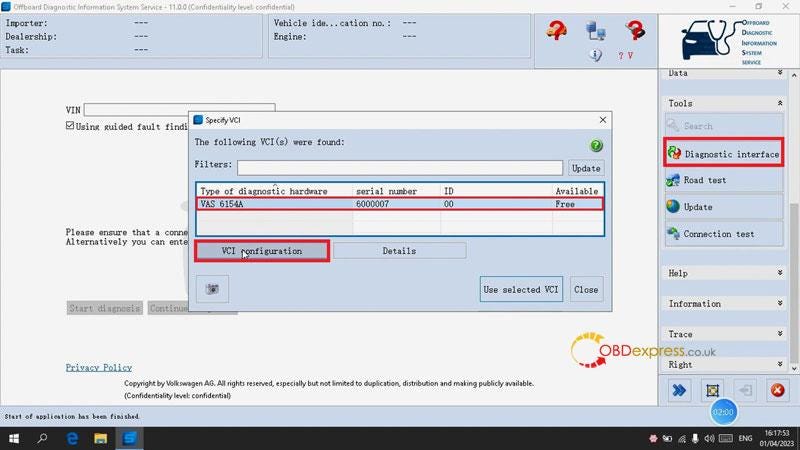
        2. Detect VIN: Diagnosis >> Tools;
          1. Configure VNCI 6154A VAG Tool Connection

          2. Configure WLAN settings
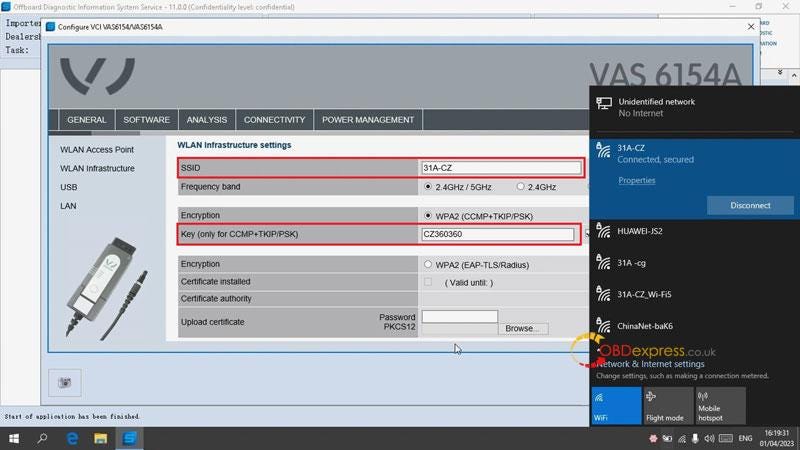
              • Diagnostic interface >> VAS 6154A >> VCI configuration >> Connectivity >> WLAN infrastructure
              • Check local area network on computer;
              • Input same network name in "SSID", passwords in "Key", click "Accept" to save.

              Configure VNCI 6154A VAG Tool Connection

              Configure VNCI 6154A VAG Tool Connection

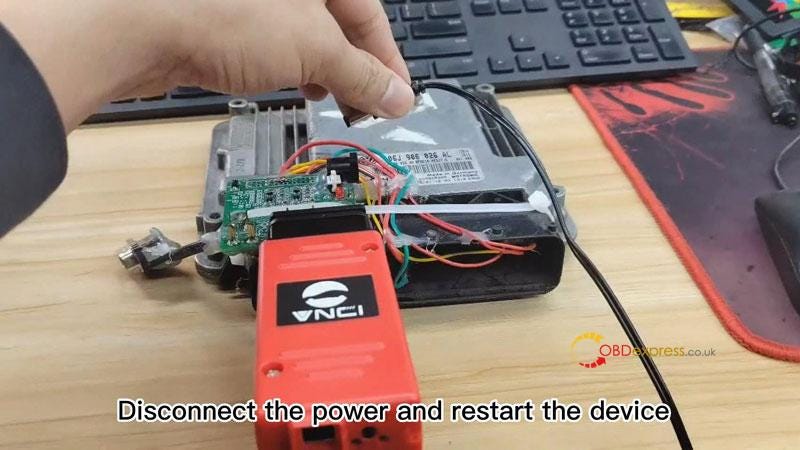
            1. Disconnect VNCI 6154A from vehicle & computer, then restart it;
              1. Configure VNCI 6154A VAG Tool Connection

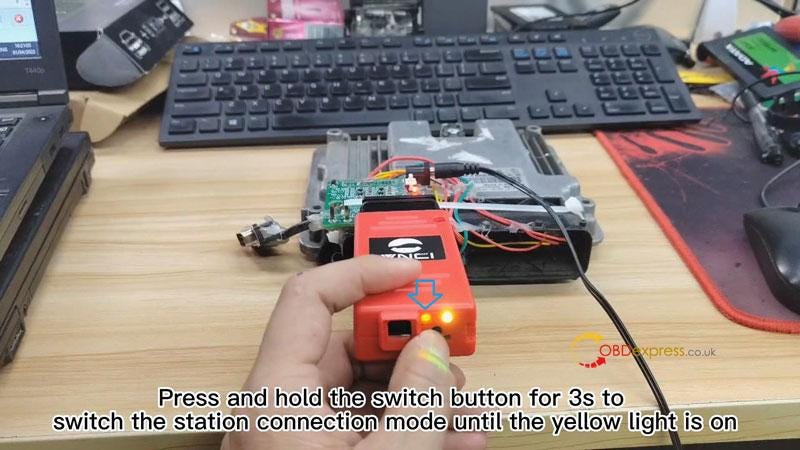
              2. Press and hold the switch button for 3s until the orange light is on, which means it's in station connection mode.
                1. Configure VNCI 6154A VAG Tool Connection

                  Completed!

                  Now the VAG diagnostic tool is ready for start.

                  Operation video:

                  https://www.youtube.com/watch?v=La398VEmTeE

                  Read also:

                  VNCI 6154A VAG Scanner: Alternative of Original VAS 6154A

                  VNCI 6154A VAG Scanner: Alternative of Original VAS 6154A

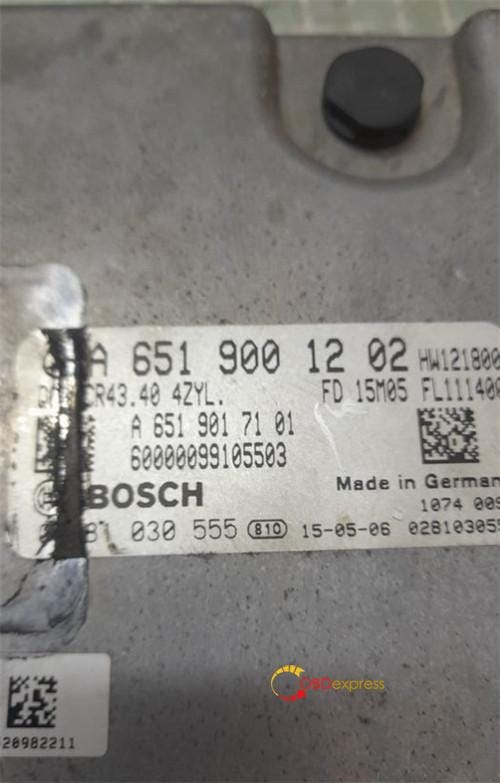
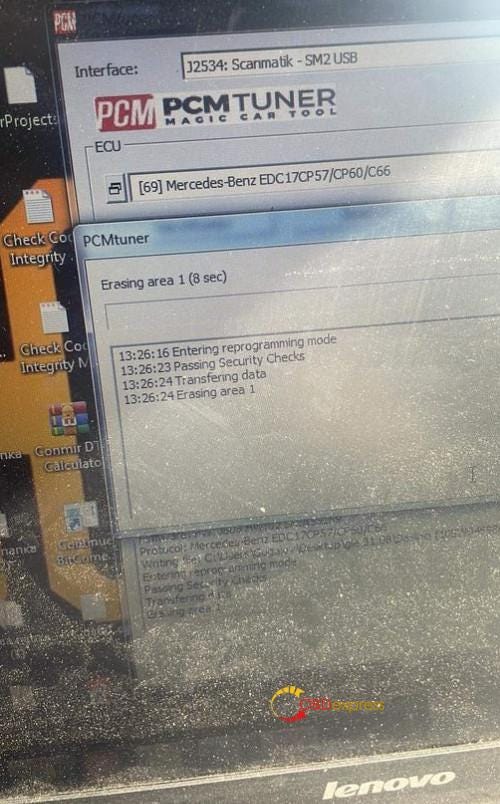
                   PCMTuner ECU Programmer can read, write and auto correct checksum on Mercedes- Benz EDC17CP60 via OBD and on bench.

                  Customer feedback 1:

                  Working fine OBD read/write/checksum!

                  PCMtuner Read Write and Checksum for Mercedes-Benz EDC17CP60

                  Customer feedback 2:

                  Mercedes GLE 250CDI 204HP 2018

                  R/W OBD 2 EDC17CP60 MODULE 69

                  REMAP STAGE 1

                  TQ MONITORING OFF

                  AdBlue OFF

                  SCR OFF

                  DPF OFF

                  NOX OFF

                  EGR OFF

                  FLAPS OFF

                  M55 OFF

                  START STOP OFF

                  PCMtuner Read Write and Checksum for Mercedes-Benz EDC17CP60

                  fyi…

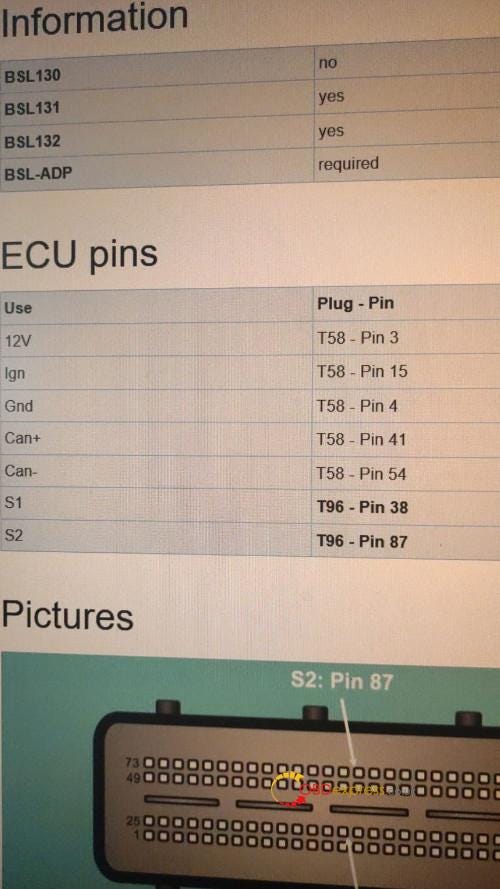
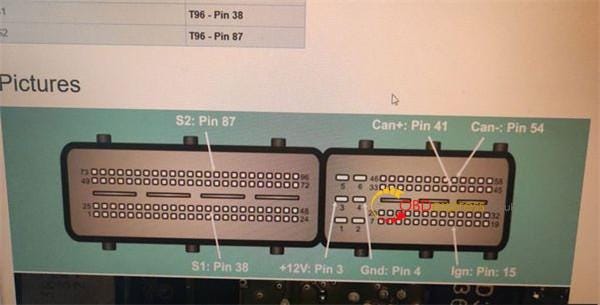
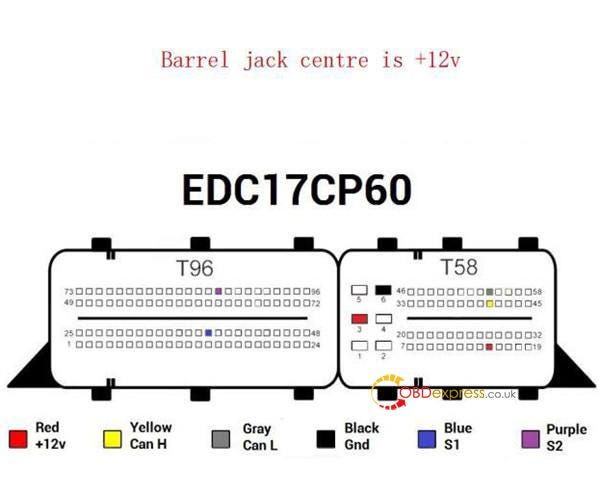
                  Here is the PCMTuner Mercedes EDC17CP60 Bench PINOUT.

                  12V- T58 Pin3

                  Ign-T58 Pin 15

                  Gnd- T58 Pin 4

                  Can+ T58 Pin 41

                  Can- T58 Pin 54

                  S1- T96 Pin 38

                  S2- T96 Pin 87

                  PCMtuner Read Write and Checksum for Mercedes-Benz EDC17CP60

                  PCMtuner Read Write and Checksum for Mercedes-Benz EDC17CP60

                  This bench pinout is also ok.

                  PCMtuner Read Write and Checksum for Mercedes-Benz EDC17CP60

                  You can also read it OBD on car.

                  www.obdexpress.co.uk

                  Thursday, 6 April 2023

                  VNCI 6154A VAG Scanner: Alternative of Original VAS 6154A

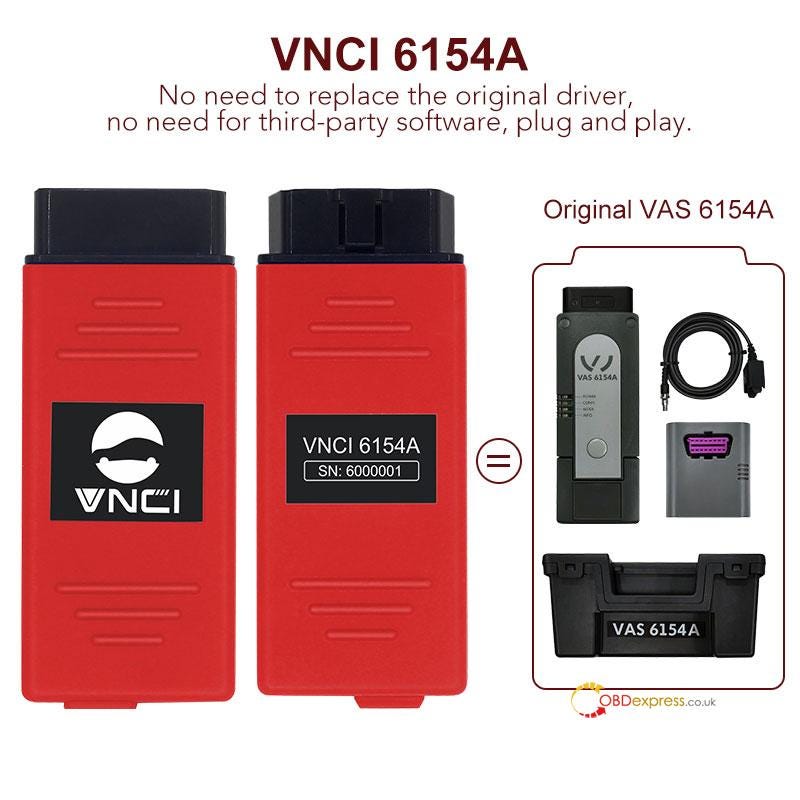
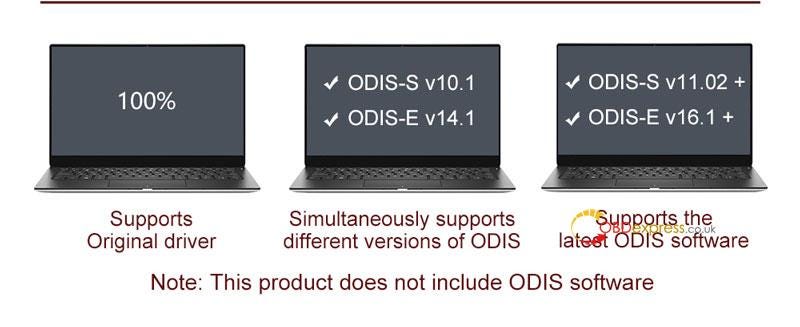
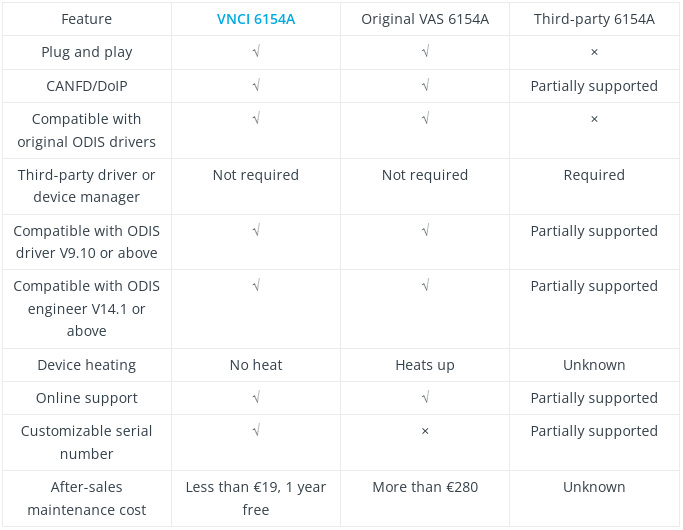
                   VNCI 6154A VAG Diagnostic Tool is an OBD2 scanner for Volkswagen group vehicles including VW, Audi, Skoda, Seat, Bentley, Bugatti, Lamborghini & MAN. It has newly added CANFD, DOIP protocol to replace VAS 6154A, compatible with latest ODIS V9.10, ODIS Engineer V14.1 or above.

                  VNCI 6154A VAG Scanner - Alternative of Original VAS 6154A

                  Features

                2. 100% support for all original factory functions: online function, clear fault codes, flashing of hidden features, coding and programming, etc.
                3. 100% supports original driver, no need for third-party software, plug and play.
                4. 100% support DoIP & CANFD protocol for VW group's electric vehicle ID series.
                5. 100% support KWP2000, UDS, CAN, K-line protocol to cover VAG models from 1995–2023+
                6. Supports different and latest versions of ODIS software.
                7. Supports 3 types of connection methods: USB connection mode, AP connection mode and station connection mode.
                8. Support 22 languages covering GB, US, FR, DE, ES, RU, GR, DK, HR, IT, HU, NL, PL, PT, RO, SLO, FI, SW, TR, CZ, JP, CN, KO.
                  1. VNCI 6154A VAG Scanner - Alternative of Original VAS 6154A

                    VNCI 6154A VAG Scanner - Alternative of Original VAS 6154A

                    VNCI 6154A VAG Scanner - Alternative of Original VAS 6154A

                    Installation Requirements

                  2. Win10 64-bit Professional Edition, 4G Memory, at least 100G free space on C drive.
                  3. Supply power: OBD port 12V, USB port 5V.
                  4. The original ODIS V9.10, ODIS Engineer V14.1 or above software must be installed.
                  5. The original factory driver CANNOT be replaced.
                  6. The third-party ODIS drivers CANNOT be installed.
                    1. VNCI 6154A vs. VAS 6154A vs. Third-party 6154A

                      VNCI 6154A VAG Scanner - Alternative of Original VAS 6154A

                      Button Instruction

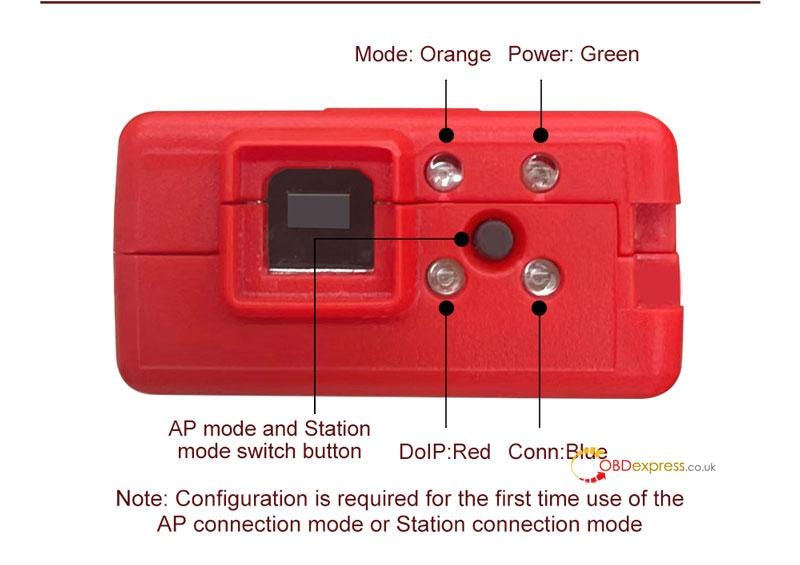
                      Switch Button: switch AP mode and Station mode

                      Mode Light: orange

                      Power Light: green

                      DoIP Light: red

                      Conn Light: blue

                      VNCI 6154A VAG Scanner - Alternative of Original VAS 6154A

                      Why to choose VNCI 6154A?

                    2. Free license until 2030 year.
                    3. One year free maintenance, the second year cost will not exceed $19.
                    4. Free firmware online upgrade.
                    5. Free after-sales support.
                    6. Suitable for individual enthusiasts, auto repair shops and authorized service stations. Low cost and investment for high return.
                      1. www.obdexpress.co.uk

                        KEYDIY New KD-Moto Adapter Adds Honda, Yamaha & Ducati

                          Motorcycle key programming is now coming to the KEYDIY KD-X4 . The new KEYDIY KD-Moto Adapter adds dedicated motorcycle coverage for a w...