Showing posts with label Scania SDP3. Show all posts

Wednesday, 24 August 2022

Scania SDP3 2.51.1.43 Free Download and Install Guide (Win7/ Win10)

 Newest Scania SDP3 V2.51.1.43 software has been tested and confirmed by obdexpress.co.uk engineer 100% working for Scania VCI3 Scanner. There is no software crash problem at present. Here share the related software download link and installation guide.

Part 1: Free Download 2.51.1.43 Scania SDP3

Resource 1: Mega Download

https://mega.nz/folder/0htQAS7I#qtgqIP_UwKgkdOMb_Nqohg

Resource 2: Chinese weiyun

https://share.weiyun.com/NFdpWEjN

password: vfy9fq

Resource 3: with 1 time free activation

https://www.obdexpress.co.uk/wholesale/scania-sdp3-diagnosis-programmer.html

Free activation is locked to one PC.

Compatible diagnostic interface: SCANIA VCI3

Language supported: English, Dutch, Spanish, Italian, German, French, Persian, Finnish, Russian, Thai, Turkish, Swedish, Chinese, Czech, Japanese, Korean, Polish and Portuguese

Operating system:

Win7 sp1 ultimate edition 32 or 64

Win7 pro sp1 just 32 bit

Win10 pro (Windows 10 HOME EDITION, NOT RECOMMENDED.)

5 GB of Free HDD space 3 GB of RAM

Part 2: Scania SDP3 2.51.1.43 Installation Guide

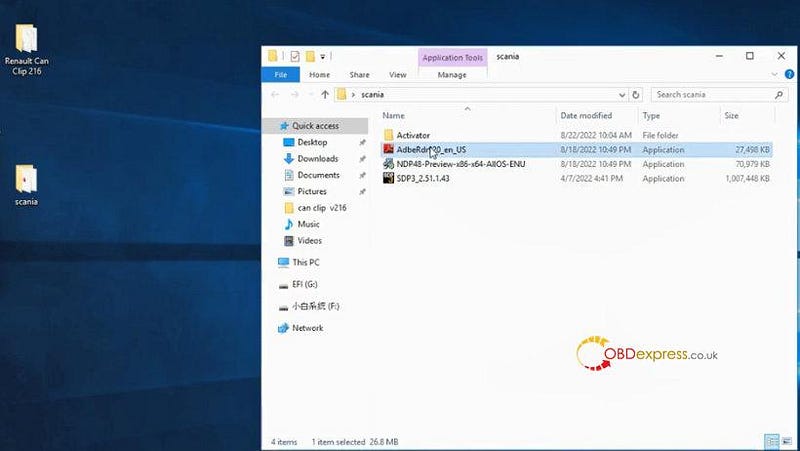
After download, there are 4 items in the Scania software folder.

  • Activator
  • AdbeRdr920_en_US
  • NDP48-Preview-x86-x64-ABOS-ENU
  • 51.1.43

install the latest version V2.51.1.43 Scania SDP3 software

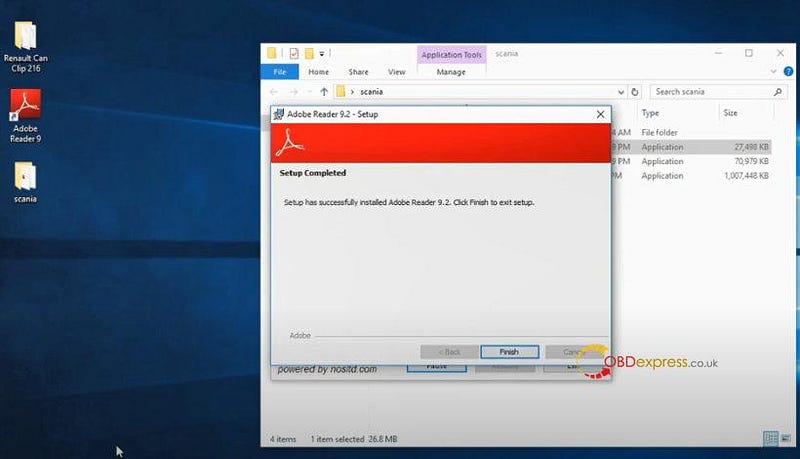
Step 1: Install Adove Reader 9.2

Open AdbeRdr920_en_US to install

install the latest version V2.51.1.43 Scania SDP3 software

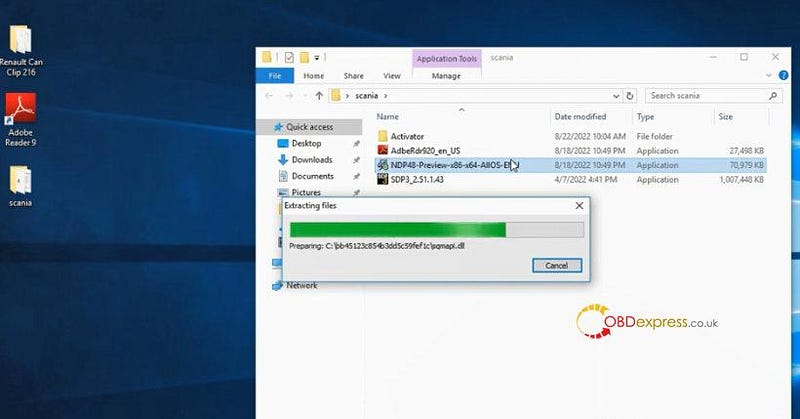
Step 2: Insatll NET4.8

If your computer does not have NET 4.8 installed. Run this application package 'NDP48-Preview-x86-x64-ABOS-ENU'

Open the application to extract files

install the latest version V2.51.1.43 Scania SDP3 software

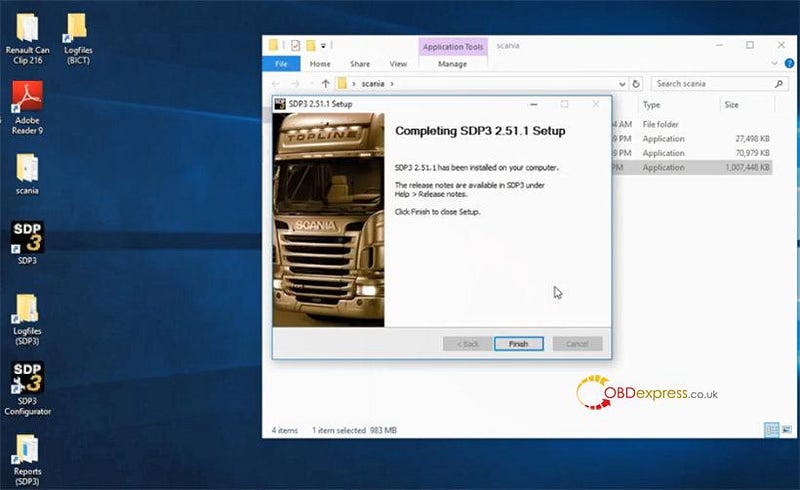
Step 3: Install SDP3 2.51.1 software

Open SDP3_2.51.1.43 application to install

install the latest version V2.51.1.43 Scania SDP3 software

Step 4: Install and activate SDP3 driver

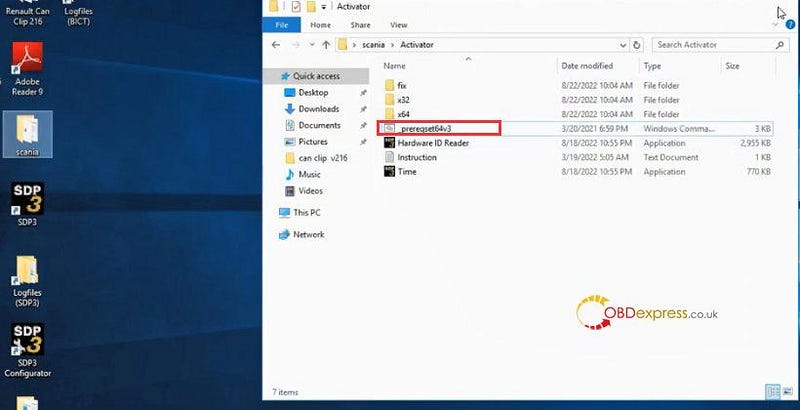
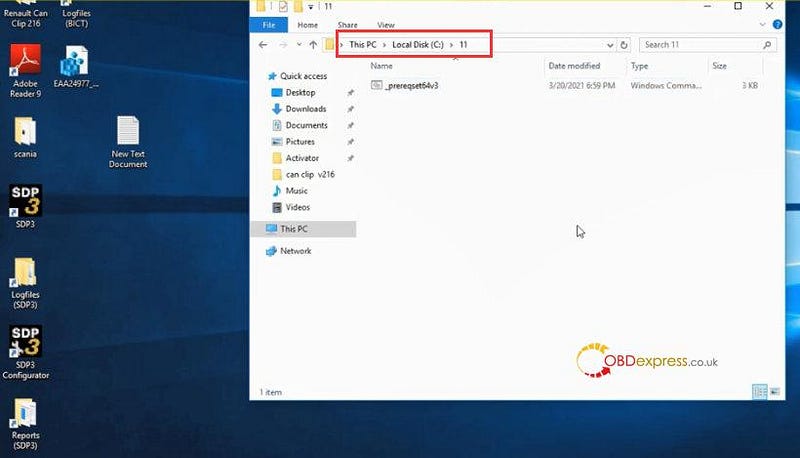
1.Run _prereqset64v3

Open Activator folder

Open _prereqset64v3 to run

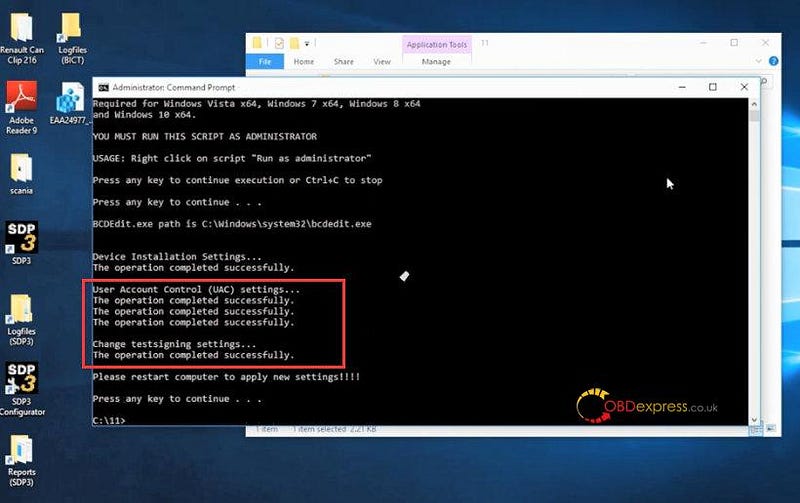
If it prompts 'the operation completed successfully', go to next step.

If not, copy _prereqset64v3 to local disk C

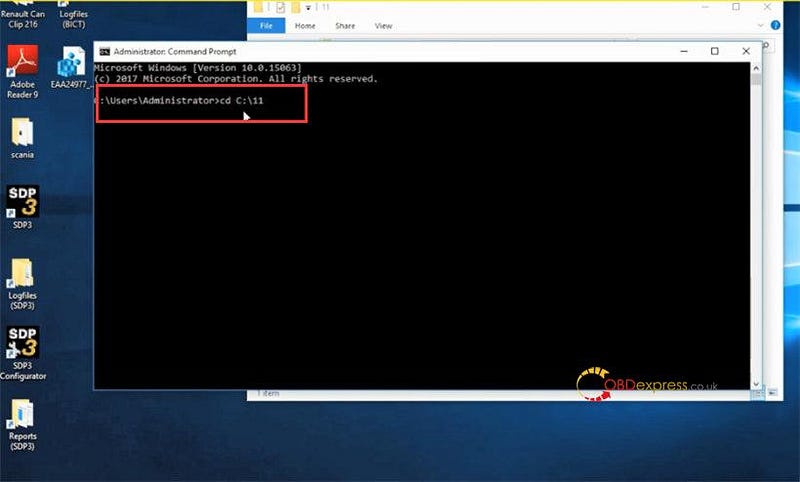
Run command prompt as administrator

Copy C:\11 and paste to command prompt, input cd firstly

Then the operation completed successfully

install the latest version V2.51.1.43 Scania SDP3 software

install the latest version V2.51.1.43 Scania SDP3 software

install the latest version V2.51.1.43 Scania SDP3 software

install the latest version V2.51.1.43 Scania SDP3 software

Restart the computer

2.Choose X64 or X32 bit according to the computer operating system

Open the related folder and click _install to install SDP3 driver

Select 'install this driver software anyway'

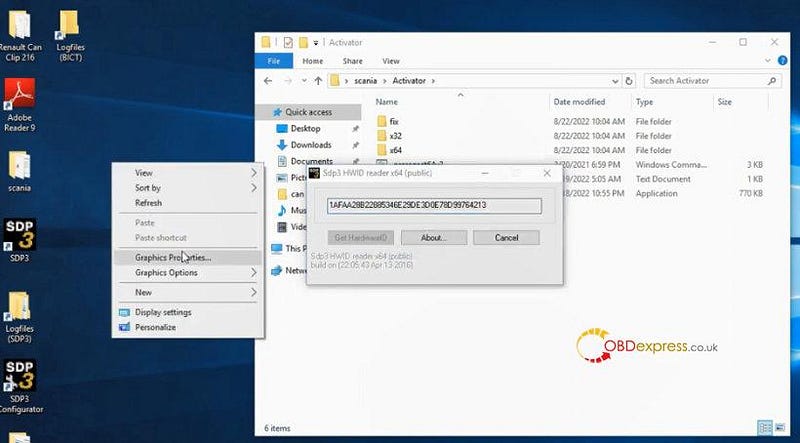
3.Open Hardware ID reader

Copy the ID and send it to our customer service for activation

install the latest version V2.51.1.43 Scania SDP3 software

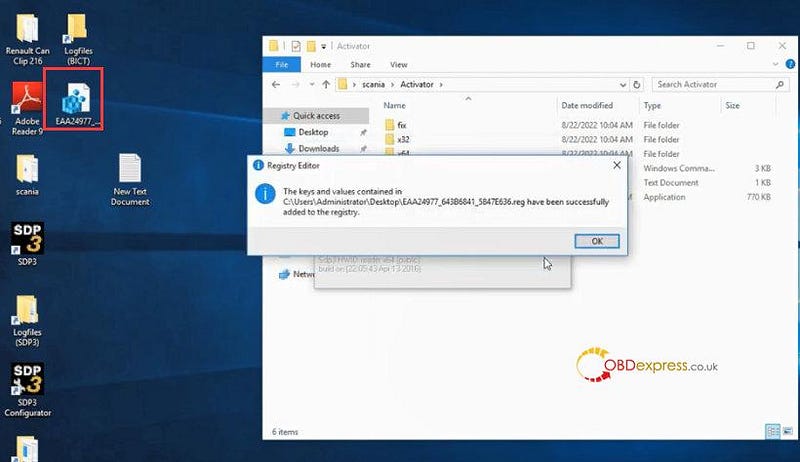
4.Registry editor (Merge the registration file)

install the latest version V2.51.1.43 Scania SDP3 software

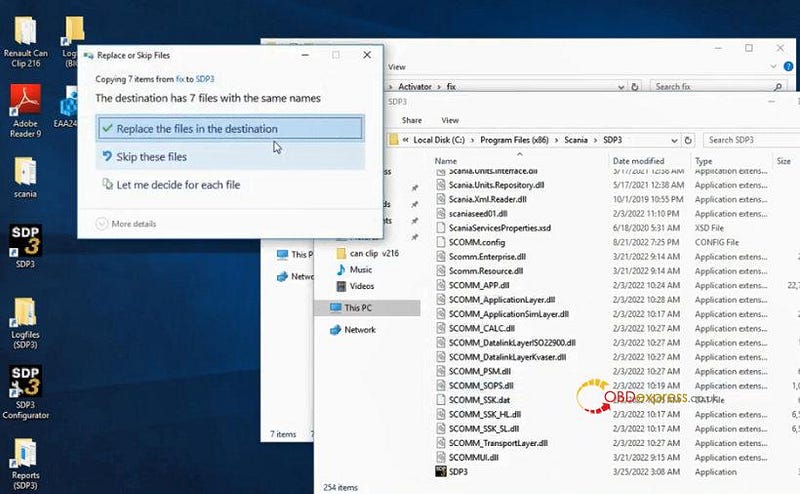
5.Copy all items in fix folder to replace the original one in SDP3 folder

install the latest version V2.51.1.43 Scania SDP3 software

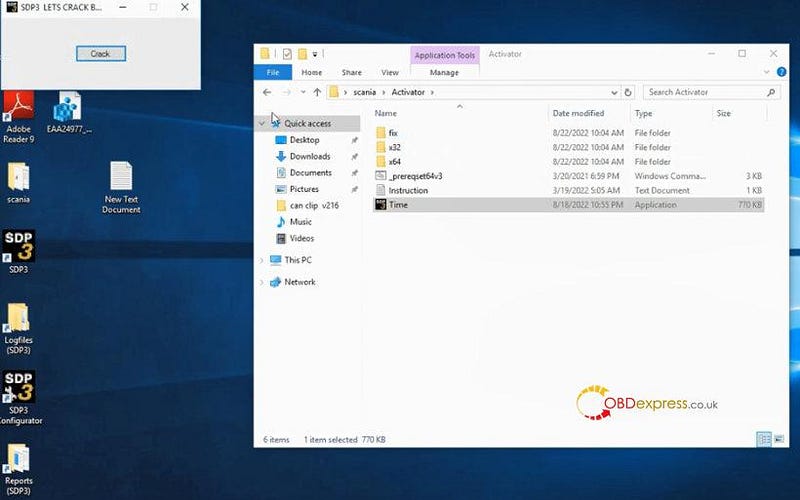
6.Open Time to crack

install the latest version V2.51.1.43 Scania SDP3 software

Restart the computer

Now the Scania SDP3 2.51.1.43 software is ready to use.

https://www.obdexpress.co.uk/


Wednesday, 3 February 2021

How to download and install Scania VCI3 SDP3 software version V2.46.1

 Free download SDP3 2.46.1 for Scania VCI3 heavy duty diagnostic tool and install on Win7.

Mega download:

https://mega.nz/file/a1BQHJRK#ydE4TiWWThdiRmhJqoG3WaG4tZUw0azejWm-8YklVI4

Security: from forum


Reliable source:

https://www.obdexpress.co.uk/wholesale/scania-sdp3-diagnosis-programmer.html

Activation: yes

Dongle: No


Language Available:  English, German, Spanish, French, Japanese, Dutch, Persian, Polish, Portuguese, Swedish, Norwegian, Suomi, Turkish, Italian, Czech, Russian, Chinese.


SDP3 2.46.1, what's new?

New general features
No major new general features in the issue.
New system-specific features
New user function warns of open door
The cab door open warning is a new user function for all trucks in the P, G, R and T series.
The UF1157 user function warns if any of the cab doors are open. This is because there is a potential safety risk to people inside and outside the vehicle if a cab door is open.
The new function can be found under User functions > Driver warning >UF1157 Cab door open warning.
Systems affected by the new function are ICL3, COO8 and DCS1.
New parameter for gas vehicles
A new parameter has been created for gas vehicles, Over-acceleration protection bypass.
The parameter can be found under Electrical system > Engine management system > EMO2 > adjustment.
The new parameter applies to vehicles with power take-offs and has self-regulating software.
System-specific changes
Revised text in installation test
Changes to the menu option text in the installation test have been introduced in the function wizard Installation test for industrial engines.
Systems affected are EMS/EME1. More specifically, this applies to StageV industrial engines.
The menu option Excessive nitrogen oxide levels in the exhaust gases has been renamed and is now called: Emission-related faults (MIL).
The change has been introduced to make the text more consistent with the text in the installation manual.SDP3 certificate
Handling of SDP3 certificates will change from 1 November.
In connection with this, the certificate needs to be reinstalled. For this reason, a new version (v14) of the document Certificate for services in SDP3 is available for download from Scania Technical Information Library.
The change applies to all use of services in SDP3.
Addition to information about compression tests
An addition has been made to the information about the requirements that must be satisfied in order to run the compression test on Scania
Engines engines with S8 and EME1, included in the EMS system.
The text that has been added is CAN communication between starter motor and engine control unit must be active.
Facilitated troubleshooting of the charge air pressure system
Five signals have been added to the signal list for OCS1. The signals are under Signal logging, OCS1.
The signals have been added to facilitate troubleshooting of the charge air pressure system.

The signals that have been added are:
• Adaptive correction of charge air pressure 0-1,200 rpm
• Adaptive correction of charge air pressure 1,200-1,400 rpm
• Adaptive correction of charge air pressure 1,400-1,600 rpm
• Adaptive correction of charge air pressure 1,600-1,800 rpm
• Adaptive correction of charge air pressure, over 1,800 rpm
The affected products are trucks and buses that run on gas, both NGS and NCG.


Scania VCI3 SDP3 2.46.1 Win7 installation


Requirements:

  1. Need Netframework 4.6 or up version installed on system.
  2. After installation, need restart your pc
  3. Administrator rights are required.


Installation Procedure:

https://www.youtube.com/watch?v=BxnejbCqQ4E


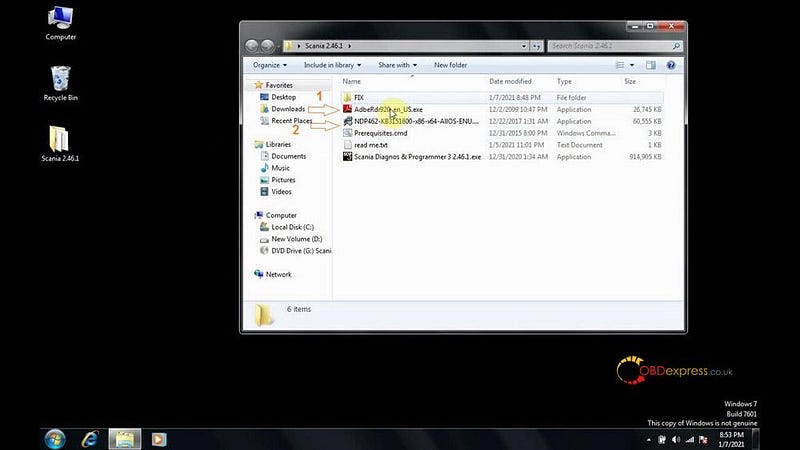
Copy and paste Scania SDP3 2.46.1 software folder onto the desktop.

Setup “Adobe Reader 9.2” as administrator.

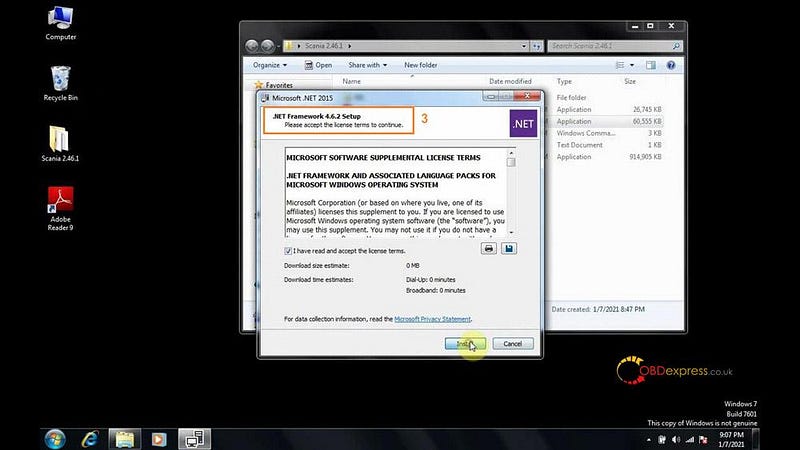
Run “NDP462 setup” as administrator

Install Framework 4.6.2 setup
How to download and install Scania VCI3 SDP3 software version V2.46.1

Accept license agreement and press Install.

Right click on “Scania Diagnos & Programmer3 2.46.1.exe” and select “Run as administrator” to install setup.

Click on “Next”.

Accept license agreement.

Select the installation location

Click on “Install”.

Ensure the VCI unit and SDP3 USB key are disconnected from the computer before going on with this installation.

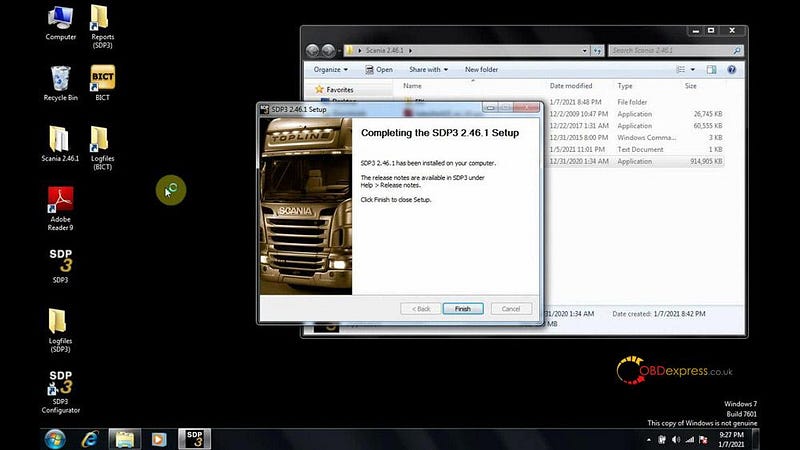
Complete SDP3 setup installation.
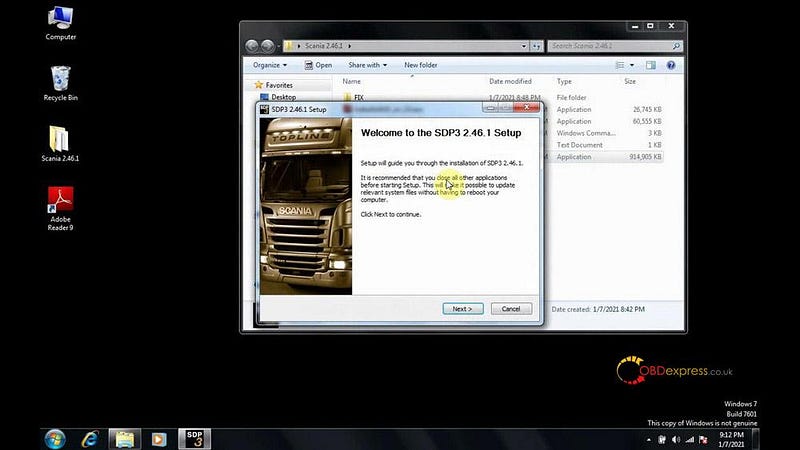
How to download and install Scania VCI3 SDP3 software version V2.46.1

Open “Prerequistes.cmd” to ensure if the operation completed successfully.
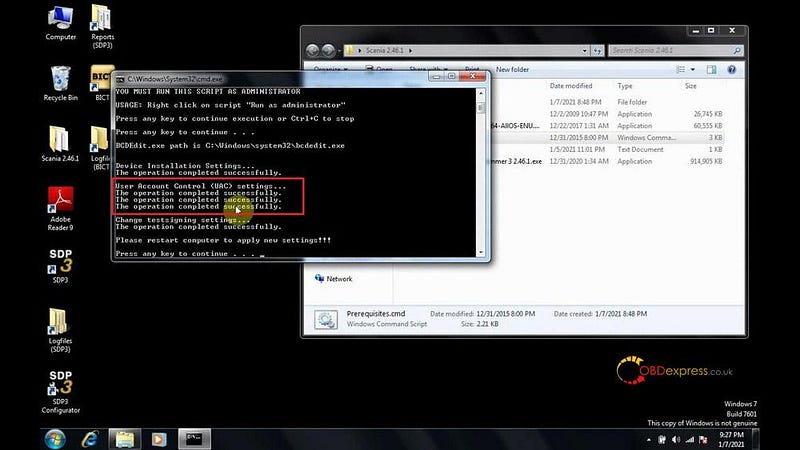
How to download and install Scania VCI3 SDP3 software version V2.46.1

Reboot the computer

Open Scania 2.46.1 -> Fix -> Hardware ID Reader.exe.
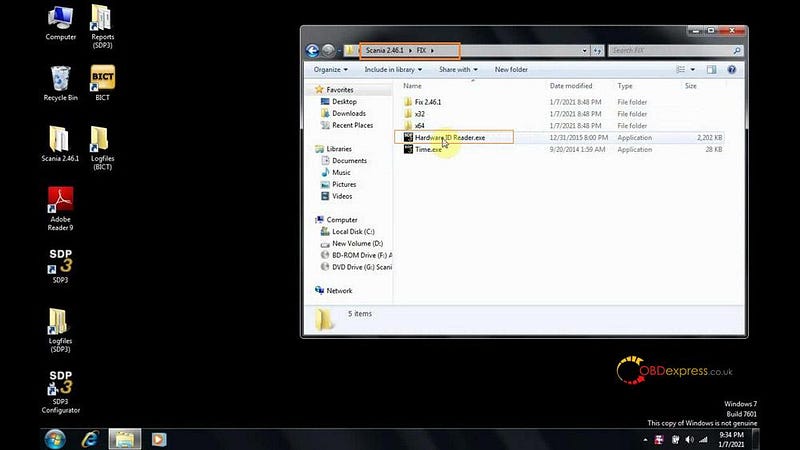
How to download and install Scania VCI3 SDP3 software version V2.46.1

Copy and paste the ID to obdexpress.co.uk engineer to obtain the activation ID.
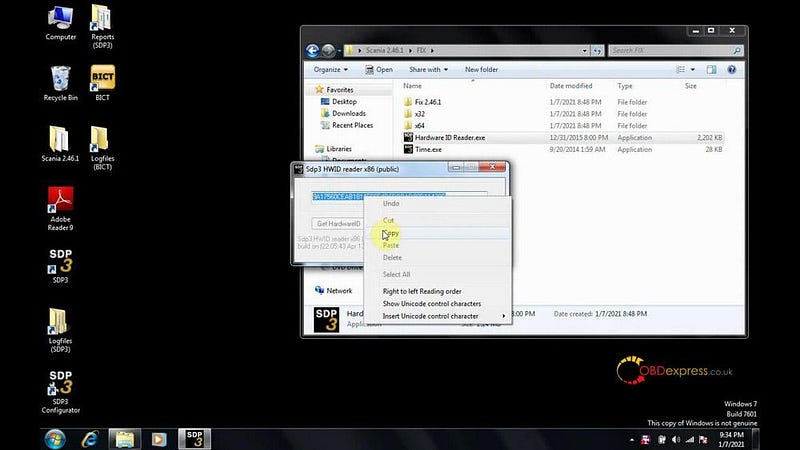
How to download and install Scania VCI3 SDP3 software version V2.46.1

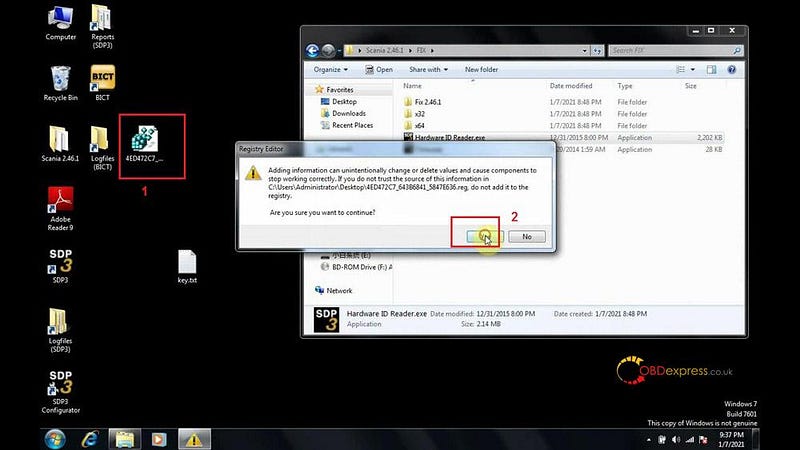
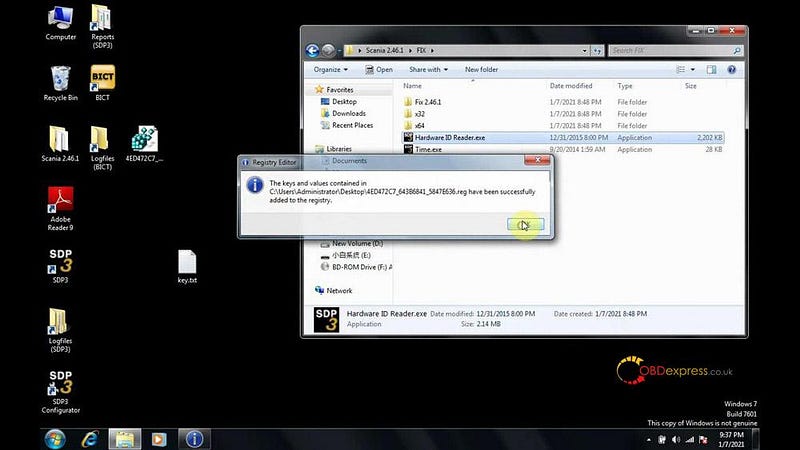
Merge registration key

How to download and install Scania VCI3 SDP3 software version V2.46.1

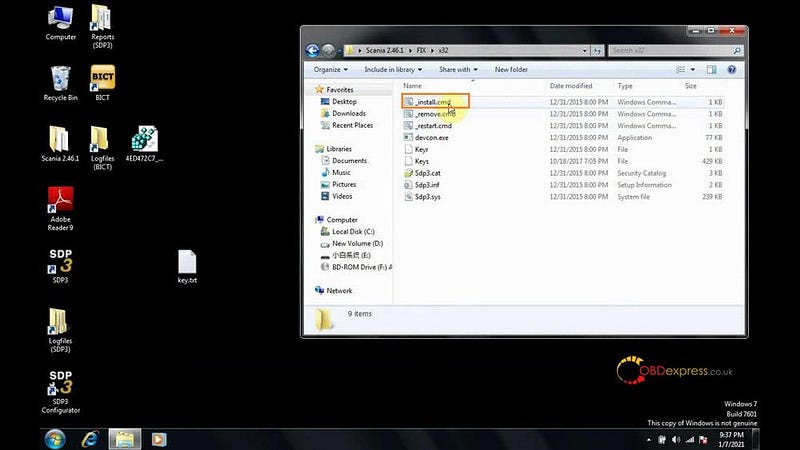
Since the computer is Win7 32bit, go to C:/Scania 2.46.1/FIX/x32, open “ Open -install_cmd file”.
How to download and install Scania VCI3 SDP3 software version V2.46.1

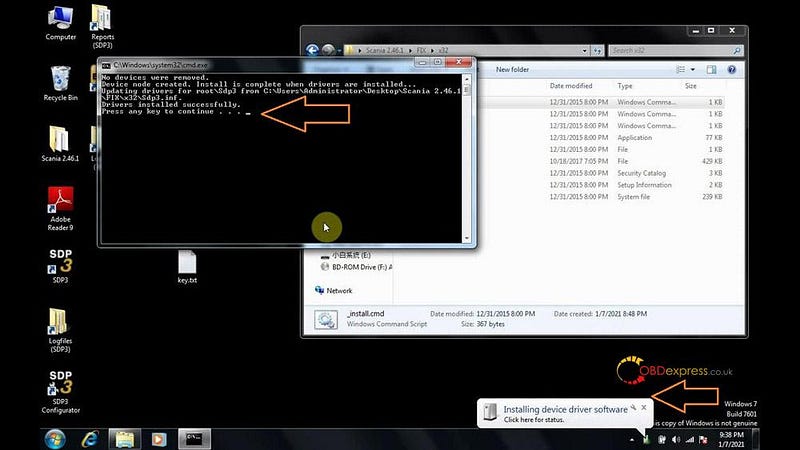
Plug Scania VCI3 interface into the computer.

Install device driver software.

Restart computer
How to download and install Scania VCI3 SDP3 software version V2.46.1

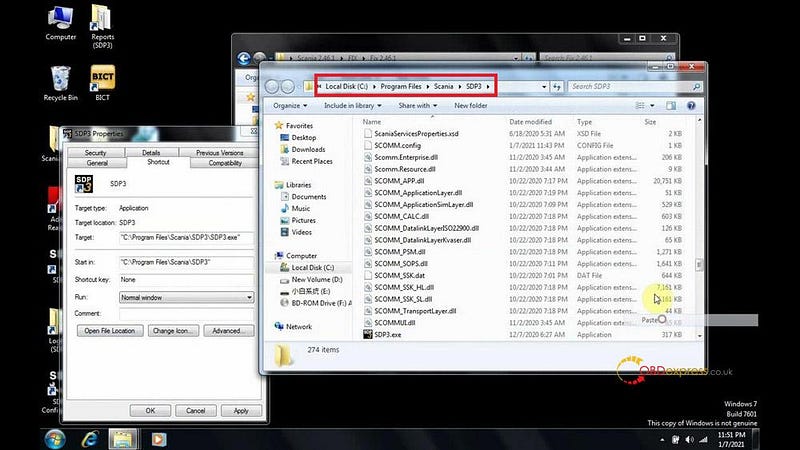
Open C:/Scania 2.46.1/FIX/Fix 2.46.1, copy and replace them in C:/Program Files/Scania/SDP3.
How to download and install Scania VCI3 SDP3 software version V2.46.1

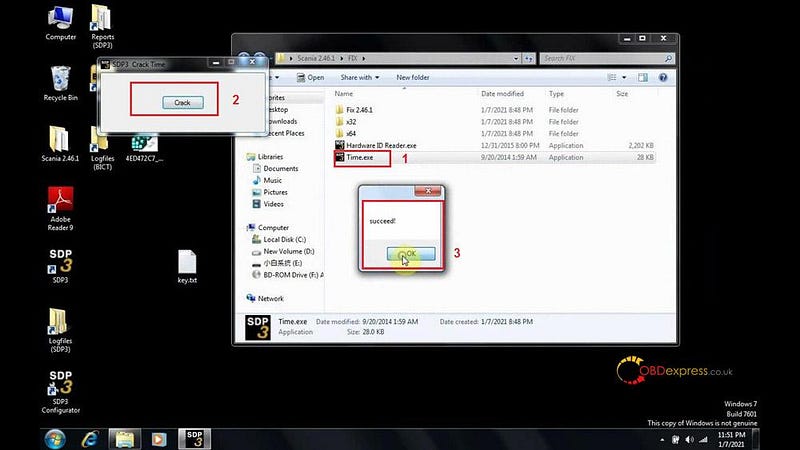
Right click on “Time.exe “ in FIX folder, select “Run as administrator”. Crack SDP3 time

Restart computer
How to download and install Scania VCI3 SDP3 software version V2.46.1

Run SDP3 software on desktop

It pops up Warning and click on “Yes”, then “Yes” to update the VCI, then update successfully.
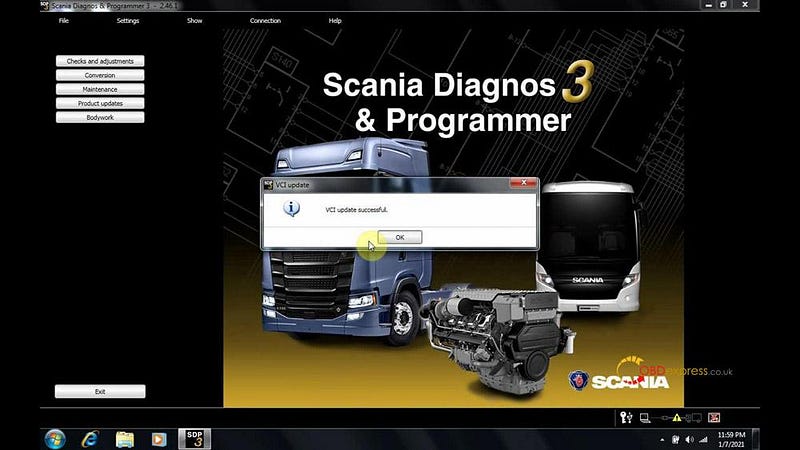
How to download and install Scania VCI3 SDP3 software version V2.46.1

Open “SDP3 Configurator” on desktop, it allows you to reset language.
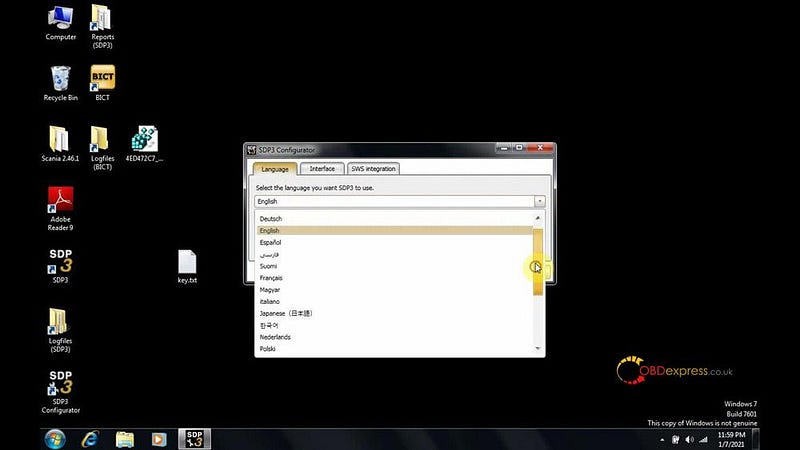
How to download and install Scania VCI3 SDP3 software version V2.46.1

Alright, SDP3 2.46.1 software is ready to use.
Wednesday, 18 December 2019

(Solve) Scania SDP3 V2.40.1 “can’t find any valid key”

Installed Scania SDP3 V2.40.1 with VCI3 scanner by following the video demo, but had error message "Could not find a valid key. To run SDP3 with limited functionality, select the No Key option. For fault locator or demo mode, it is necessary to have „- 3 valid software key installed. Select the key Software option; _Dicate a USB key and select the USB key option."
Sdp3 V2 40 1 Cant Find Any Valid Key Solution 01
obdexpress.co.uk engineer solution:

  1. Possible reason:
No installed the patch
No Crack

  1. How to crack SDP3 2.40.1:
Right click on "Prerequisites" and select "Run as administrator".
Sdp3 V2 40 1 Cant Find Any Valid Key Solution 02
Restart the computer.
Sdp3 V2 40 1 Cant Find Any Valid Key Solution 03
Right click on "Computer" and choose "Properties" to view the computer system is 32bit or 64bit.
Back to open Computer -> Local Disk(D:) -> KeyGenandFIX->X32 -> install.
Sdp3 V2 40 1 Cant Find Any Valid Key Solution 04
Sdp3 V2 40 1 Cant Find Any Valid Key Solution 05
Sdp3 V2 40 1 Cant Find Any Valid Key Solution 06

SDP3 2.40.1 activation service:
Open "Hardware ID reader".
Copy "SDP3 HWID reader X86(public)", send the ID to the dealer to active.
After the dealer helps register, right click on "Registry Editor" and select "Merge", then "Yes".
Sdp3 V2 40 1 Cant Find Any Valid Key Solution 07
Sdp3 V2 40 1 Cant Find Any Valid Key Solution 08
Sdp3 V2 40 1 Cant Find Any Valid Key Solution 09
Sdp3 V2 40 1 Cant Find Any Valid Key Solution 10

Open Local Disk(D:)->KeyGenandFix -> Fix File 2.40.1.
Copy the .dat and .dll files.
Right click on "SDP3" on the desktop, then "Properties", then "Open File location", then "Paste" (Paste the above two.dat and .dll files to replace the existing ones).
Sdp3 V2 40 1 Cant Find Any Valid Key Solution 11
Sdp3 V2 40 1 Cant Find Any Valid Key Solution 12

Open Local Disk(D:)->KeyGenandFix.
Open "Time" and click on "Crack", then succeed.
Sdp3 V2 40 1 Cant Find Any Valid Key Solution 13

Restart the computer.

Watch video:


Time 1:38 to 4:18 is on how to crack sdp3 2.40.1 software for the VCI3 scanner.

Good luck


Source:http://blog.obdexpress.co.uk/2019/12/18/scania-sdp3-v2-40-1-cant-find-any-valid-key-solution/

How to Unlock Ford BOSCH MD1CP006 with OBDSTAR ECU Master via Boot?

 This guide covers the procedure for unlocking, reading, and writing locked Bosch MD1 CP006 engine control units found on Ford F-250 and F-...