Wednesday, 27 March 2024

Lonsdor K518 Pro Appearance/ Highlights/ Language Switch Instruction

 This is an instruction on Lonsdor K518 Pro appearance, highlight functions & language switch.

Highlights

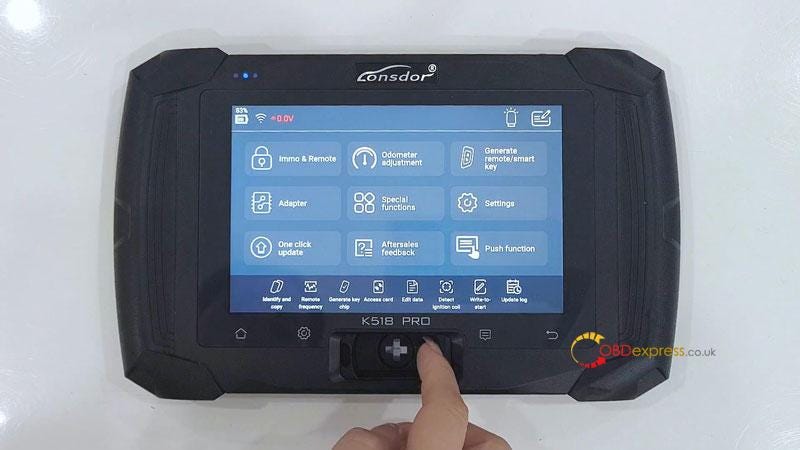
  • K518 Pro adopts a new comprehensive touch screen, which can be woken up by clicking anywhere.
  • The card key slot of K518 Pro has also been better optimized. It can support long-distance signal transmission.
  • K518 Pro has built-in analog circuit, the acquisition antenna can be used when doing Toyota all key lost, directly replacing SKE and LKE.
  • The K518 Pro OBD cable, which can support 12-volt automotive communication, CANFD and DOIP protocols vehicles.
    1. Lonsdor K518 Pro Appearance, Highlights, Language Switch Instruction

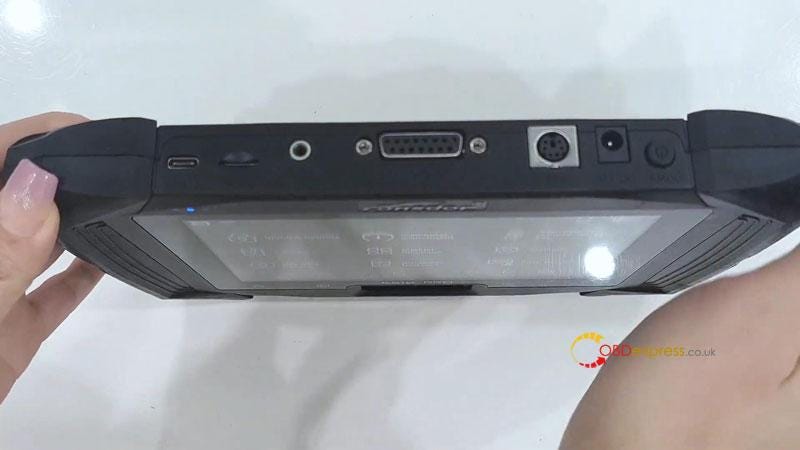
      Appearance

      On/ off button

      Power cord port

      Port for universal generation

      Changed from 25-pin to 15-pin OBD port

      Acquisition of analog antenna port

      Type-C port

      Lonsdor K518 Pro Appearance, Highlights, Language Switch Instruction

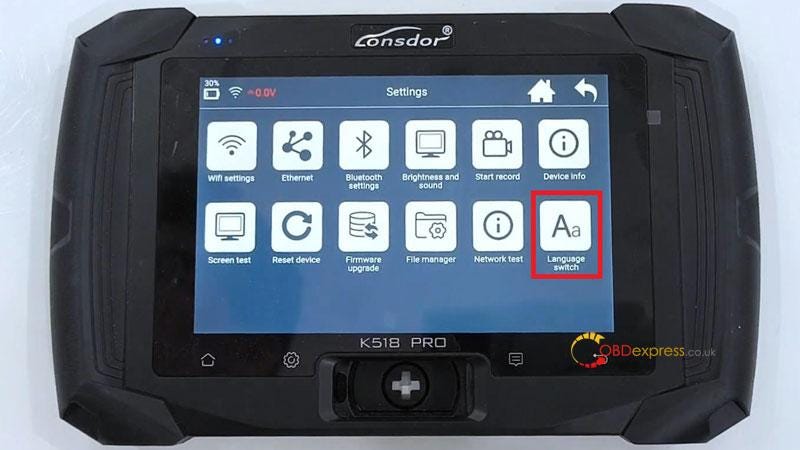
      How to switch Lonsdor K518 Pro language?

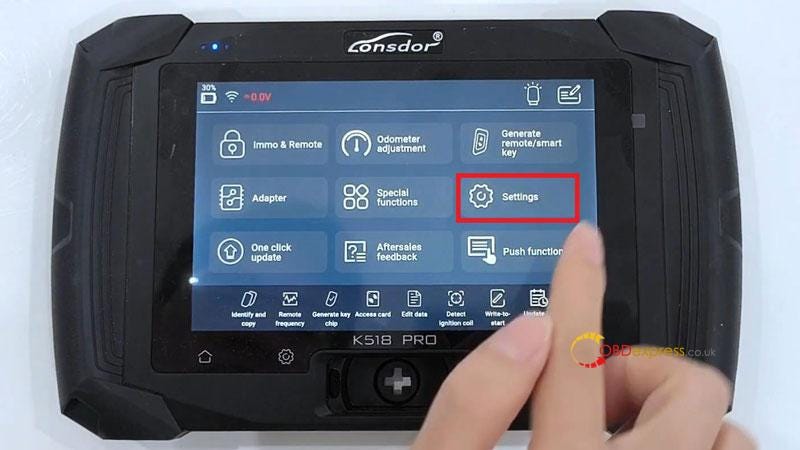
    2. Settings >> Language switch >> Select language
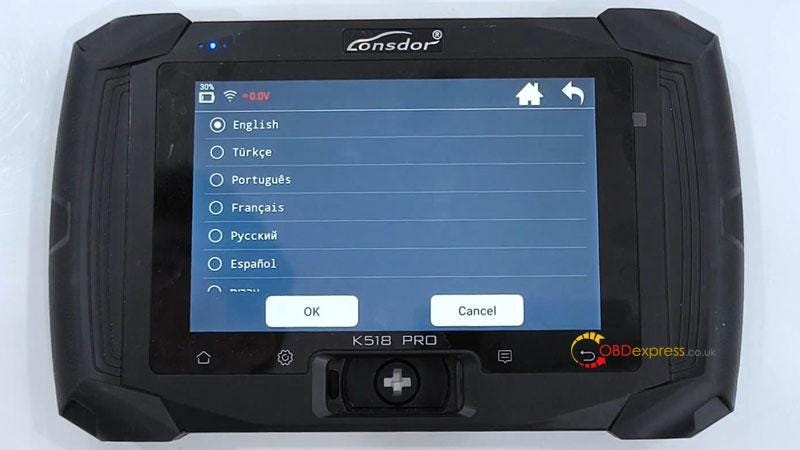
      1. - The default language is English. Here we can switch to any language in the list.

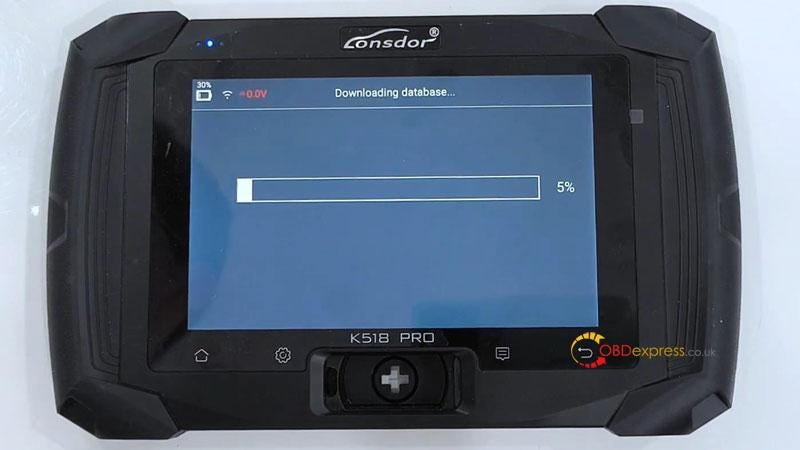
        - K518 Pro will start to download the language package. So we need to have good WIFI connection.

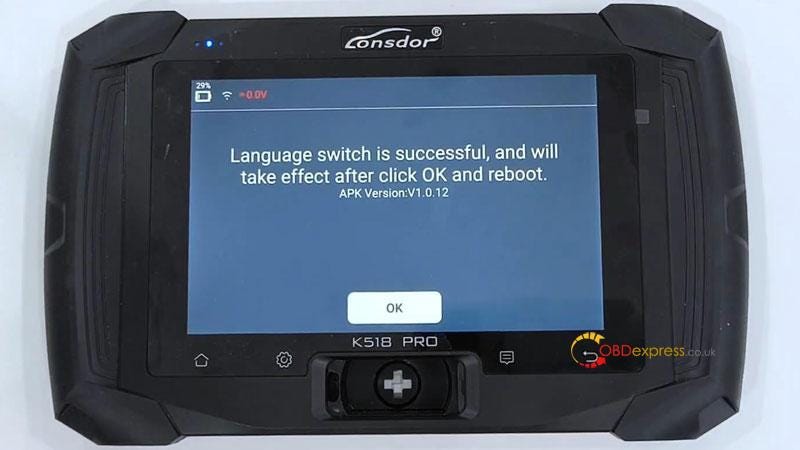
        Language switch is successful.

      2. K518 Pro will reboot to change to the new language after pressing OK.
        1. Done.

          Lonsdor K518 Pro Appearance, Highlights, Language Switch Instruction

          Lonsdor K518 Pro Appearance, Highlights, Language Switch Instruction

          Lonsdor K518 Pro Appearance, Highlights, Language Switch Instruction

          Lonsdor K518 Pro Appearance, Highlights, Language Switch Instruction

          Lonsdor K518 Pro Appearance, Highlights, Language Switch Instruction

          www.obdexpress.co.uk

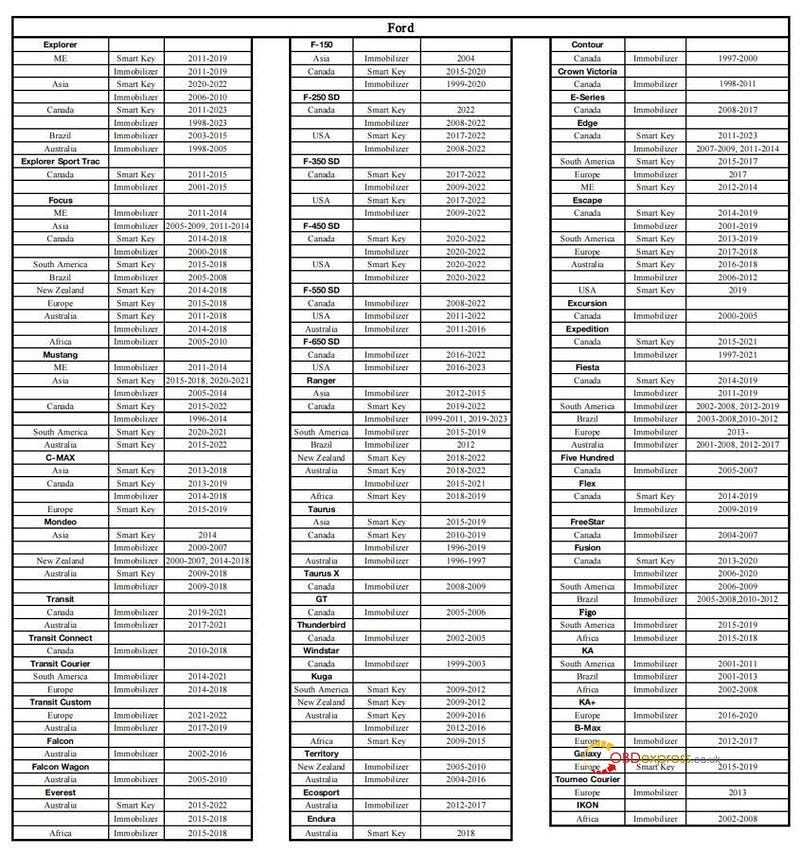
          Lonsdor K518 Pro Added Ford IMMO Car Models via OBD

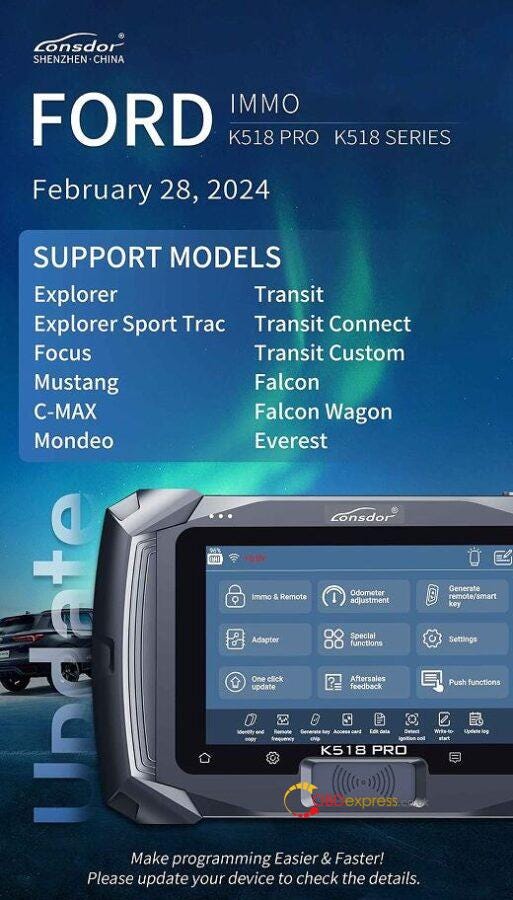
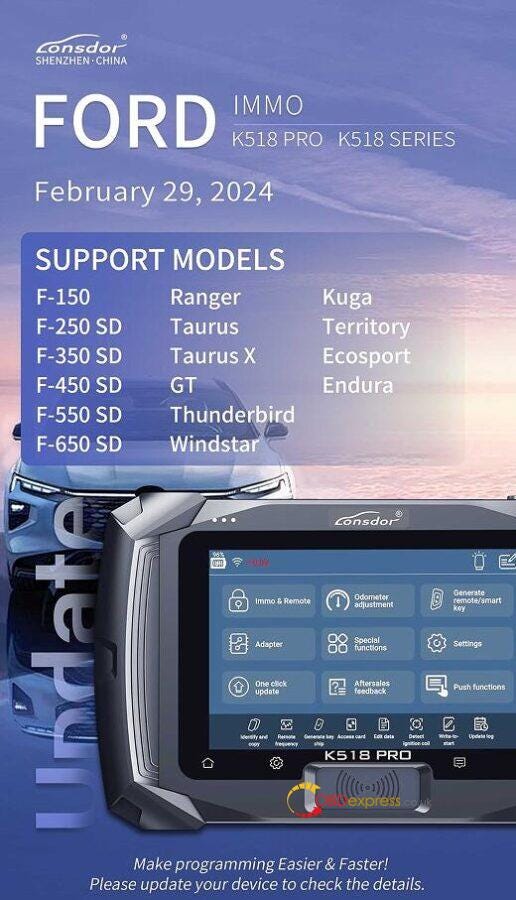
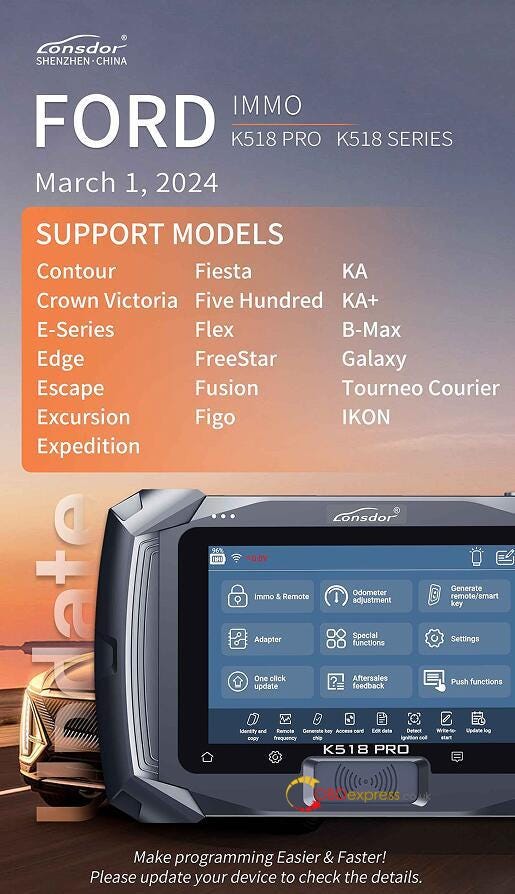
           Lonsdor K518 Pro/K518 Series key programmer added new Ford car models for new key adding and all keys lost via OBD. Please update your Lonsdor key programmer online to check the details.

          Which Ford car models are newly added?

          • Explorer, Explorer Sport Trac, Focus, Mustang, C-MAX, Mondeo, Transit, Transit Connect, Transit Custom, Falcon, Falcon Wagon, Everest;

          Lonsdor K518 Pro Added Ford IMMO Car Models via OBD

          • F-150, F-250 SD, F-350 SD, F-450 SD, F-550 SD, F-650 SD, Ranger, Taurus, Taurus X, GT, Thunderbird, Windstar, Kuga, Territory, Ecosport, Endura;

          Lonsdor K518 Pro Added Ford IMMO Car Models via OBD

          • Contour, Crown Victoria, E-Series, Edge, Escape, Excursion, Expedition, Fiesta, Five Hundred, Flex, FreeStar, Fusion, Figo, KA, KA+, B-Max, Galaxy, Tourneo Courier, IKON.

          Detailed New Ford Car List to Lonsdor K518Pro:

          www.obdexpress.co.uk

          New Easy Way to Export Yanhua Mini ACDP Data in Android

           Here we provide 2024 new easy way to export Yanhua Mini ACDP 2/ ACDP 1 data in Android system phone.

          NOTE

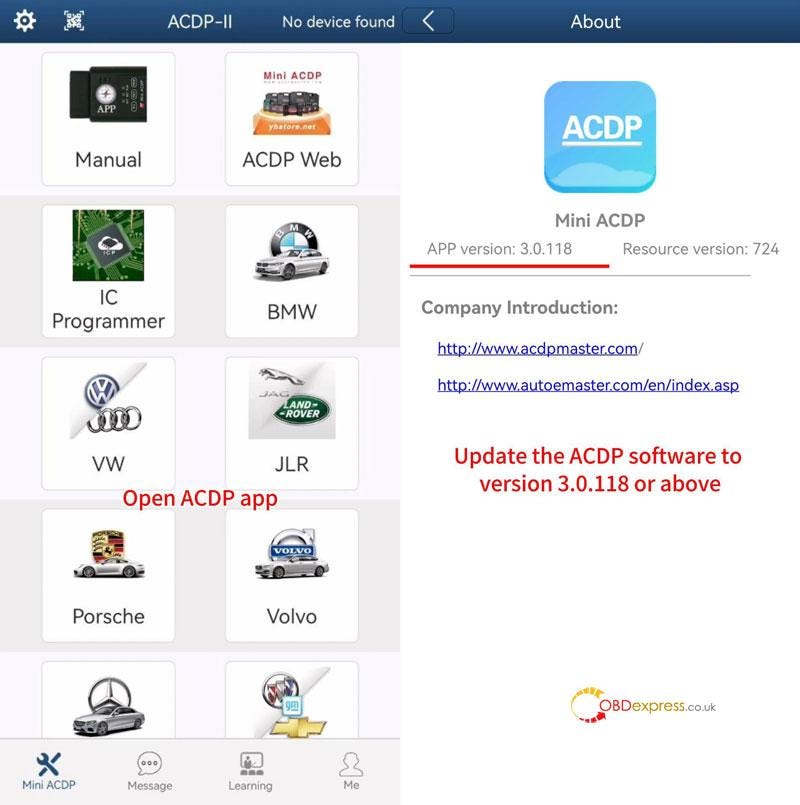
          Please ensure the ACDP APP version is 3.0.118 or above.

          Export Yanhua Mini ACDP Data in Android

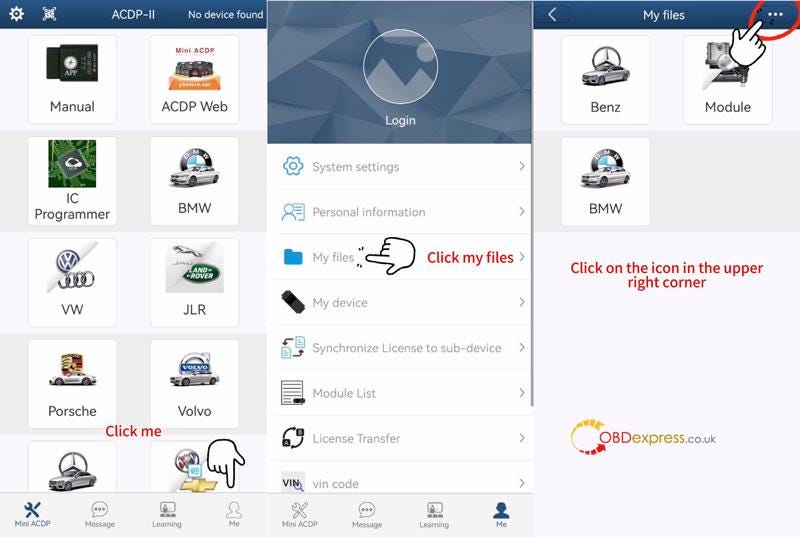
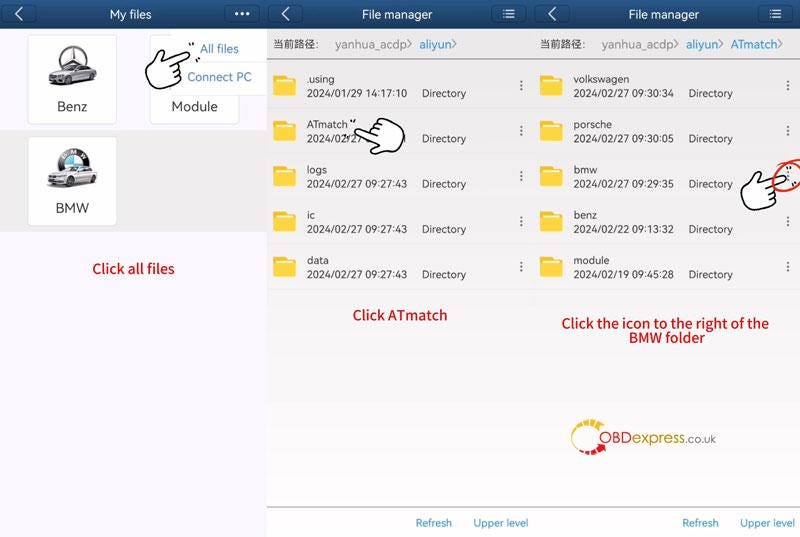
          Open ACDP software >> Me >> My files >> More >> All files >> ATmatch

          Here's taking BMW folder as an example, click the More icon right to the BMW folder.

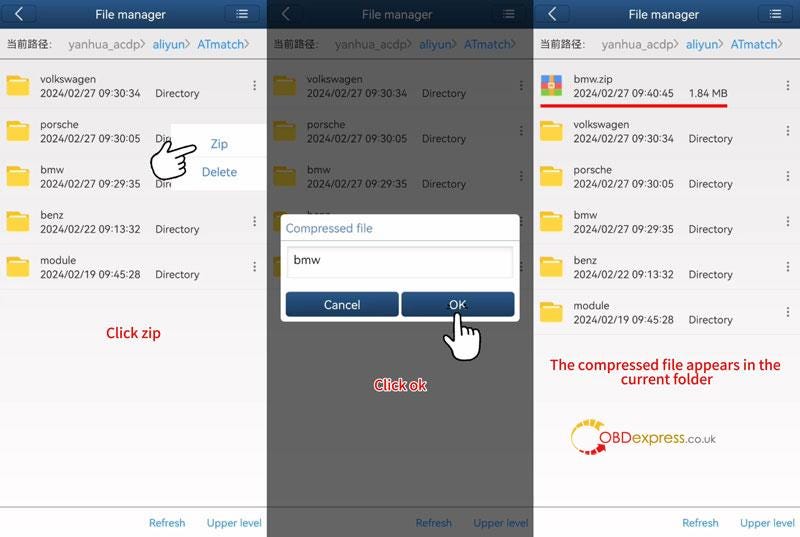
          Zip >> OK

          The compressed BMW file will appear in the the current folder.

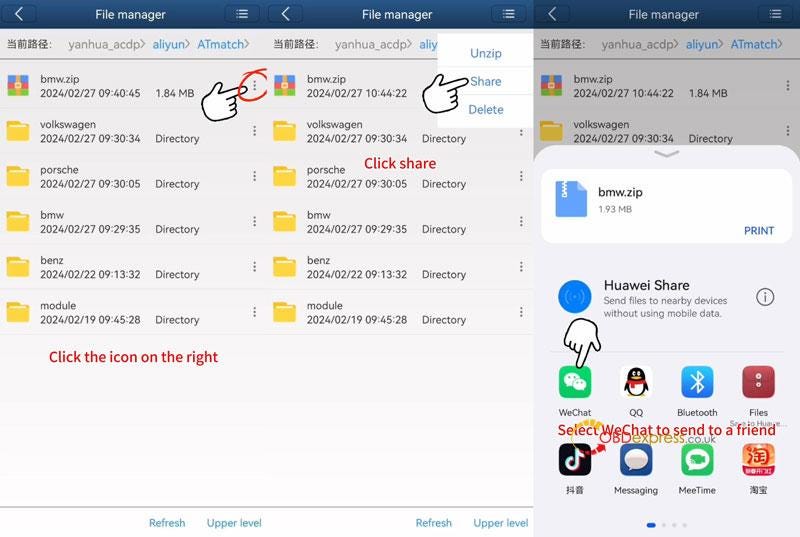
          Click More icon right to the zipped file.

          Now we can share to others via social media as wanted.

          Easy done!

          Export Yanhua Mini ACDP Data in Android

          Export Yanhua Mini ACDP Data in Android

          Export Yanhua Mini ACDP Data in Android

          Export Yanhua Mini ACDP Data in Android

          Read also

          Yanhua Mini ACDP IOS System Data Export & PC Bind Guide

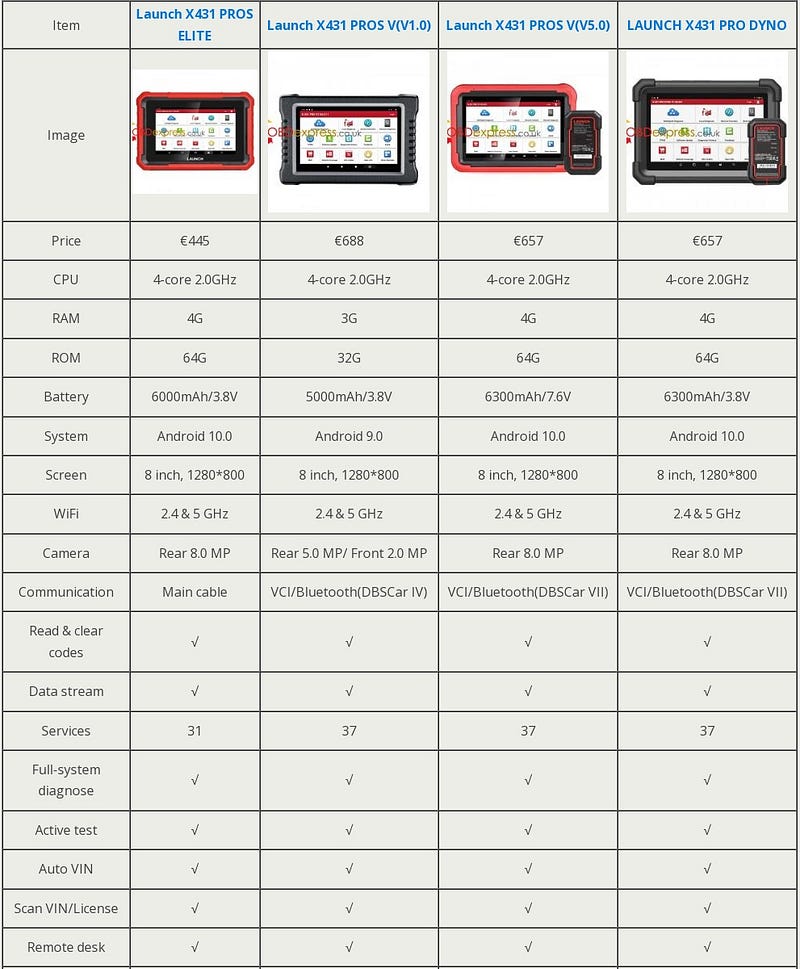
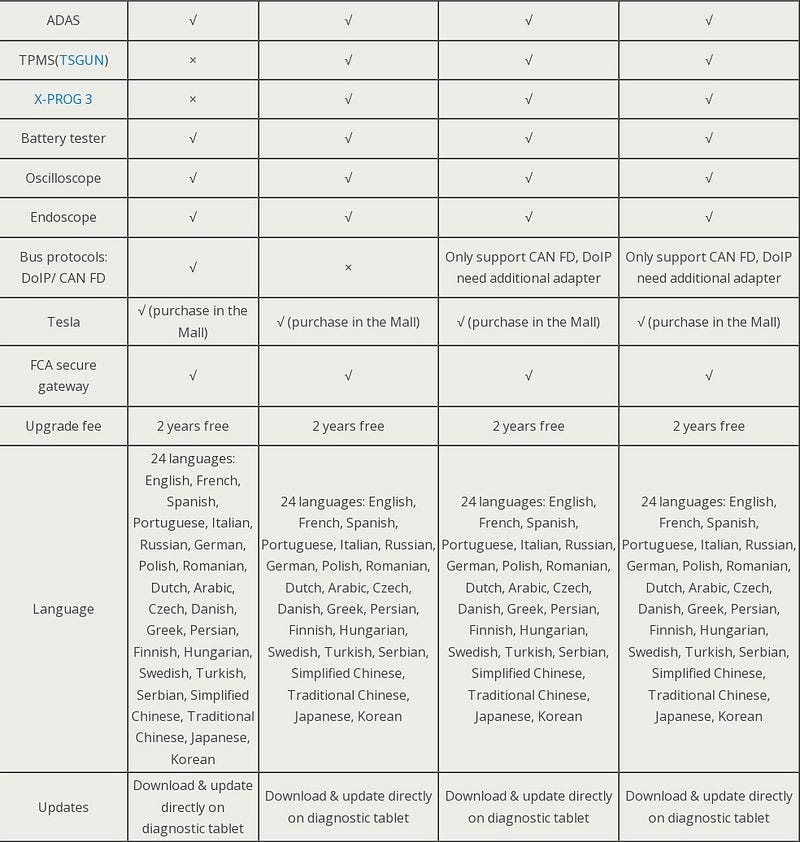
          Launch-X431 Pros Elite vs. Pros V vs. PROS V5.0 vs. Pro Dyno

           What's different between Launch X431 Pros Elite, Pros V, Pros V5.0 & Pro Dyno diagnostic tablets? Here we've compared them from cost, hardware, software, expansibility and supported protocols for reference. Hope this can help.

          Comparison Table

          Launch X431 Pros Elite vs. Pros V vs. PROS V5.0 vs. Pro Dyno

          Launch X431 Pros Elite vs. Pros V vs. PROS V5.0 vs. Pro Dyno

          Launch X431 Pros Elite vs. Pros V vs. PROS V5.0 vs. Pro Dyno

          Conclusion

          X431 PROS ELITE is the cheapest tool with basic diagnostic features. As an entry-level diagnostic tool, it's very suitable for beginners.

          X431 Pros V, Pros V5.0 & Pro Dyno are much the same in features except for the supported bus protocols. Their price are also similar. If you had to choose one, it's recommended to pick the newest X431 PRO DYNO.

          www.obdexpress.co.uk

          How to Clone Audi 6HP TCU by Yanhua ACDP 2 and Module 32?

           Question:

          Is it possible to use Yanhua Mini ACDP2 to clone Audi 6HP TCU?

          Here is the answer:

          Yes, Yanhua ACDP Module 32 is required to work with ACDP-2.

          Besides 6HP Bosch TCU, it also supports MPC56X chip DME clone, incl.ME9.0/ MED9.1/ MED9.5/ MED9.5.10/ EDC16C2/ EDC16C8/ EDC16CP31/ EDC16CP35 DME etc.

          http://blog.obdexpress.co.uk/2024/01/30/yanhua-mini-acdp-module-32-k-line-module-clone-diagram/

          How to do:

          Power on ACDP
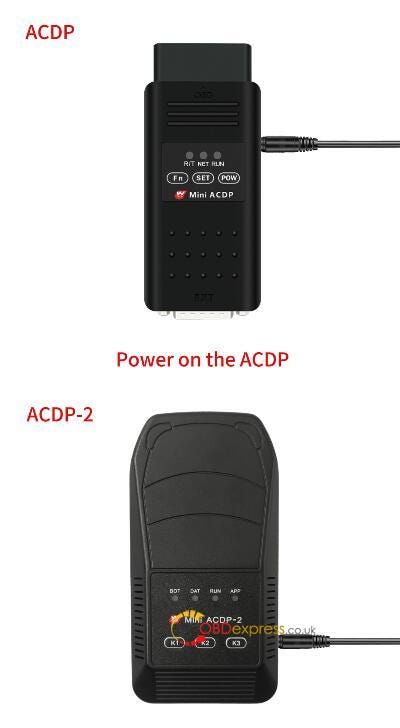
          How to Clone Audi 6HP TCU by Yanhua ACDP 2 and Module 32

          Open Mini ACDP App, check if device is connected

          Select Module>> K-Line module clone>> 6HP BOSCH (VAG)

          Click [Help] icon on the right side to check the accessories required and connection method

          Follow it to connect ACDP 2, Yanhua Module 32 and 6HP gearbox correctly
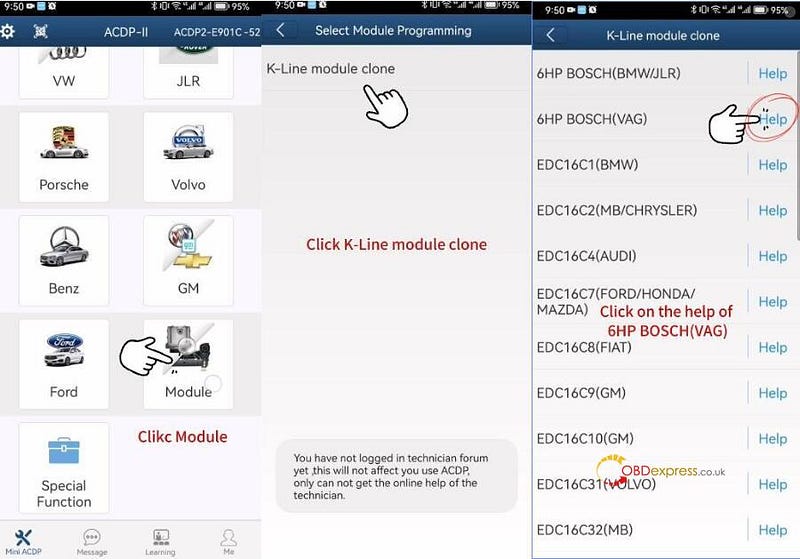
          How to Clone Audi 6HP TCU by Yanhua ACDP 2 and Module 32

          How to Clone Audi 6HP TCU by Yanhua ACDP 2 and Module 32

          Then perform the functions below one by one.

          Step 1: Identify

          Step 2: Full backup data

          Step 3: Full write data

          Use the ACDP standard power adapter (voltage +12V, current>= 2.5A), and ensure the stable network connection and DO NOT pull out the device during it working.

          Step 1: Identify

          Confirm the system info and save a screenshot

          Identify chip info finish
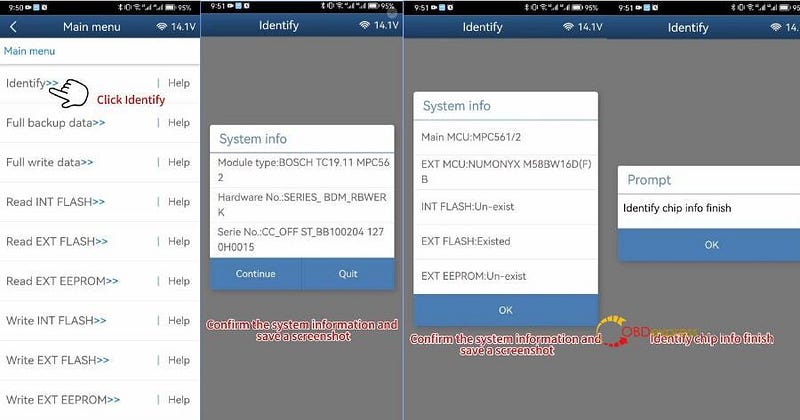
          How to Clone Audi 6HP TCU by Yanhua ACDP 2 and Module 32

          Step 2: Full Backup Data

          Read chip data, and save the data file after reading

          Backup data success
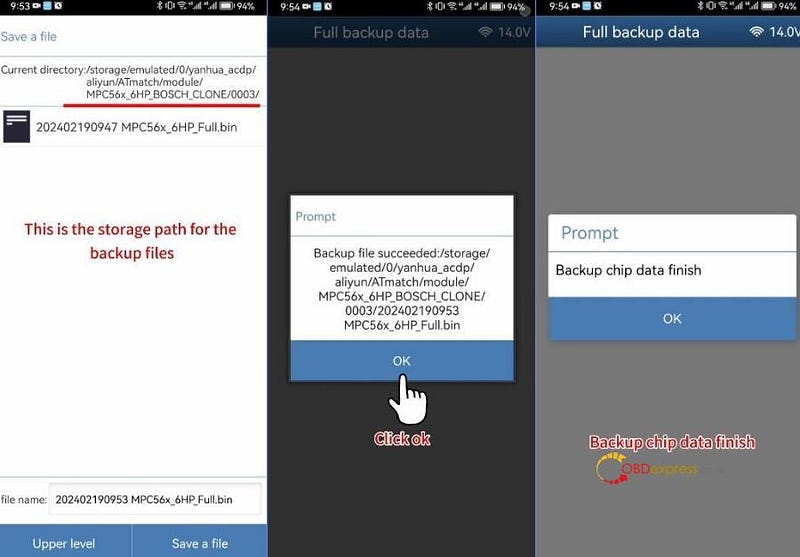
          How to Clone Audi 6HP TCU by Yanhua ACDP 2 and Module 32

          Step 3: Full write data

          Connect Mini ACDP 2 to a new Audi 6HP gearbox TCU
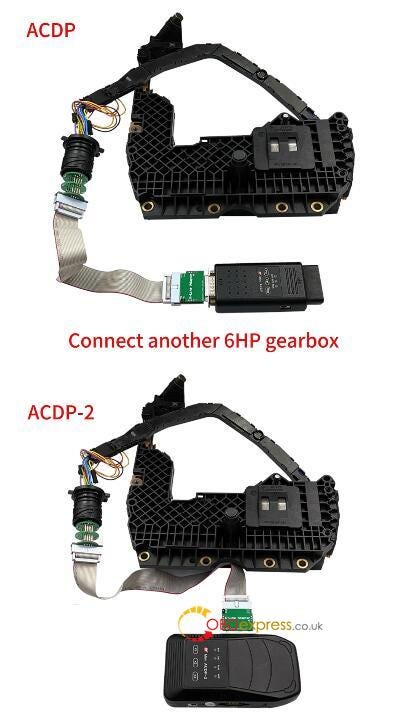
          How to Clone Audi 6HP TCU by Yanhua ACDP 2 and Module 32

          Confirm the system info and save a screenshot

          Select the original chip data and write into the new TCU

          Don't cut the power nor pull out the device during the programming

          Write chip data successfully
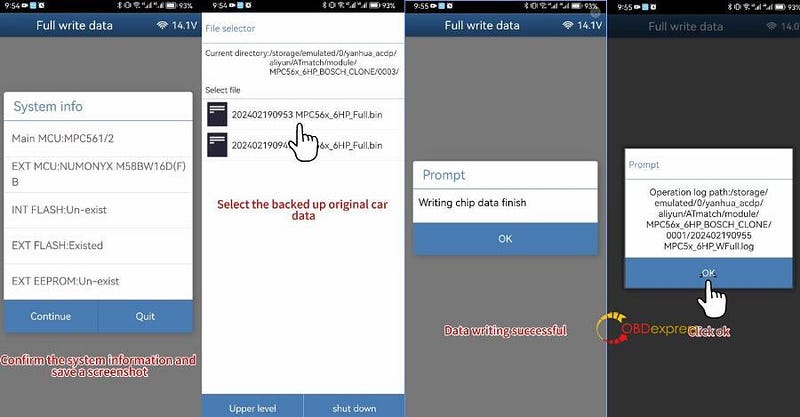
          How to Clone Audi 6HP TCU by Yanhua ACDP 2 and Module 32

          Done!

          www.obdexpress.co.uk
          Tuesday, 12 March 2024

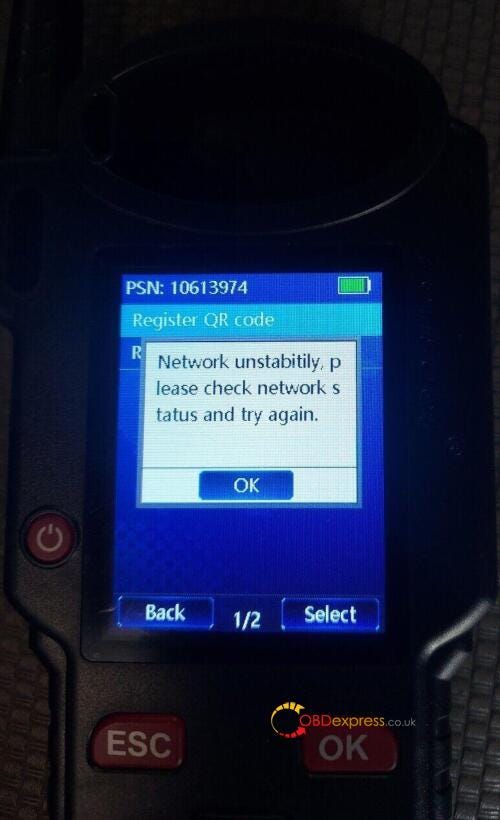
          How to Solve Lonsdor KH100+ Network Unstability Problem?

           Recently, some customers gave feedback that Lonsdor KH100+ remote maker appeared "Network Unstability" error when using. It still cannot use even if changed network.

          Solve Lonsdor KH100+ Network Unstability Problem

          Obdexpress.co.uk engineer gave the suggestion below.

          1.Connect with your smartphone hotspot

          2.Try to repair KH100 via update tool.

          KH100+ repair (WiFi)

          Follow video inside to fix KH100+, it will be fine.

          https://www.obdexpress.co.uk/

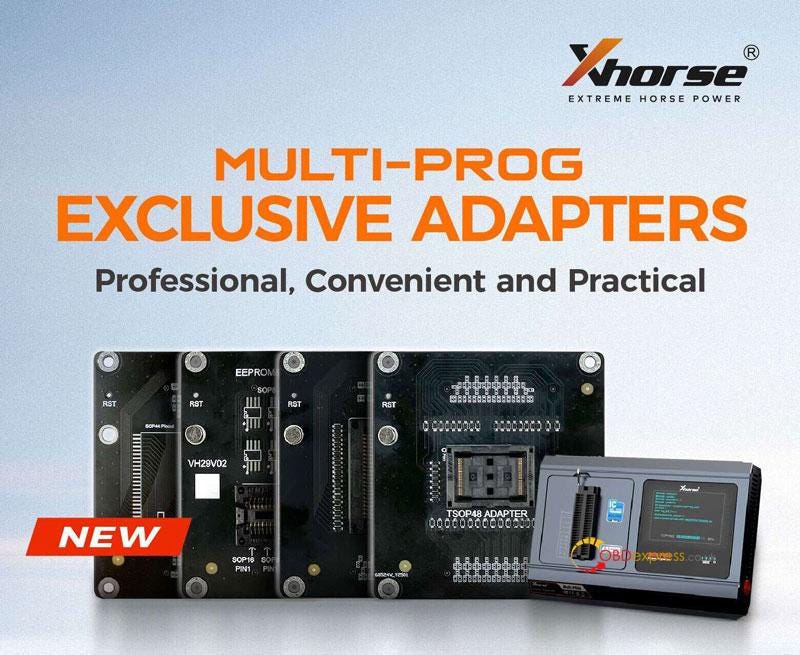
          Xhorse Multi-Prog SOP44/TSOP48 EEPROM & FLASH Adapter

           Latest 2024 exclusive adapters for Xhorse Multi-Prog Programmer have been released. Including 4 professional adapters to read and write SOP44/TSOP48 package FLASH chips or common 8-pin chip data. Convenient and practical that you will need it very much.

          Xhorse Multi-Prog SOP44 TSOP48 EEPROM and FLASH Adapter

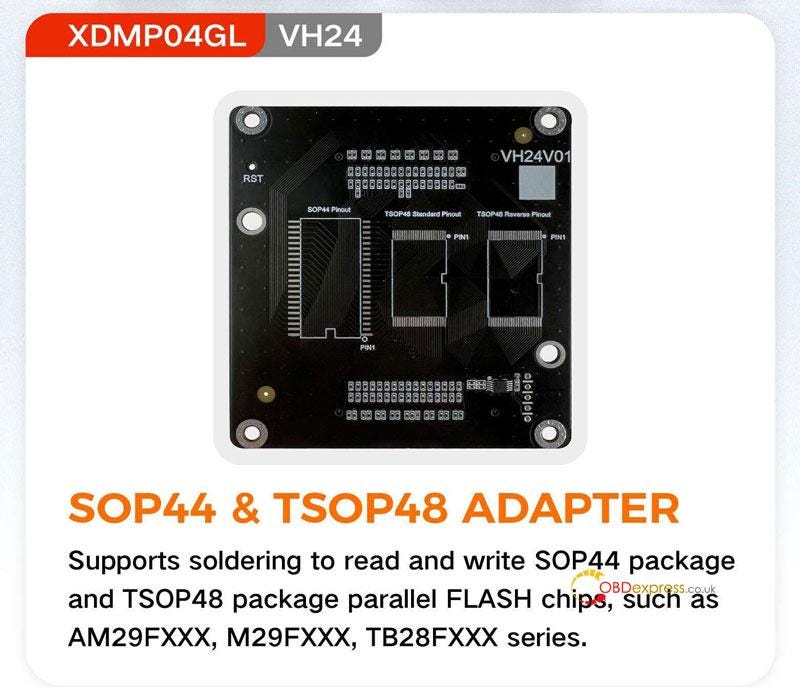
        2. SOP44 & TSOP48 Adapter
          1. Model: XDMP04GL VH24

            Function: Supports to read and write SOP44 package and TSOP48 package parallel FLASH chips by soldering, covering AM29FXXX, M29FXXX, TB28FXXX series.

            Xhorse Multi-Prog SOP44 TSOP48 EEPROM and FLASH Adapter

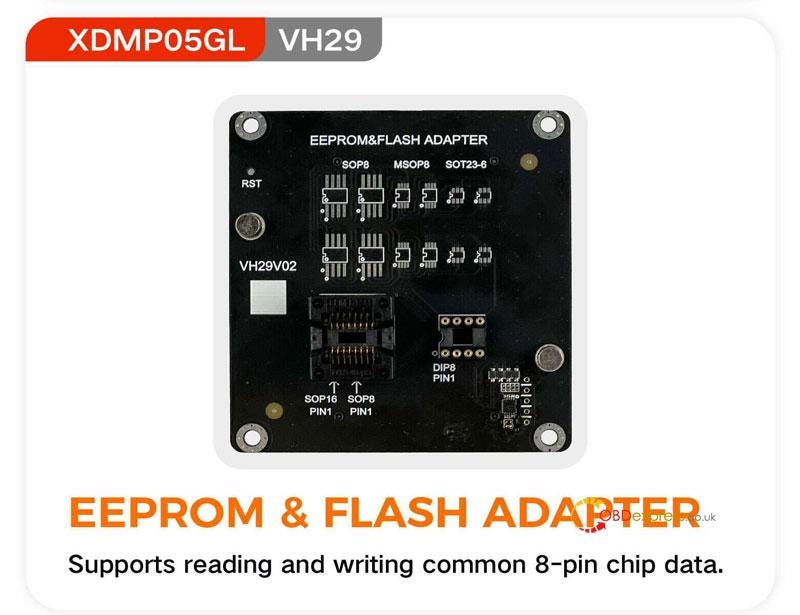
          2. EEPROM & FLASH Adapter
            1. Model: XDMP05GL VH29

              Function: supports to read and write common 8-pin chip data.

              Xhorse Multi-Prog SOP44 TSOP48 EEPROM and FLASH Adapter

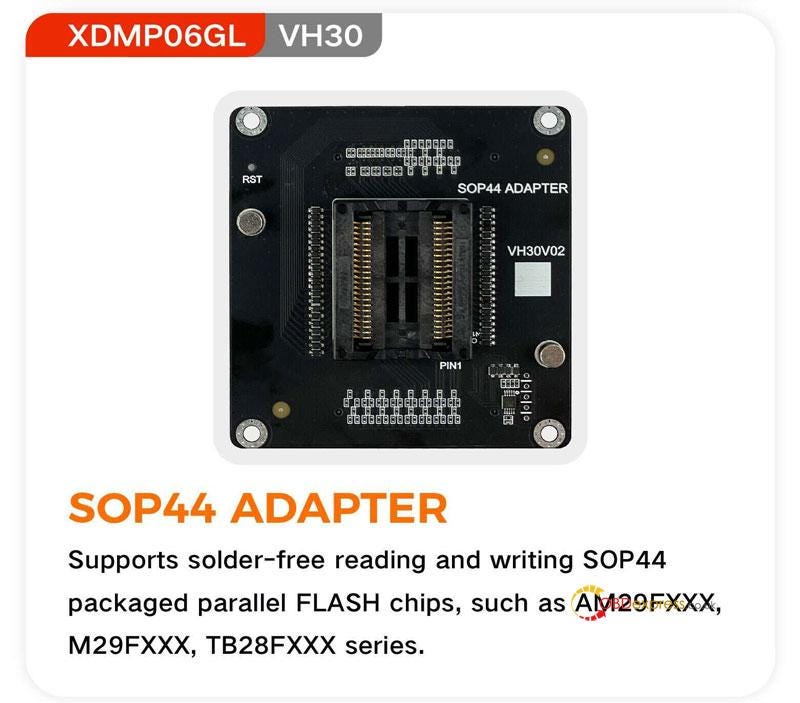
            2. SOP44 Adapter(Solder-Free)
              1. Model: XDMP06GL VH30

                Function: supports to read and write SOP44 packaged parallel FLASH chips without soldering, covering AM29FXXX, M29FXXX, TB28FXXX series.

                Xhorse Multi-Prog SOP44 TSOP48 EEPROM and FLASH Adapter

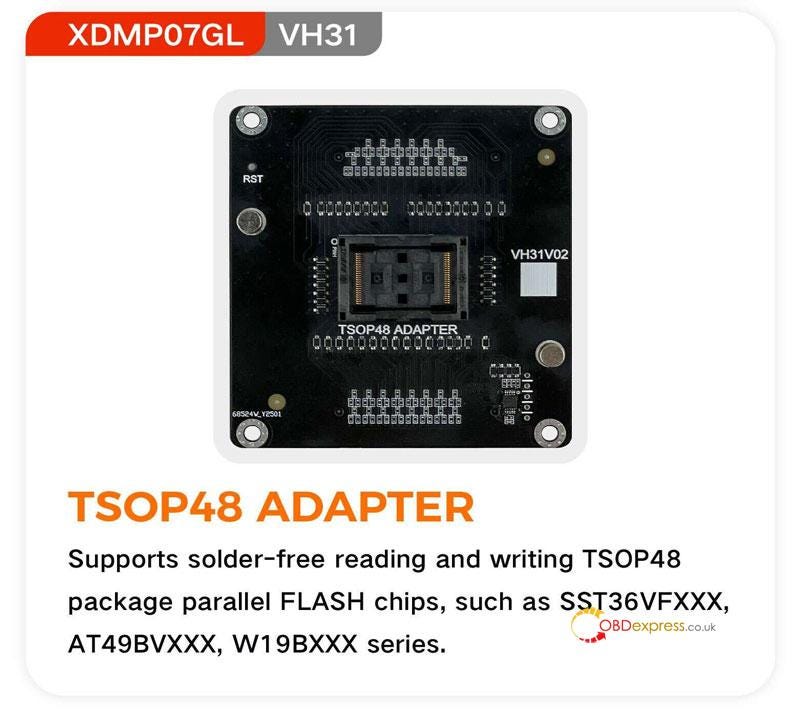
              2. TSOP48 Adapter(Solder-Free)
                1. Model: XDMP07GL VH31

                  Function: supports to read and write TSOP48 package parallel FLASH chips without soldering, covering SST36VFXXX, AT49BVXXX, W19BXXX series.

                  Xhorse Multi-Prog SOP44 TSOP48 EEPROM and FLASH Adapter

                  www.obdexpress.co.uk
                  CGDI BD006 Manual: Battery, Cranking, Charging & Voltage Tests

                   The CGDI BD006 Car Battery Tester uses conductance testing technology to quickly measure a starting battery’s cold-cranking capability a...