Thursday, 5 March 2026

Best 3 Picks for €299: Launch vs OTOFIX vs ThinkCar (2026)

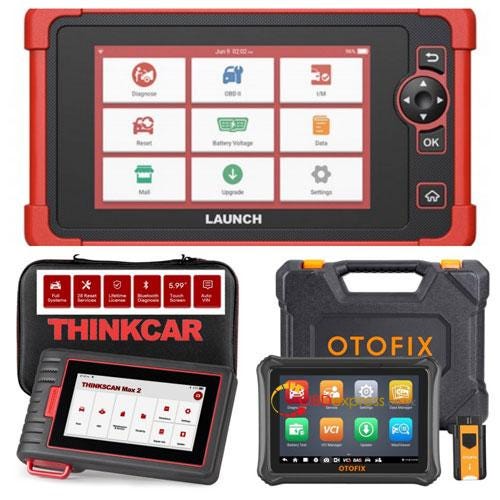
 Selecting the right OBD2 diagnostic scanner at the €299 price point is a critical decision for any car owner or technician. This guide provides a neutral technical analysis of three top-tier contenders — the ThinkCar ThinkScan MAX2, OTOFIX D1 Lite, and Launch X431 CRP919X — to help you identify the best hardware and software value for your specific diagnostic needs.

Technical Specification Matrix

The following table summarizes the core hardware and software capabilities of each unit to assist in your selection process:
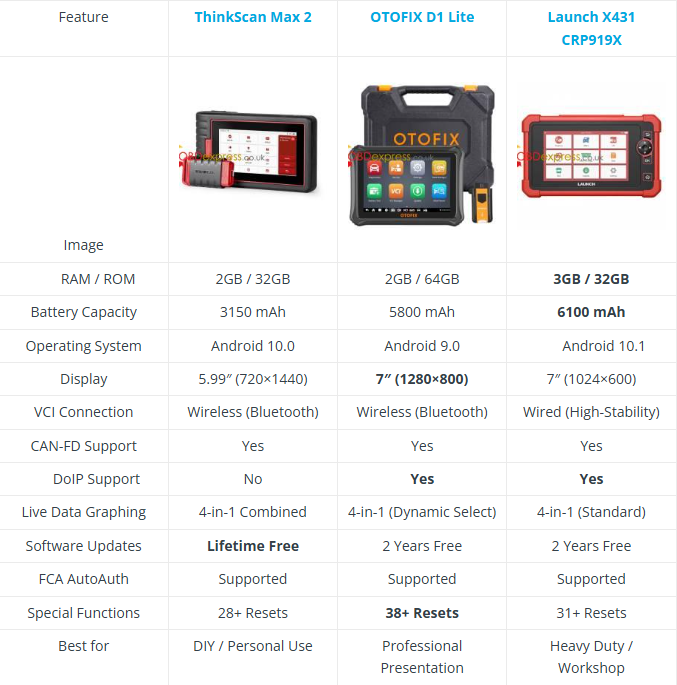

Launch vs OTOFIX vs ThinkCar

Deep-Dive: Connectivity & UI Philosophies

The Connection Trade-off

  • The Wireless Route (OTOFIX & ThinkScan): Using a Bluetooth VCI allows for modern mobility.
  • Ergonomic Advantage: Technicians can stand at the engine bay while triggering actuators via the tablet, a significant advantage in solo-diagnostics.
  • The Wired Route (Launch CRP919X): A physical DB15 cable ensures a zero-latency, unbreakable connection.
  • Professional Reliability: In professional circles, this is often preferred for ECU Coding, as it eliminates the risk of signal interference during the critical write-process.

Launch vs OTOFIX vs ThinkCar

The Visualization Factor & Data Stream Depth

  • OTOFIX D1 Lite: Features the highest resolution (1280x800). While many tools display data, the D1 Lite’s pixel density makes its 4-in-1 graphing much more valuable for glitch catching. The sharper waveforms allow technicians to identify minute voltage drops or sensor signal "noise" that lower-resolution screens might blur.
  • Launch X431 CRP919X: While it also focuses on 4-in-1 merging, its 3GB RAM provides a smoother refresh rate. This ensures that when monitoring high-speed data PIDs, the "frames per second" remain high, preventing data lag during critical troubleshooting.


Hardware Context: Why the Specs Matter in the Shop

RAM & Multitasking Efficiency

The jump from 2GB to 3GB RAM in the Launch CRP919X is noticeable when running modern, heavy diagnostic software. It allows the device to handle background processes (like checking repair databases or PDF manuals) while maintaining an active diagnostic session without the app crashing.

Battery Capacity & Field Reliability

  • The 6100mAh and 5800mAh batteries in the Launch and OTOFIX models are designed for "long-haul" tasks. Functions like DPF Regeneration or Battery Registration require the ignition to be on for extended periods; a larger battery ensures the tool doesn’t die mid-procedure.
  • ThinkScan Max 2 (3150mAh) focuses on portability, making it an excellent "glovebox" tool for quick scans, though it may require more frequent charging in a professional shop environment.

Financial and Protocol Considerations

  • TCO (Total Cost of Ownership): The ThinkScan Max 2 is the only tool in this class offering Lifetime Free Updates. For a long-term personal owner, the cumulative savings over 5 years can exceed €400.
  • Modern Car Coverage: Both OTOFIX D1 Lite and Launch CRP919X support DoIP (Diagnostic over IP), essential for deep scans on modern Volvos, Land Rovers, and BMWs. The ThinkScan is limited to CAN-FD, which covers newer American vehicles but may miss high-speed European architectures.

Summary of Recommendations

  • Choose Launch X431 CRP919X if: You prioritize stability and endurance. The wired connection, 6100mAh battery, and 3GB RAM make it a rugged, consistent tool for heavy daily use.
  • Choose OTOFIX D1 Lite if: You prioritize user experience and storage. The 64GB ROM and HD display are unmatched in this bracket, and the Autel-backed software provides excellent cloud reporting for clients.
  • Choose ThinkScan Max 2 if: You prioritize long-term economy. If you want a capable full-system scanner with zero recurring costs, this is the industry’s strongest value proposition.


Frequently Asked Questions (FAQ)

Q: Which scanner is best for modern European cars like BMW or Volvo?

A: The Launch CRP919X and OTOFIX D1 Lite are the best choices because they support the DoIP protocol, which is required for deep diagnostics on newer European models.

Q: Can I use these tools for Bi-Directional (Active) Tests?

A: Yes, all three tools support bi-directional control, allowing you to trigger actuators like fuel pumps or cooling fans directly from the tablet.

Q: Which tool is the most cost-effective over five years?

A: The ThinkScan Max 2 is the most cost-effective because it offers Lifetime Free Updates, saving users an estimated €400 in subscription fees over five years.

Q: Why are CAN-FD and DoIP protocols important in 2026?

A: CAN-FD is required for newer GM and Ford models, while DoIP is essential for high-speed communication in modern BMW, Volvo, and Land Rover architectures

Action Now: Get Your Pro Diagnostic Tool Today

Ready to elevate your diagnostic capabilities? Whether you prioritize the Launch-X431, OTOFIX, or THINKCAR, you can find the best deals and professional technical support at: www.obdexpress.co.uk

Monday, 2 March 2026

Resolve different mileage on Yanhua YH35XX software & dashboard?

 Problem: When I use a Yanhua YH35XX programmer to read the EEPROM of the instrument panel, I find that the mileage displayed on the software is different from the mileage displayed on the instrument panel. What could be causing this?

Answer: The discrepancy between the mileage displayed in the software and on the dashboard indicates that the mileage data is located in different places. There’s no need to use an analog chip; you can directly modify the vehicle’s original chip using a Yanhua YH35XX programmer.

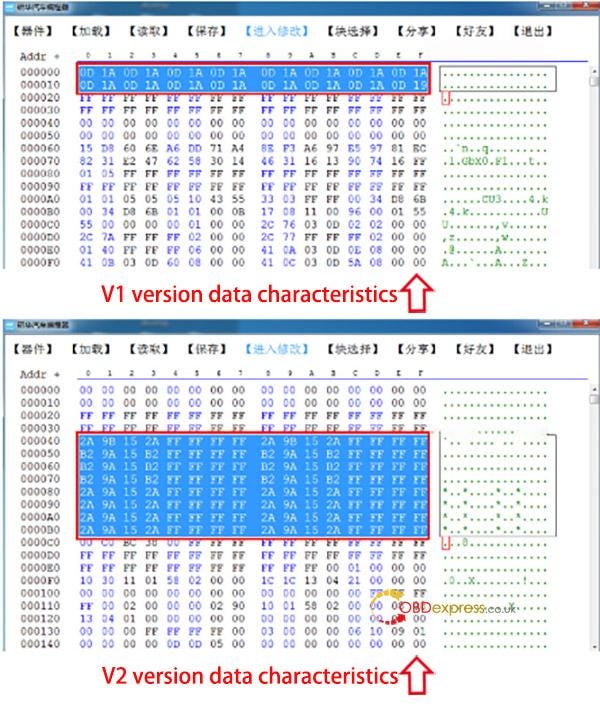
The 35128WT chip requires differentiation of data formats; the data characteristics of versions V1 and V2 differ significantly.


Resolve different mileage on Yanhua YH35XX software and dashboard

The 35128WT chip requires differentiation in data format; the data characteristics of versions V1 and V2 differ significantly. The difference lies in the following: version V1 does not allow modification of mileage and requires the use of the Yanhua simulator, while version V2 allows direct modification of mileage on the original vehicle chip.

Problem: How can I decode and modify this file? Are there any tutorials?

Answer: Yanhua offers a file modification service. After reading the file, it is saved and sent to a technician, specifying the original mileage and the mileage to be modified. The technician will manually modify the file and send it back. Simply write the modified file into the vehicle’s original chip.

Contact us:

Email: sales@OBDexpress.co.uk

WhatsApp: +44 7418609676

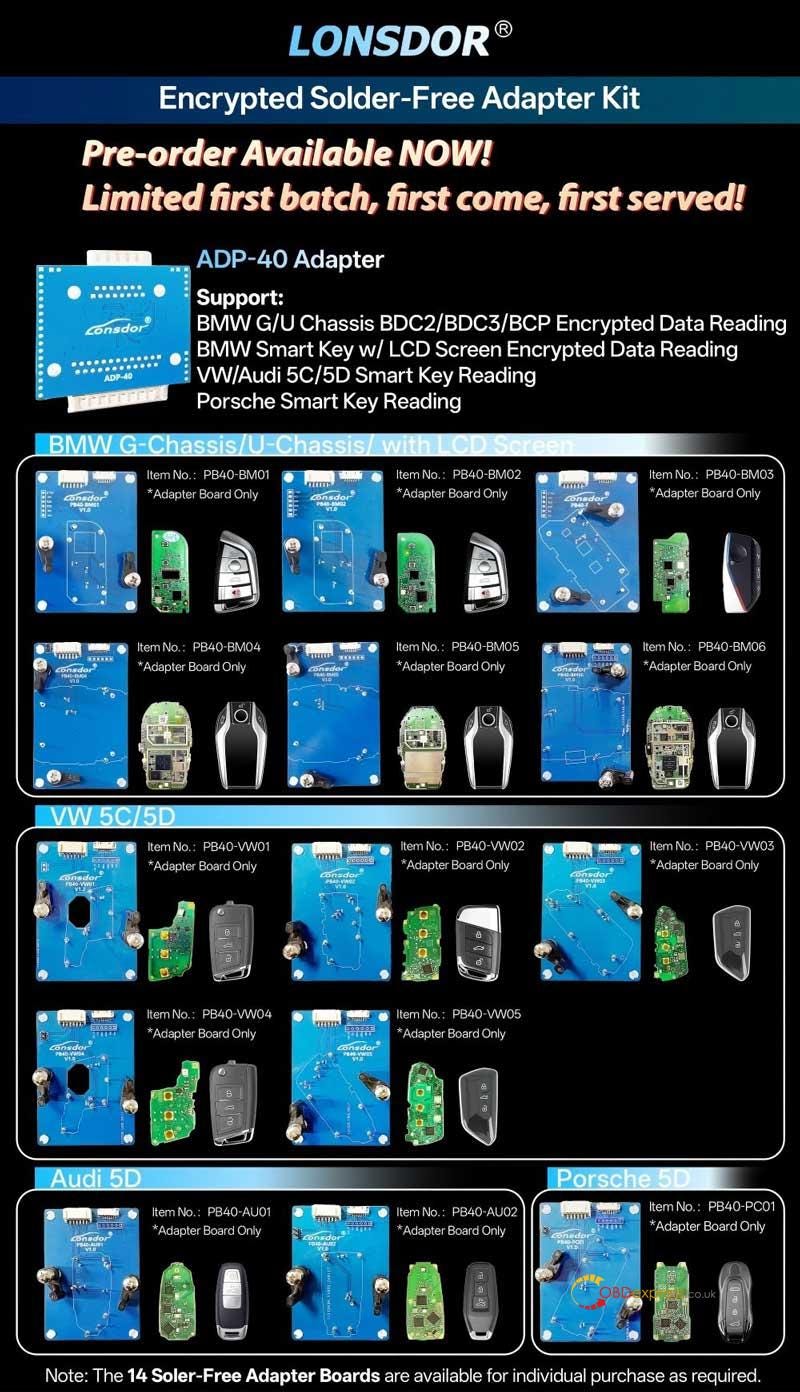
Lonsdor ADP-40 Adapter: BMW G/U Chassis & VAG 5C/5D No Solder

 Stop soldering and start earning. The Lonsdor ADP-40 Solder-Free Adapter Kit is the professional solution for reading encrypted data without the risk of hardware damage.

Limited first batch — first come, first served!

The ADP-40 Adapter: Key Features

The new ADP-40 adapter is a powerhouse designed for the most demanding luxury vehicle brands:

  • BMW G/U Chassis: Effortless BDC3/BCP encrypted data reading.
  • BMW LCD Keys: Full support for encrypted smart key data.
  • VAG Group: Specialized reading for VW/Audi 5C and 5D smart keys.
  • Porsche: Reliable 5D smart key data reading.
  • Compatibility: Plug-and-play with Lonsdor K518 and K518 Pro.

Lonsdor ADP-40 Adapter_BMW G U Chassis VAG 5C 5D No Solder

Professional License Upgrades

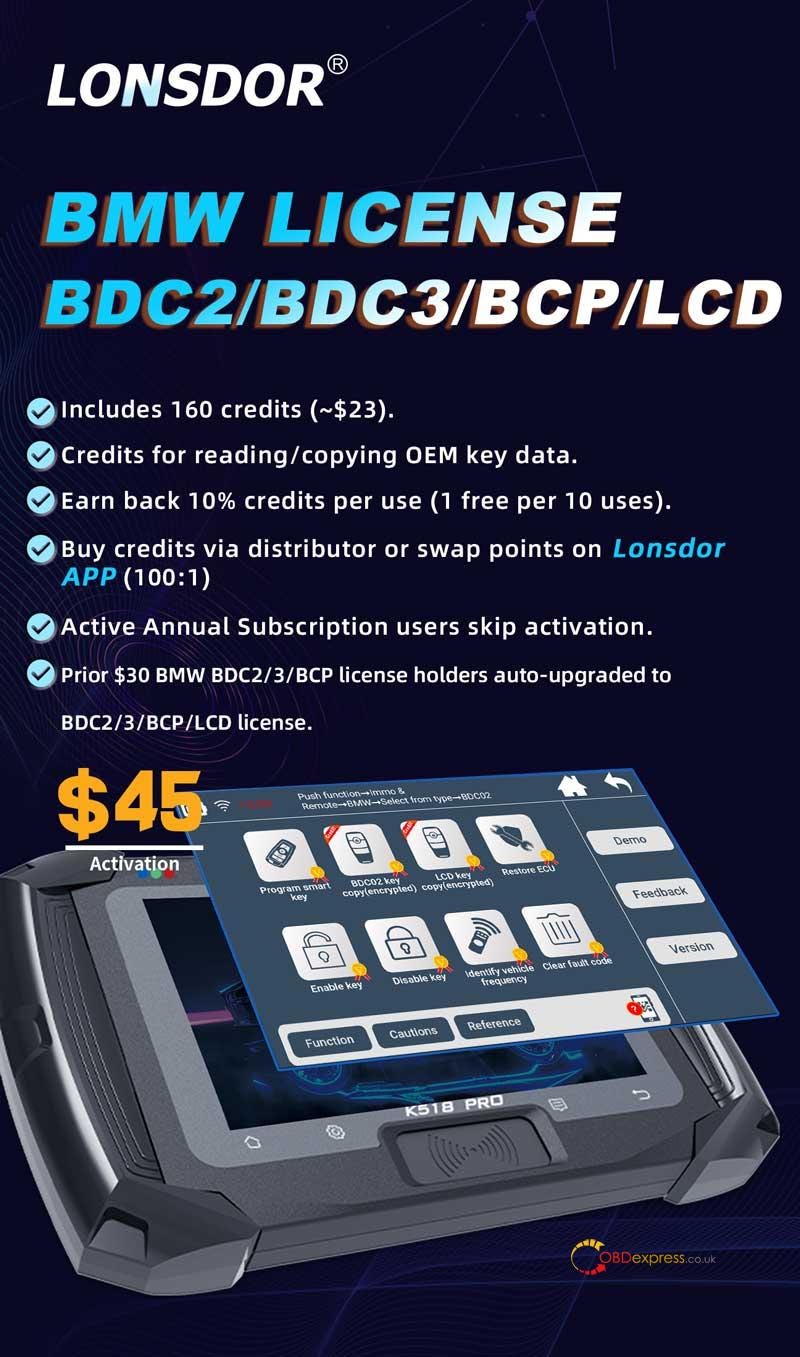
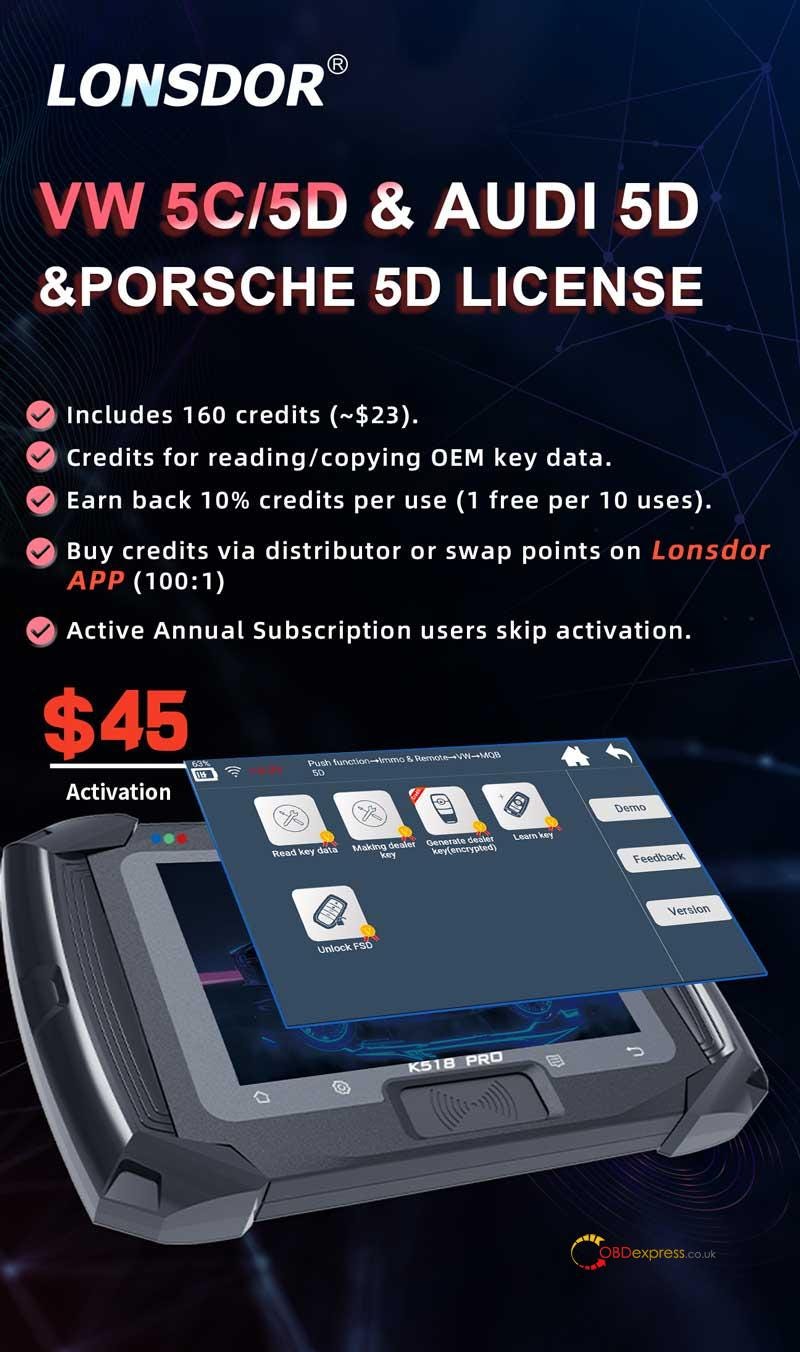
To unlock these high-end functions, choose the license that fits your shop’s needs. Both licenses include a 160-credit starter pack (~$23 value):

BMW BDC2/BDC3/BCP/LCD License

  • Smart Rewards: Earn 10% credits back per use — get 1 free read for every 10 uses.
  • Free Upgrades: Previous BDC2/3/BCP license holders are auto-upgraded to include LCD support.
  • Pro Perk: Active Annual Subscription users skip the activation fee entirely.

Lonsdor ADP-40 Adapter_BMW G U Chassis VAG 5C 5D No Solder

VW 5C/5D & Audi/Porsche 5D License

  • Credit System: Use credits for reading/copying OEM key data.
  • Easy Top-up: Buy credits through distributors or swap Lonsdor APP points (100:1).
  • Efficiency: Active Annual Subscription users bypass activation.

Lonsdor ADP-40 Adapter_BMW G U Chassis VAG 5C 5D No Solder

Secure Your Kit Today

Don’t get left behind by encrypted vehicle systems. Whether you need the full kit or specific adapter boards (14 varieties available separately), Lonsdor has you covered.

Boost your shop’s capabilities — order your Lonsdor Solder-Free Kit today!

www.obdexpress.co.uk
How to Clone BMW BDC3 Encrypted Key by Yanhua Mini ACDP2?

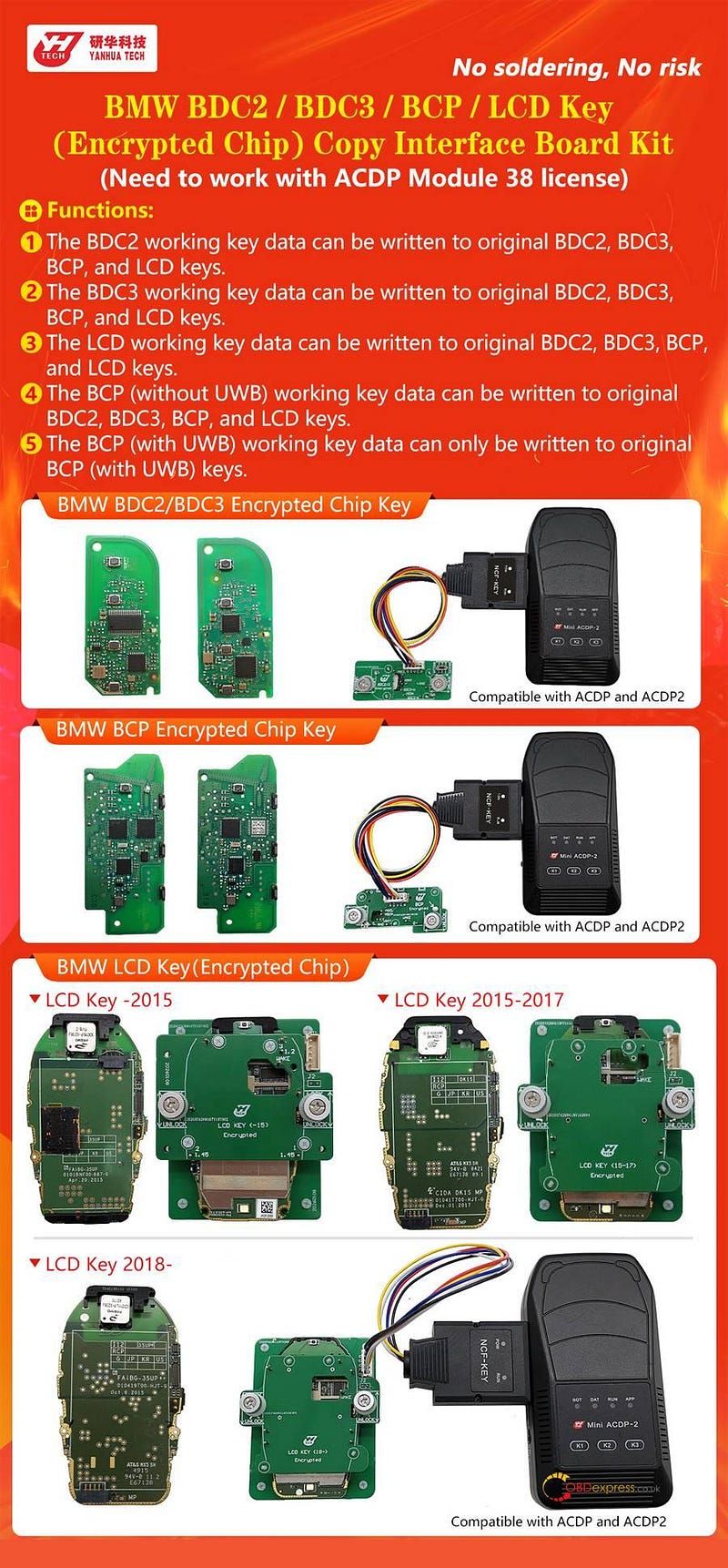
 Yanhua Mini ACDP2 now supports keys cloning for BMW BDC2, BDC3, LCD (with encrypted chips), and BCP modules (both with and without UWB) in bench mode. This tutorial uses a BDC3 key as a practical example to illustrate the complete procedure.


How to Clone BMW BDC3 Encrypted Key by Yanhua ACDP2

Equipment & Software Preparation:

1.Required Hardware:

2.Software Prerequisites:

Ensure all software is updated to the latest compatible versions to enable this functionality.

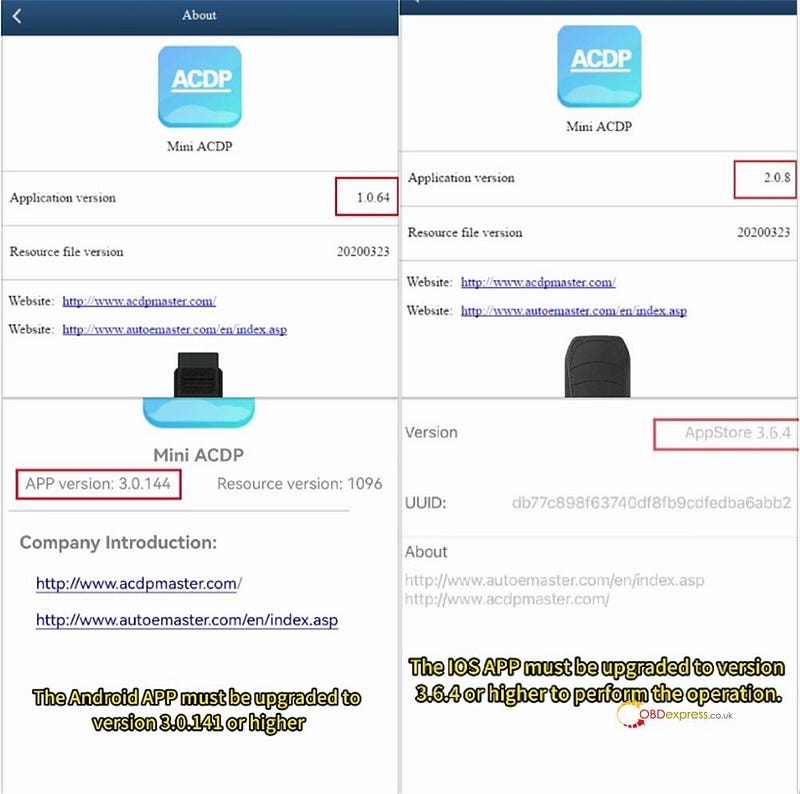
  • ACDP PC Software: Version 1.0.64 or higher
  • ACDP2 PC Software: Version 2.0.8 or higher
  • Android App: Version 3.0.141 or higher
  • iOS App: Version 3.6.4 or higher

How to Clone BMW BDC3 Encrypted Key by Yanhua ACDP2

Procedure:

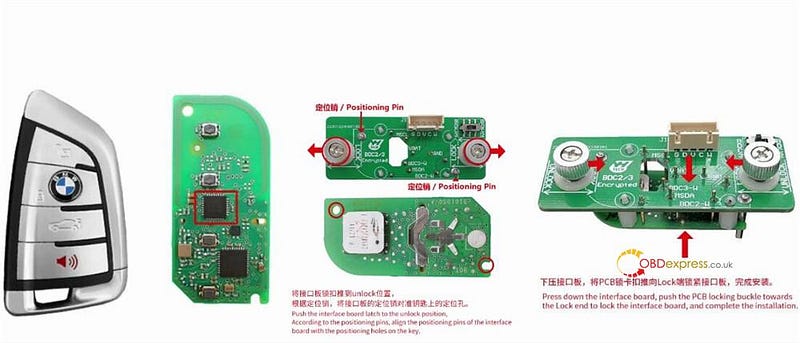
Step 1: Prepare BMW BDC3 Key

Gently open BDC3 key fob casing.

Move the latch on the interface board to the UNLOCK position.

Align the interface board’s guide pins with the matching holes on the key’s internal PCB.

Press the board firmly into place.

Secure the assembly by sliding the PCB locking latch to the LOCK position.


How to Clone BMW BDC3 Encrypted Key by Yanhua ACDP2

Step 2: Hardware Connection

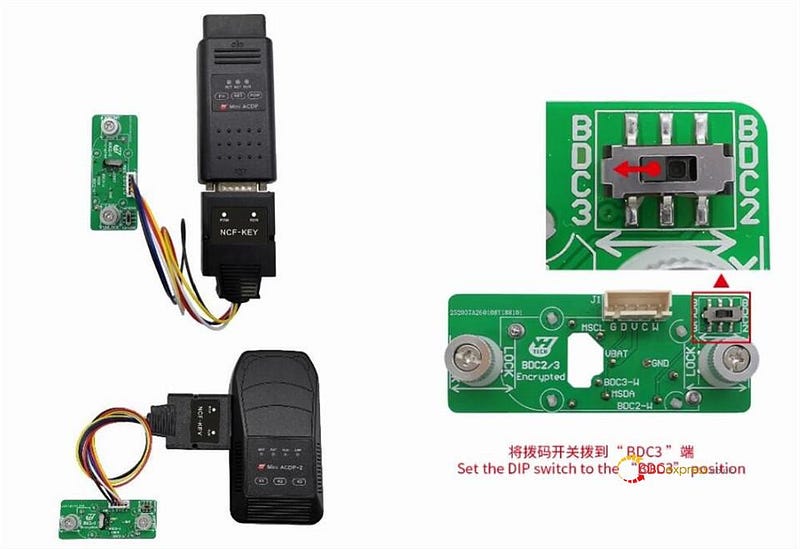
Establish a proper connection between Yanhua ACDP2 unit, BDC3 interface board (with the original key attached), and the adapter cable.

Set the DIP switch on the adapter to the BDC3 position.


How to Clone BMW BDC3 Encrypted Key by Yanhua ACDP2

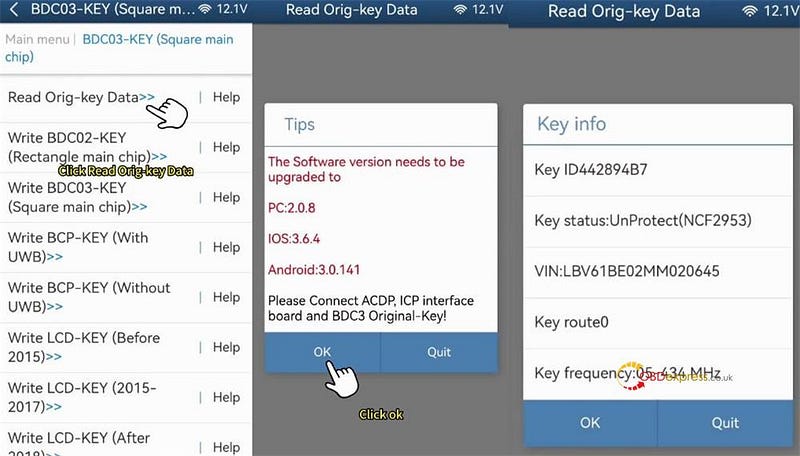
Step 3: Access the Cloning Function

Launch Yanhua ACDP application on your computer or mobile device.

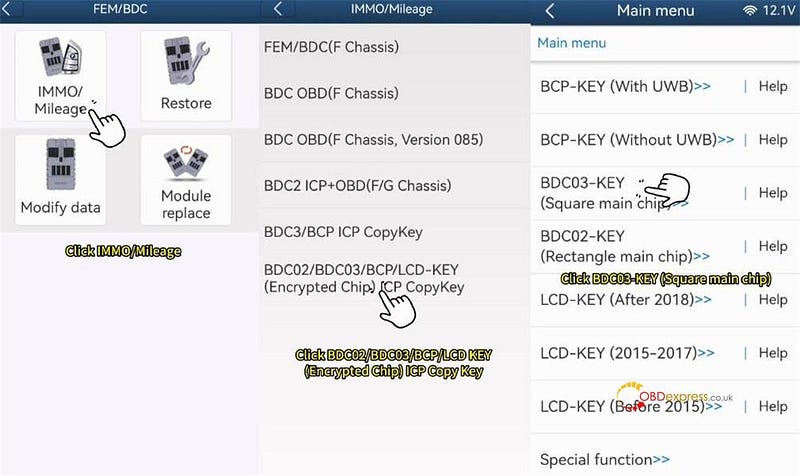
Navigate through the menu: BMW > FEM/BDC > IMMO/Mileage > BDC02/BDC03/BCP/LCD key (encrypted chip) ICP Copy Key.

Select the specific option: BDC03-key (square main chip/encrypted).


How to Clone BMW BDC3 Encrypted Key by Yanhua ACDP2

Step 4: Extract and Backup Original Key Data

Begin the process to read the data from the original key.

Once reading is complete, carefully review the displayed key details (such as VIN).

It is critical to back up this data. Take a screenshot and note the backup file’s location, creation date/time, and VIN. The saved file must have a .bin extension.


How to Clone BMW BDC3 Encrypted Key by Yanhua ACDP2

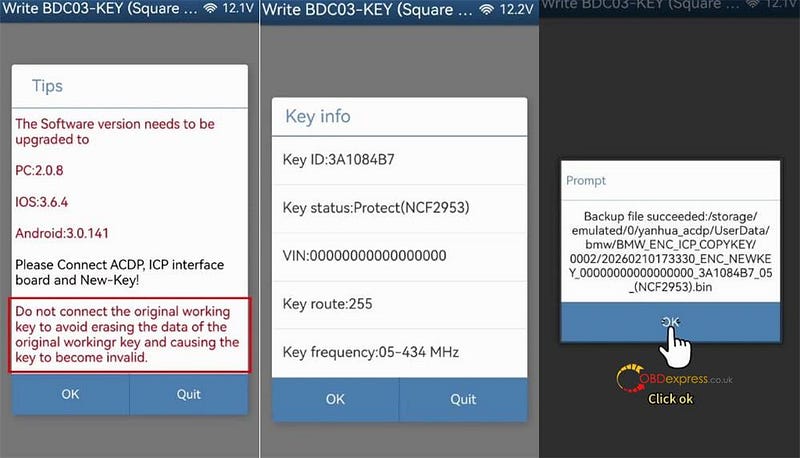
Step 5: Program the Replacement Key

After the read operation, select the target key type. Choose Write BDC03 key (encrypted).

Remove the original key. Attach the new, blank BDC3 key to ACDP BMW BDC3 interface board and reconnect it to the unit.

Warning: Avoid reconnecting the original working key during this step to prevent accidental data loss, which would permanently disable it.

Confirm the new key’s information and also create a backup of its initial data.


How to Clone BMW BDC3 Encrypted Key by Yanhua ACDP2

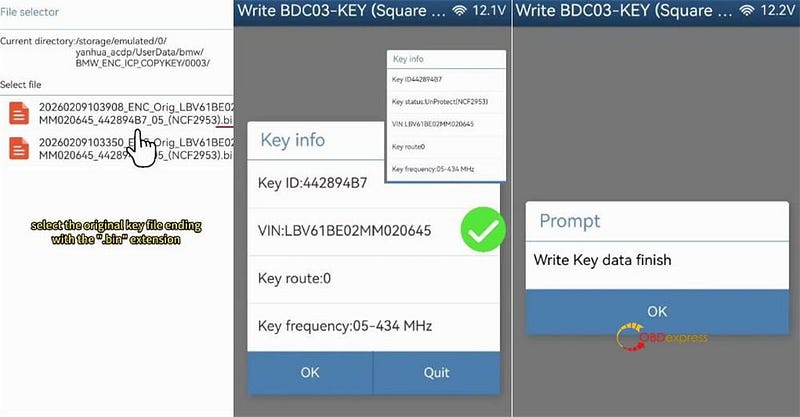
Step 6: Write Data and Finalize

Upload the previously saved original key data (the .bin file).

Verify that the uploaded data correctly corresponds to the original key.

Proceed to write this data onto the new BDC3 key.

A "Write key successfully" message will confirm completion.


How to Clone BMW BDC3 Encrypted Key by Yanhua ACDP2

Mini ACDP2 automatically stores the information for the newly cloned key.


How to Clone BMW BDC3 Encrypted Key by Yanhua ACDP2

www.obdexpress.co.uk

Sunday, 1 March 2026

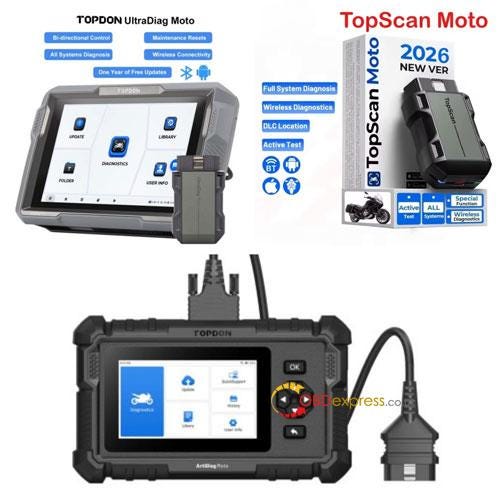
Topdon Moto Series Comparison: Topscan vs. ArtiDiag vs. UltraDiag

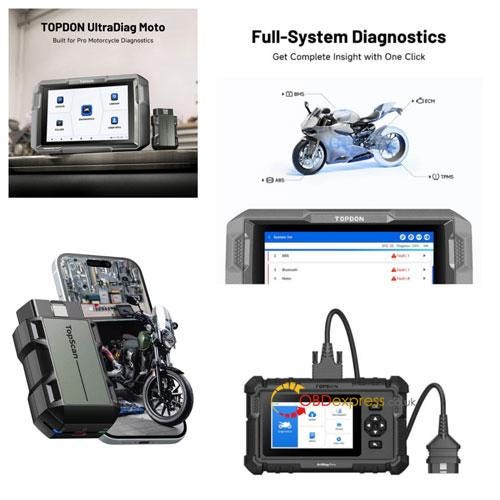
 Choosing between the Topscan Moto, ArtiDiag Moto, and UltraDiag Moto depends on your specific technical needs and the variety of bikes you service. While all three support full system diagnosis and bi-directional control, they differ significantly in hardware, brand coverage, and specialized maintenance capabilities.

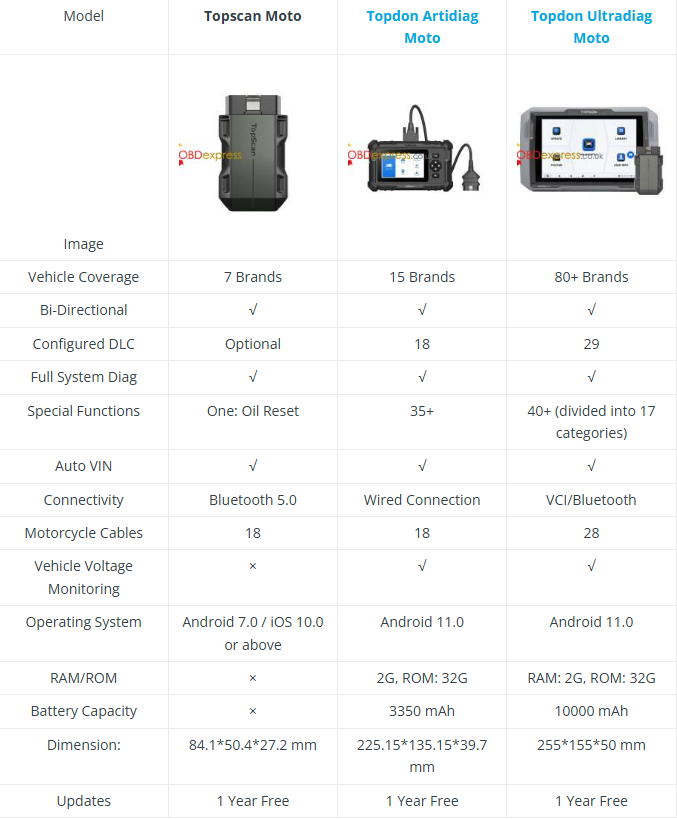
Quick Comparison Table


Topscan vs. ArtiDiag vs. UltraDiag


  • Topscan Moto: Best Value Bluetooth Scanner for DIYers

The Topscan Moto is a smartphone-based Bluetooth adapter designed for high portability. It offers full system scanning and bi-directional tests for 7 major brands. As the most cost-effective wireless solution in the lineup, it is the ideal solution for individual riders who need professional-level diagnostics without the bulk of a dedicated tablet.

The ArtiDiag Moto features a 5-inch Android 11 tablet with a stable wired connection. It expands coverage to 15 brands and includes over 35 essential service functions such as ABS bleeding, throttle matching, and oil resets. This model is best for enthusiasts or small shops requiring integrated battery power (3350 mAh) for mobile repairs.

The UltraDiag Moto is built for high-volume workshops, supporting over 80 brands and featuring 40+ special functions. It includes a 10,000 mAh battery for all-day use and a wireless VCI for flexible operation. With 28 included cables, it offers the most extensive hardware kit for handling complex tasks like ECU coding and deep system calibrations.


Topscan vs. ArtiDiag vs. UltraDiag

Technical Recommendation: Which One Should You Buy?

Scenario A: "I only work on my own bike."

Choose the Topscan Moto. It provides essential bi-directional tests and oil reset capabilities needed to maintain your personal ride at an affordable price point.

Scenario B: "I run a small shop focusing on popular brands."

The ArtiDiag Moto is your best bet. It offers 35+ specialized maintenance functions required for daily service tasks across the most common 15 motorcycle brands.

Scenario C: "I need a tool that can do everything for any bike."

Invest in the UltraDiag Moto. Its 80+ brand coverage and 10,000 mAh battery ensure you are never turned away by an obscure brand or a dead battery during a long diagnostic session.

Final Verdict: All three tools offer one year of free updates and Full System Diagnosis. Your choice ultimately depends on the variety of brands you service and the specific maintenance resets your workflow requires.


Topscan vs. ArtiDiag vs. UltraDiag

Get Your Professional Moto Tools Today

Ready to upgrade your garage or workshop? Explore the full range of TOPDON motorcycle diagnostic tools and secure the best pricing at www.obdexpress.co.uk

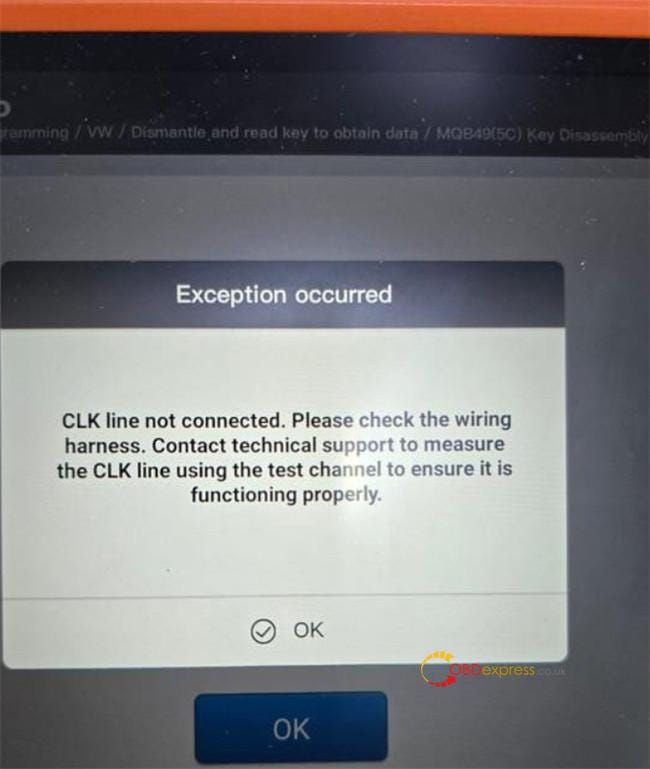
Xhorse Key Tool Plus VW MQB49 5C CLK Line not Connected Solution

 One customer reported that when he tried to add a 2023 VW MQB49 5C key using VVDI Key Tool Plus, the device could not read the original key data, and appeared the error message "CLK line not connected." All soldering was correct, the error also occurred with solder‑free adapter.


VVDI Key Tool Plus VW MQB49 5C CLK Line not Connected Solution

Solution:

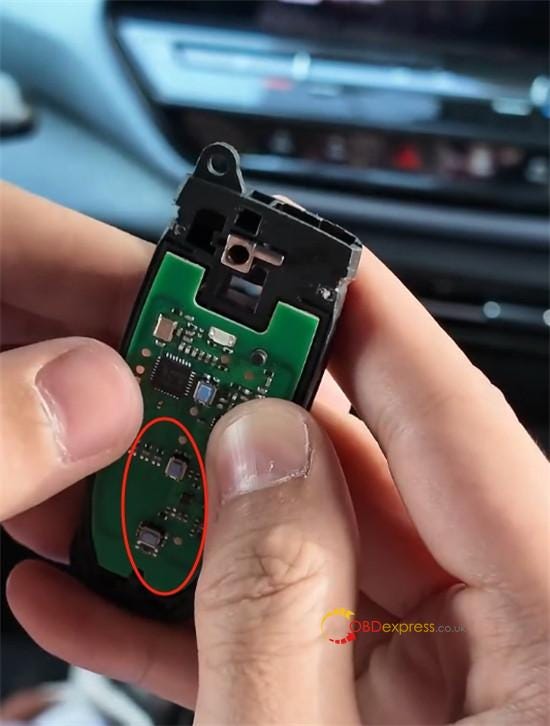
1.Inspect all wiring connections thoroughly — wire colors can vary. Always verify by matching the actual labels on the wires themselves.

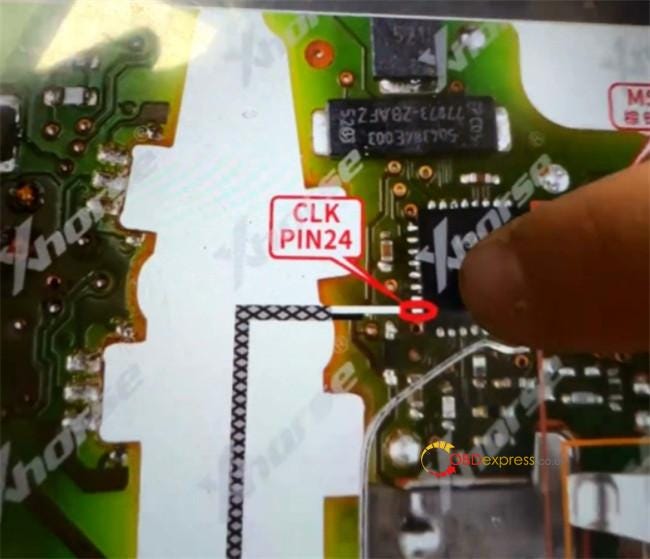
2.Pay special attention to the CLK line.

The CLK signal connects to Pin 24 on the chip.


VVDI Key Tool Plus VW MQB49 5C CLK Line not Connected Solution

3.Check and restore the chip connection if needed:

  • Examine the chip pins under a microscope.
  • Carefully polish any cracked or visibly damaged pins.

VVDI Key Tool Plus VW MQB49 5C CLK Line not Connected Solution

4.Ensure the CLK connection is physically stable:

  • Resolder the wire securely, or
  • If using a 5C/5D solder‑free adapter, press a needle firmly against the CLK pin to maintain consistent contact throughout the procedure.

VVDI Key Tool Plus VW MQB49 5C CLK Line not Connected Solution

Once the CLK connection is properly established, the Xhorse Key Tool Plus will successfully read the original key data.

www.obdexpress.co.uk

KEYDIY KD-X4 with FGB08 PCB Board Add VAG MQB 5D key

 KEYDIY released the specialized Keydiy FGB08 PCB Key Board. Designed for compatibility with KD-X4 key programmer, this tool enables precise programming support for Volkswagen and Audi ZA & FGA platforms.

Key Features:

  • Equipped with built-in 5D basic programs for Volkswagen and Audi — featuring the original two-chip design (non-UWB).
  • Ready-to-use functionality: No program generation is required for 5D vehicle matching, and ID modification is supported.
  • Comprehensive ZA and FGA program generation capabilities.

(Please note: Once generated, 5D programming functions are temporarily unavailable.)


KEYDIY KD-X4 with FGB08 PCB Board Add VAG MQB 5D key

Usage Note:

Before key matching, the two buttons on Keydiy FGB08 key may not respond — this is normal operation.


KEYDIY KD-X4 with FGB08 PCB Board Add VAG MQB 5D key

Upon pressing the first button, the indicator light will illuminate.


KEYDIY KD-X4 with FGB08 PCB Board Add VAG MQB 5D key

Quick Guide: Generating and Learning an FGB08 Key

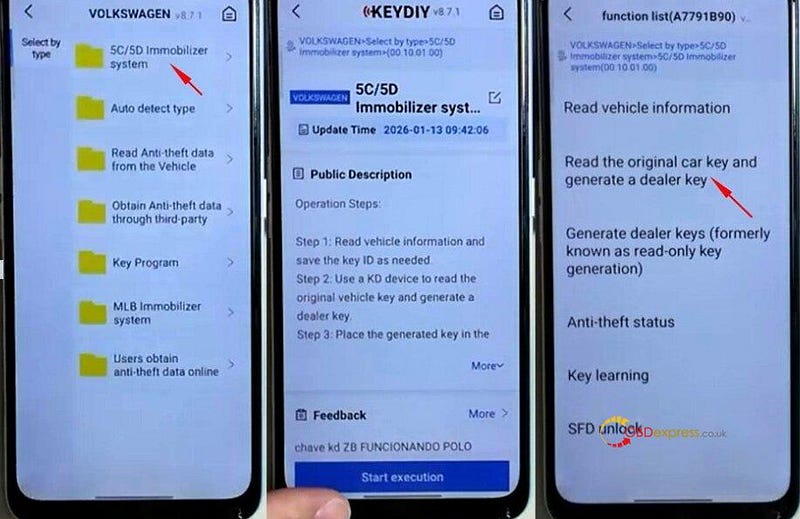
Open the KD App and go to:

IMMO Programming → VW → 5C/5D Immobilizer System → Start execution.

Choose "Read the original car key and generate a dealer key."


KEYDIY KD-X4 with FGB08 PCB Board Add VAG MQB 5D key

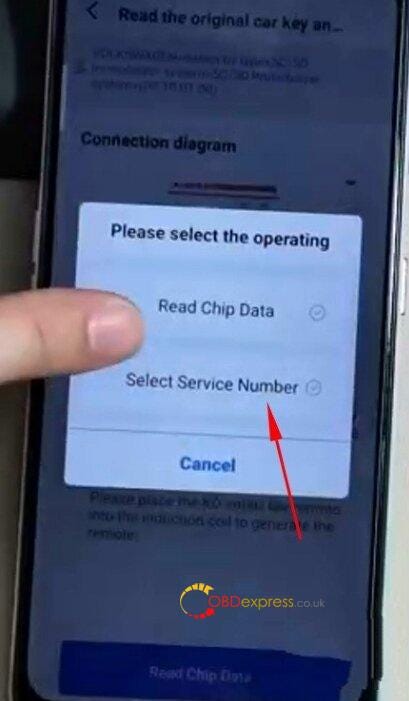
After reading the original key data, click "Select service number".


KEYDIY KD-X4 with FGB08 PCB Board Add VAG MQB 5D key

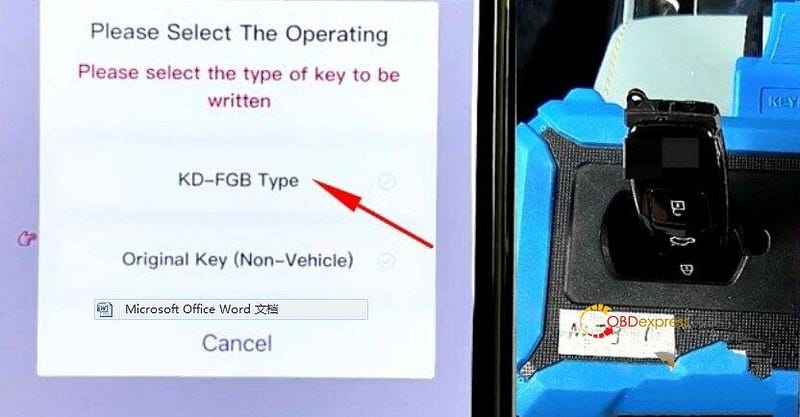
When prompted by KD-X4, select "KD-FGB Type" as the key type.

Choose the appropriate frequency.

Insert FGB08 key (with housing) into KEYDIY KD-X4 induction coil area.


KEYDIY KD-X4 with FGB08 PCB Board Add VAG MQB 5D key

Once "FGB08 remote generated successfully" appears, proceed to learn the key in the vehicle.

For the in-vehicle key learning process, please refer to Step 3 in the related tutorial to finalize the setup.

www.obdexpress.co.uk

CGDI BD006 Manual: Battery, Cranking, Charging & Voltage Tests

 The CGDI BD006 Car Battery Tester uses conductance testing technology to quickly measure a starting battery’s cold-cranking capability a...