Friday, 6 September 2024

TOPDON TopScan Pro vs Lite Comparison, FAQs, Review

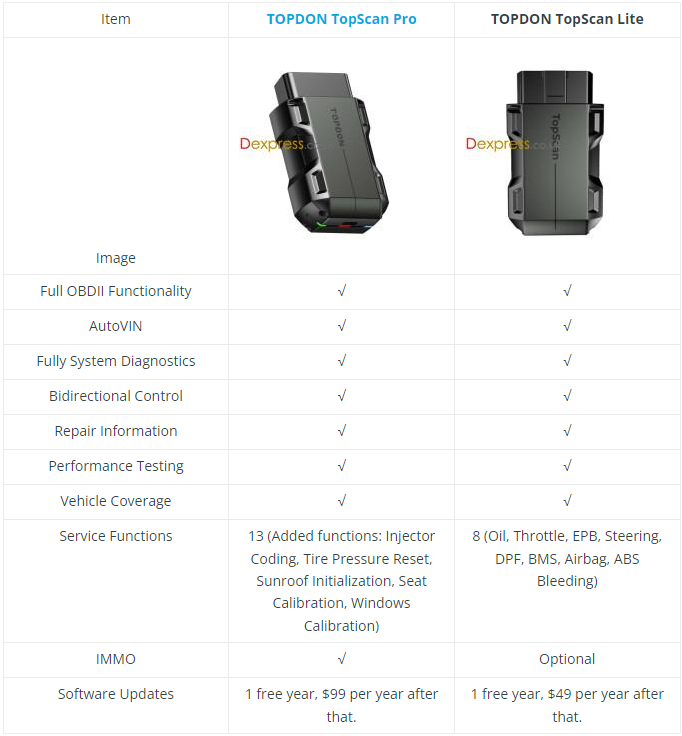
 The TOPDON TopScan is a pocket-sized tool that turns a phone into a scanner and keep up with its users as they to beyond basic scans. It offers 2 version: the Pro and the Lite. The TopScan Pro is the more advanced version that offering IMMO key programming and 13 reset functions.

Here we’ve compared 2 versions, also collected the FAQs and reviews for reference.

Comparison Table
TOPDON TopScan Pro vs Lite Comparison, FAQs, Review

TopScan Pro vs. Lite Differences

  1. TopScan Pro can support IMMO function while Lite is optional.
  2. TopScan Pro added 5 new service functions including injector coding, tire pressure reset, sunroof initialization, seat calibration & windows calibration.
  • TopScan Pro FAQs

Q: What special functions does the TopScan Pro support?

A: The TopScan Pro supports 13 special functions, including oil reset, throttle adaptation, EPB reset, ABS bleeding, steering angle reset, DPF regeneration, airbag reset, BMS reset, injector coding, tire pressure reset, sunroof initialization, seat calibration and windows calibration.

Q: Can multiple devices be bound to one TopScan app account?

A: Yes.

Q: What should I do if a communication error occurs?

A: Follow the steps below to identify the problem:

  • Check if the ignition is ON.
  • Check if the TopScan Pro is securely plugged into the vehicle’s OBDII port.
  • Turn the ignition off. Then turn it on after 10s and continue the operation.
  • Check if the vehicle’s control module is defective.

Q: Do I need to update the firmware before using it for the first time?

A: Yes. Firmware will automatically update to the latest version once the TopScan Pro is connected with your phone via Bluetooth. You can also tap “Me >> Firmware Update” to update the firmware manually.

Q: Why do I need to download the diagnostic software after installing the TopScan app?

A: Since there are various vehicle manufacturers, different diagnostic software is required for different brands.

Q: What features are available if I choose not to renew my TopScan software subscription?

A: If not renew the TopScan software subscription, you will still have permanent and free access to several valuable features. These include EOBD diagnostic software, I/M Readiness, Vehicle Performance Test, DTC Repair Guide, Technical Service Bulletins(TSB), DLC location, Warning Light Library and the VE Calculator.

Q: Where to download the TopScan Pro app?

APP Store: TopGuru (Requires iOS 11.0 or later)

Google Play: TopScan (Requires Android 7.0 or later)

  • TopScan Pro Reviews

Thomas. K Review

I absolutely love this TopScan from TOPDON!

This affordable little unit packs a big punch. You’ll be hard pressed to find a better scan tool in the sub $100 range that is bi-directional as capable as this one!

Not only is this TopScan bi-directional, it is an all system diagnostic tool, with 13 reset functions

In my testing, it has performed fantastic! It connects very quick and easy. Being wireless and using Bluetooth for both Android and IOS makes usability very simple. You’re not connected by a cable so you’re free to walk around while using this scan tool.

This scan tool works great for a simple code reader to read and clear DTC’s, or a bi-directional scan tool capable of resetting functions and performing tests.

Overall, coming in at under $100, this TopDon TopScan Pro is a great little scan tool for someone who may not need all the bells and whistles of a full featured scan tool, or someone who does but wants a small compact scan tool to have handy anywhere, anytime! Definitely a solid little scan tool!
TOPDON TopScan Pro vs Lite Comparison, FAQs, Review

Bob D Review

While these may appear to be nothing more than gadgets it couldn’t be further from the truth. These are fully functional scanners with bi-directional control. If you’re not careful you can create problems for yourself by getting into systems without doing your homework.

It can take some time for certain tasks to complete depending on what you have it paired with. I am currently using it with a iPhone and Apple being Apple it can limit you from time to time.

You will not find another scanner at this price point. It has me thinking about the Topdon Phoenix series to replace the main shop scanner
TOPDON TopScan Pro vs Lite Comparison, FAQs, Review

Mia Review

I plugged it into my vehicle. Took forever to set up, but once I finished downloading everything in the app it gave me a reading of what was going on with my engine.

I took my car to the mechanic and told them what I needed them to fix. They did the repairs and the engine light went away. It also saved me money because I didn’t have to pay them their $100 fee to detect the problem themselves.

It’s been 3 weeks and the light is still off. So it seems the code the device gave me was right. It was easy to read the codes given. Overall good product. I guess I’ll do an update if I need to use it again.
TOPDON TopScan Pro vs Lite Comparison, FAQs, Review

www.obdexpress.co.uk

Wednesday, 4 September 2024

LAUNCH Creader Elite 2.0 Free Software Upgrade Guide

 LAUNCH Creader Elite 2.0 FGC is a diagnostic tool for Ford, GM, Chrysler, Dodge, and Jeep. It has powerful functions and free lifetime updates. This article will introduce how to update the LAUNCH Creader Elite 2.0 software.


LAUNCH Creader Elite 2.0 Free Software Upgrade Guide

Connect to the Network

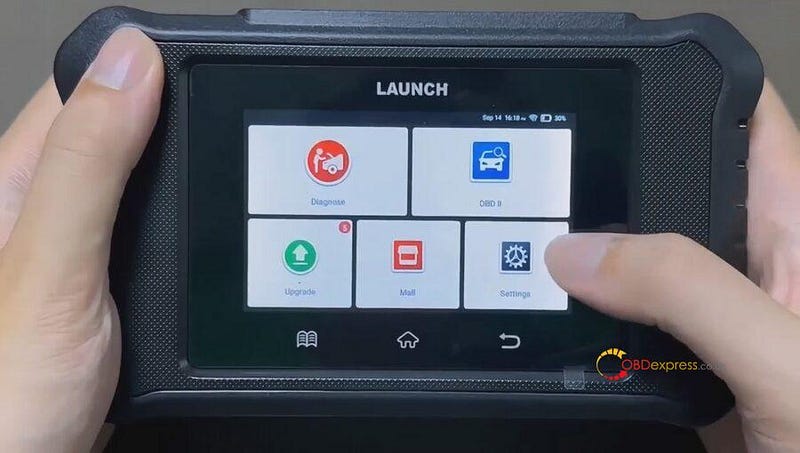
Turn on your LAUNCH Creader Elite 2.0 FGC device, from the main interface, tap on [Settings].


LAUNCH Creader Elite 2.0 Free Software Upgrade Guide

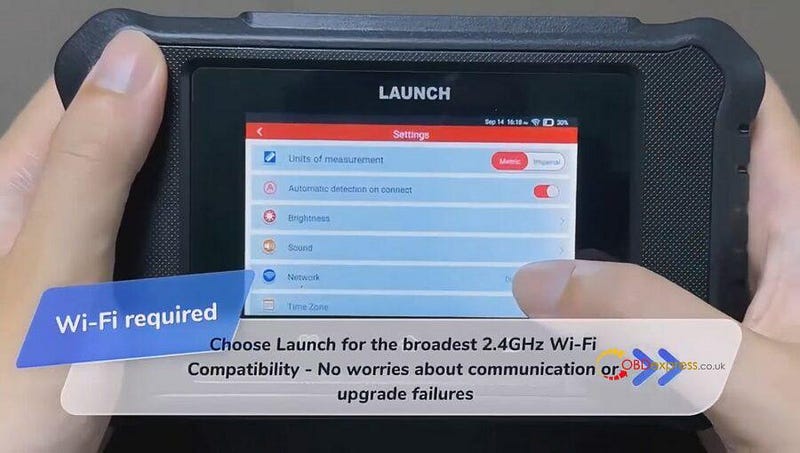
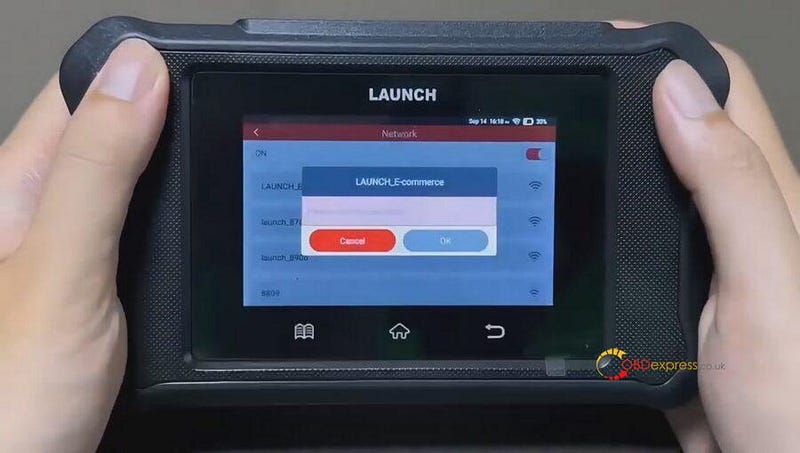
Choose Launch for the broadest 2.4GHz WiFi Compatibility — No worries about communication or upgrade failures


LAUNCH Creader Elite 2.0 Free Software Upgrade Guide

Upgrade the Software

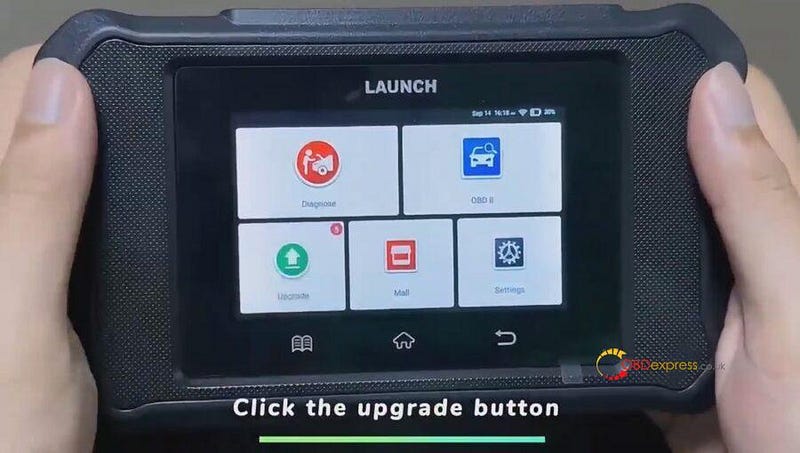
Once connected to the internet, return to the main interface and click on the [Upgrade] button.


LAUNCH Creader Elite 2.0 Free Software Upgrade Guide

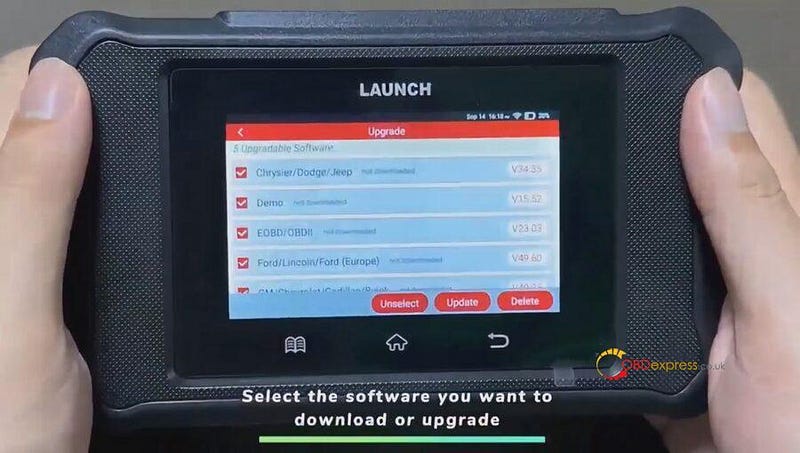
A list of available software updates will be displayed. Select the specific software you wish to download or upgrade.


LAUNCH Creader Elite 2.0 Free Software Upgrade Guide

The download process will begin automatically. Ensure your device remains connected to the network and avoid interrupting the process.
Once the download and installation are complete, your LAUNCH Creader Elite 2.0 FGC is ready for use with the latest software enhancements.


LAUNCH Creader Elite 2.0 Free Software Upgrade Guide

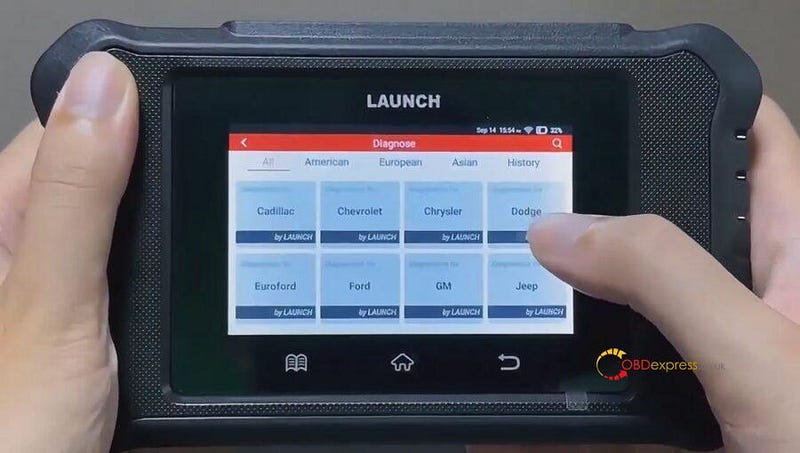
Now the upgrade is complete, and you can use the latest version of LAUNCH FGC software.

www.obdexpress.co.uk

Xhorse VVDI MLB Tool FAQs: Language, Binding, Data Calculation Failure

 OBDEXPRESS.co.uk has collected some frequently asked questions of Xhorse VVDI MLB Tool including device language and binding, usage count and syncing, vehicle models, data collection & calculation, matching, common issues with collection failures, etc.


Xhorse VVDI MLB Tool FAQs

1.Device Language and Binding

  • Language: For regions outside of China, you should use global version (GL). If you purchased a CH version by mistake, please contact the dealer for assistance.
  • Binding: The MLB Tool needs to be bound to an Xhorse account before it can be used normally. There is a binding button on the Key Tool Plus On the PC version, there is a binding menu under "Special Function".

2.Device Usage Count and Syncing

MLB-TOOL does not limit usage counts. When the usage count decreases on the software interface, you can restore the count by clicking "Sync Authorization".

3.Supported Vehicle Models

VVDI MLB-TOOL supports adding new keys for Audi, Porsche, Audi, Porsche, Volkswagen, Lamborghini, Bentley, and other MLB model keys. (Doesn’t support AKL)

4.Data Collection & Calculation

  • Points Cost and Collection Method Selection

Collect the original vehicle key: 200 points.

Collect the original vehicle key, but you have a VVDI MLB key: waive the current collection points. Each MLB key can only waive points once.

Collecting a VVDI key: does not require points.

  • Common Issues with Collection Failures

1).VCC1 and VCC2 are reversed:

The capacitor was removed incorrectly.

2).Short circuit in soldering:

Data collection requires wireless reading of the key simultaneously; if the key is not positioned correctly, it will not be sensed.

3).How to Handle Calculation Failures

Typically, the issue lies with the collected data; try re-collecting.

If repeated collections fail, check the soldering, wiring harness, and chip sensing.

5.Matching Devices

Xhorse MLB TOOL can work with VVDI KEY TOOL PLUS or VVDI2.

For vehicles from 2023 onwards, due to SFD restrictions from manufacturers, SFD must be remotely unlocked before the matching device can be used.

6.Supported Keys

Only supports original keys and VVDI MLB keys. Other aftermarket keys are not guaranteed.

Read also:

Audi A4L Key Programmed by VVDI MLB Tool and VVDI2:

http://blog.obdexpress.co.uk/2024/07/08/audi-a4l-key-programmed-by-vvdi-mlb-tool-and-vvdi2/

How to Add Audi A4L Key by VVDI MLB Tool and Key Tool Plus?

http://blog.obdexpress.co.uk/2024/07/03/how-to-add-audi-a4l-key-by-vvdi-mlb-tool-and-key-tool-plus/

GODIAG GT106 Plus User Guide: Add Fuel Injector Cleaning and Relay Test

 GODIAG GT106 Plus is the upgraded version of GODIAG GT106. It newly adds fuel injector cleaning and relay test for cars and trucks. Besides that, it covers the same function as the old version. Both can work with X431 Easydiag 3.0, Easydiag 2.0, Golo Carcare 3, ICARSCAN golo technician box, Thinkcar, Thinkcar2, Thinkcar Pro, Thinkdiag, Thinkdiag Mini, Thinkdriver OBD2 diagnostic Bluetooth head for truck diagnosis, and help to convert the truck 24v K-Line communication protocol to 12v K-Line, so that the Launch vehicle equipment can be used, and the Launch 12V diagnostic head will not be burned.

GODIAG GT106 Plus Heavy Duty Truck Adapter comes with the following items:

1pc x GODIAG GT106 PLUS 24V to 12V Heavy Duty Truck Adapter

1pc x power cord with fuse

1pc x power cord

4pcs x clamps

4pcs x rubber protective cover

GODIAG GT106 Plus User Guide

GODIAG GT106 Plus VS GODIAG GT106 VS other 24V to 12V Adapters:

GODIAG GT106 Plus User Guide

Relay Test:

When the car’s headlights, turn signals, horn and the engine starter do not work, if there is no problem with these components after detection, you can check the relay switch.

After the relay is removed from the car, connect the adapter based on the connection of the relay.

GODIAG GT106 Plus User Guide

Fuel Injector Test:

When the vehicle has difficulty in starting, acceleration and fuel consumption, etc, it is necessary to check the fuel injector.

When detecting the fuel injector, if the fuel injector is driven to open or close, the ammeter shows the normal value and the fuel injector woks normally, it means that the fuel injector is normal. Otherwise, it means that the fuel injector is damaged.

Note: Use a 24v 8A power supply to test the fuel injector of the truck and the time should not exceed 120s.

GODIAG GT106 Plus User Guide

Fuel Injector Cleaning:

When the fuel injector is blocked, the fuel injection is not smooth. There are carbon deposits and thick sticky substance in the gap of the fuel injector. The designed fuel injection volume or atomization effect cannot be achieved, it needs to be cleaned.

1) Prepare a fuel injector cleaner pressurized can or a carburetor cleaner pressurized can (nozzle diameter of the pressurized cans: 4mm)

2) Hold the manual cleaning tool tightly with your hand, and firmly fix the fuel injector with your fingers to prevent the pressure of the cleaner can from washing away the fuel injector.

3) Pay attention to the hazards of liquid to human body during manual cleaning, and take protective measures. Do not operate in dangerous places with open flames because the pressurized cans are extremely flammable. Choose an open place to facilitate the discharge of cleaning liquid.)

Note: Fuel injector cleaning requires the additional purchase of an extension cord and a bottle of cleaning agent.

GODIAG GT106 PLUS Supported Trucks or Heavy Duty Vehicles:

ABS (HD), ALLISON (HD), BENDIX ABS (HD), BONLUCK (HD), BOSCH (HD), CATERPILLAR (HD), CHAOCHAI (HD), CHRYSLER (DIESEL) CITROEN (DIESEL), CTRUCKTY (HD), CTRUCKZY (HD), CUMMINS (HD), DACHAI (HD), DAF (HD), DAYUN (HD), DEMO (HD), DETROIT (HD), DFL (HD), DongFeng (HD), EATON (HD), FAW (HD), FIAT (DIESEL), FORD (DIESEL), FOTONAUMAN (HD), FREIGHTLINER (HD), GM (DIESEL), Great Wall (DIESEL), HALDEX ABS (HD), HIGER (HD), HINO (HD), HONGYAN (HD), HUANGHAI (HD), HYUNDAI (HD), INTERNATIONAL (HD), ISUZU (HD), IVECO (HD), JAC (DIESEL), JAC (HD), JAC LIGHT (HD), JMC (HD), KAMA (HD), KARRY (HD), KARRY TRUCK (HD), KENWORTH (HD), KINGLONG (HD), KOBELCO (HD), LAIDONG (HD), MACK (HD), MAN (HD), MAXUS (DIESEL), MAXXFORCE (HD), MAZDA (DIESEL), MERCEDES (HD), MITSUBISHI (DIESEL), MITSUBISHI FUSO (HD), NISSAN (DIESEL), OBD (HD), OPEL (DIESEL), PACCAR (HD), PETERBILT (HD), PEUGEOT (DIESEL), QUANCHAI (HD), RENAULT (HD), SCANIA (HD), SCR (HD), SHACMAN (HD), SHANGCHAI (HD), SINOTRUK (HD), SPRINTER (DIESEL), STERLING (HD), SUNWIN (HD), TOYOTA (DIESEL), UD (HD), VOLVO (HD), VW (DIESEL), WABCO ABS (HD), WAW (HD), WEICHAI (HD), WESTERN STAR (HD), WUZHOULONG (HD),XICHAI (HD), YANGCHAI (HD), YQSH (HD), YUCHAI (HD), YUNNEI (HD), YUTONG (HD), ZHONGTONG (HD)

Pre-order GODIAG GT106 PLUS 24V to 12V Heavy Duty Truck Adapter (will be in stock in Sept. 29)

https://www.obdexpress.co.uk/wholesale/godiag-gt106-plus-adapter.html

Tuesday, 3 September 2024

TOPDON AD600S vs AD800BT vs ArtiDiag Pro vs AD900BT Comparison

 As the versatile mid-level diagnostics tool, what’s different between TOPDON AD600S, AD800BT, ArtiDiag Pro & AD900BT? How to choose a best scan tool for myself? Referring to the below table, you may find the answer.

Comparison Table


TOPDON AD600S vs AD800BT vs ArtiDiag Pro vs AD900BT Comparison

Price

AD600S < AD800BT < ArtiDiag Pro = AD900BT

AD600S is the cheapest, ArtiDiag Pro is as expensive as the AD900BT.

  • Hardware

AD600S < AD800BT < ArtiDiag Pro < AD900BT

Aside from differences in screen and battery capacity, the memory is the same in all four models.

  • Software

AD600S < AD800BT < ArtiDiag Pro ≈ AD900BT

  1. ArtiDiag Pro & AD900BT support the most features include full OBD2 functions, full system diagnose, bi-directional control, online coding, etc.
  2. ArtiDiag Pro supports more reset functions while AD900BT supports wider coverage and more languages.
  • Upgrade

AD600S & AD800BT are free lifelong while ArtiDiag Pro & AD900BT only enjoy 2 years free to update.

Conclusion

So which TOPDON Artidiag OBD2 scanner is the best?

Artidiag 600S is the cheapest that can run basic diagnosis and 8 reset functions, suitable for DIYer or car owners.

Artidiag 800BT supports all system diagnose and 28 reset functions that can fully meet the daily needs for small repair shop.

ArtiDiag Pro & AD900BT are recommended for those who require advanced features like bi-directional control & online coding.

www.obdexpress.co.uk

Yanhua ACDP with Module 34 Change VW MQB 3426+95128 Dashboard Mileage

 How to change mileage on VW MQB dashboard with 3426+95128 chip model by Yanhua ACDP with Module 34? It’s easy to operate with the connection diagram in the Mini ACDP APP/software.

Check the detailed operation guide below.

1.Turn on the power switch on the car and light up the instrument panel

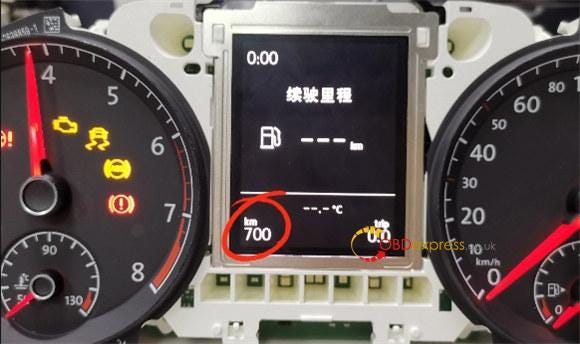
2.Record the current mileage (i.e. 700 km)


Yanhua ACDP with Module 34 Change VW MQB 3426+95128 Dashboard Mileage

3.Power on Yanhua ACDP2 and open Mini ACDP APP

4.Check the upper right corner to confirm the ACDP device has been bound

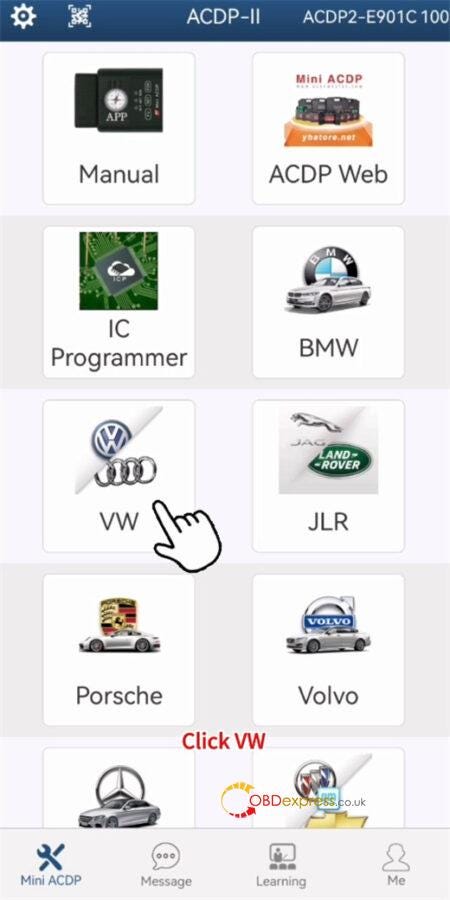
5.Click on "VW" on the main menu


Yanhua ACDP with Module 34 Change VW MQB 3426+95128 Dashboard Mileage

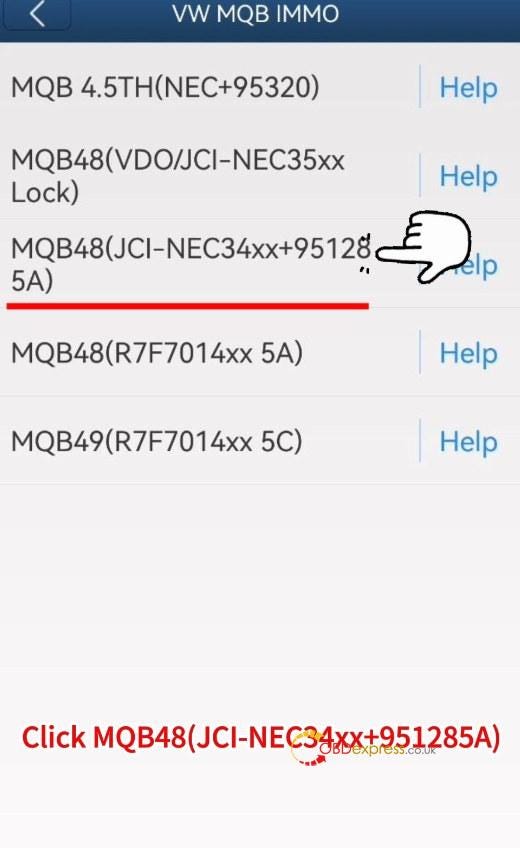
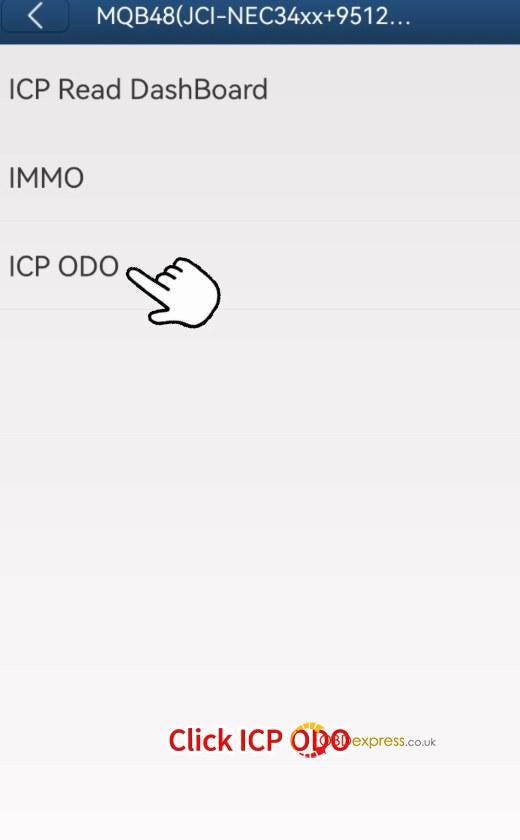
6.Select VW MQB IMMO>> MQB48 (VDO/JCI-NEC34xx +95128 5A)>> ICP ODO


Yanhua ACDP with Module 34 Change VW MQB 3426+95128 Dashboard Mileage

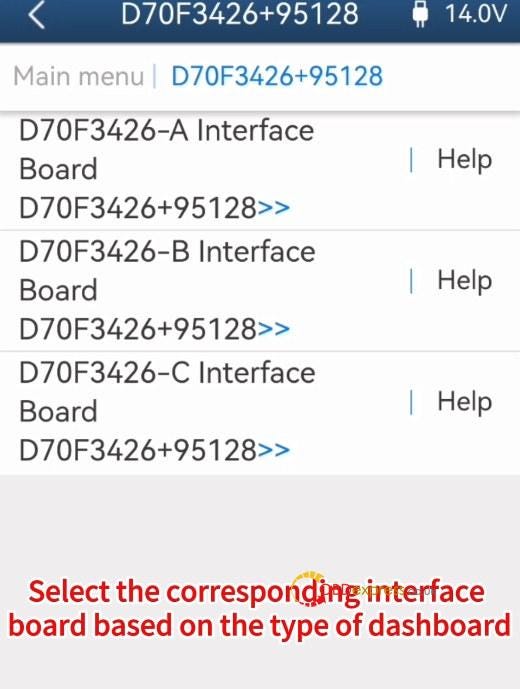
7.Select D70F3426+95128 and the corresponding interface board based on the type of dashboard

Here we select D70F3426-A Interface Board D70F3426+95128

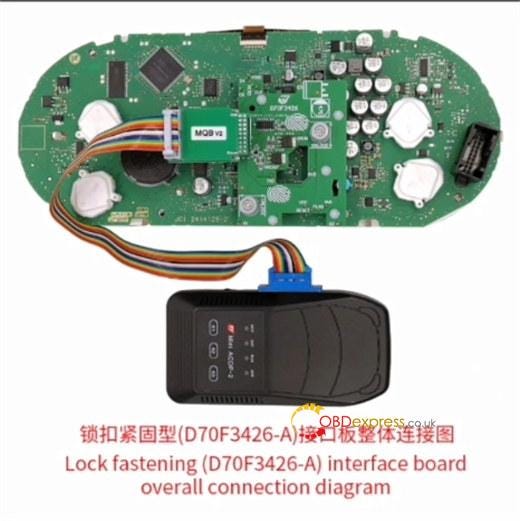
Click "Help" to check the connection diagram and connect Mini ACDP 2, MQB 3426+95128 chip dashboard and Yanhua Module 34 interface board correctly (click here to check the installation guide)


Yanhua ACDP with Module 34 Change VW MQB 3426+95128 Dashboard Mileage

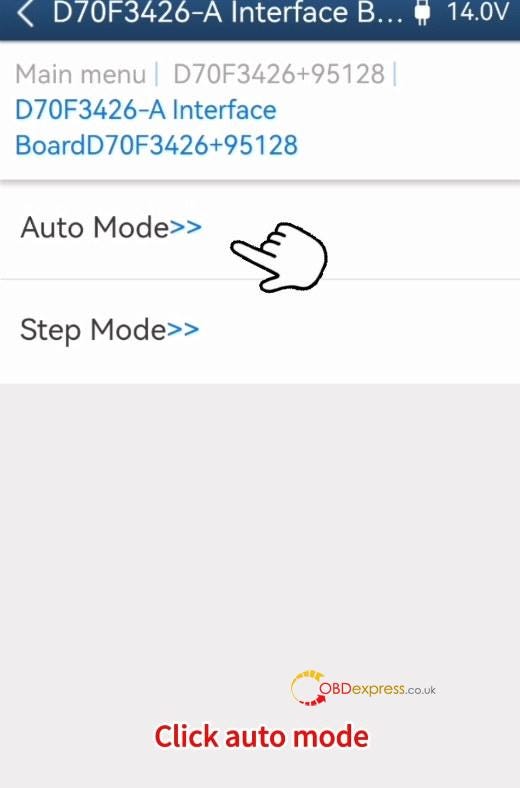
8.After connection, select "Auto Mode"


Yanhua ACDP with Module 34 Change VW MQB 3426+95128 Dashboard Mileage

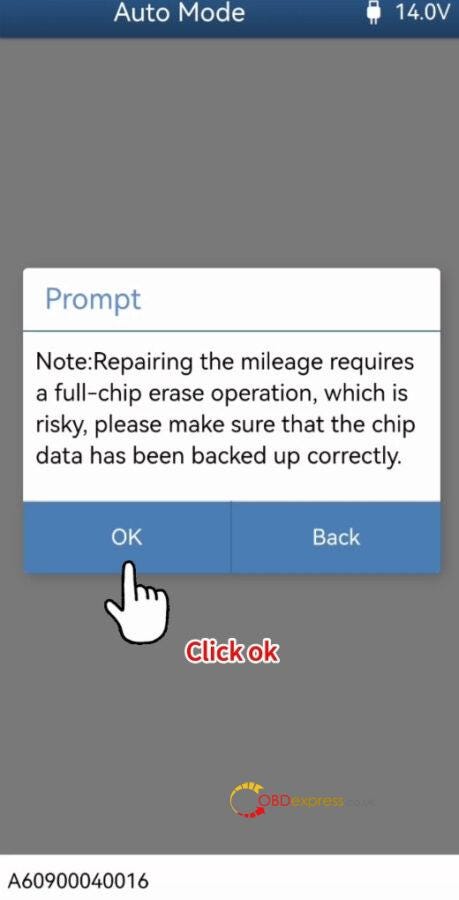
9.Confirm to repair the mileage


Yanhua ACDP with Module 34 Change VW MQB 3426+95128 Dashboard Mileage

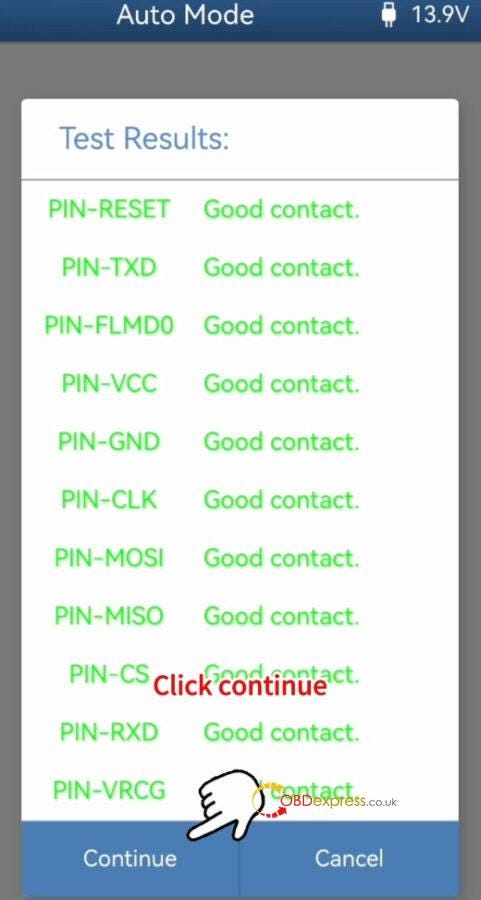
10.Detect Pins are good contact


Yanhua ACDP with Module 34 Change VW MQB 3426+95128 Dashboard Mileage

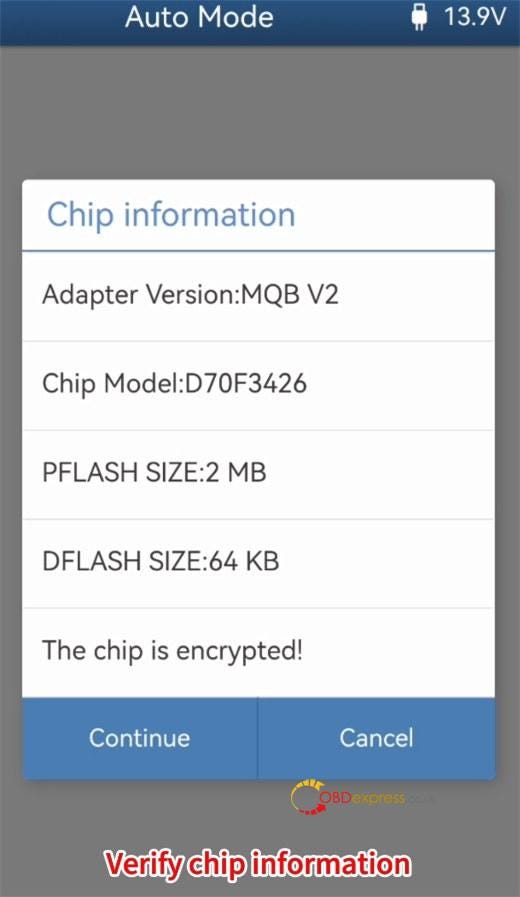
11.Verify the chip information


Yanhua ACDP with Module 34 Change VW MQB 3426+95128 Dashboard Mileage

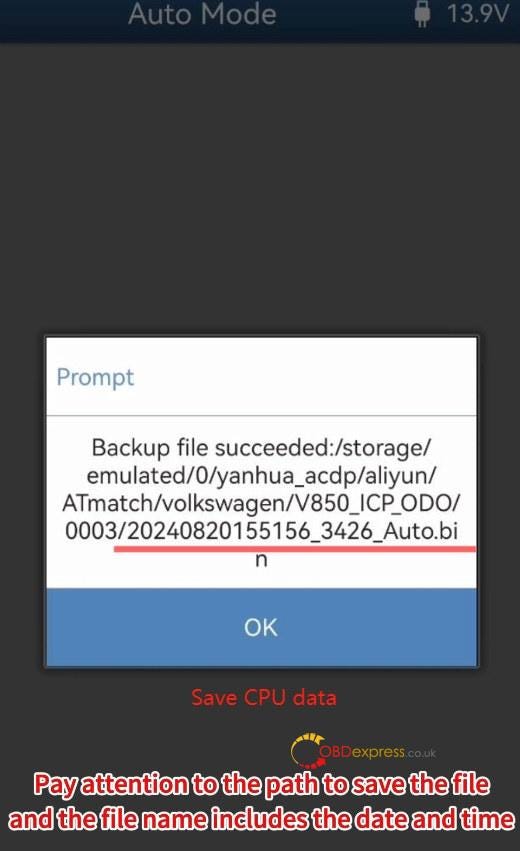
12.Read CPU data and save the data


Yanhua ACDP with Module 34 Change VW MQB 3426+95128 Dashboard Mileage

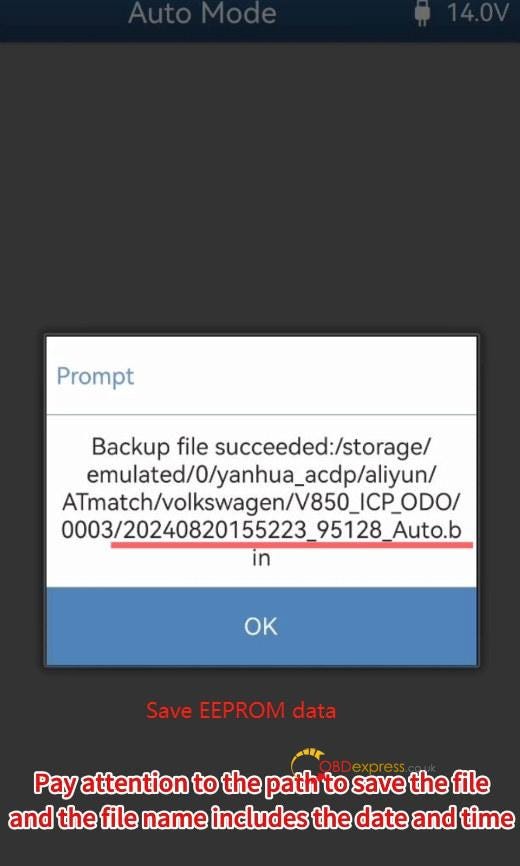
13.Read EEPROM data and save the data


Yanhua ACDP with Module 34 Change VW MQB 3426+95128 Dashboard Mileage

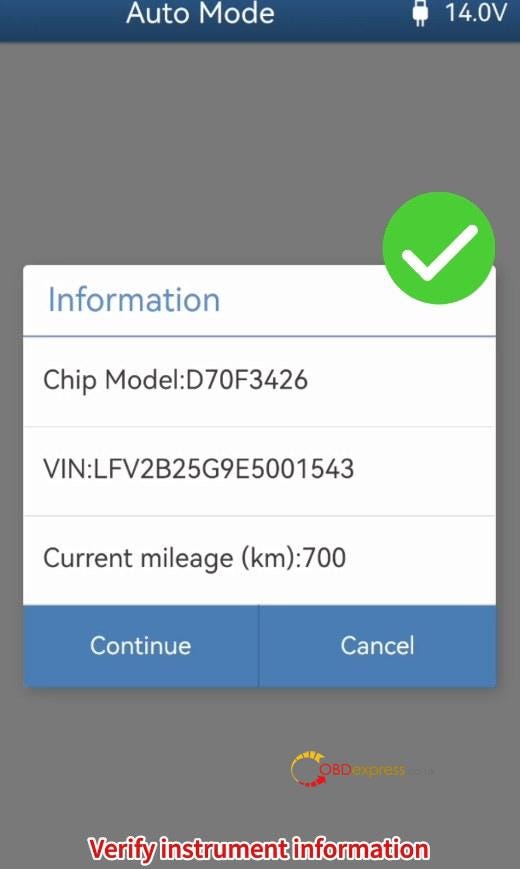
14.Verify the instrument information


Yanhua ACDP with Module 34 Change VW MQB 3426+95128 Dashboard Mileage

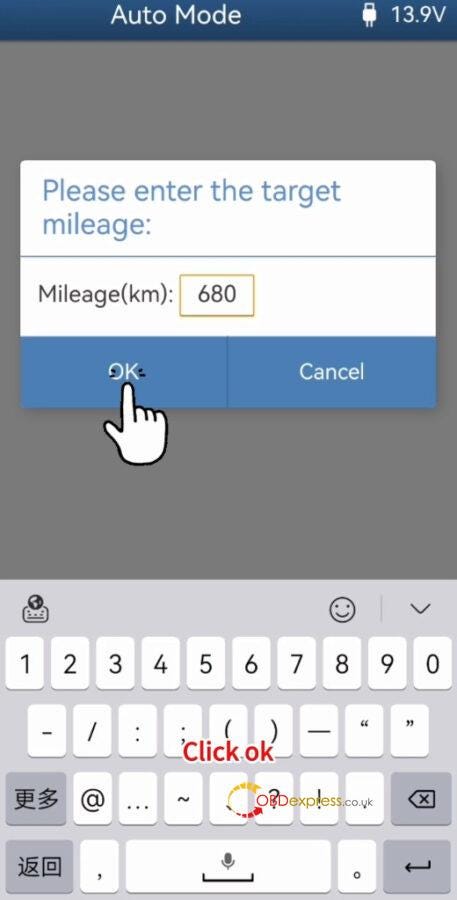
15.Input the target mileage (i.e. 680)


Yanhua ACDP with Module 34 Change VW MQB 3426+95128 Dashboard Mileage

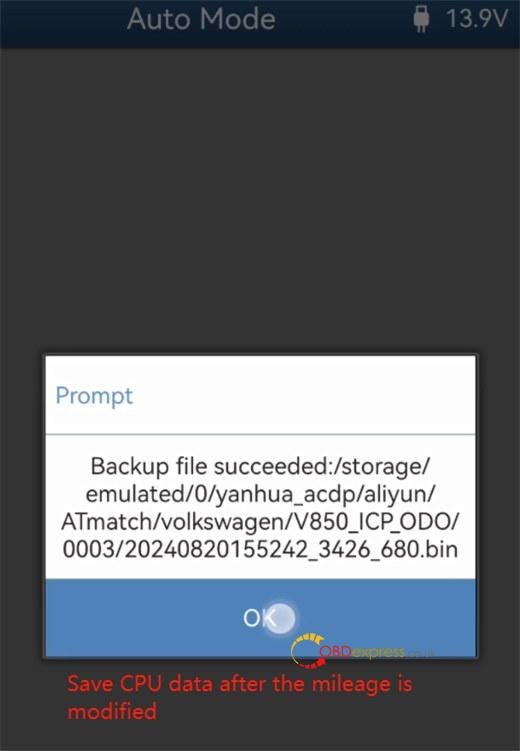
16.Save the CPU data after the mileage has been modified


Yanhua ACDP with Module 34 Change VW MQB 3426+95128 Dashboard Mileage

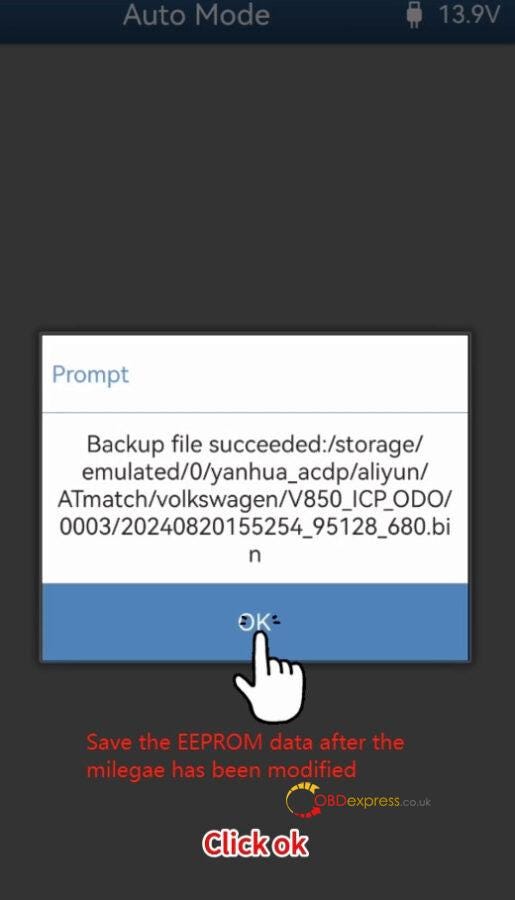
17.Save the EEPROM data after the mileage has been modified as well


Yanhua ACDP with Module 34 Change VW MQB 3426+95128 Dashboard Mileage

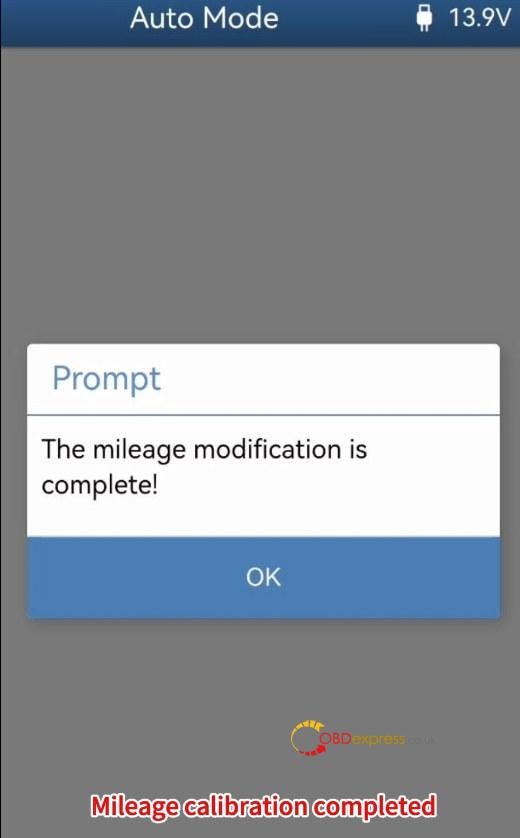
18.The mileage modification is complete


Yanhua ACDP with Module 34 Change VW MQB 3426+95128 Dashboard Mileage

19.Install the instrument panel into the car and turn on the dashboard

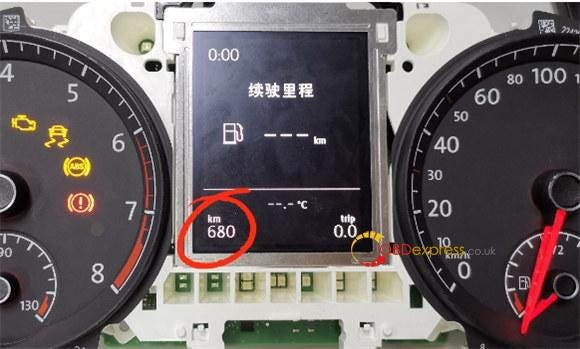
Now the mileage on the dashboard is 680km, which is the same as modified.


Yanhua ACDP with Module 34 Change VW MQB 3426+95128 Dashboard Mileage

Video guide:

https://youtu.be/-JOEglIgSNs

Kindly notice:

To perform IMMO and mileage correction for the 4th generation instrument with D70F3423 +95320 chip model, D70F3426 +95128 chip model MQB 5A instrument, RH850 series R7F701401, R7F701402, R7F701407 chip model 5A instruments, and mileage correction for RH850 series R7F701401, R7F701402, R7F701404, R7F701406, R7F701407 chip model 5C instrument:

www.obdexpress.co.uk

Autel MK900 vs. MK900BT vs. MP900 vs. MP900TS Comparison

 What's different between the 2024 Autel new series diagnostic tablets? Here we’ve compared Autel MK900, MK900BT, MP900 & MP900TS from price, hardware, software and expansibility, trying to help make it clear.

Comparison Table


Autel MK900 vs. MK900BT vs. MP900 vs. MP900TS Comparison

Difference

  • Price

MK900 < MK900BT < MP900 < MP900TS

Autel MK900 is the cheapest while MP900TS is the highest price.

  • Hardware

Except for the VCI connection method(wired or wireless), all parameters of four are the same.

  • Software

MK900 < MK900BT < MP900 < MP900TS

  1. Autel MP900TS supports the most diagnostic features, meanwhile it overs all features of other tools.
  2. Only Autel MP900TS is able to do TPMS service like program & activate MX-Sensor, etc.
  3. Only Autel MP900 series tablets can support advanced diagnosis like BMW/Porsche/VW online coding, BMW/VW/Audi/Skoda hidden feature, VW/Audi/Skoda/Seat/Man LD guidance.
  • Extension

Both MK900BT & MP900TS are compatible with endoscope & battery tester.

Conclusion

If you only need to meet the daily maintenance work, Autel MK900 & MK900BT will be the cost-effective option.

If you’re looking for advanced diagnostic tools, Autel MP900 & MP900TS are more recommended.

www.obdexpress.co.uk

Best 5 Key Cutting Machines: Xhorse vs. 2M2 Buying Guide

  Choosing an automotive key cutting machine depends on five factors: portability, operation method, cutting efficiency, key coverage, and ...