Car OBD2 Tools global one-stop shopping supplier
--OBDexpress.co.uk is a professional OBD2 tool online seller supplies car truck diagnostic tools, car ECU programmer,car key programmer, mileage correction tool, airbag reset tool, ECU chip tunning and Provide good service
This guide will show you how to use TOPDON TopScan Pro to securely access FCA
vehicles by unlocking the SGW via AutoAuth, enabling you to perform advanced
diagnostics, programming, and module updates, etc.
Stable connection to the vehicle (via VCI or compatible interface)
Step-by-Step FCA SGW Unlock Guide
Step 1: Enter Diagnostics Mode
Run TopScan app
Tap "Diagnostics" to enter the vehicle selection interface.
Step 2: Download FCA Vehicle Software
From the vehicle list, find and download the FCA (Fiat Chrysler Automobiles)
software.
✅ Tip: Skip this step if the software is already installed.
Step 3: Choose Vehicle Identification Method
Open the FCA software and choose between "Automatic" or "Manual" entry.
Note: "Automatic" is recommended for faster and more accurate
detection.
Step 4: Automatically Read VIN
Let TopScan read the VIN automatically to ensure
correct vehicle identification.
Step 5: Confirm Vehicle Details
Review the vehicle information displayed on the screen
Confirm model, year, and VIN match your vehicle.
Step 6: SGW Detection & AutoAuth Prompt
If an FCA SGW is detected, a prompt will appear asking to unlock it.
Select "Yes" to continue with AutoAuth.
Selecting "No" will require an FCA 12+8 adapter cable — a more
hardware-intensive workaround.
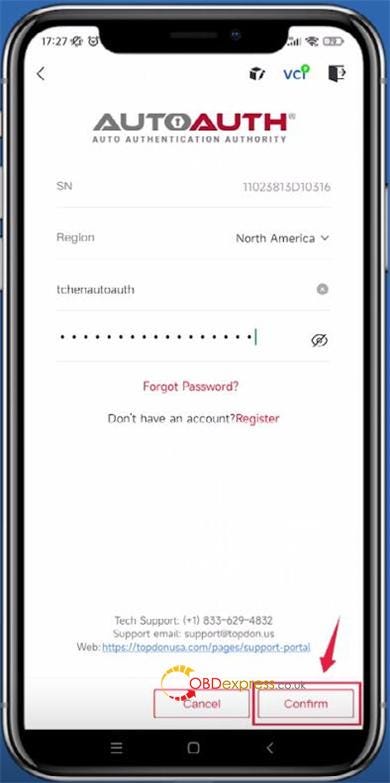
Step 7: Enter AutoAuth Account Details
After choosing "Yes", input your AutoAuth username and password, then tap
"Confirm". This grants TopScan secure access to the SGW.
Step 8: Begin Full Diagnostics
Once the FCA SGW is successfully unlocked, a confirmation message will
appear. You can now use TopScan Pro to perform comprehensive diagnostics,
coding, adaptations, and module programming.
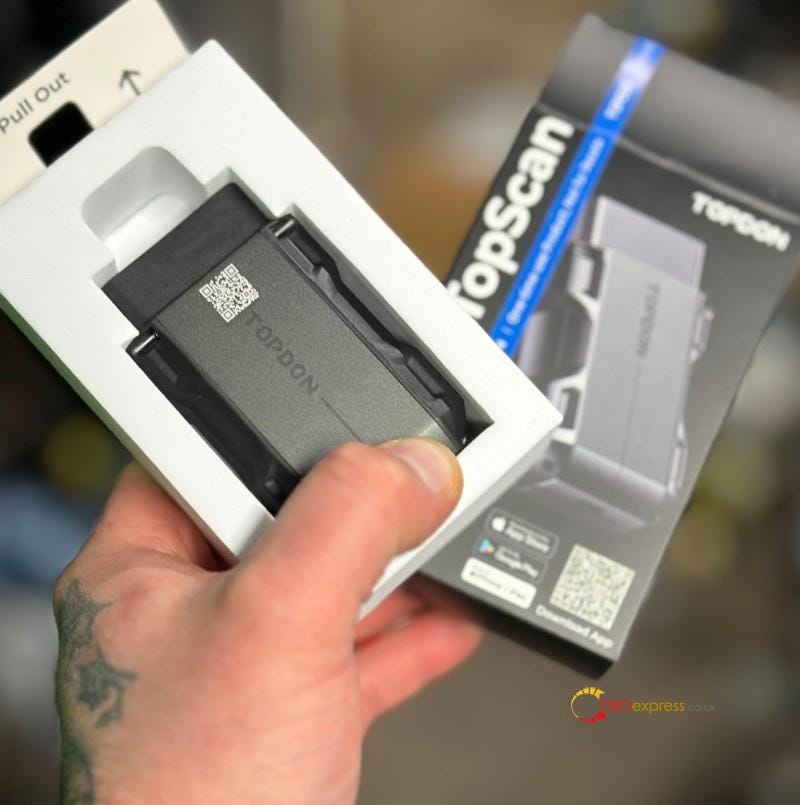
The TOPDON
TopScan is a pocket-sized tool that turns a phone into a scanner and keep up
with its users as they to beyond basic scans. It offers 2 version: the Pro and
the Lite. The TopScan
Pro is the more advanced version that offering IMMO key programming and 13
reset functions.
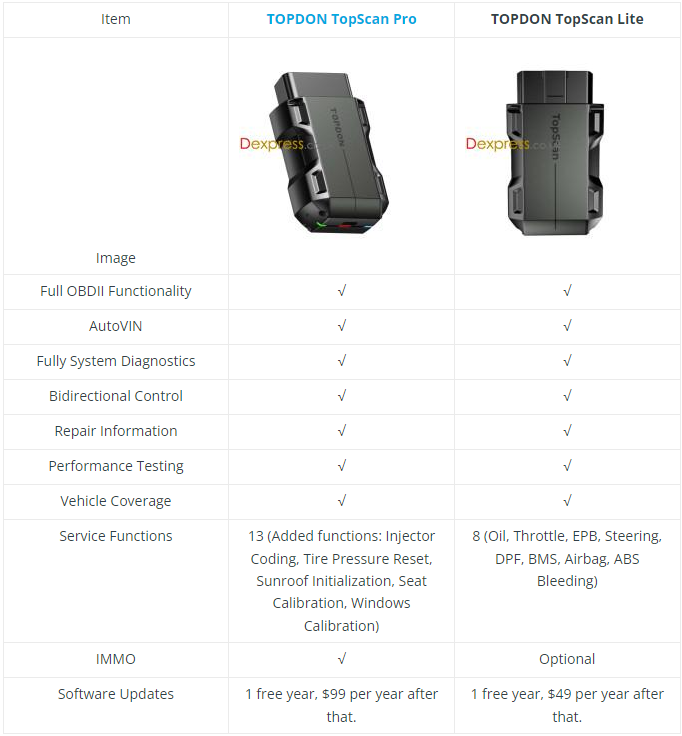
Here we’ve compared 2 versions, also
collected the FAQs and reviews for reference.
TopScan Pro can support IMMO function
while Lite is optional.
TopScan Pro added 5 new service functions
including injector coding, tire pressure reset, sunroof initialization, seat
calibration & windows calibration.
TopScan Pro FAQs
Q: What special functions does the
TopScan Pro support?
A: The TopScan Pro supports 13 special
functions, including oil reset, throttle adaptation, EPB reset, ABS bleeding,
steering angle reset, DPF regeneration, airbag reset, BMS reset, injector
coding, tire pressure reset, sunroof initialization, seat calibration and
windows calibration.
Q: Can multiple devices be bound to one
TopScan app account?
A: Yes.
Q: What should I do if a communication
error occurs?
A: Follow the steps below to identify the
problem:
Check if the ignition is ON.
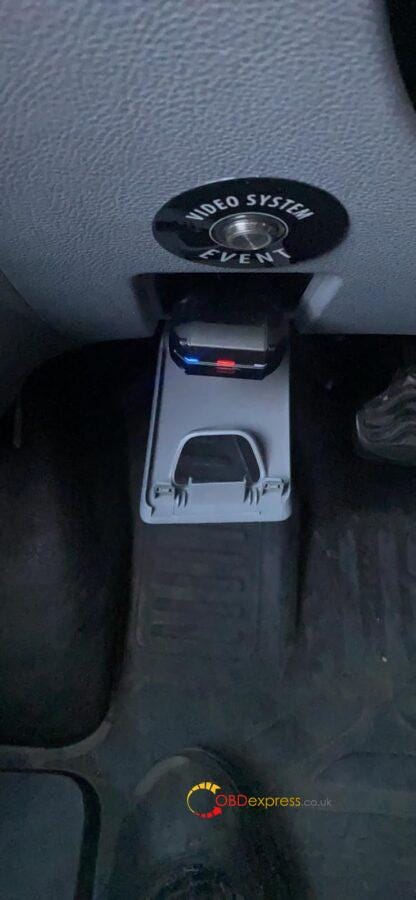
Check if the TopScan Pro is securely
plugged into the vehicle’s OBDII port.
Turn the ignition off. Then turn it on
after 10s and continue the operation.
Check if the vehicle’s control module is
defective.
Q: Do I need to update the firmware
before using it for the first time?
A: Yes. Firmware will automatically update
to the latest version once the TopScan Pro is connected with your phone via
Bluetooth. You can also tap “Me >> Firmware Update” to update the firmware
manually.
Q: Why do I need to download the
diagnostic software after installing the TopScan app?
A: Since there are various vehicle
manufacturers, different diagnostic software is required for different
brands.
Q: What features are available if I
choose not to renew my TopScan software subscription?
A: If not renew the TopScan software
subscription, you will still have permanent and free access to several valuable
features. These include EOBD diagnostic software, I/M Readiness, Vehicle
Performance Test, DTC Repair Guide, Technical Service Bulletins(TSB), DLC
location, Warning Light Library and the VE Calculator.
Google Play: TopScan
(Requires Android 7.0 or later)
TopScan Pro Reviews
Thomas. K Review
I absolutely love this TopScan from
TOPDON!
This affordable little unit packs a big
punch. You’ll be hard pressed to find a better scan tool in the sub $100 range
that is bi-directional as capable as this one!
Not only is this TopScan bi-directional, it
is an all system diagnostic tool, with 13 reset functions
In my testing, it has performed fantastic!
It connects very quick and
easy. Being wireless and using Bluetooth for both Android and IOS makes
usability very simple. You’re not connected by a cable so you’re free to walk
around while using this scan tool.
This scan tool works great for a simple code
reader to read and clear DTC’s, or a bi-directional scan tool capable of
resetting functions and performing tests.
Overall, coming in at under $100, this
TopDon TopScan Pro is a greatlittle scan tool for someone
who may not need all the bells and whistles of a full featured scan tool, or
someone who does but wants a small compact scan tool to have handy anywhere,
anytime! Definitely a solid little scan tool!
Bob D Review
While these may appear to be nothing more
than gadgets it couldn’t be further from the truth. These are fully functional
scanners with bi-directional control. If you’re not careful you can create
problems for yourself by getting into systems without doing your homework.
It can take some time for certain tasks to
complete depending on what you have it paired with. I am currently using it with
a iPhone and Apple being Apple it can limit you from time to time.
You will not find another scanner at
this price point. It has me thinking about the Topdon
Phoenix series to replace the main shop scanner
Mia Review
I plugged it into my vehicle. Took forever
to set up, but once I finished downloading everything in the app it gave me a
reading of what was going on with my engine.
I took my car to the mechanic and told them
what I needed them to fix. They did the repairs and the engine light went away.
It also saved me money because I
didn’t have to pay them their $100 fee to detect the problem
themselves.
It’s been 3 weeks and the light is still
off. So it seems the code the device gave me was right. It was easy to read the
codes given. Overall good
product. I guess I’ll do an update if I need to use it
again.