Sunday, 1 November 2026

Disable 2018+ Land Rover AKL Active Alarm: Autel IM608, Yanhua ACDP or CG100X?

 All three tools — Autel IM608, Yanhua ACDP, and CGDI CG100X — can disable the active factory alarm on 2018+ Jaguar Land Rover (JLR) All-Keys-Lost (AKL) situations, but they work through very different methods (OBD/jumper bypass vs. module direct/EEPROM writing).

1. Autel IM508S / IM608 II

Method:

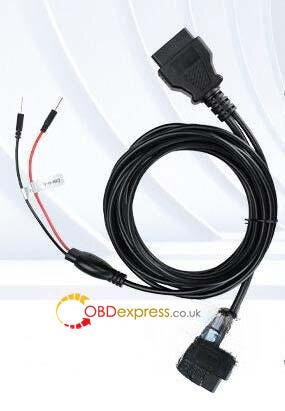
OBDII / Jumper-wire connection to the RFA (Remote Frequency Actuator) module using specific CAN wiring diagrams (or Autel’s JLR alarm bypass cable).

CAN Wiring (Typical): CAN-H (Pin 6) → Yellow/Orange; CAN-L (Pin 14) → Yellow/Purple.

Note: Wire colors may vary on some modules — CAN-H (Pin 6) may be Green; CAN-L (Pin 14) may be Brown.


Disable 2018+ Land Rover AKL Active Alarm_ Autel IM608, Yanhua ACDP or CG100X

Menu Path:

Manual selection -> [Model] -> [Year] -> Smart Key -> Select Control Unit -> RFA replacement -> Disable anti-theft alarm function

Pros:

  • Direct software-driven routine via the diagnostic tablet interface.
  • No need to desolder or read/write chips on the board if using the proper CAN jumper configuration.

Cons:

  • Requires custom or dedicated jumper wire/bypass connections to the RFA and OBDII port.


2. Yanhua ACDP (Module 24)

Method: Direct CAN-bus connection to the RFA module using ACDP Module 24 License (with a free software update) paired with a PCAN, PTCU, or PECU cable.

Connection Steps:

  • Locate the RFA module (do not disconnect the main RFA connector).
  • Insert the white CAN_H wire into Pin 2 and the green CAN_L wire into Pin 20 of the RFA connector (verify model-specific diagram).

Disable 2018+ Land Rover AKL Active Alarm_ Autel IM608, Yanhua ACDP or CG100X
  • Run ACDP app/software, navigate to JLR IMMO-> Program smart key (2018-)-> Replace RFA Program key-> OBD Programming RFA-> Turn off anti-theft alarm, and follow the on-screen prompts to operate.

Disable 2018+ Land Rover AKL Active Alarm_ Autel IM608, Yanhua ACDP or CG100X

Pros:

  • Free update added to Module 24 for JLR AKL active alarm handling.
  • Avoids destructive desoldering by interfacing directly via targeted CAN pins on the RFA harness.

Cons:

Requires Module 24 authorization and specific cables (PCAN/PTCU/PECU)

These cables are included in some ACDP modules, you have the related module, you can use them directly. Otherwise, you need to buy the cable separately.


3. CGDI CG100X Programmer

Method: Bench/EEPROM flashing of the Body Control Module (BCM) / integrated gateway-BCM chip.

Connection Steps:

  • Locate and connect 8 wires to the BCM chip (e.g., 95128 / 95X series EEPROM) following the CG100X wiring diagram.

Disable 2018+ Land Rover AKL Active Alarm_ Autel IM608, Yanhua ACDP or CG100X
  • Navigate to: 8-pin chip > 95X > 95128 in CG100X software
  • Read and save the original chip data.

Disable 2018+ Land Rover AKL Active Alarm_ Autel IM608, Yanhua ACDP or CG100X
  • Write the modified/alarm-off flash file (sourced via CG technical support or a verified third-party matching the specific model year) back to the chip.

Disable 2018+ Land Rover AKL Active Alarm_ Autel IM608, Yanhua ACDP or CG100X

Pros:

  • Bypasses live network/OBD lockouts by directly modifying the BCM EEPROM data on the bench.

Cons:

  • Requires physical bench hookup (8-wire soldering or clip connection) to the BCM board.
  • You must source the exact right alarm-off flash file for your specific model/year variant.

Summary Recommendation

  • Choose Autel IM608II/IM508S if you prefer an on-car diagnostic/software routine using custom CAN jumper wires into the RFA/OBD setup.
  • Choose Yanhua Mini ACDP if you already have own an ACDP key programmer and want to use its Module 24 license and harness/PCAN bypass method.
  • Choose CG100X if you prefer (or are forced into) a bench-programming approach reading/writing the BCM EEPROM chip directly.

LONSDOR JL30-01 + K518 PRO: Copy a 2019 Land Rover Discovery Key

 The new LONSDOR JL30–01 and JL30–11 Smart Key support Jaguar and Land Rover models from both pre-2018 and 2018+ generations, featuring direct data copy, dual-frequency switching (315/433 MHz), and fast key generation. Here’s how to use the JL30–01 and LONSDOR K518 PRO to copy a smart key for a 2019 Land Rover Discovery.


LONSDOR JL30–01 + K518 PRO Copy 2019 Land Rover Discovery Key

Required Tools

LONSDOR JL30–01/ JL30–11 Universal Key

LONSDOR ADP40 adapter

LONSDOR K518 Key Programmer

Generate the Smart Key

  • Go to Generate Smart Key >> Land Rover >> 2018- ID49 433M.
  • Place the LONSDOR smart key in the K518 PRO card slot and click Generate.
  • Wait for the Generation successful message.

LONSDOR JL30–01 + K518 PRO Copy 2019 Land Rover Discovery Key

Read Vehicle Information

  • Navigate to Immo & Remote >> Land Rover >> Select from vehicle >> Land Rover (2018-) >> Key copy (no KVM removal) >> Read vehicle info.
  • The system displays a remote frequency of 434 MHz and UWB function: No.
  • Select Add key (no KVM removal). This function supports key copying on non-PEPS Land Rover and Jaguar models from 2018 onward.

LONSDOR JL30–01 + K518 PRO Copy 2019 Land Rover Discovery Key

Copy the Key Using Either Method

  • Follow the on-screen instructions: connect the original key to K518 PRO through the ADP40 adapter and click OK. The first ID represents the original vehicle key.
  • The first ID represents the original vehicle key, so Select the second ID, then choose the required method:
  • LONSDOR key: Select Select to use Lonsdor key. Remove the ADP40 adapter, place the generated LONSDOR smart key flat on the card slot, and click OK.

LONSDOR JL30–01 + K518 PRO Copy 2019 Land Rover Discovery Key
  • Genuine/OEM key: Select Select to use genuine/OEM key. Remove the original key, connect the OEM key to the K518 PRO through the ADP40 adapter, and click OK.
  • Wait for the Written successfully message.

LONSDOR JL30–01 + K518 PRO Copy 2019 Land Rover Discovery Key

Key Function Check

Start the vehicle and confirm that it starts normally and the copied key’s basic functions work correctly.


LONSDOR JL30–01 + K518 PRO Copy 2019 Land Rover Discovery Key 

How to Find Korhex Serial Number for Activation?

 Before using Korhex Boot Glitch Tool for the first time, activation is required. If you cannot locate the serial number, follow the guide below to complete the activation process quickly and access all Korhex functions within Flex.

Step 1:

Open Flex software on your computer and log in to your account.

Step 2:

From the Flex interface, click Helpdesk to open the User Portal.


How to Find Korhex Serial Number for Activation

Step 3:

Inside the User Portal, select:

Add Tool → KRX02.001 MMS Korhex Tool

This option allows you to associate your Korhex device with your Flex ECU Programmer account.


How to Find Korhex Serial Number for Activation

Step 4:

During the activation process, click:

Insert Serial Number -> Where Is It?


How to Find Korhex Serial Number for Activation

Korhex serial number can be found in one of the following locations:

Option 1: Purchase Confirmation Email

Check the email sent by Magic Motorsport after completing your Korhex purchase. The serial number is included in the order information.

Option 2: Order Invoice

Open the invoice associated with your Korhex order. The serial number is listed directly on the document.


How to Find Korhex Serial Number for Activation

Step 5:

Enter Korhex serial number and complete the activation process by binding the tool to your MMS Flex account.


How to Find Korhex Serial Number for Activation

Once activation is successful:

  1. Return to the Flex main interface.
  2. Click the Korhex icon on the left-side menu.
  3. The software will display your Korhex device information and available functions.

For illustrated operating instructions, click Tutorial in the upper-right corner of the Korhex interface.


How to Find Korhex Serial Number for Activation


Disable 2018+ Land Rover AKL Active Alarm: Autel IM608, Yanhua ACDP or CG100X?

 All three tools — Autel IM608, Yanhua ACDP, and CGDI CG100X — can disable the active factory alarm on 2018+ Jaguar Land Rover (JLR) All-Ke...