Showing posts with label vxdiag toyota. Show all posts

Thursday, 31 March 2022

Free Download& Install Toyota Techstream V17.00.020 Software for VXDIAG VCX NANO

 Free download the newest VXDIAG Toyota TIS Techstream V17.00.020 software & patch for your VXDIAG VCX NANO, install it on Win7/Win10.

Software: V17.00.020
Software language: Chinese, English, French, Italian, Spanish, German
Operating system: WIN7 / WIN10

Compatible device: vxdiag vcx nano for Toyota USB and WiFi

Free Download Techstream V17.00.020 for VXDIAG VCX NANO:

Techstream Setup v17.00.020.exe

https://mega.nz/file/XmhhkYRB#HYmk2DV_m0-J174T_vWPddBFhctjZmJgZp5cax5urK0

Size: 248.6MB

Free download Techstream Patch

https://mega.nz/#F!7VZzBQgZ!wO9Fjk0gfZF-tfv6zQAqzw

Password: NO PASS!!! With Patch does not require activation.

Run techstream from pacth, does not require an activation key.

How to install VXDIAG Toyota Techstream V17.00.020?


Step-by-step guide:

Step 1: Install Techstream Setup and Framework

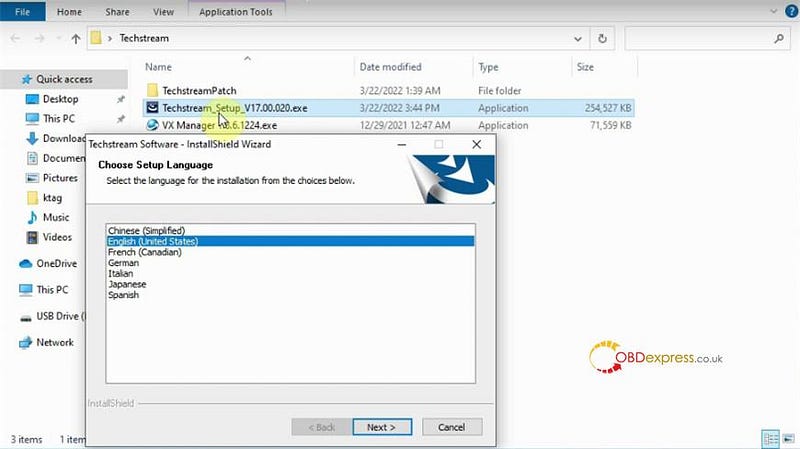
Run Techstream_Setup _V17.00.020

Select setup language
upgrade VXDIAG VCX NANO Toyota Techstream V17.00.020

Install InstallShield wizard for Techstream
Accept license agreement

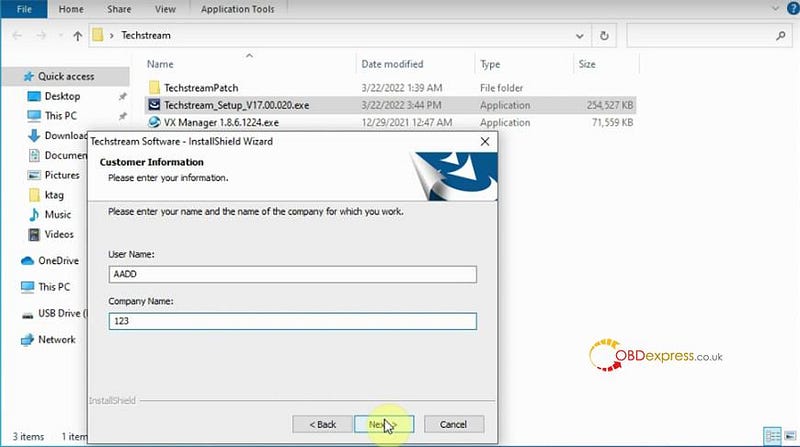
Enter User Name: AADD and company name: 1
upgrade VXDIAG VCX NANO Toyota Techstream V17.00.020

Press Install

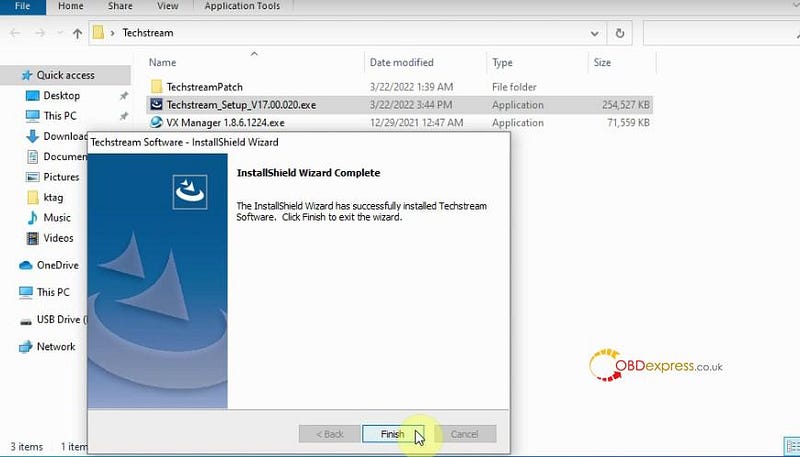
Install wizard completed. Press ‘Finish’.
upgrade VXDIAG VCX NANO Toyota Techstream V17.00.020

Step 2: Install VX Manager

Tick ‘1-PASSTHRU- J2534’ and ‘3-TOYOTA- TechStream’

Click ‘Next’
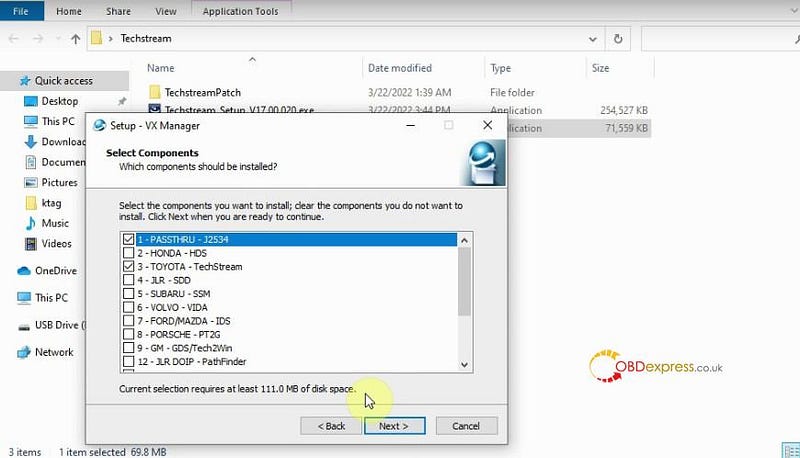
upgrade VXDIAG VCX NANO Toyota Techstream V17.00.020

Install VX Manager completed. Press ‘Finish’.

Run VX Manager to check whether the connection is successful
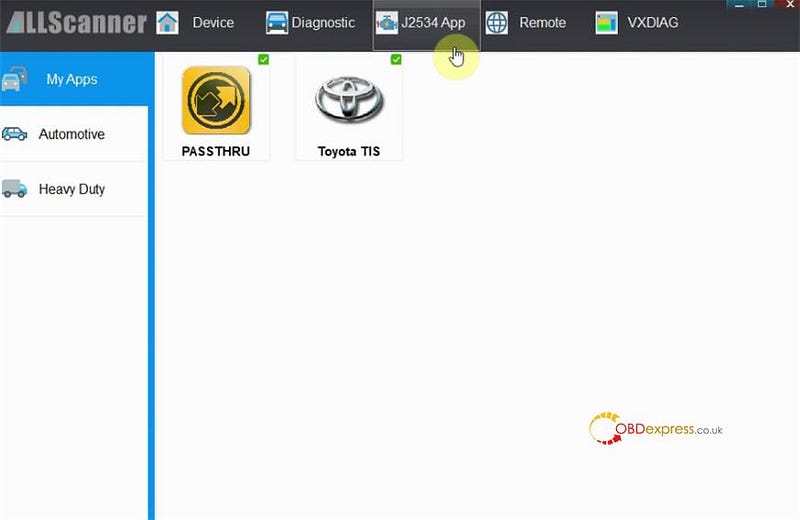
upgrade VXDIAG VCX NANO Toyota Techstream V17.00.020

Then delete the Techstream icon on the desktop

Open TechstreamPatch folder

Drag the patch file to the desktop.
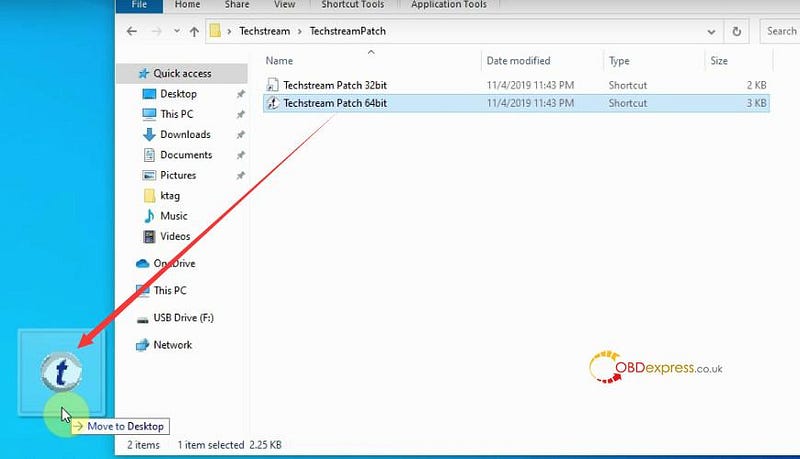
upgrade VXDIAG VCX NANO Toyota Techstream V17.00.020

Step 3: Run Techstream Patch

Run Techstream Patch

When it prompts the techstream was unable to access the network, click ‘Offline Mode’.
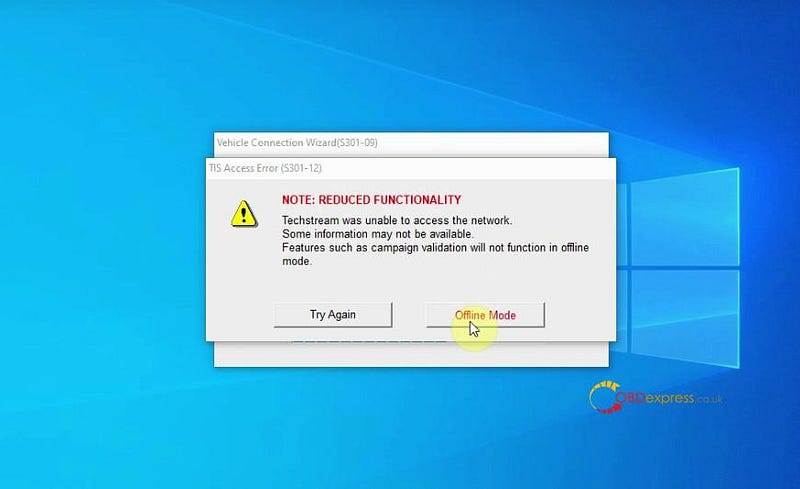
upgrade VXDIAG VCX NANO Toyota Techstream V17.00.020

Confirm the vehicle info and click ‘Next’
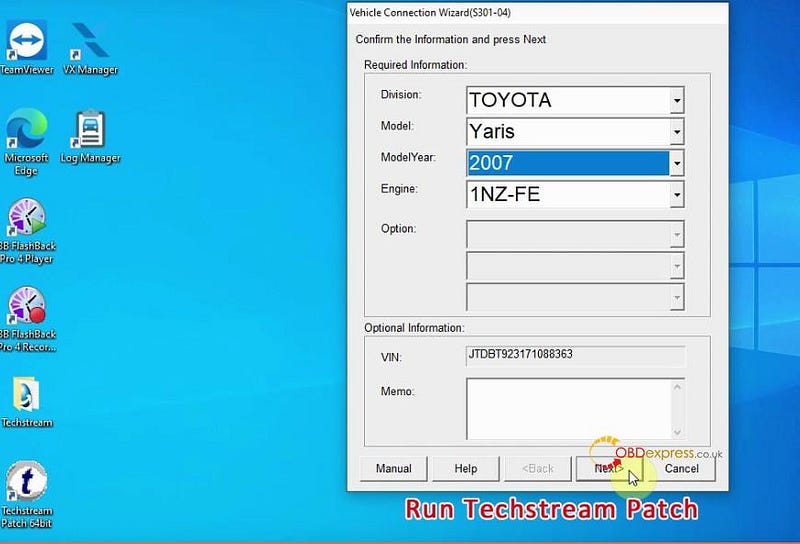
upgrade VXDIAG VCX NANO Toyota Techstream V17.00.020

Step 4: Run software

Run Techstream Patch (V17.00.020)

Connect to vehicle

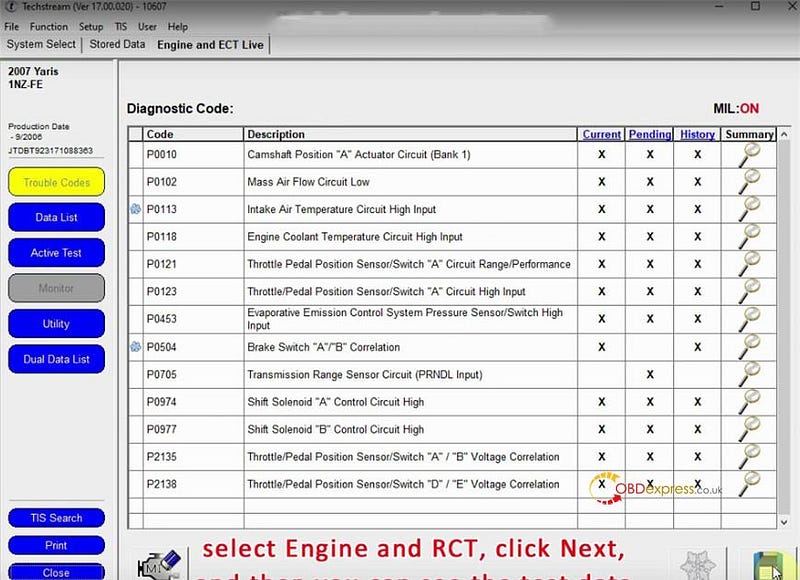
Select Engine and ECT, click ‘Next’

Then you can see the test data.

Save the data
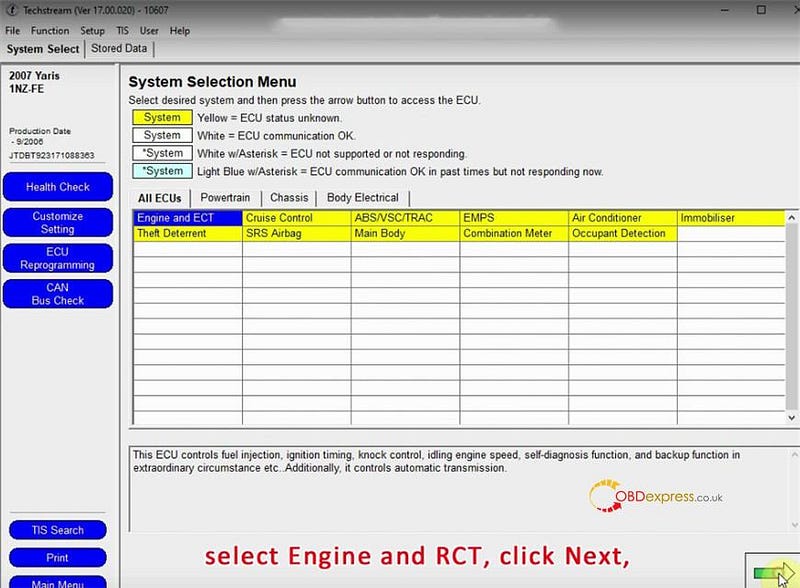
upgrade VXDIAG VCX NANO Toyota Techstream V17.00.020upgrade VXDIAG VCX NANO Toyota Techstream V17.00.020

VXDIAG VCX NONA for Toyota Connection:
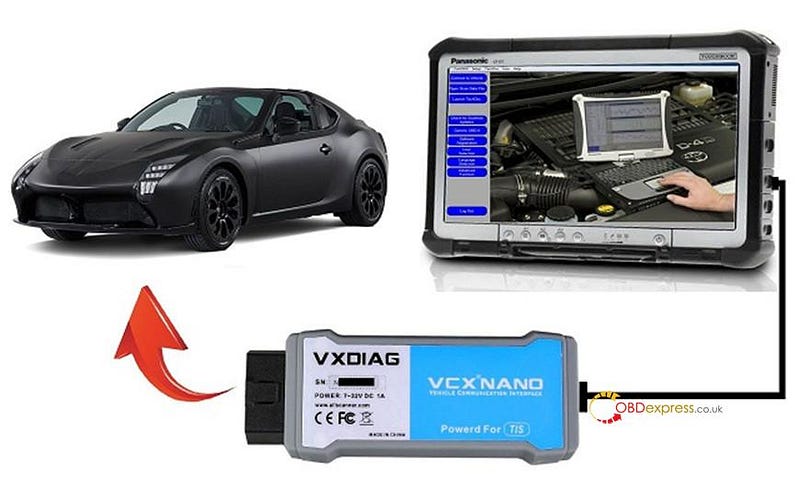
upgrade VXDIAG VCX NANO Toyota Techstream V17.00.020


Thursday, 25 May 2017

Vxdiag Multi Diagnostic Tool: Rheingold Techstream IDS 3 in 1

This is VXDIAG Allscanner for BMW TOYOTA FORD/MAZDA.

This vxdiag multi diagnostic tool is called VXDIAG A3.
vxdiag-bmw-toyota-ford-mazda
Allscanner vxdiag a3 can be performed as a combination of BMW ICOM A2, Vxdiag vcx nano Ford/Mazda, and Vxdiag vcx nano Toyota.

Professionals @obdexpress.co.uk tested its functionality and verified it’s working 100% no issues in OBDII diagnostics, coding, key/ ecu programming.

Vxdiag a3 diagnostic tool on BMW works as ICOM A2
wifi-bmw-icom-a2-b-c
Vxdiag A3 and Bmw software worked!

ISTA-D 4.04.12………diagnose OK
ISTA-P 3.60.2.001…………….program OK
BMW ETK: 2017.2………read electronic catalogue OK
BMW KSD 09.2016………..read commercial service data OK
BMW Engineer Software:
– INPA………diagnose E series OK
– NCS………..coding E series OK
– WinKFP………..programming E series OK
– E-Sys 3.27.1, Psdzdata 59.0)……..coding f series OK
BMW FSC code generator
BMW AiCoder


Vxdiag a3 on Ford/Mazda works as VCM2 clone or Vxdiag vcx nano for Ford/Mazda
best-ford-vcm-ii-wifi
wifi-version-vxdiag-vcx-nano-for-ford-mazda-ids
Vxdiag A3 with Ford IDS software is good at Ford diagnostics and programming as VCM2 china clone and Vxdiag vcx nano Ford do, incl.

  1. Programming & Installation of new ECUs (PCM, ABS, Instrument Cluster, Air Bag, Fuel Pumps, etc.)
  2. Live Data-stream with Recording & Playback Functions for Main ECUs
  3. Read & Clear Diagnostic Trouble Codes (DTCs)
  4. New Software Re-flash for Existing ECUs
  5. Set, Adjust or Remove Speed Governors
  6. Automatic vehicle recognition
  7. All Other Dealer Functions
  8. Guided Fault Finding
  9. Steering Angle Resets
  10. Program New Keys
  11. DPF Regeneration
  12. Brake Bleeding
  13. Injector Coding

The important tip: VXDIAG NANO vs VCM II : Which is better?

Full chip high quality VCM II (SP177-C1) better!
But be careful programming!


Vxdiag a3 on Toyota works as well as Vxdiag vcx nano for Toyota
vxdiag-vcx-nano-for-toyota
Vxdiag A3 Toyota performs well with Techstream software for Toyota/Lexus diagnostics and customizing setting.

Some of the more memorable ones are:
Program and erase my own keyless remotes, FOB’s, Smart Keys, Etc….
Change DRLs on or off
Change light sensor for when headlights come on or go off with AUTO mode
Make it so windows roll down when you hold down unlock on your remote for 2.5 seconds.
Roll up/down windows by turning key in the door lock for 2.5 seconds
Turn on or off seatbelt warning buzzer
Turn beeper on/off for doors locking and unlocking with remote
Change door locks on/off when shifting FROM park
Change door locks on/off when speed over 15mph
Change door locks on/off when shifting INTO park
Change doors locks to unlock all doors 10 seconds after driver door opens.
Change delay for how long headlights stay on after ignition off.
Program your TPMS sensors to your vehicle if you get a new/replace one.
Shows temp inside tires, and actual pressure inside each tire including spare.
Every switch in the car is displayed with it’s current status.
Press the Cruise control Accel stick up and it shows that switch is now on.
Pull the stick and it shows the cancel button is now on.
Push window down button and it shows window down button on.

Every imaginable sensor, temp, flow, psi, that’s on the vehicle is displayed to you.

….

Enjoy!

Best 5 Key Cutting Machines: Xhorse vs. 2M2 Buying Guide

  Choosing an automotive key cutting machine depends on five factors: portability, operation method, cutting efficiency, key coverage, and ...