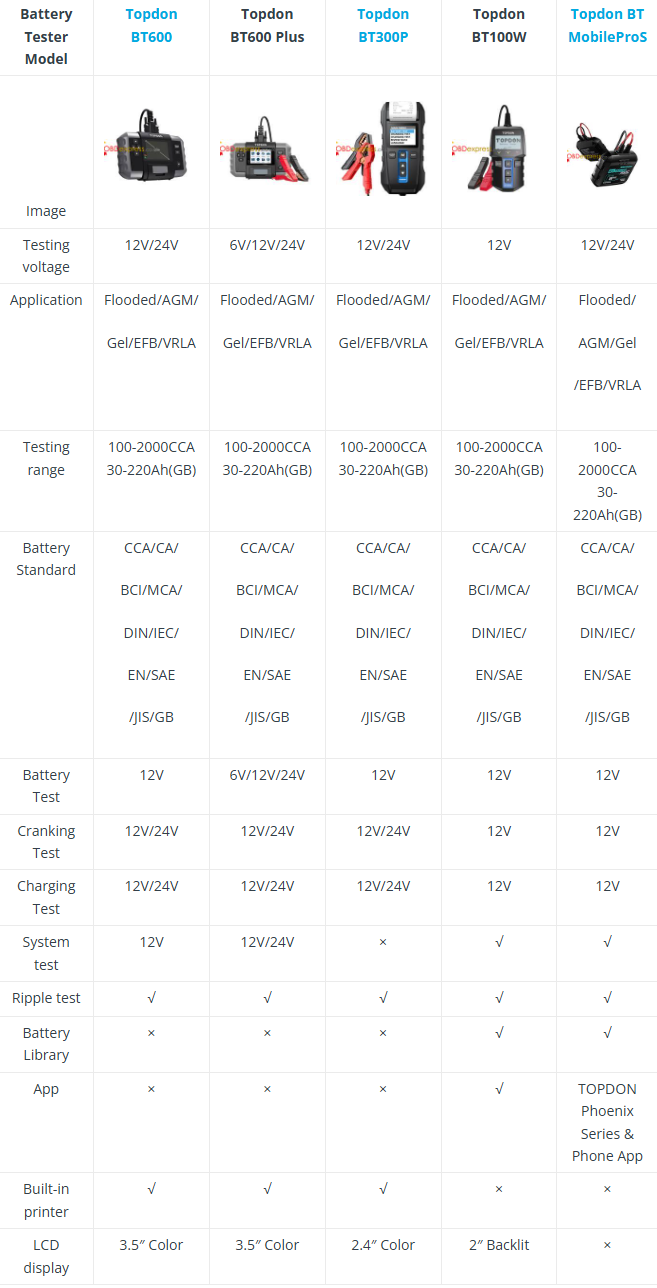
Choosing the wrong battery tester wastes time and risks diagnostic errors. With five Topdon models available — BT600, BT600 Plus, BT300P, BT100W, and BT MobileProS — this direct comparison helps you quickly identify which tool matches your workshop’s specific needs and workflow.
Technical Specifications Comparison Table

Key Differentiators Explained
Topdon
BT600 → The workshop standard with balanced features
Why it stands out:
Built-in printer + 3.5" color display + complete diagnostics
Best for:
General repair shops needing reliable testing with physical reports
Topdon BT600 Plus → The voltage-versatile
upgrade
Why it stands out: Adds 6V system testing to BT600’s
capabilities
Best for: Technicians working with classic cars or specialty
vehicles
Topdon
BT300P → The compact professional
Why it stands out: Printer-equipped at
a competitive price point
Note: Lacks system testing functionality
Best
for: Budget-conscious professionals wanting essential features
Topdon BT100W → The entry-level digital
option
Why it stands out: Basic app support + battery library at
12V-only
Best for: Occasional use or as a secondary diagnostic tool
Topdon
BT MobileProS → The connected future
Why it stands out: Full app
integration + maximum portability
Best for: Technicians preferring digital
workflows over printed reports
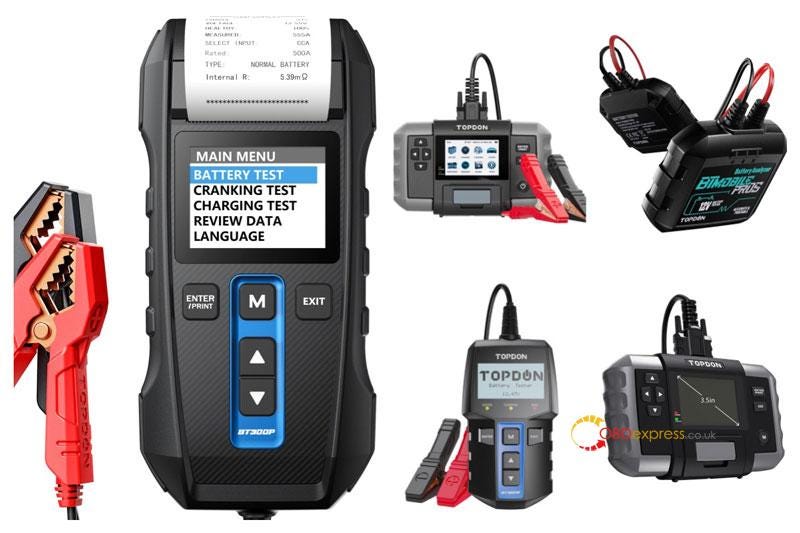
Top Recommendations for Different Users
Best Overall: Topdon BT600
Perfect for: Most automotive
workshops
Key advantages:
• Complete diagnostic suite including system
testing
• Built-in printer for instant customer reports
• Large 3.5" color
display for clear readings
• 12V/24V coverage for most modern vehicles
The BT600 delivers the optimal balance of professional features without unnecessary complexity. It handles approximately 95% of automotive battery testing scenarios while providing tangible reports customers appreciate.
Best Value: Topdon BT300P
Perfect for: Professionals on a
budget
Key advantages:
• Includes essential built-in printer
• Compact
2.4" color display
• Full cranking and charging diagnostics
• Lower price
point than feature-rich models
While the BT300P lacks system testing capability, it retains core professional features at an accessible price. Ideal for technicians who need reliable testing but don’t require advanced system diagnostics.
Most Innovative: Topdon BT MobileProS
Perfect for: Digital-first workshops
Key
advantages:
• TOPDON Phoenix app integration
• Battery library for quick
reference
• System and ripple testing capabilities
• Ultra-portable
design
The MobileProS represents Topdon’s vision for connected diagnostics. Technicians who already use tablets or smartphones in their workflow will appreciate the seamless digital integration and data management capabilities.
Frequently Asked Questions
Q: Which Topdon tester should I choose
for a busy auto repair shop?
A: The BT600 provides the best balance
with its built-in printer, complete diagnostics, and clear display — ideal for
generating customer reports quickly.
Q: Which model supports 6V battery
testing?
A: Only the BT600 Plus offers 6V capability, making it
unique for classic car restoration or specialty vehicle maintenance.
Q: Is the BT300P suitable for
professional use despite missing system testing?
A: Yes, the BT300P
handles core battery, cranking, and charging tests effectively. Many workshops
find these functions sufficient for daily diagnostics.
Q: How does the MobileProS work without
a display?
A: The MobileProS connects to your smartphone or tablet
via the TOPDON Phoenix app, using your device’s screen as the display
interface.
Q: What’s the difference between CCA and
CA testing?
A: CCA tests at -18°C for cold weather performance, CA
at 0°C. Topdon models measure both, but prioritize CCA in colder climates.
Q: Do these testers work with modern
start-stop batteries?
A: Yes, all support AGM/EFB batteries. BT600
and MobileProS offer more complete system diagnostics for start-stop
vehicles.
Final Decision Guide
- Choose BT600 if: You need one reliable tool for most vehicles with professional reporting capabilities
- Choose BT300P if: Budget matters but you still want printed results and core diagnostics
- Choose MobileProS if: You prefer app-based tools and digital record-keeping
Ready to choose?
Compare all Topdon testers at www.obdexpress.co.uk. Bulk order discounts available — contact their team for expert configuration advice.
Features and specifications may vary by region. Confirm details with your supplier before purchase.