Showing posts with label Autel MaxiSYS Ultra. Show all posts

Thursday, 10 April 2025

How to Solve Autel "Topology Data Unavailable" Error?

 If the message "Topology data unavailable" appears on your Autel MaxiSys Ultra, MS909, or other models, it typically indicates that the device is unable to retrieve the latest vehicle network topology. This feature visually maps out all control modules and their communication links within the vehicle. Check the common causes and solutions below.


How to Solve Autel

1.Expired Update Subscription

Why it happens: Autel scanners require an active software update subscription to access the latest topology data.

Solution: Renew your subscription through the Autel website or your authorized dealer to restore full functionality.

2.Unstable or Slow Internet Connection

Why it happens: Downloading topology data requires a reliable, high-speed connection (recommended: 50 Mbps or higher).

Solution:

  • Ensure the device is connected to a strong Wi-Fi signal.
  • Avoid public or congested networks.
  • Try restarting your router or switching to another network if needed.

3. Software or Firmware Glitches

Why it happens: Outdated firmware or corrupted software may prevent data from being downloaded or displayed.

Solutions:

  • Update the software to the latest version in the system settings.
  • If issues persist, consider performing a factory reset:

Backup your important data by a SD card first (diagnostic logs, reports, settings).

Go to: Settings > System > Reset Options > Factory Reset.

4.Older Vehicle Models

Why it happens: Not all vehicles — especially older models — support full topology visualization.

Solution: This is a normal limitation. The scanner will still perform diagnostics, but without the visual network layout.

Summary:

If you encounter the "Topology Data Unavailable" message on your Autel scan tool:

  • Check your subscription status
  • Verify a strong internet connection
  • Update or reset the device as needed
www.obdexpress.co.uk

Tuesday, 18 January 2022

Can Autel MaxiSYS Series of Tools Diagnose Tesla Cars?

 Autel MaxiSYS Ultra / MS919 / MS909 tablet, by using Autel TESKIT Adapter Cables, is able to connect with Tesla S and X vehicles to activate factory mode and perform system diagnostics.


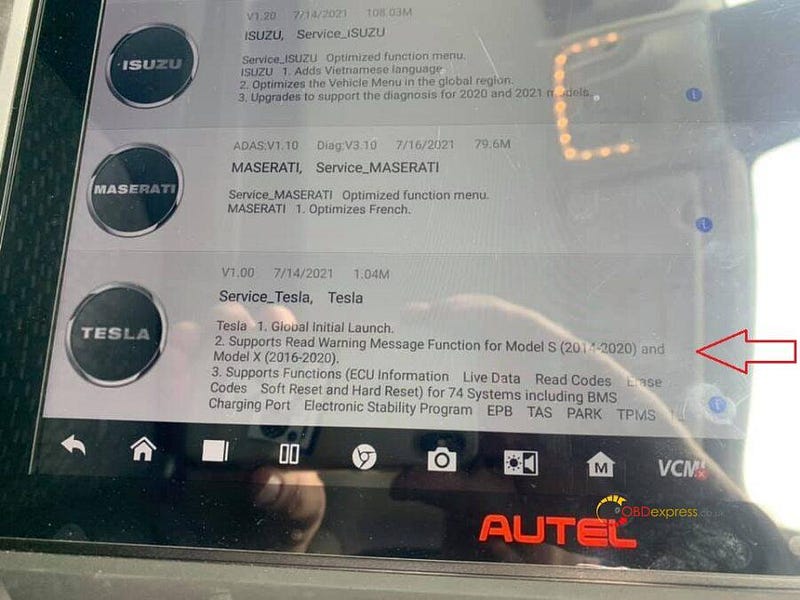
Here are two images showing Autel MaxiSYS update for Tesla S and X vehicles diagnosis:

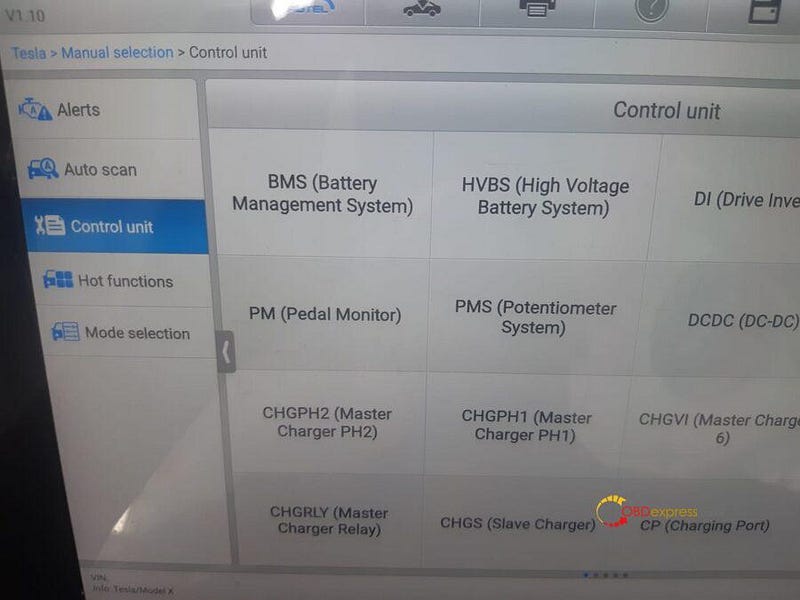
Supports Basic Functions including Read Warning Message, ECU Information, Live Data, Read Codes and Erase Codes, as well as 41 Hot Special Functions including BMS Reset Alert, BMS Clear Contactor Stress Index, EPB Service Mode, Brake Bleed and Read/Write TPMS Sensor ID for Model X and Model S.

Autel MaxiSYS Series of Tools Diagnose Tesla Cars

Autel MaxiSYS Series of Tools Diagnose Tesla Cars


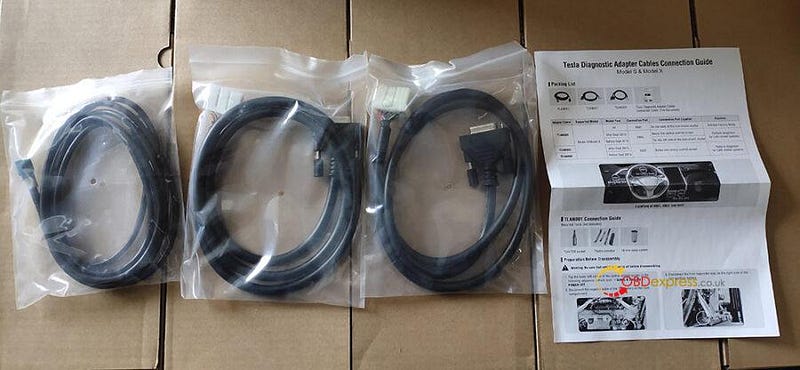
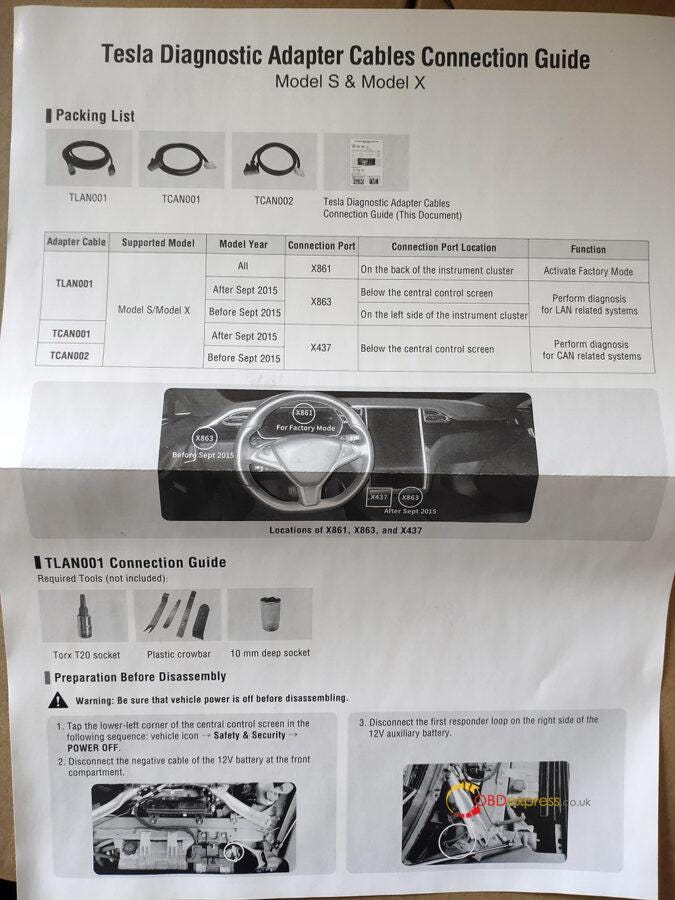
How to use Tesla Diagnostic Adapter Cables? (Cable LAN001, cable CAN001 and cable CAN002):


LAN001

- Connects to Tesla port X861 (located behind the instrument cluster) to activate factory mode (instrument cluster must be disassembled)

- Connects to Tesla port X863 (located below the central control screen) for diagnostics of post-2015/Sept vehicles.

- Connects to Tesla port X863 (located to the left of the instrument cluster) for diagnostics pre-2015/Sept vehicles.


CAN001

- Connects to Tesla port X437 (located below the central control screen) for diagnostics of post-2015/Sept vehicles.


CAN002

- Connects to Tesla port X437 (located below the central control screen) for diagnostics of pre-2015/Sept vehicles.

Autel MaxiSYS Series of Tools Diagnose Tesla Cars


How to use Tesla Diagnostic Adapter Cables?

In the package, there is a sheet of paper writing when and where the cable should be used, where and how to connect the cable to the Tesla and Autel MaxiSYS Ultra / MS919 / MS909 tablet.

Autel MaxiSYS Series of Tools Diagnose Tesla Cars


What specific Tesla S and X vehicles to diagnose using Autel tablet and the cable?

Check Autel MaxiSys Tesla Function List below:

https://www.obdexpress.co.uk/upload/pro/22011216419809232473.pdf

PS: This page has a lot of content. Use the search function (the ctrl+F key combination on the computer web page) can help you quickly locate the content you want to view.


Okay, hope it helps!

Technical support by: www.obdexpress.co.uk

KEYDIY New KD-Moto Adapter Adds Honda, Yamaha & Ducati

  Motorcycle key programming is now coming to the KEYDIY KD-X4 . The new KEYDIY KD-Moto Adapter adds dedicated motorcycle coverage for a w...