Friday, 21 July 2017

How to use VXDIAG VCX PRO for Diagnostics & Programming(

VXDIAG VCX NANO Pro 7 in 1 is an auto diagnostic tool  with different software designed  for GM/FORD/MAZDA/VW/HONDA/VOLVO/TOYOTA/JLR.

VXDIAG VCX NANO Pro 7 in 1 for sale:


Software Version:2016.02

PC-based diagnostics…YES, via GDS & GDS2
Online programming…YES, via GM TIS2WEB SPS
Tech 2 tool functionality…YES, via Tech2Win application
vxdiag vcx nano ford: Ford IDS 101
vxdiag vcx nano mazda: Mazda IDS 104
obd2 diagnostic test…YES
module programming…YES
key programming…YES
special functions …YES:
Reset steering angle
Injector Coding
DPF Regeneration
Set, adjust or remove speed governors
….

Software Version: Techstream V12.10.019
obd2 diagnostic test…YES
online ECU programming…YES
customizing settings…YES

Software version: ODIS-Service 4.0
obd2 diagnostic test…YES
online ECU programming…YES
online service coding…YES
key programming…YES

vxdiag vcx nano jaguar:
Software version: JLR SDD 149
obd2 diagnostic test…YES
ECU programming…YES

vxdiag vcx nano volvo:
Software version: VIDA 2014D
obd2 diagnostic test…YES
ECU programming…YES


ALL above can be done with VCX PRO price: €180


vxdiag vcx nano review:
This is the first review of Allscanner VCX Pro
how-to-use-VXDIAG-VCX-NANO-Pro (1) how-to-use-VXDIAG-VCX-NANO-Pro (2) how-to-use-VXDIAG-VCX-NANO-Pro (3) how-to-use-VXDIAG-VCX-NANO-Pro (4) how-to-use-VXDIAG-VCX-NANO-Pro (15) how-to-use-VXDIAG-VCX-NANO-Pro (6) how-to-use-VXDIAG-VCX-NANO-Pro (7) how-to-use-VXDIAG-VCX-NANO-Pro (8) how-to-use-VXDIAG-VCX-NANO-Pro (9) how-to-use-VXDIAG-VCX-NANO-Pro (10) how-to-use-VXDIAG-VCX-NANO-Pro (11) how-to-use-VXDIAG-VCX-NANO-Pro (12) how-to-use-VXDIAG-VCX-NANO-Pro (13) how-to-use-VXDIAG-VCX-NANO-Pro (14)
Done! This is how to use VCX Pro with IDS V101 on Ford.

Source:

Wednesday, 19 July 2017

Professional DPF+EGR REMOVER 3.0 Reviews

Here is new review and feedback on ASC Equipments Professional DPF EGR Remover  DPF, EGR, Lambda, Hotstart, Flap, O2, DTC software :
OK:
Ford S-Max 2007 SID 206 EGR off= OK
Opel Vectra 1,9DTi 16c39 dpf off= (OK)
WV Transporter 2006 2,5 96kW EDC16U34 DPF Generic Switch (OK)
renault edc16C03/9 DPF OK
mazda5 2006 2,0 81kW DENSO dpf (OK)
I test old version on 635d with edc16cp35 and works Very good with dtc off.
Worked for me. Made a mazda 3 with ecu 0281011995 and no problem at all.
mazda 3 2007 1.6d edc16c34 dpf solution -OK
Audi A4 EDC17CP14 DPF Off
Audi Q7 EDC16CP34 DPF Off
VW Touareg EDC16CP34 V6 DPF Off
Renault Scenic EDC16C3 V1 DPF Off (How to know the version you need ? )
BMW 320D EDC16C35 DPF Off
BMW EDC16C35 DPF EGR OK
PEUGEOT DELPHI DCM3.5 DPF OK
AUDI A1 SIMOS PCR 2.1 EGR DPF OK
Audi a4 2.0 tdi edc16u31 egr off ok Tup
peugeot 308 edc16c34 dpf ok
volvo s60 edc16c34 version switch ok
Tested On Denso Mitsubishi DPF made more than 10 cars and no problem with Both Processor 7058 and 7059 …
Alfa 159 edc16c39 egr OK
Opel Zafira edc16c39 dpf OK
MB E320 w211 EDC16C2 DPF Type 1 don’t work Type 2 DPF OFF ok.
Opel vivaro 1.9dci EDC15C2 Egr off ok with disconnected egr plug.
BMW 120d 2009 edc17cp02 egr off (OK)
Peugeot P406 edc15c2 egr off (OK)
Peugeot P407 edc16c34 egr off (OK)
Golf 6 PCR 2.1 egr off (OK)
Passat B6 EDC17CP20 dpf off (OK)
Citroen c4 1.6 hdi edc16c34 egr off (wrong solution)must use Peugeot (Solution 2)
Ford Galaxy 2.0 tdci SID206 egr off (OK)
Clio 1.5dci egr off (OK)
audi A3 with pcr 2.1 for dpf and worked perfectly.
suzuki 1.9 dpf ok
peugeot edc17c10 dpf ok
Hyundai Santa Fe 2008 edc16c39 EGR OFF P0489 EGR Disconnect —- delete ok DPF OFF error P2002 P0473 — delete OK
I tested on edc16c31 type 2 dpf off. work fine.
I never have problem with mercedes edc16 ecus for dpf off only egr solution is not good.
Ford Transit 2.2TDCI DCU101 – EGR off = Ok
Mazda 6, engine code RF, model year 2005: DPF OFF ok, seems all faults codes deleted by the software,
Flap off mercedes c220 e mercedes classe B=ok
Peugeot 407 EDC16c34 FAP off……OK
mitsubishi denso dpf off ok
ford KUGA delphi 3,5 dpf off. GOOD TESTED
SUZUKI EDC16C3 1.9 DDIS DPF OFF OK
i have tested on laguna 2 1.9 dci edc16c3-9.21 type 1 for dpf and egr off. Ok for the moment after 500kms…
VW Pasat 2.0tdi 170hp.siemens pdd1.2 dpf-OK , for me audi A4 PPD 1.2 dpf don’t work . how you can do that…just remove dpf sensor and drive car for few Km
Citroen Jumpy 2.0hdi delphi dcm3.5 dpf off …ok
ford connect 2013 sid206 egr dpf off ok
laguna 2 1.9 dci edc16c3-9.21 type 1 for dpf and egr off
SUZUKI EDC16C3 1.9 DDIS DPF OFF OK
ford KUGA delphi 3,5 dpf off
mitsubishi denso dpf off ok
Peugeot 407 EDC16c34 FAP off……OK
Flap off mercedes c220 e mercedes classe B=ok
Volkswagen Passat cc edc17c46…egr off OK
Ford Transit 2.2TDCI DCU101 – EGR off = Ok
EGR and DPF on fiat = Good
EGR and DPF on hyundai = Good
Hyundai Tucson 2.0 CRDI 4WD 2006 DPF OFF
VOLVO S60 & XC90 EDC16 DPF OFF WORK OK
VW Crafter EDC16CP34-4 DPF and EGR off,works OK
Focus 1.6 tdci EDC16C34 EGR OFF ok with DTC table patch.
Ford Mondeo, year 2008, Siemens SID206, EGR OFF works ok
Egr golf 5 edc16u1 1.9l 105cv bkc ok.
Audi A5 2.7tdi edc17cp14 dpf OK.
Citroen Xsara Picasso, year 2007, engine 9HZ, EDC16C34 egr off ok
BMW 320d e90 2006r 120kw EDC16c31-35 type 2 solution dpf off -ok
Clio 1.5 dci my2007 Delphi DDCR EGR off OK
Subaru Legacy Denso DS 2.0TD 150hp DPF OFF OK
Subaru Impreza Denso DS 2.0TD 150hp DPF OFF KO Engine run only 500rpm No error in diag
megane 2 edc16c3 with 1mega file EGR off 100%
VW Golf 6 1.6 PCR 2.1 DPF ok.
Audi edc17cp14 dpf off ok
Egr off in edc16c9 opel ok
DPF OFF and EGR OFF for PCR2.1 work good but have do separate !!!
DPF OFF for Audi a6 3.0tdi 224hp work perfect and can unplug all sensors
DPF OFF for Audi q7 3.0tdi 233hp work perfect and can unplug all sensors
Opel Zafira 1.9CDTI 120hp 2008year BOSCH EDC16C39-DPF OFF=OK
Vw golf 6 2.0tdi 103kw 2010year BOSCH edc17c46-DPF OK
Seat Ibiza 1.6CR TDI 105hp 2012year SIMOS PCR 2.1=>EGR OFF=OK
Mercedes w221 s-class 320cdi v6 235hp 2008year EDC16CP36=>DPF OFF=OK
Mercedes E320 w211 EDC16C2 DPF Type 2 – DPF OFF (OK)
Work great with FLAPS OFF for Mercedes-Benz CLS 320CDI V6 224hp 2007year EDC16CP31
Opel Astra H EDC16C9 1.9CDTI 150hp 2006year for FLAPS OFF and EGR OFF
opel meriva a z13dtj dpf off works good.
opel corsa d z13dtj dpf off works good.
Works good for EGR OFF of BMW e90 320D 163hp 2006year EDC16C35
Mercedes W164 EDC16CP31 2MB flash – EGR_OFF_DTC 2527 2511 2355 OFF —- Works OK
NOT OK:
Egr off “EDC16U34 generic solution” on audi 2.0l TDI 140 NOT OK.
Iveco new daily 2011 edc16c39 bosch 02810121193 EGR does not work DPF does not work.
mazda 3 2007 1.6d edc16c34 dpf solution dosn work….after 170kmh engine try stopAngry
Passat ppd 1.2 2007 year dpf ok but cruise control stop working.Please any solution ?
tested DPF remove on FIAT EDC15C2 with Citroen Dpf remove solution : not ok
FIAT EDC15C2 solution is not available on the soft.
Verified on 4,2 q7 edc17cp24. Doesn’t work. Ecu stops responding. After checksums counting ecu doesn’t work anyway.
egr off edc16c34 berlingo tepee . first version ,version 1 & 2 all not work
Kia edc15c7 egr wrong solution
for Hyundai/KIA EDC16C39 DPF OFF wrong solution
DPF Remover for Insignia EDC17c19 no good
S320cdi edc16 not work., S420 cdi V8 not work.
W204 CRD3 not work .
Volkswagen Passat cc edc17c46…egr off OK DPF off. No Ok
Vw Crafter Edc16CP34 and Opel Insignia Edc17 Not working.
C4 PICASSO 2008 EDC16C34 not working
Peugeot 807 EDC15C2 DPF Off= wrong solution P1429 failure.
Opel Vivaro 2.5tdi edc16c36 dpf+egr off have appeared P0487 P0488 errors
opel astar h edc16cp39 1,9 diesel from 2007 egr off not works.
Mercedes Delphi 3.5 DPF not OK.
Mini EDC16C35 Fap & EGR wrong solution
MB W203 C220 EDC16C2 DPF Version 2 ECU bricked
bmw edc17cp41 dpf off not ok
Renault edc16c36 dpf off not ok
VW Sharan 2.0tdi EDC16U31 – EGR Not OK
VW Crafter EDC16C34 – DPF Not OK, EGR – OK.


Monday, 17 July 2017

How to use BDM frame with adapters set

It’s used to update/flash ECUs, writeECM modified and programProbe holder/Dimsport aids.
The frame can work with ECM Chip Tuning Tools such as KESS, KTAG, FGTECH, BDM 100, KTM100, CMD, DIMSPORT AIDS...

This set includes: aluminum alloy support pair, acrylic sheet (LED lamp and interface),BDM probes 4, wire 4

ktag-bdm-frame-led-2 ktag-bdm-frame-led-3
How to use the BDM frame aluminium:
Insert the probe to connect the BOOT on the ECU board and CNF1, the legend for the public MED17.5.2 computer board.
ktag-bdm-frame-led-4

Applicable to open the ECU, to avoid welding jumper. In the acrylic board with LED light bar, help the case of poor light to see the hole of the board.
ktag-bdm-frame-led-5
Jumper for the plug-in, to reduce the trouble of welding the connection, easy to connect, and can be more than a series.
ktag-bdm-frame-led-6
LED power situation, the whole board can see clearly. LED power supply with ECU equipment with 12V power supply, connect the probe, you can disconnect the power supply, to the equipment for the
ktag-bdm-frame-led-7
The new LED light bar interface is fixed on the acrylic plate, for the straight type.
ktag-bdm-frame-led-8
Add a LED light to facilitate the case of poor light to see the computer board, the picture on the LED lights may be updated at any time, only for more practical.
ktag-bdm-frame-led-9
The tip of the probe is specially designed and scalable.
ktag-bdm-frame-led-10

How does the BDM frame work with ECU programmers:
Here, how to work with Ktag 7.020:
ktag-bdm-frame


Tuesday, 11 July 2017

How to update and install FCar F502 scanner online?

This is for your information: FCar F502 scanner reader driver software download, update and installation on Windows 10/8/7/XP/Vista.


FCar F502software version: 5.0

 Part 2: How to update & install FCar F502 software
To install FCar F502software, you will need to have a mini-USB cable (NOT included in retail package) ready and then follow 4 steps:

  1. Hold scanner’s “Enter” key and connect USB cable to your Windows PC (Mac is not supported), and then release “Enter” key. The scanner will go into Update Mode screen.
FCar-F502-reader-update-(1) FCar-F502-reader-update-(2)
  1. Install USB VCOM driver (Only need at first time, see next USB VCOM driver installation guide)
  2. Download the software from top of this page, extract the zip file (ie. FcarReader_502_20150806.zip) into a folder. ie. d:\temp\FcarReader_502_20150806, run file named FcarReader_502.exe. Select COM number. (You will find the COM number on step 2, or you will be found under Control Panel–>Device Manager).
  3. Start Update

How to update FCar F502 software on Windows 10:

  1. Press and Hold scanner’s “Enter” key and connect USB cable to your Windows 10, and then release “Enter” key. The scaner will go into Update Mode screen.
  2. Windows 10 will search driver and install automatically (first time only)
  3. Download the software from top of this page, extract the zip file (ie. FcarReader_502_20170508.zip) into a folder. ie. d:\temp\FcarReader_502_20170508, run file named FcarReader_502.exe.
  4. Select COM number. (You will be found under Control Panel–>Device Manager).
  5. Click Start Upgrade
  6. Whole process will take about 2-3 minutes, and it will auto restart.
  7. Select USB Serial Device (COM3)
FCar-F502-driver-software-download-update-install-1


Part 3: How to install FCar F502 USB VCOM driver on Win XP/Vista/7/8/10

For users with Windows XP/Vista:

Find file: vcom.inf in your downloaded folder.
vcom.inf is usb driver, Right click and select install


For users with Windows 7:
1)Click Windows Start menu–>Control Panel–>Device Manager
2)Right lick on “F50x USB VCom Port (COM4)” under Ports (COM & LPT)
3)Select Update Driver and Browse my computer for driver software
4)Select vcom.inf from your download package
 FCar-F502-driver-software-download-update-install-2
FCar-F502-driver-software-download-update-install-3

FCar-F502-driver-software-download-update-install-3
FCar-F502-driver-software-download-update-install-4


For users with Windows 8:

Under Windows 7 64bits, Windows 8 or Windows 10, you have to disable driver signature enforcement before to install VCOM driver.

How To Disable Driver Signature Enforcement In Windows 8/8.1 And Windows 10
  1. Find PC Settings from the start menu or apps list >> select Update and Recovery >> click Recovery.
  2. Under Advanced Startup, click on Restart Now.
  3. Your PC will do a kind of reboot and go to a blue Choose an option screen. Click on Troubleshoot (refresh or reset your PC or use advanced tools) >> Advanced Options >> Startup Settings (change windows startup behaviour) >> Restart.
  4. Your PC will now restart and go to yet another blue screen with 10 options. Press 7 or F7 on your keyboard to select Disable driver signature enforcement.
  5. Your computer will auto restart again and then you can now proceed with the installation of FCAR F502 USB VCOM driver for Windows 7/8/8.1/10.
When the Windows driver signature is disable, repeat the above Windows 7 step to install VCOM driver and do the update.

Part 4: Fcar F502 heavy duty code reader How to use

Now, you have finish FCar F502 driver software update. And it’s ready for use.

FCar-F502-truck-reader-how-to-use-(1) FCar-F502-truck-reader-how-to-use-(2) FCar-F502-truck-reader-how-to-use-(3) FCar-F502-truck-reader-how-to-use-(4) FCar-F502-truck-reader-how-to-use-(5) FCar-F502-truck-reader-how-to-use-(6) FCar-F502-truck-reader-how-to-use-(7) FCar-F502-truck-reader-how-to-use-(8) FCar-F502-truck-reader-how-to-use-(9) FCar-F502-truck-reader-how-to-use-(10) FCar-F502-truck-reader-how-to-use-(11) FCar-F502-truck-reader-how-to-use-(12) FCar-F502-truck-reader-how-to-use-(13) FCar-F502-truck-reader-how-to-use-(14) FCar-F502-truck-reader-how-to-use-(15) FCar-F502-truck-reader-how-to-use-(16) FCar-F502-truck-reader-how-to-use-(17)
This is all for how to use a FCar F502 reader on a heavy duty truck.


Monday, 10 July 2017

Where To Download MaxiLinkII Software And How To Update

1. Download & Install MaxiLinkII Software
The TS401 is updated via the MaxiLinkII software (installed on a Windows PC) and by downloading the Update file from the Maxitpms.com website. The Maxilink II software is available at http://www.maxitpms.com/tpmscms/ product/580.jhtml. From the homepage, www.maxitpms.com, go to Products, then select MaxiTPMS TS401, click on the Downloads tab and then click on Maxi PC Suite TS401 file to download the MaxiLinkII software. To unzip the file, rightmouse click on the file and select Extract All. Double-click on Setup.exe to install.
donwload-autel-ts401-software
2. Download TS401 Update
To download software updates, click here, http://www.maxitpms.com/tpmscms/ product/580.jhtml, then select TS401 Update file. Or from the homepage, www. maxitpms.com, click on Products, then MaxiTPMS TS401, and click the Downloads tab. In the list, click the TS401 Update file to download the zip file. To unzip the file, right-mouse click on the file and select Extract All. Remember to note the location of extracted folder.
Download-TS401-Update
3. Connect Tool to PC

Connect tool to the computer using the supplied USB and select Update Mode on the tool.
Note: When an error occurs and the tool is unable to work properly, you may need to update the programs. Power off the tool first and then hold the N button, connect the tool with the computer via USB and then the tool will enter the Update Mode forcedly. Follow the update procedures to refresh the program
autel-ts401-connect-to-pc
4. Update the Tool
IMPORTANT: Both the TS401 file and the DTC file must be updated for the tool to function correctly. There is NO need to register the tool before updating.
Updat-autel-ts401-tool-1 Updat-autel-ts401-tool-2
Launch MaxiLinkII on the PC and then select TS401 on the left-hand side of the screen under the TPMS tab. Under Update Program, click on Select File and browse to the software update you downloaded. Open the folder labelled US, select the file within (the file extension is .bin) and click on Update. The application will communicate with the tool and update. The PC application and the tool will display a message once the update is completed. Next, under Update DTC, click on Select File, browse to file (the file extension is .aut) and click on Open, and then click on Update. The application will communicate with the tool and update its software. The PC application and the tool will display a message once the update is completed. Now your tool is ready to use!

Monday, 3 July 2017

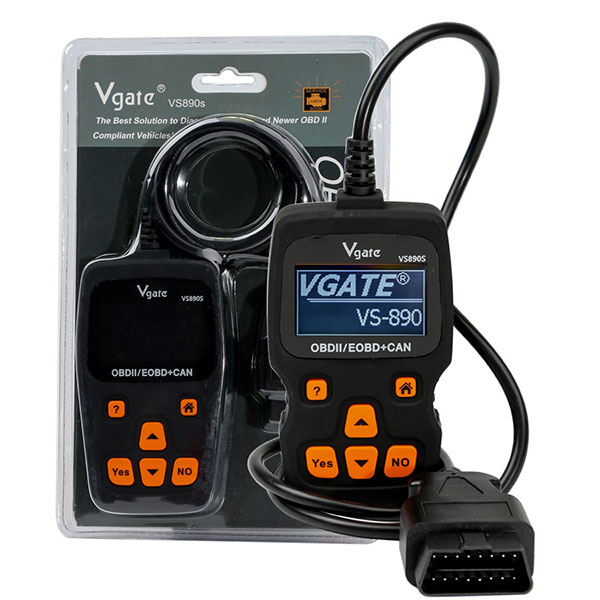
Vgate VS890S Car Code Reader Support Multi-Brands Cars

The Vgates can OBD II Diagnostic Scanner VS890s allows you to access your OBD II vehicle’s data which was only available to dealership technicians using expensive proprietary scan tools.
Now it's available to every people who has a Vgatescan!
 
Vgatescan is the prime choice for users who keen on DIY. 
Vgate VS890S

Vgate VS890S 2

Vgate VS890S 3

Vgate VS890S 4


Vgate VS890S Supports 13 languages:

English  Spanish  Portuguese  Korean  Japanese  Italian  Hebrew  German   French  Finnish  Dutch  Danish   Chinese
 
Vgate VS890S Features & Functions:
 
Works with all 1996 and later OBDII compliant US, European and Asian vehicles.
Support manually input DTC Lookup. This operation will erase all DTCs, Freeze Frame Data, Oxygen sensor data,and reset IM Monitors and MIL.
Read Diagnostic Trouble Codes(DTCs)
Clear trouble codes
View real-time vehicle operation data (Data stream)
View Freeze Frame data
View I/M readiness
Read O2 Monitor Test data
Read On-Board Mon.Test
Component Test
View the vehicle’s information
Modules Present
Unit of Measure
State Emission
Read All DTCs
Read Stored DTCs
Detailed help information
Capable of showing probable caues of a DTC code
Up to 161 data items, each of them is with online help information.
Reset engine MIL.
This operation will erase all DTCs, freeze frame Data, oxygen sensor data,and reset IM Monitors and MIL.
 
Vgate VS890S Specifications:
 
LCD:2.4 inch VA STN 128*64, wide visible area and  high contrast
The contents are readable even in strong sunshine. 
Harmless fade-resistant paint
Rubber oil sprayed outer cover, slide,dirty and vibration proof.   
High quality PET film 6-key keypad.(3M harmless glue)
CE,FCC, RoHs certified
 
Package List:
 
1pc x   Vgate OBD II Diagnostic Scanner VS890s 
Vgate VS890S 5


How to Unlock Ford BOSCH MD1CP006 with OBDSTAR ECU Master via Boot?

 This guide covers the procedure for unlocking, reading, and writing locked Bosch MD1 CP006 engine control units found on Ford F-250 and F-...