Showing posts with label Ford IDS. Show all posts

Monday, 19 April 2021

Ford IDS Software V121 Download and Installation Guide

IDS V121 for Ford Mazda is verified working like a charm and available the software and patch free for all of you.


Ford IDS V121 Free Download:

https://mega.nz/folder/fcoVnYZT#jpEjr4HHXU5Ifg8Hm0xERg

1,Install IDS Software

2,Intall VCI_Software_1.0.0.10

3,Install VCI Manager(Ford) 20.11.24


Mazda IDS V121 Free Download:

https://mega.nz/file/KBpEwIrB#cfsHcX9cf_l3u3CzQNNvl9vwNpR9aKWOP1l3bSt6fpA

Size: 781.4 MB


Free download Ford Mazda IDS programming crack patch (required):

https://mega.nz/folder/OV4RRC6B#seCWP6UCzOPWEDYlQxZ1iQ

Size: 12.6MB
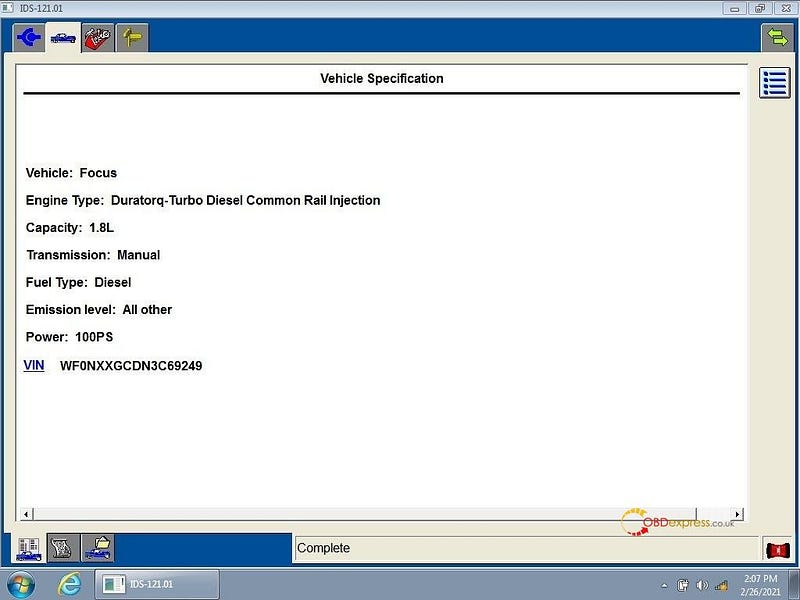
 

IDS V121 for Ford Mazda Free Download and Installation


Image 1: IDS V121.01 software


Ford IDS V121 workable hardware:

vxdiag vcx nano for Ford Mazda USB and WiFi : confirmed

VXDIAG VCX SE PRO: confirmed

vxdiag full : confirmed

vcm2 clone (Item No. sp177-2): confirmed
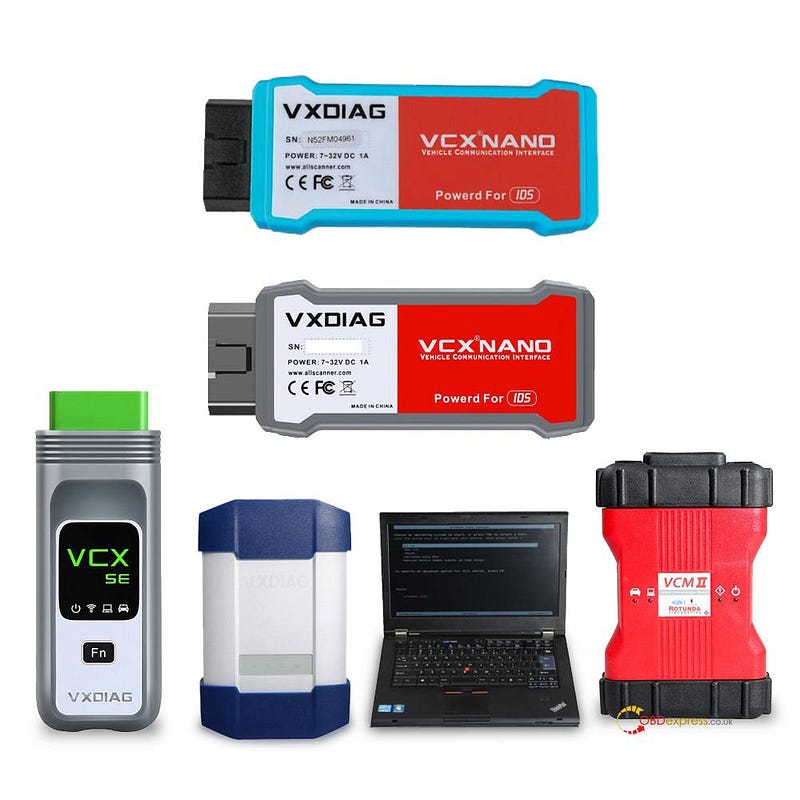
IDS V121 for Ford Mazda Free Download and Installation


7 main steps to setup VXDIAG IDS V121 for Ford and Mazda:

1). Setup Ford IDS-V121
2). Wait until Ford IDS -v121 installation successfully, and restart the computer
3). Setup the Ford original VCI software_ 1.0.0.10.exe
4). Setup VX manager and Ford IDS driver
5). Wait until VX manager and Ford IDS driver installation complete
6). Plug VCX device and install IDS patch
7). Use IDS patch to open IDS and start diagnosis.


Ford/Mazda IDS V121, what's new:

-This version also has the ability to download the very latest calibration/software files from Ford’s server if you have an internet connection available at the time of conecting to vehicles.

-Read and decode fault codes

-Delete fault codes

-Displays system current parameters in digital form

-Combined displaying of data

-Logs keeping-writing and keeping of digital parameters in memory

-Special functions-changing of permissible settings of blocks, programming etc.


Enjoy!

Thursday, 31 October 2019

STIC FVDI J2534 error “An active IDS software license is not found” solution

STIC FVDI J2534 Ford Mazda got an error “An active IDS software license is not found on your computer and is required to establish communications with the vehicle”.
STIC FVDI J2534 Ford Mazda


obdexpress.co.uk engineer solution:
Please install Ford IDS software in one computer and install Mazda IDS software in another computer.
  1. visit: www.flyobd.com
  2. Click on “Download”.

-> For Ford diagnostic & programming software, Please download and install:
1) SVCI-J2534-Ford V1.1.5.1 
2) IDSFord V115.01                                    
3) IDS_VCI V1.03

->For Mazda Ford diagnostic & programming software, Please download and install:
1) SVCI-J2534-Mazda V1.1.5.1
2) IDSMazda v115

Good luck.
More question, please contact at Sales@OBDexpress.co.uk

Or you are looking for Ford IDS V115 version, here you can go STIC FVDI J2534:

Monday, 27 August 2018

FVDI J2534 and Ford VCM 2: What’s the main difference?

2018 newest  FLY FVDI J2534 Diagnostic Tool rolled out!!!What's the main difference between FVDI J2534 for Ford and Ford VCM 2?

FVDI J2534 vs Ford VCM 2:

Function/ToolFVDI J2534Ford VCM II Notes
Auto startup without licenseYes  
No virtual machine neededYesYes 
Online programmingYesYes 
Online PATS/RKE learningYesYes 
SAE j1850 PWM 83.3K baud rateYesYes 
PEPS 18V programming voltageYesYes 
PEPS 5-20V adjustable voltageYesYes 
EEC-V multiple items data loggerYesYesMY1994-2000 Ford
PTEC multiple items data loggerYesYesMY2000-2006 Ford
SAE J1850 module programmingYes MY1995-2006 Ford
Power balance performance testYesYesMY1995-2006 Ford
CANBUS module programmingYesYesMY2006-2018 Ford
Online software updateYes Keep software newest
Free incode calculation for pre-2010 carsYes  

What is FVDI J2534:

SAE J2534 is a standard for communications between a computer and a vehicle. Government regulations require all automakers provide a J2534 service to everyone in the U.S. for re-flashing emissions related controllers. FVDI J2534 is such a SAE J2534 Pass-Thru device that you can re-flash and, in some cases, diagnose vehicles with factory functionality.

2018 FVDI J2534 is the newest FVDI interface that will work with J2534 software, including BMW/Mini ISTA, Chrysler Witech, Daewoo, Ford/Mazda IDS, GM GDS2, Honda/Acura HDS, Hyundai/Kia, Isuzu, Mercedes Benz Xentry,  Mitsubishi, Nissan/Infiniti Consult 3, Subaru FreeSSM III, Toyota/Lexus/Scion Techstream, Volvo VIDA, VW/Audi IDS

NOW, FVDI J2534 is confirmed to work with Honda HDS, Ford IDS and Toyota Techstream.
BUT, the other is being tested! FVDI J2534 will work with more J2534-based vehicles!
fvdi-j2534-ford-ids

fvdi-j2534-pcb-1

fvdi-j2534-pcb-2


Source:http://www.obdexpress.co.uk/wholesale/fly-fvdi-j2534-mazda-diagnostic.html

What is VCM 2:

VCM 2 SP177-C1 is the best VCM 2 China clone unit working with Ford IDS software for Ford diagnostic tests, ECU reprogramming and programming.
VCM 2 SP177-C1

vcm2-sp177-c1-pcb-1

vcm2-sp177-c1-pcb-1

 
Source: http://www.obdexpress.co.uk/wholesale/best-ford-vcm-ii-diagnostic-tool-wifi-wireless-version.html

KEYDIY New KD-Moto Adapter Adds Honda, Yamaha & Ducati

  Motorcycle key programming is now coming to the KEYDIY KD-X4 . The new KEYDIY KD-Moto Adapter adds dedicated motorcycle coverage for a w...